















Screens

Video

Guide

Eula

Export PST into 12+ File Formats With Aryson PST Converter

Export Outlook Data File into 12+ file formats along with 5+ Email Platforms

PST Create a fresh PST to access Outlook data without any issues.
MBOX: Move emails from Outlook to Thunderbird, Apple Mail, and other MBOX-based clients easily.
EML: Export individual emails from PST for flexible sharing and access in many email apps.
MSG: Save particular PST emails as MSG files so Outlook users can open them instantly.
PDF Convert emails into secure PDF documents for legal, business, or offline viewing.
DOCX: Export PST emails into a modern DOCX format for editing and documentation.
JSON: Maintain structured metadata of PST emails for development or data migration tasks.
MD: Export PST emails into lightweight Markdown format for documentation, note-taking tools, and developer workflows.
CSV: Export PST contacts or email lists into CSV for Excel or CRM import.
ICS: Export Outlook calendar events from PST into ICS for importing into any calendar app.
VCF: Move Outlook PST contacts into VCF to sync on smartphones and multiple email services.
PNG: Convert PST emails into clean, clear images for records and offline access.
Thunderbird: Migrate PST mailboxes directly into Mozilla Thunderbird for seamless offline email access and management.

All Migration Destinations of the Aryson PST Converter Tool

Here is a basic overview to import PST files into popular email platforms

Zoho Mail

Zoho Mail

Yandex Mail

Yandex Mail

Yahoo Mail

Yahoo Mail

AOL Mail

AOL Mail

Hotmail / Outlook.com

Hotmail / Outlook.com

iCloud Mail

iCloud Mail

Office 365

Office 365

Gmail

Gmail

Google Workspace

Google Workspace

Exchange Server

Imap

Aryson Outlook PST Converter – Ratings & Reviews

Expert Reviews

Rating & Reviews

Aryson PST Converter – Core Functions with Export PST Data Types

Outlook Emails: Aryson PST Converter software lets you export complete mailbox emails along with metadata such as Subject, To, From, Cc, Bcc, Date, Time, and Message Body. Moreover, users can export emails from specific folders, including Inbox, Sent Items, Outbox, Drafts, Junk Email, and Deleted Items.
Email Attachments: You can easily convert PST emails along with all attachments, such as images, docs, PDFs, media files, hyperlinks, and embedded items.
Email Filters: Users can apply filters like "From," "To," "Date Range," and "Subject" to move only required emails.
Preview & Sort Option: This utility offers a detailed preview of messages with sorting options for Subject, From, To, Received Date, Size, etc., to ensure accurate export.
Contacts: Export Outlook contacts with complete attributes such as Full Name, Nickname, Display Name, Email ID, Job Title, Company Name, Business, and Home Address.
Contact Attachments: Maintains fields like Profile Pictures, Notes, Web Address, Department, IM Address, etc.
Supported Items:
  • Individual Contacts
  • Contact Groups
Phone Field Support: Exports Business Phone, Home Phone, Mobile Phone, and Fax numbers accurately.
Calendar: Outlook PST File Converter allows users to export their complete calendar schedules, ensuring no important details are missed. It accurately migrates every appointment stored in the PST file, including status, category, meeting duration, location, and event reminders.
Calendar Attachments: This software moves all types of attachments associated with calendar items, such as:
  • Meeting documents
  • Business cards
  • Shared files
  • Linked notes

All attachments remain fully intact and accessible after conversion.

Supported Calendar Items: It supports the complete migration of:
  • Meetings – with attendees and time information
  • Appointments – including recurring schedules
  • Group schedules – shared or business events
  • Tasks linked with calendar entries Every detail is preserved during the export.
Tasks: Convert Outlook task entries with important details such as Subject, Start & Due Date, Priority Level, Percentage of Completion, Current Status, and Reminder settings.
Task Types
  • One-time Tasks
  • Recurring Tasks
  • Assigned Tasks
Task Attachments: Exports comments, documents, notes, and files added to a task.
Notes: Export all PST sticky notes written in Outlook with original formatting, color scheme, and timestamp.
Notes Fields
  • Notes Fields
  • Note Text
  • Created & Modified Time
Other Folders: Apart from core items, the software supports export of custom user-defined folders, Archive PST data, Search folders, and additional Outlook mailbox collections.
Folder Structure Preservation: Keeps the original mailbox hierarchy the same after conversion.
Complete Data Verification

Advanced Preview Panel for Complete Data Verification

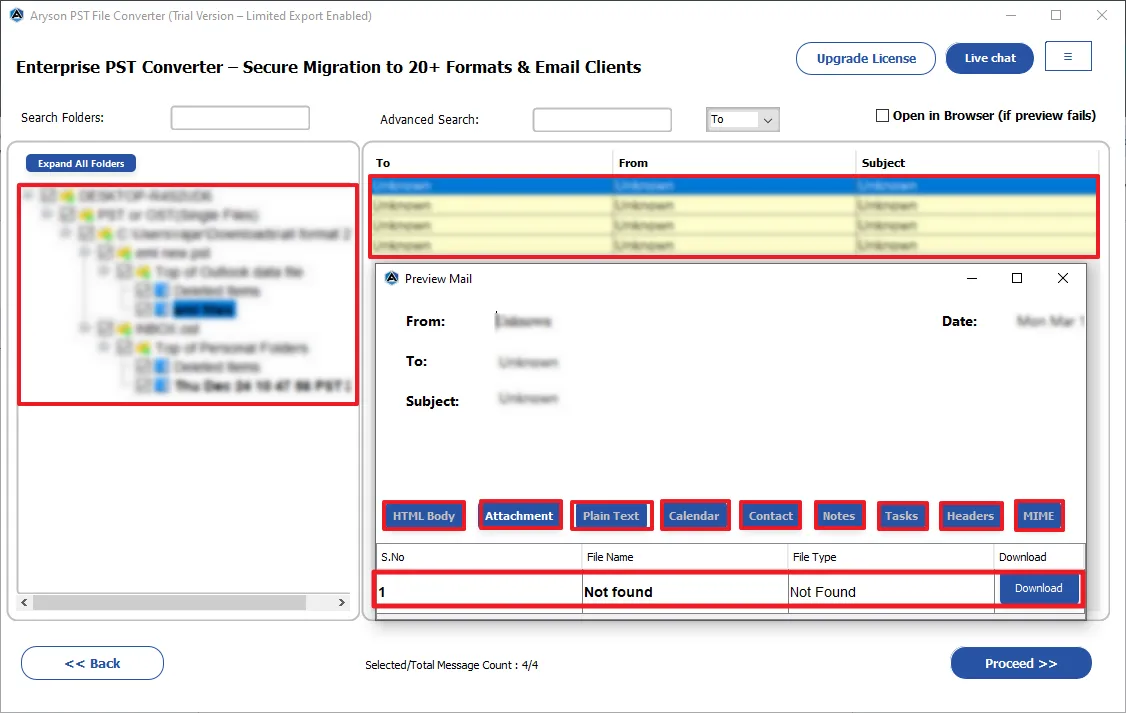
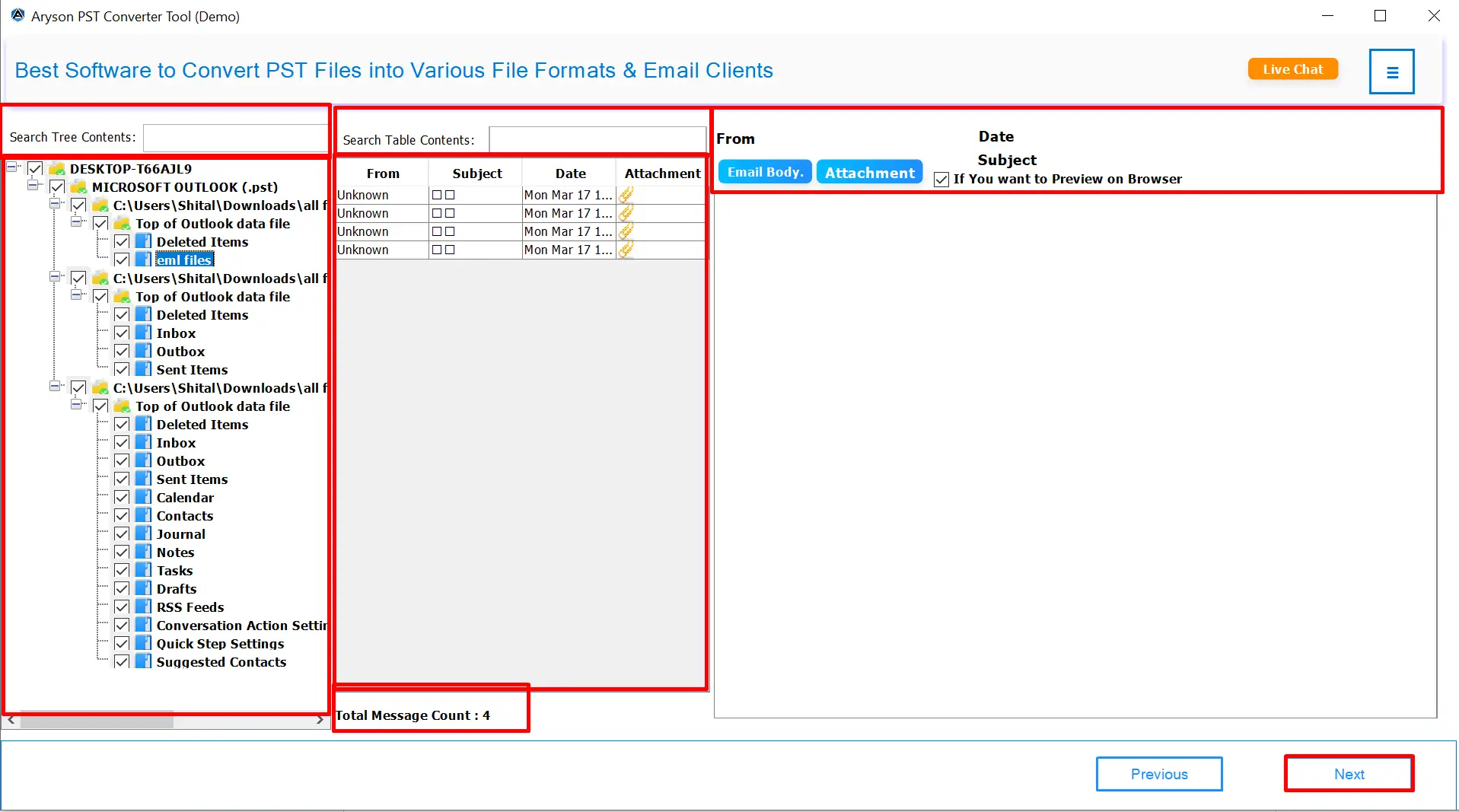
The Aryson Outlook PST Conversion Tool provides a preview panel that helps users check their mailbox items before conversion. The user has to just double-click on the required emails, and a preview window with two halves will appear. The upper section displays the From, To, Subject, and Date. At the same time, the lower section shows the following information associated with the emails.

  • HTML format: Displays the email with its original formatting, including fonts, colors, and images.
  • Plain text: Shows the email content in simple text without any formatting.
  • Headers: Displays detailed technical header information of the email.
  • MIME: Shows the MIME structure and encoding details of the message.
  • Calendars: Displays the calendars' associated fields.
  • Contacts: Shows the information like phone numbers, emails, etc.
  • Tasks: Displays the fields like start date, end date, due date, and sensitivity.
  • Notes: To preview the notes' content and their creation date.
  • Raw HTML: Displays the original HTML source code of the email message.

Flexible Attachment Handling Options

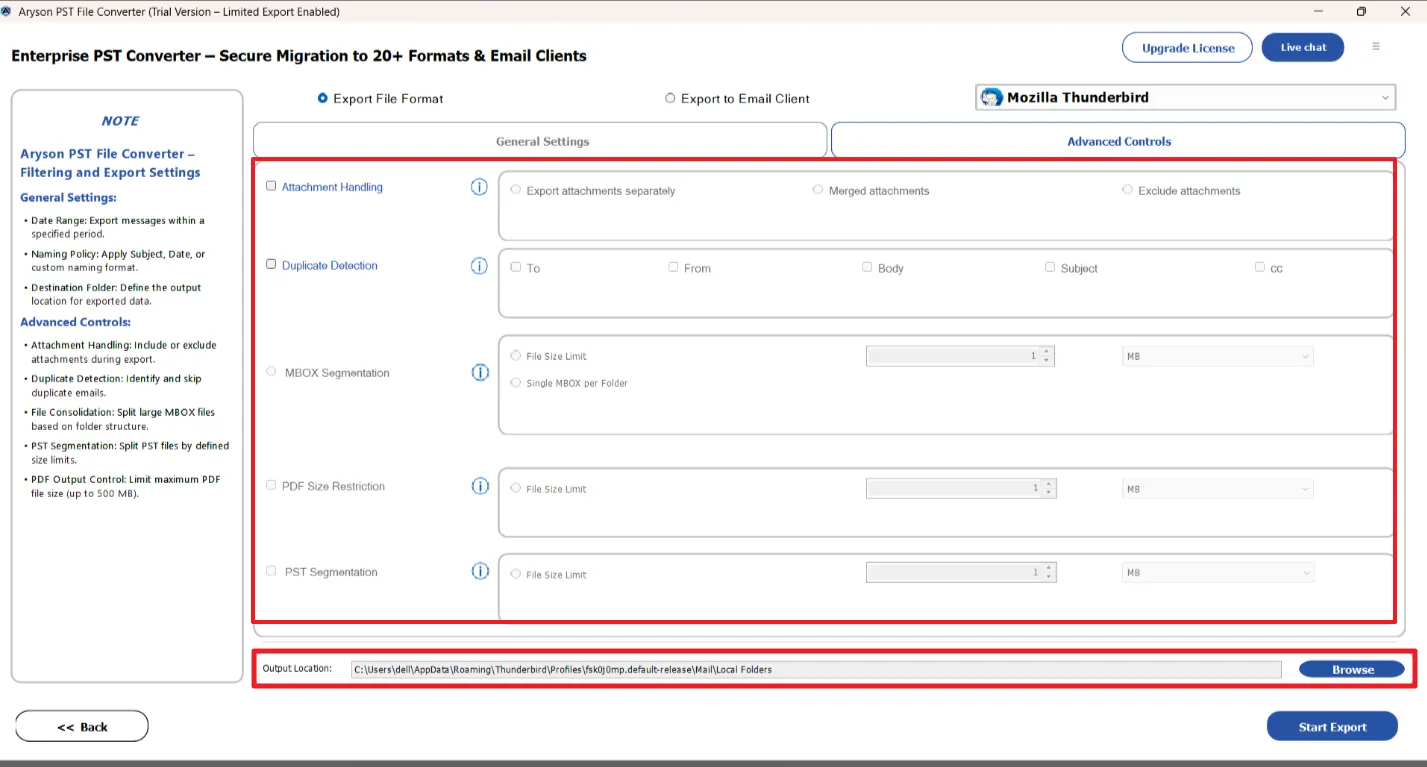
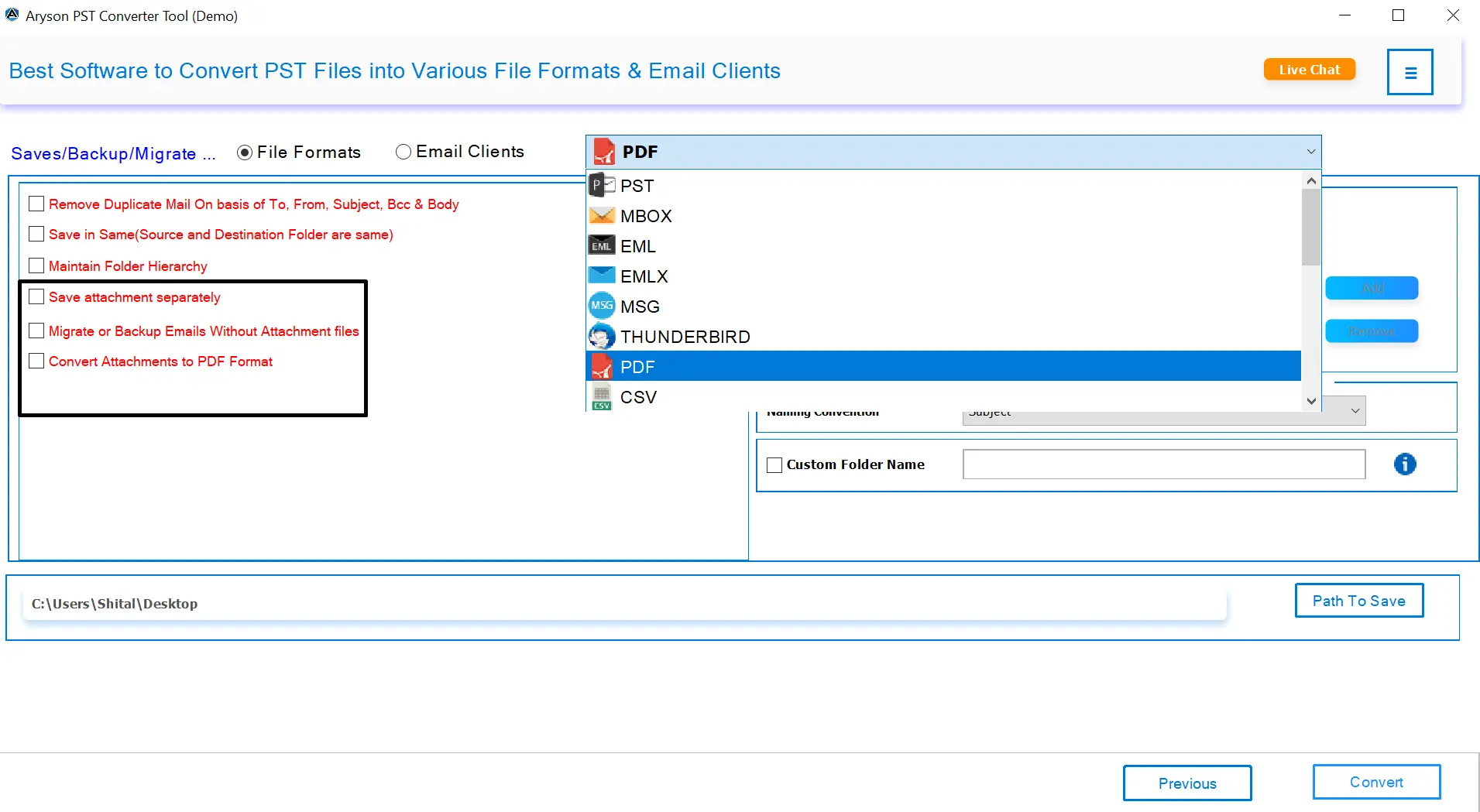
With PST file conversion software, you can customize how attachments are handled during the conversion process. You can choose to export attachments separately, exclude attachments, or even merge them in PDF format. Hence, it is easy to organize files according to your needs, which helps reduce mailbox size when required. These options are particularly helpful when you want to focus only on the main email content without bulky attachments.

  • Save all attachments in a separate folder for easy access.
  • Export emails without attachments if they are not required.
  • Convert attachments into PDF format when saving emails as PDFs.
  • Helps manage mailbox size and keeps data well-organized.
Flexible Attachment Handling Options

Unique Functionalities of the Aryson PST Converter Tool

Convert PST into Different File Formats

Convert PST into Different File Formats

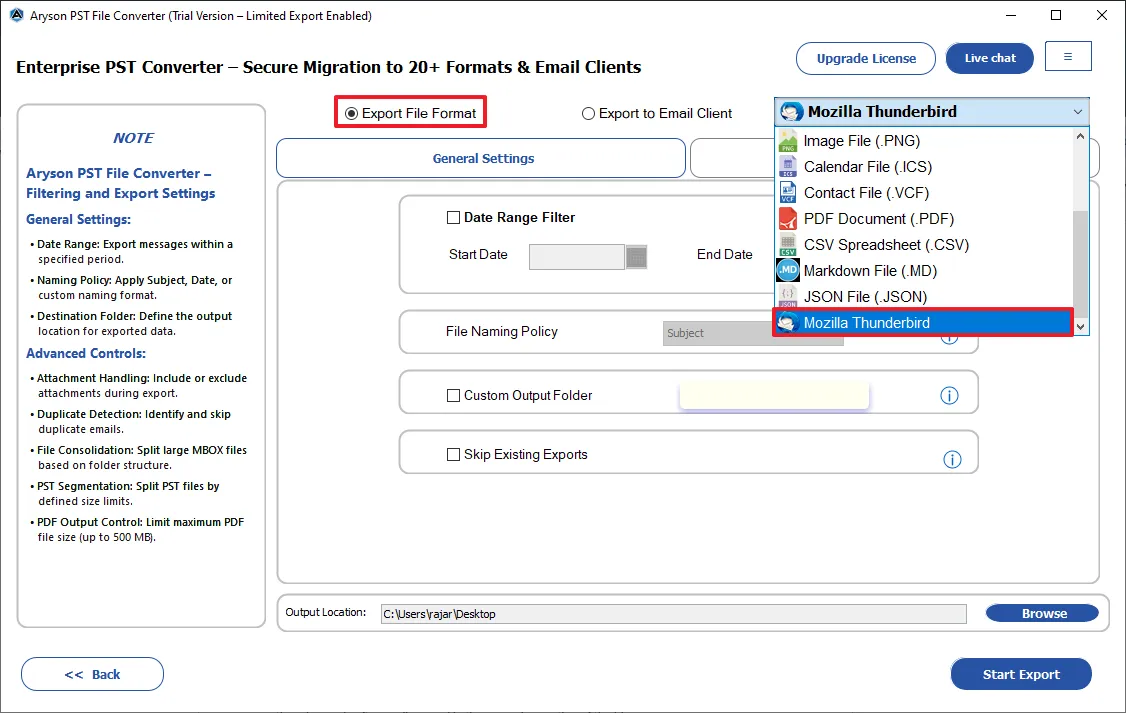
PST Converter Wizard can export everything: emails, attachments, contacts, calendars, tasks, journals, notes, and even deleted items. An individual can easily convert their Outlook data file into PST, MBOX, EML, MSG, DOCX, PNG, ICS, VCF, PDF, CSV, MD, JSON, and Mozilla Thunderbird. Hence, it is quite easy to perform the PST/OST conversion within a few clicks.

Convert PST File in Batch Mode

Convert PST File in Batch Mode

Users can convert a single PST file or choose multiple files for batch conversion. Aryson PST File Converter saves a lot of time when handling large amounts of data. It also helps IT professionals and businesses to detect corrupted, invalid, or blank PST files to process multiple accounts at once. So that the user can ensure that all PST files convert smoothly without slowing down performance.

Direct Migration to Email Accounts

Direct Migration to Email Accounts

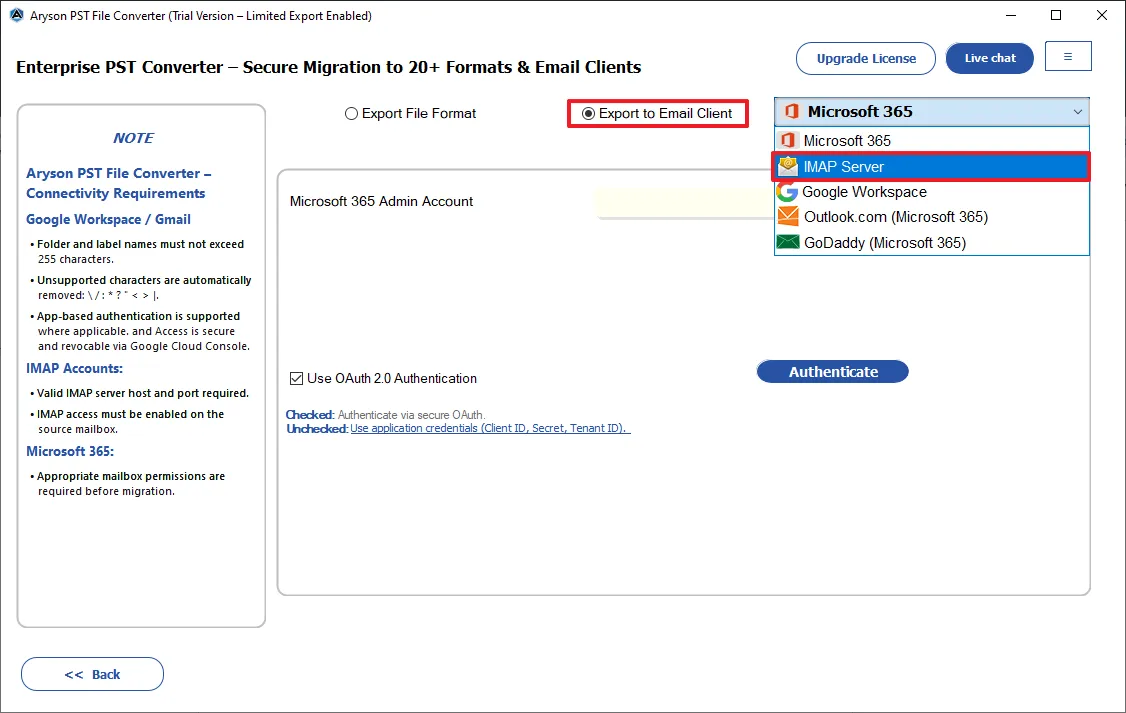
Aryson Outlook PST Converter enables you to move your PST emails directly into webmail services like Yahoo, Zoho Mail, Thunderbird, iCloud, and Outlook.com. Along with that, it can perform PST migration into Yandex Mail, Yahoo Mail, AOL Mail, Hotmail, Office 365 (Microsoft 365), Gmail, GoDaddy (Office 365), G Suite / Google Workspace & IMAP servers.

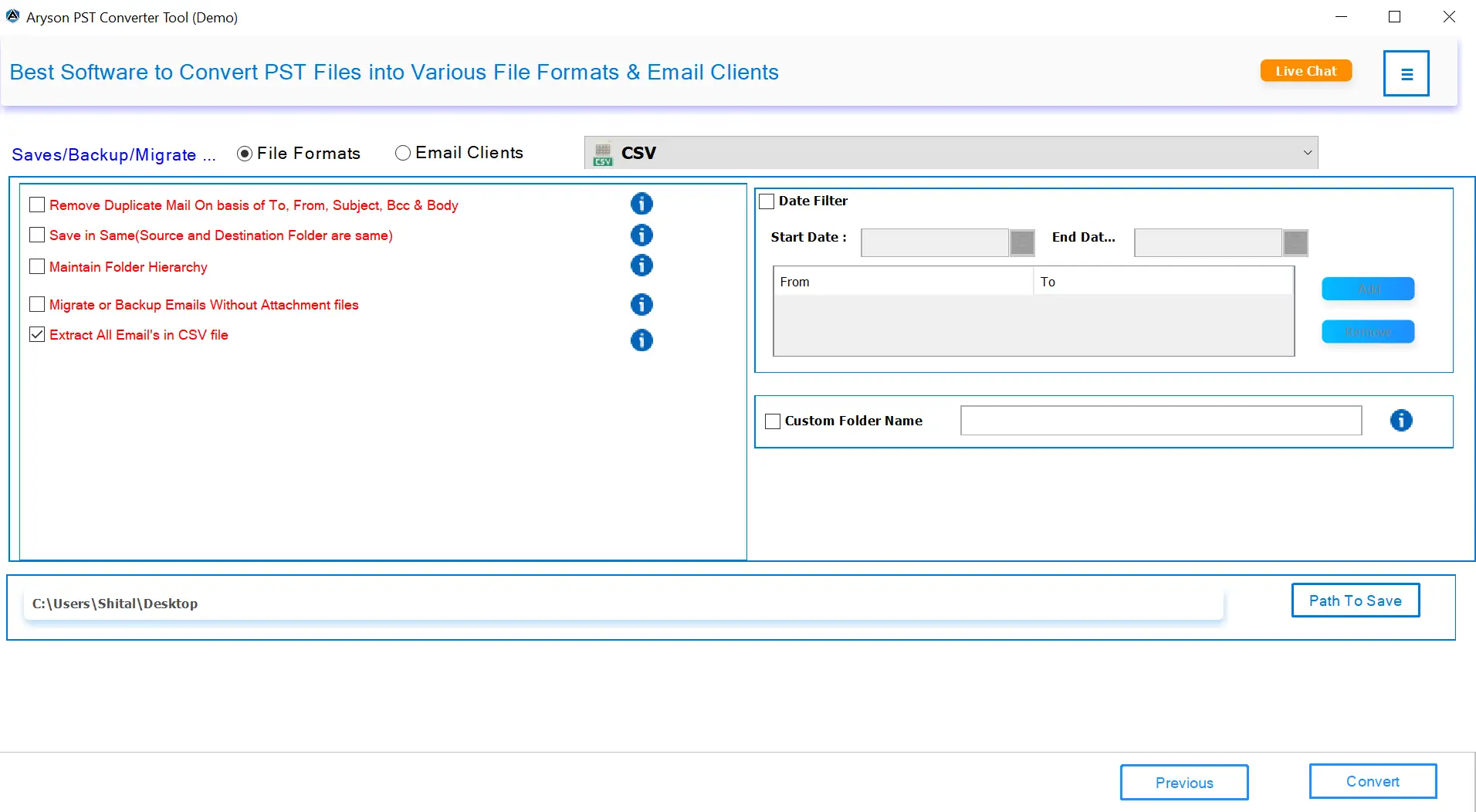
Extract All Emails in CSV File

Advanced Preview Panel

This software allows users to preview the required email details of the selected PST/OST files. Users can preview the To, From, Subject, and Date fields of the selected emails. Along with that, you can even review the HTML body, attachments, plain text, raw HTML, calendar, contacts, tasks, notes, MIME, and headers.

Date Range & Remove Duplicate Filter

Date Range & Remove Duplicate Filter

Aryson PST Data Converter lets you filter emails by a specific date range, so you can extract only the emails you need from certain periods. It saves time and avoids unnecessary data. Additionally, this software can automatically detect and remove duplicate emails during the conversion. With these options, you get precise results with ease.

Save in Same Source & Destination

Custom Folder Name Feature

Aryson PST Mailbox Converter is embedded with the Custom Folder Name feature to rename folders during the conversion process according to the user's preference. It ensures that the converted PST files are organized in a way that makes sense for individual projects, clients, or personal use. By customizing folder names, users can easily navigate their mailboxes.

Custom Folder Name Feature

Split Resultant PST File

The Split Resultant PST File option helps users manage large PST files by dividing them into different parts. With this feature, you can reduce the risk of PST corruption, improve Outlook performance, and make storage and backups more convenient. Users can choose the split size according to their needs, which ensures smooth handling of even very large mailboxes.

folder

MBOX Segmentation

You can split the resultant MBOX files into subparts based on two different criteria. Either select the single MBOX per folder option or divide the MBOX files based on a specified size for each sub-MBOX file. This feature allows users to manage the large MBOX files in an optimized way.

Custom Folder Name Feature

Map PST Data with Default Folders

Toggle on the Mapped with Default Folders option to map the required PST data to the default folders of destination email clients. The default folders include Inbox, Sent, Drafts, etc. This option makes sure that the required PST metadata is mapped to the destination properly and maintains data integrity.

Embedded with Naming Convention

Embedded with Naming Convention

Aryson PST Converter comes with a naming convention feature that automatically renames emails or files during conversion based on user-selected patterns. For example, users can name emails by date + subject + sender, along with other options. It ensures consistency and easy identification of Outlook emails.

Maintain Folder Hierarchy

Works with All Windows & Outlook Versions

Aryson PST Converter Wizard fully supports all editions of Microsoft Outlook, including Outlook 2021, 2019, 2016, 2013, 2010, and earlier. This software continues to support modern Microsoft updates. Also, it runs smoothly on all Windows versions like Windows 11, 10, 8, 7, along with all earlier and major versions.

Works with All Windows & Outlook Versions

Free Trial Version & Simple GUI

Aryson PST File Converter comes with a free trial version and a user-friendly interface to make the conversion process easy for everyone. The free version lets users export up to 50 items per PST/OST folder. This helps them test features, check preview quality, and see conversion accuracy.

How to Use Aryson PST Converter: Complete Guide

How to Use Aryson PST Converter: Complete Guide

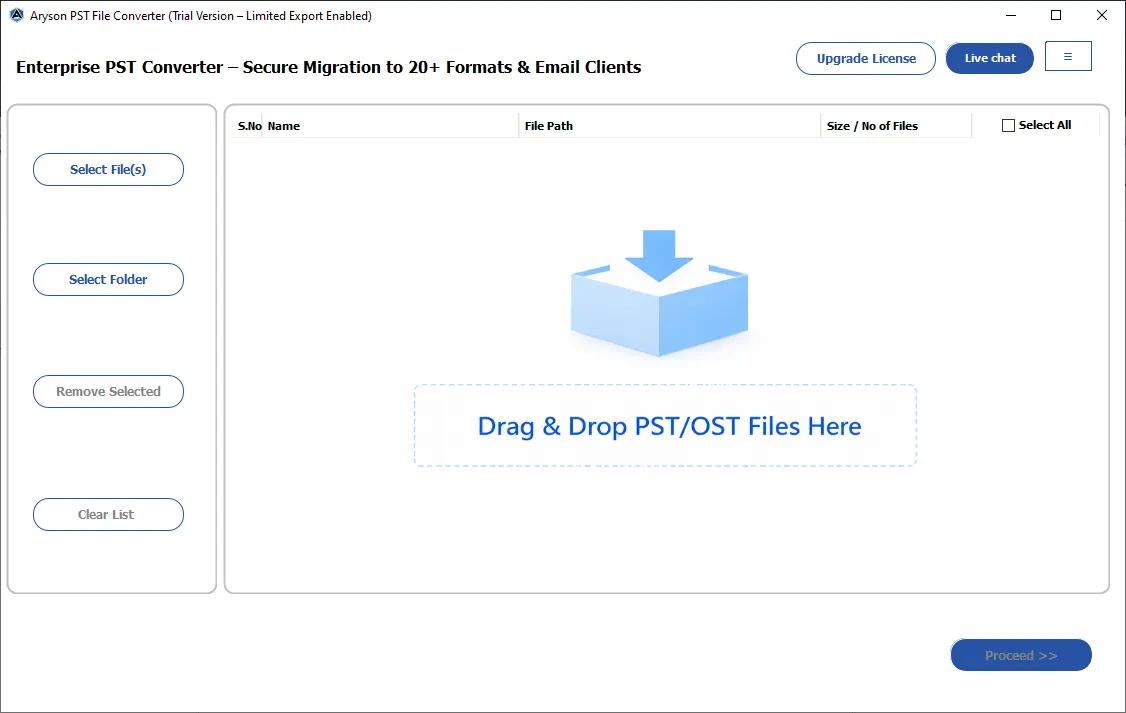
Aryson PST File Converter allows you to convert, migrate, and manage PST files easily without requiring MS Outlook installation. With its intuitive interface and advanced options, you can preview emails, contacts, calendars, attachments, and other mailbox items before exporting to multiple formats. Follow the given steps to convert the Outlook data file:

  • Step 01: Install the Aryson PST Converter Tool on your system.
  • Step 02: Click the Select Files/Select Folders button to load single or multiple files.
  • Step 03: Preview the required email content and metadata of selected PST/OST files.
  • Step 04: Choose the desired output format or email client according to your preference.
  • Step 05: Optionally, use filters to export only the emails you need.
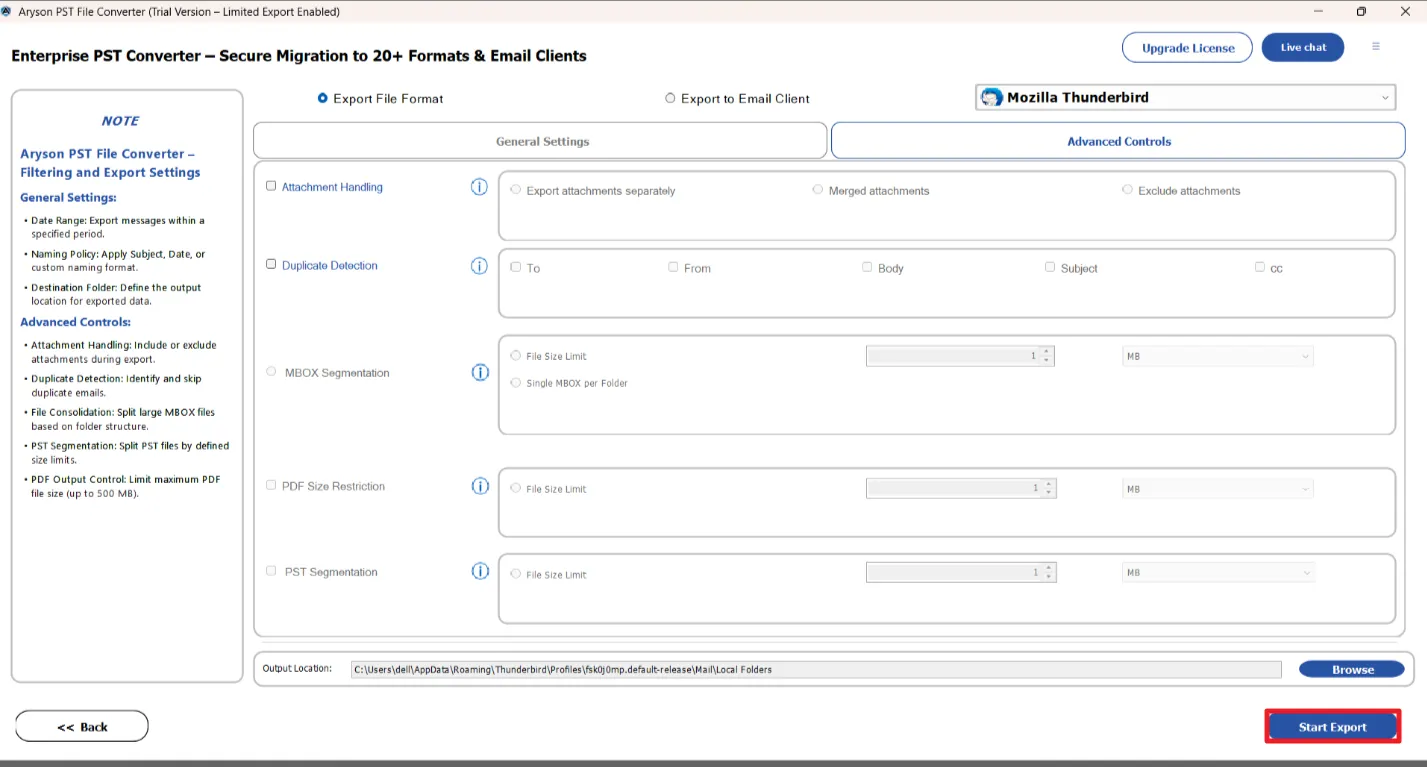
  • Step 06: Click Start Export to initiate the conversion of the Outlook data file.

Aryson PST Converter Wizard: System Specifications

Software Download

(Windows)

Download Now


(Linux)

Download Now


Size: 245 MBVersion: 26.05 ( Updated On 23 February 2026 )

Trial Limitations

The free demo version includes all features available in the fully licensed version, so you can properly evaluate the Aryson PST Converter before committing to a purchase. The only limitation is that it allows backup of up to 50 emails per folder.

Requirements & Supported Versions

Hard Disk Space: 500 MB of free hard disk space required

RAM: 4 GB of RAM (4 GB is recommended)

Processor: Intel® Core™ 2 Duo CPU E4600 @ 2.40GHz 2.39GHz

Supported Platforms

Window OS: Windows 11, 10, 8.1, 8, 7, Vista, XP, 2000, 98, NT, and 95.

Software Prerequisites

  • If you are operating Windows OS 11, 10, 8, or 7 (32-bit or 64-bit) then you must launch the tool as an Administrator.
  • Turn off the Windows Firewall for proper installation.
  • Disable the Antivirus programs.

FAQ

Request For Software Customization

If you need to customize Aryson Software or need additional some specific features then, provide the software customization Request Quote

Aryson Outlook PST Converter Tool: Free & Premium Version

Get an overview of the Free and Premium versions of the PST Mailbox Converter to convert PST files:

Product Features Free Version Full Version
Convert PST Emails to 12+ File Formats 50 Items per folder Complete Mailbox
Export PST to Email Clients & Cloud Platforms 50 Items per folder Complete Mailbox
Preview PST Mailbox
Convert PST file in Bulk
Date-Range Mail Filter
Remove Duplicate Emails
Save Attachments Separately
Custom Naming Convention
Split Resultant PST File
Migrate Emails Without Attachments
Maintain Original Folder Hierarchy
Compatible with All Windows& Outlook Versions
24/7 Technical Support
Price Free $69
Money Back Policy

Frequently Asked Questions

Ans. Aryson Outlook Data File Converter can convert PST files into multiple formats, including PST, MBOX, EML, MSG, DOCX, PNG, ICS, and more.

Ans. No, PST File Conversion Software works independently and does not require MS Outlook to be installed.

Ans. Yes, the Outlook PST Converter supports both single mode for one file and batch mode for converting multiple PST files simultaneously.

Ans. Yes, Aryson Outlook Data File Converter allows direct migration to Office 365, Gmail, Google Workspace, Zoho Mail, Thunderbird, Yahoo Mail, Outlook, and iCloud.

Ans. Yes, attachments can either be preserved within the emails or saved separately, depending on your preference.

Ans. Yes, PST File Converter Tool can detect and remove duplicate emails based on To, From, Subject, Bcc, and Body fields.

Ans. Yes, Aryson PST File Converter supports Outlook 2021, 2019, 2016, 2013, and earlier versions, ensuring compatibility across all PST files.

Ans. Yes, Aryson PST Mailbox Converter can split large PST files into smaller parts to avoid corruption and improve performance.

Ans. Yes, the free version allows converting up to 50 items per PST file to understand the software in a better way.

Ans. Yes, Aryson PST Mailbox Converter is compatible with Windows 11, 10, 8, 7, and older versions.

Trusted by IT Professionals & Enterprises Worldwide

See what our IT professionals say about their experience with the Aryson PST Mailbox Converter

review-rating