




Screens

Video

Guide

Eula

Pegasus Mail Conversion Workflows

Visual Guide Showing All Conversion Paths Supported By Pegasus Mail Migration Tool

Source Formats

PMM
PMI
CNN
PNM
PML
PMF
PMC

Aryson Pegasus Mail Converter

Target Formats

Email Formats PST, MSG, EML, EMLX, MBX, MBOX
Document Formats PDF, DOCX, RTF, HTML
Data & Spreadsheet Formats CSV
Archive Formats MBOX, MBX
Microsoft Outlook Formats PST, MSG
Cross-Platform Formats EML, EMLX, MBOX, MSG

Aryson Pegasus Mail Converter vs Doing It Manually

Discover how Aryson Pegasus Mail Export Tool outperforms manual methods

Hands-On Approach Aryson Pegasus Email Converter
The manual method may take long hours or even days to convert large Pegasus mailboxes. Convert single or multiple PMM/CNN/PMI files in one operation without processing them individually.
There is no way to cross-verify Pegasus email content before actually converting it. The advanced preview panel and enhanced searching option make it easier to review the selected emails.
The user cannot apply any advanced filtering while performing the manual conversion steps. IT admins can be more selective using the Date, Attachments, read status and keyword-based filters.
Manual processes often disrupt the original folder hierarchy or cause formatting issues. The Pegasus Mail Converter keeps the original folder hierarchy, metadata, & attachment intact.
There is a possibility of converting one email more than once, which results in data redundancy. There is an automatic Duplicate Removal Engine that eliminates data redundancy.
There is no way to track the ongoing conversion of Pegasus Mail mailboxes. Aryson Pegasus Mail Export Tool consists of a real-time conversion panel with a progress bar & detailed live logs.
6 Critical Limitations
Hands-On Approach approaches lack consistency and accuracy
6 Complete Solutions
Aryson resolves every challenge automatically
Get Demo

Aryson Pegasus Mail Converter: Built For Multiple Roles

A Multi-purpose Pegasus Converter to Serve Different Roles and their purposes

IT Administrators/ Consultants

Perform bulk Pegasus Mail conversions with a maintained folder structure and formatting and zero data loss across large mailboxes

Compliance Officers

Date and keyword-based filters make the retrieval of specific mail records for audit and legal purposes straightforward.

Business Users

Non-technical users can start Pegasus Mail conversion with the self-explanatory interface. Original folder structure is fully preserved.

Technical Teams/MVPs

Flexible output formats including PST, PDF, MBOX, EML, and more - ensuring compatibility across all major platforms.

Complete Pegasus Mail Conversion Suite

All-In-One Utility to load, filter and securely convert Pegasus Mail data into 10+ formats.

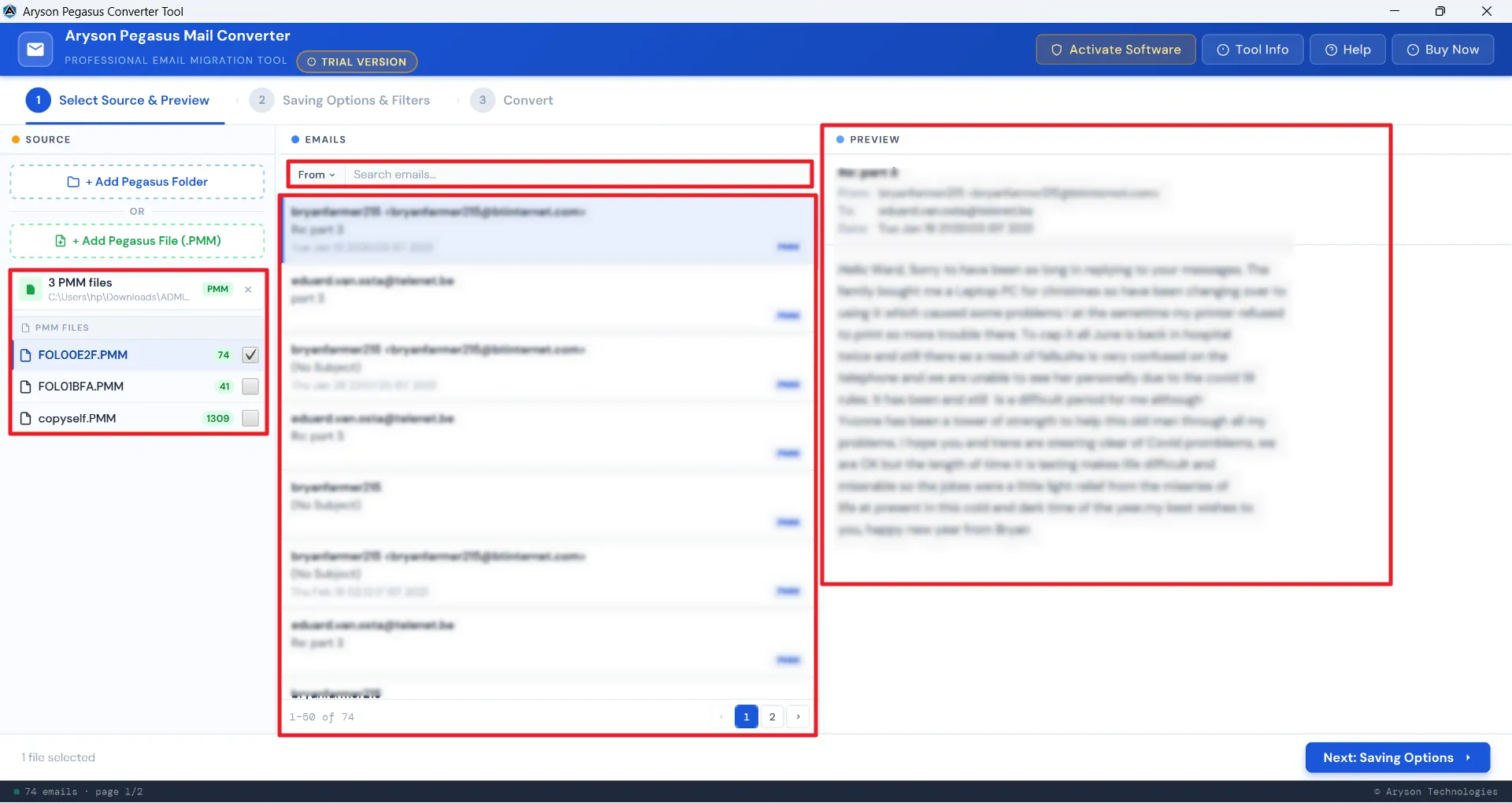
Verify Every Email Before You Convert

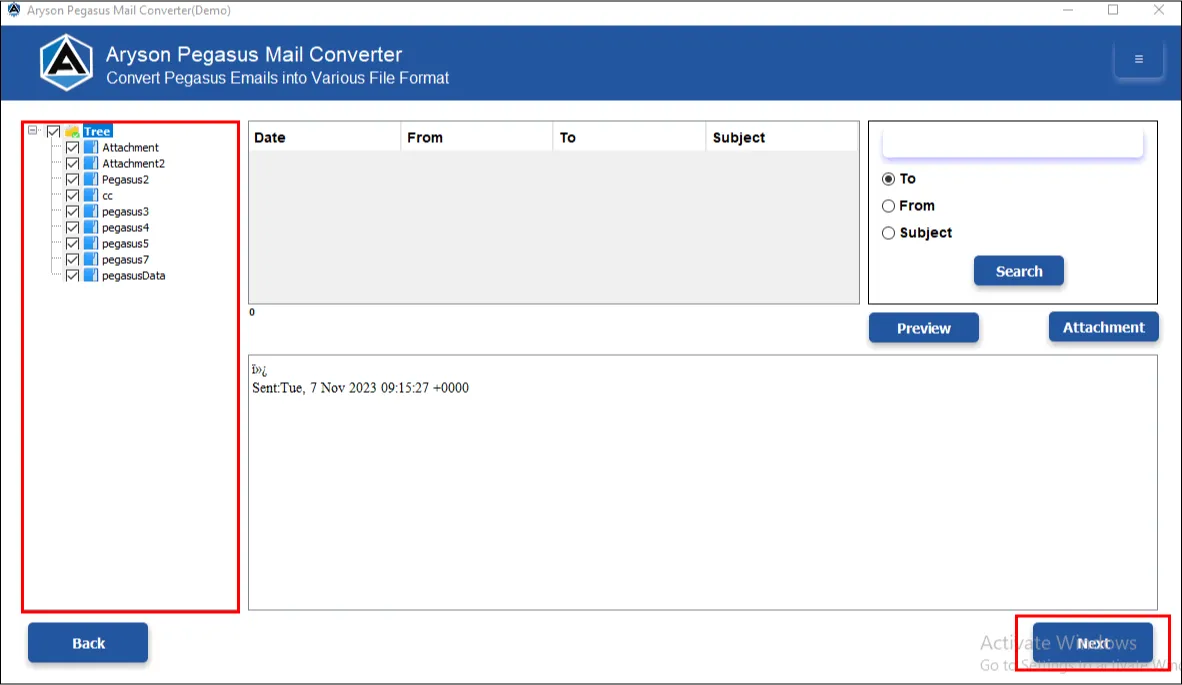
Aryson Pegasus Mail Migration Tool allows users to cross-verify their Pegasus Mail data before conversion to maximise data accuracy. Even the advanced search functionality makes it easier for them to browse data based on To, From and Subject fields of emails.

  • Check the total no. of emails present in each Pegasus Mail container in the left panel.
  • Select a particular Pegasus Mail mailbox to specifically convert its emails.
  • Search for a specific email based on its To, From, and Subject fields.
  • Open & read individual emails with full formatting, headers, & metadata.
  • View and verify attachments directly from the preview panel before conversion.
  • Select specific folders or individual messages after reviewing for more precision.
Email Accounts Selection

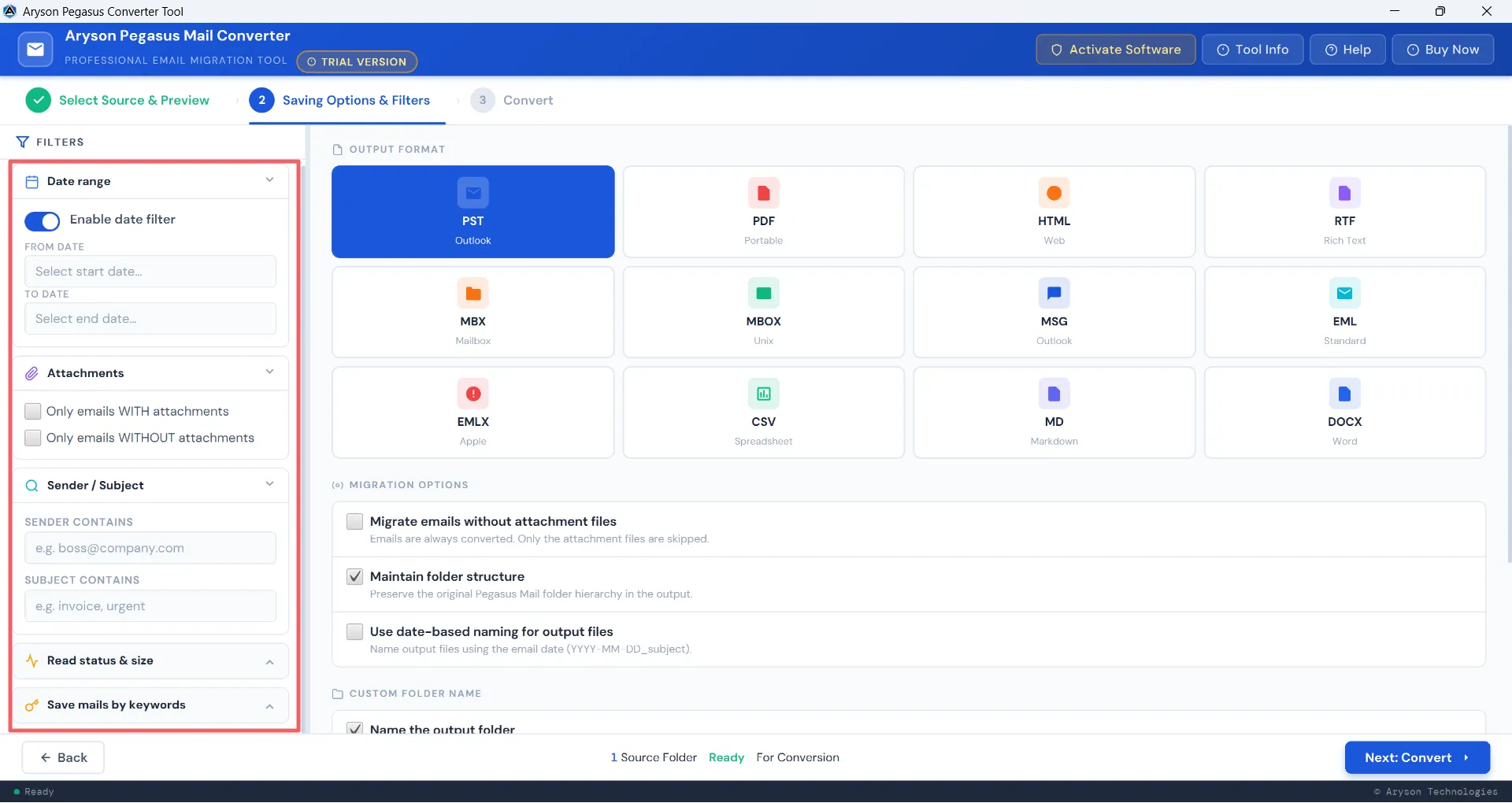
Convert Only What You Actually Need

Aryson Pegasus Mail Converter provides IT professionals with a comprehensive set of filters and features to allow selective export with full precision.

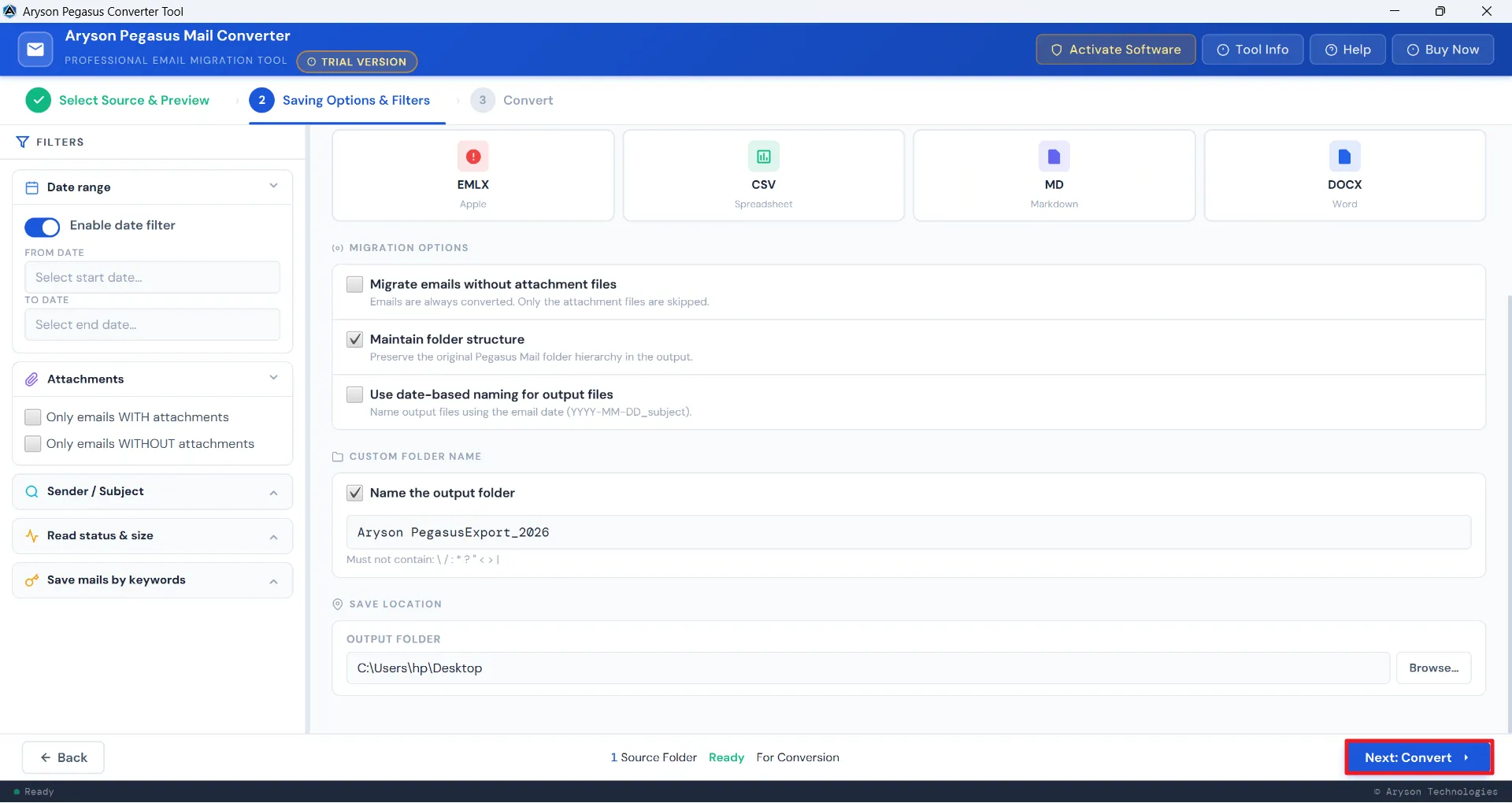
  • Date Range Filter: Specify a Date range with a Start and End Date.
  • Sender / Subject Filter: Perform Subject and Sender-based filtering with one or multiple subjects
  • Attachment Filter: Convert only emails with attachments or only emails without attachments to speed up processing.
  • Multi-Keyword Filter: Add one or more keywords based on To, From and Subject
  • Read Status Filter: select the unread emails based on the sizes- Small (under 100 KB), Medium (100 KB–1 MB), or Large (over 1 MB).
Mailbox Folder Backup

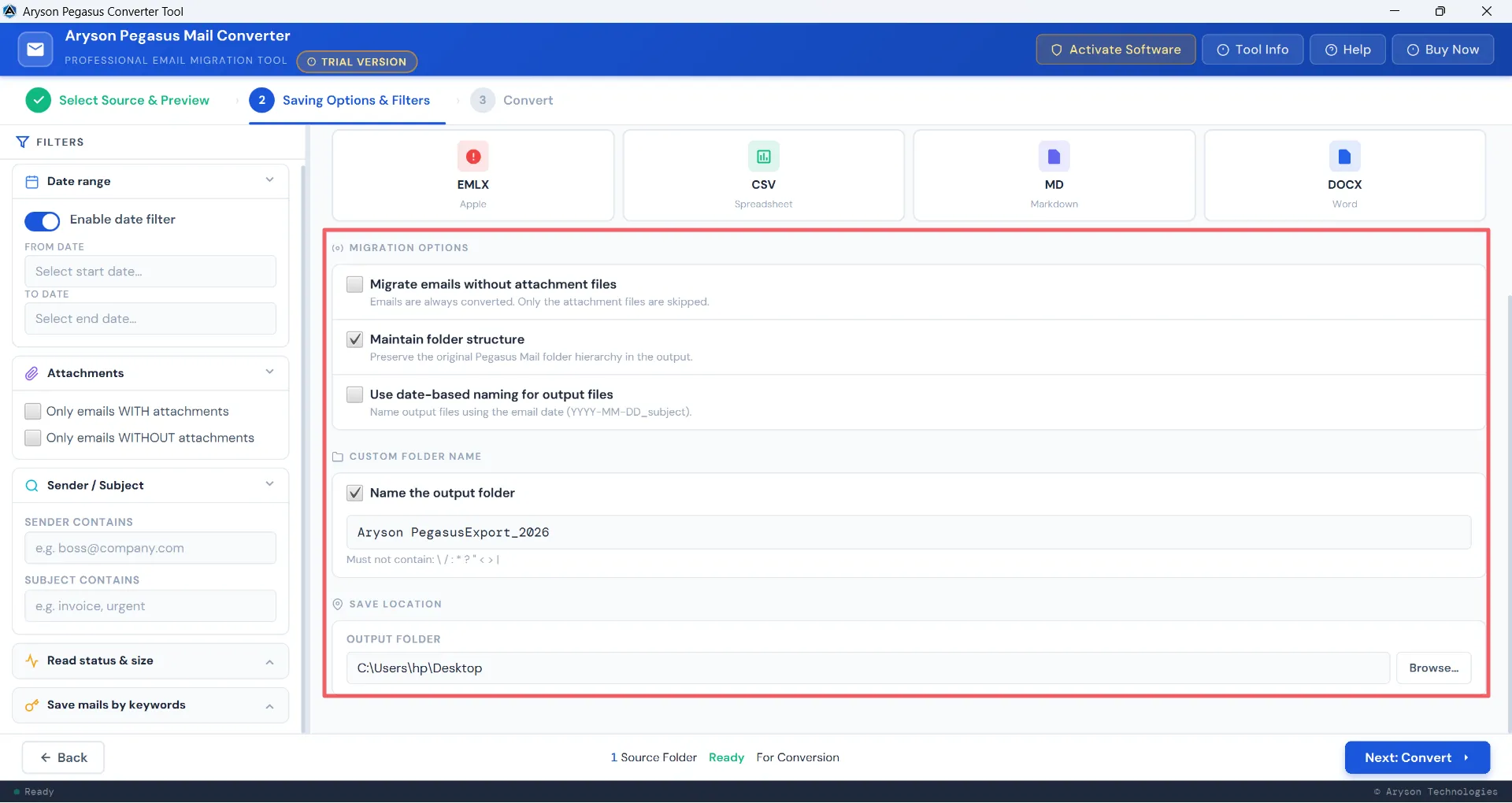
Export Pegasus Mail Accurately

Aryson Pegasus Mail Converter supports 10+ output formats. It supports the conversion of PMM, PMI, CNN and even files with no extension. There is no need to install any external plug-ins or additional applications.

  • Convert Pegasus Mail files: PMM, CNN, PMI, PNM, PML, PMF, PMC and files without extensions- into PST, PDF, HTML, RTF, MBX, MBOX, MSG, EML, EMLX, CSV, MD, and DOCX formats.
  • Consists of a check box to enable the maintenance of the original folder hierarchy, email threads, metadata, and attachment integrity throughout the conversion.
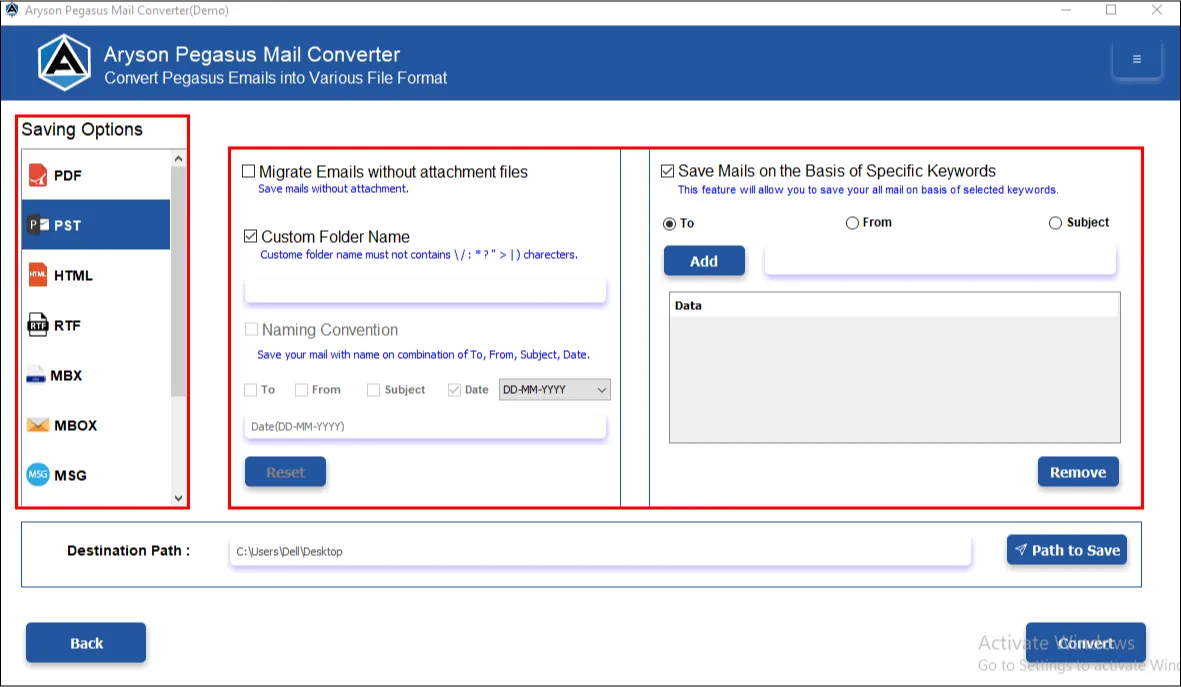
  • Custom Folder Naming: Provide a custom name to the resultant folder.
  • Date-Based Naming: Assign a specific date-naming format to the resultant folder.
  • These features allow better organisation of the resultant folders.
Migration Options

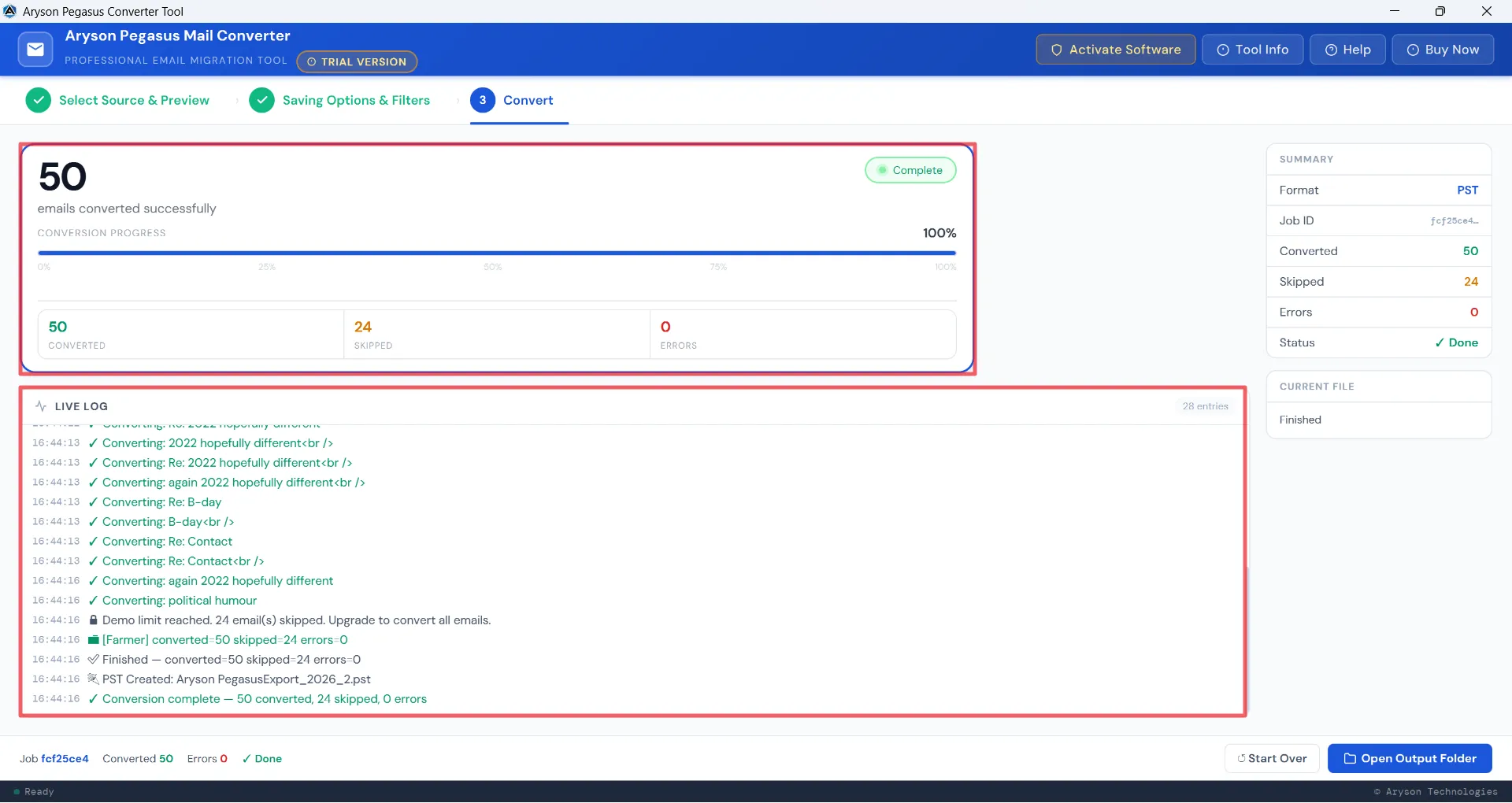
Track the Ongoing Conversion at Every Step

Aryson Pegasus Mail Migration Tool keeps users fully informed through a live progress log and a detailed conversion log in the software panel. Users can track the conversion at every step for better clarity and record-keeping.

  • Progress Bar: It displays the total percentage of the conversion completed. Live Conversion Real-time Logs: It displays each email being processed in real time, along with the timestamps, so users can track progress at every stage.
  • Detailed Report: After completion, a detailed conversion report displays the total number of emails converted, skipped, and flagged as Errors.
  • Open Output Folder: It provides instant access to the converted files right from the results- no manual browsing required.
  • Start Over: To begin a new conversion and navigate to the preview panel.
Core Functionalities

Aryson Pegasus Mail Converter - Ratings & Reviews

Experience of IT professionals and Enterprises with the Aryson Pegasus Mail Export Tool

Expert Reviews:

Rating & Reviews:

When Do You Actually Need the Pegasus Mail Converter?

Convert Pegasus Mail files to another email client

If you need to move your Pegasus Mail data to a modern email client like Outlook or Thunderbird, this Pegasus Mail Backup Tool converts from PMM and CNN files directly into a format your new client can open.

Create an offline archive of Pegasus Mail data

If you want to create offline archives of your Pegasus account, the Aryson Pegasus Mail Converter can export all emails with attachments without any data loss. It keeps everything organised and completely intact

Conversion before a system or OS upgrade

If you're planning a system migration, OS upgrade, or hardware change, converting your Pegasus mailbox beforehand ensures your email history is safely preserved in a portable, accessible format - regardless of what happens to the original system.

Export or Share Pegasus Email Data as PDF

If you need to print or share Pegasus Mail records, the Pegasus Email Converter lets you save emails in PDF format, making it straightforward to distribute or archive email records in a format anyone can open without needing an email client.

A Complete Set of Features Worth Knowing About

Complete Suite of Functionalities to Convert & Migrate Pegasus Mail Data

Convert Pegasus Mail to 10+ Formats

Convert Pegasus Mail to 10+ Formats

The Pegasus Mail Migration Tool supports the conversion of PMM, CNN, PMI, PNM, PML, PMF, PMC, and files without extensions. The output formats available are PST, PDF, HTML, RTF, MBX, MBOX, MSG, EML, EMLX, CSV, MD, and DOCX. During conversion, users can select specific Pegasus Mail mailboxes and check for the total email count in them. Moreover, there is no need to install any third-party plug-ins or applications.

Bulk Conversion Without the Wait

Bulk Conversion Without the Wait

With the help of this Pegasus Mail Export Tool, IT admins and enterprises with large datasets can efficiently convert their data in bulk without any issues. Select Add folder or Add file option to browse through thousands of emails and load them into the software panel. You can select single or multiple PDFs and embed PDFs with attachments. This eventually saves time and catalyses the productivity of the IT professionals managing large Pegasus mailboxes across multiple user accounts simultaneously.

Preview Emails For Data Accuracy

Preview Emails For Data Accuracy

For Organisations managing critical and confidential emails, data accuracy plays an important role. To maintain it, the Pegasus Mail Migration Tool provides a preview panel to review the selected Pegasus emails before conversion. The advanced search enables email browsing across selected mailboxes based on the To, From and Subject Fields. Cross-verify the attachments of the associated selected emails in the right panel. This enhances the data accuracy and integrity of the resultant data.

Date-based Filtering & Attachment Handling

Date-based Filtering & Attachment Handling

Users can toggle on Date-Filter to define a specific Start and End date range for targeted conversion. Additionally, they can choose to include only emails with attachments or convert only the relevant data and increase the processing speed. This provides users with precise control over output size and relevance, avoiding unnecessary data in the final results.

Sender, Subject & Multi-Keyword Filtering

Sender, Subject & Multi-Keyword Filtering

The Pegasus Mail Export Tool lets users filter emails associated with a particular sender and single or multiple subject keywords. The multi-keyword filter applies multiple search terms simultaneously across To, From, and Subject fields for sharper results. Professionals can pull project-specific or client-specific emails from large mailboxes without manually sorting through thousands of records. This eventually saves the total time of searching through the emails.

Unread Email Filter & Size-Based Sorting

Unread Email Filter & Size-Based Sorting

IT Experts who handle large datasets can choose to select the unread emails only based on their email sizes. They can select unread emails with sizes - Less than 100 KB, Medium (100 KB–1 MB), or Large (over 1 MB) - using a simple dropdown selection. This helps the Pegasus Email Converter to activate the selection engine as per the selected file size. Users can now focus on what genuinely matters and keep output files manageable without unnecessary bulk.

Migrate Without Attachments & Maintain Folder Structure

Migrate Without Attachments & Maintain Folder Structure

The Aryson Pegasus Mail Converter offers a dedicated check box to convert emails without attachments, reducing output size significantly. This speeds up the processing speed and work efficiency of the end-user. Apart from this, the Maintain Folder Structure checkbox makes sure that the original Pegasus Mail hierarchy stays fully intact throughout.

Custom Folder & Date-Based Naming

Custom Folder & Date-Based Naming

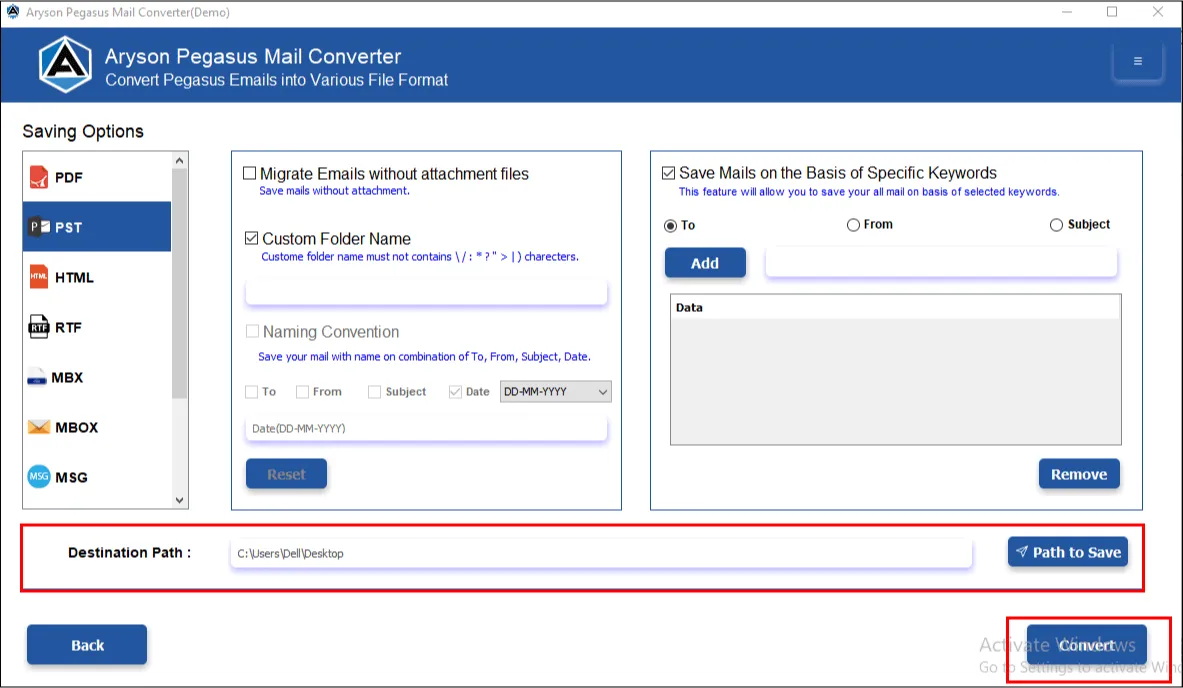
Users can assign custom names to output folders, apply date-based naming conventions for automatic file labelling, and choose any destination path on their system or external drive for saving results. This Pegasus Mail Migration Tool keeps every conversion clearly organised and easy to locate - especially useful when handling multiple client projects.

Live Progress Tracking & Detailed Conversion Report

Live Progress Tracking & Detailed Conversion Report

A real-time conversion log of the Pegasus Mail Export Tool displays every email being processed with timestamps, while a progress bar tracks the job completion. A final report breaks down the total number of converted, skipped, and flagged emails clearly. Moreover, a unique Job ID is assigned for each user for future backtracking of the conversion. Users get full visibility throughout and a documented record afterwards - valuable for audits, client handovers, and internal reporting.

Simple Interface, Windows Compatibility & Free Trial

Simple Interface, Windows Compatibility & Free Trial

The Pegasus Mail Migration Tool runs on all major Windows versions, including Windows 11, 10, 8.1, 8, 7, and earlier. The interactive GUI and self-explanatory interface make it easy to use for both technical and non-technical users. Moreover, the free demo version converts up to 50 emails per folder, letting users test against real data to get a hands-on experience.
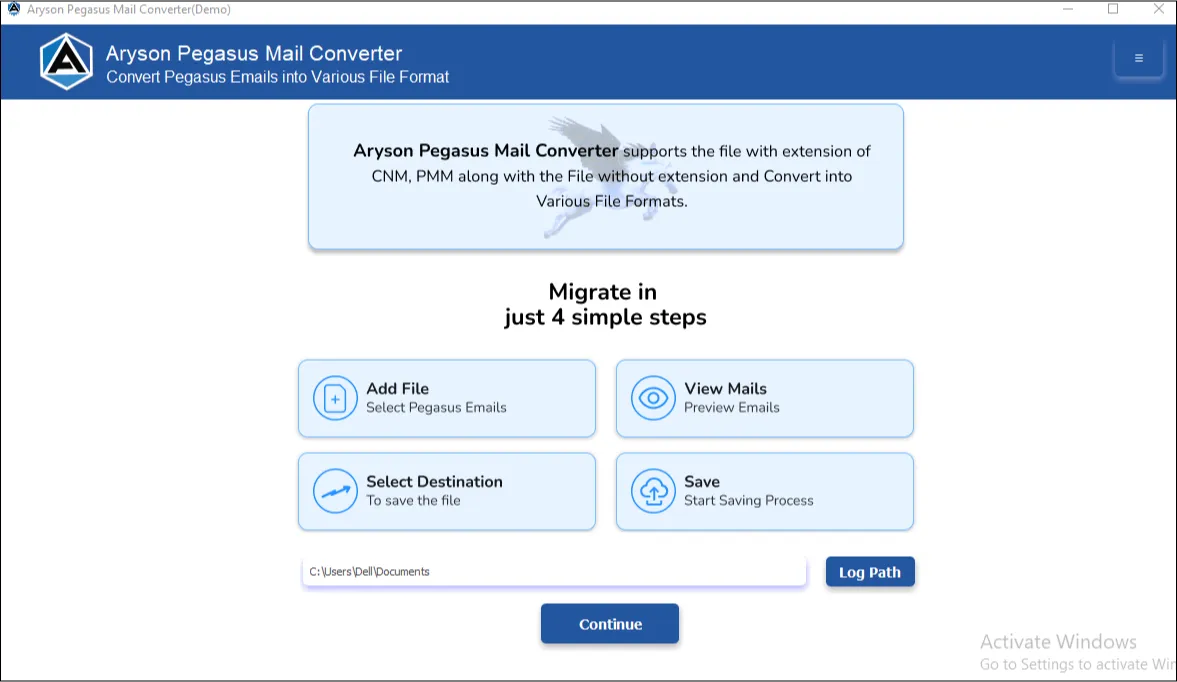
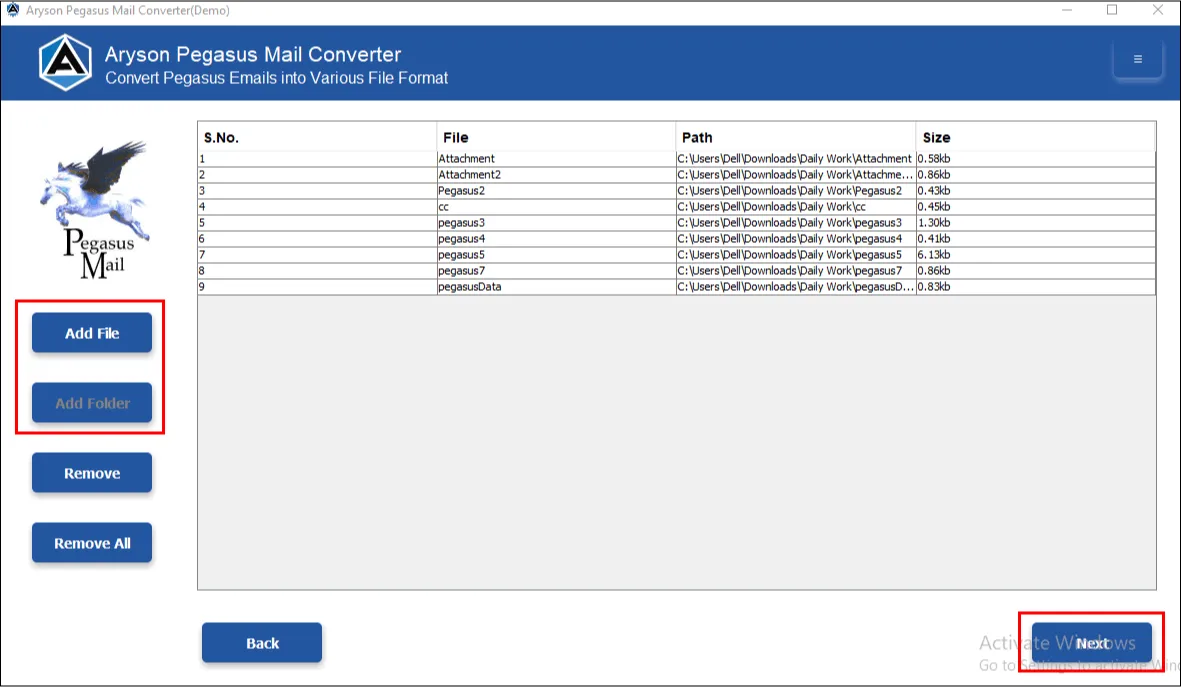
How to Use Aryson Pegasus Mail Converter?

Here are the steps to convert your Pegasus Mail data into Multiple Formats

step 1 Screenshot
step 2 screenshot
step 3 screenshot
step 4 screenshot
step 5 screenshot

Pegasus Mail Conversion for Your Industry

Tailored solutions addressing specific migration needs across different professional sectors.

Legal & Law Firms

  • eDiscovery: Convert Pegasus Mail PMM and CNM files to PDF with full headers and metadata intact for legal review and court submission.
  • Preserve Evidences: Export Pegasus emails to MSG format for direct use in legal hold platforms without any data alteration.
  • Metadata Retention: All routing information, timestamps, sender details, and email properties are kept intact for authentication purposes.
  • Batch Processing: Handle large volumes of Pegasus Mail archives in one operation - ideal for managing bulk email records across large-scale litigation cases.

Healthcare & Medical

  • PHI Archives: Convert patient communication records stored in Pegasus Mail to secure, properly formatted PDF archives for long-term retention.
  • Offline Processing: The entire conversion runs locally on your system - no data is uploaded to any cloud server, making it fully HIPAA-safe.
  • Retention Compliance: Create accurately dated Pegasus Mail archives in PDF or PST format to meet 7-year retention mandates without manual effort.
  • Encryption Ready: Output files are fully compatible with encrypted storage systems, ensuring sensitive patient data stays protected post-conversion.

Education & Academia

  • Institutional Archiving: Convert faculty and administrative Pegasus Mail correspondence into PDF or MBOX archives for long-term institutional record-keeping.
  • Bulk Folder Export: Process entire Pegasus Mail directories in one operation - ideal for managing large volumes of student or departmental email records.
  • Format Flexibility: Export to widely supported formats like PST, EML, or HTML so archived records remain accessible regardless of which email platform the institution migrates to.
  • Metadata Preservation: All email headers, timestamps, and sender information are retained, ensuring archived academic communications remain authentic and verifiable.

Government & Public Sector

  • FOIA Requests: Quickly convert Pegasus Mail files into accessible, shareable formats like PDF or EML to respond to public records requests efficiently.
  • Agency Migration: Export legacy Pegasus Mail data - including PMM, CNN, and PMI files - to modern formats like PST, MBOX, or EML for seamless platform transitions.
  • Records Management: Create searchable, structured Pegasus Mail archives in PDF or CSV format per NARA records management guidelines.
  • Air-Gapped Systems: The Pegasus Email Converter works entirely offline with no internet dependency - fully suitable for secure, air-gapped government networks.

Aryson Pegasus Mail Converter: System Specifications

Software Download

(Windows)

Download Now


Size: 280 MBVersion: 26.04

Trial Limitations

The free demo version includes all features available in the fully licensed version, so you can properly evaluate the Pegasus Mail File Converter before committing to a purchase. The only limitation is that it allows backup of up to 50 emails per folder.

Requirements & Supported Versions

Hard Disk Space: Minimum 1 GB free space required

Processor: Intel® Core™ 2 Duo CPU E4600 @ 2.40GHz or higher

RAM: Minimum 4 GB (4 GB or above recommended)

Supported Platforms

Windows OS: Windows 11, 10, 8.1, 8, 7, Vista, XP, 2000, 98, NT & 95.

Software Prerequisites

  • If you are using Windows OS 7, 8, 8.1, 10, or 11 (either 32-bit or 64-bit), then you must launch the iCloud Backup & Migration tool as an administrator.
  • Turn off the Windows Firewall for proper installation.
  • Disable the antivirus programmes.
  • Establish a proper internet connection.

FAQ

Request For Software Customization

If you need to customize Aryson Software or need additional specific features, then provide this software customisation.

Aryson Pegasus Mail Converter: Demo VS Full Version

Review the Differences of the Demo & Full Version of the Aryson Pegasus Mail Migration Tool

Product Features Demo Version Full (Licensed) Version
Convert Pegasus emails to PST, PDF, EML, MSG, CSV, MBOX, etc. 50 items per folder Entire Mailbox
Bulk Conversion of Pegasus folders 50 items per folder Entire Mailbox
Advanced Preview Panel
Remove Duplicate Emails
Convert Emails With or Without Attachments
Date Range Filter
Keyword, Sender & Subject Filters
Custom Folder Name
Naming Convention
Download Conversion Report
Save Attachments Separately
Detailed Download Report
Compatible with All Windows Versions
24×5 Tech Support
Price Free $39
Money Back Policy

Frequently Asked Questions

Ans. Yes, Aryson Pegasus Mail Converter supports PDF as one of its output formats. You can export your Pegasus emails directly as single or multiple PDF files. This makes it easy to read, share, & archive without needing any email client to open them.

Ans. Absolutely, the bulk conversion feature of the Pegasus Mail Migration Tool lets you load and convert entire Pegasus Mail folders in a single operation, instead of processing files one by one. This saves significant time, especially when dealing with large mailboxes.

Ans. No, the Aryson Pegasus Mail Converter works completely independently and does not require Pegasus Mail, Outlook, or any other email application to be installed on your system.

Ans. You can export your Pegasus emails to PDF, HTML, or MHTML formats using the Pegasus Mail Backup Tool. These can be opened directly in any browser - no email client required.

Ans. Yes, the Aryson Pegasus Converter Tool includes a date range filter, sender filter, subject filter, and keyword-based filter, all of which let you define exactly which emails get converted. This is useful when you need emails from a particular period, project, or correspondent without converting the entire mailbox.

Ans. Yes, the Pegasus PMM Converter includes a dedicated option to convert emails without attachments. This speeds up the process and reduces the output file size - particularly helpful for large mailboxes with heavy attachment data.

Ans. Everything is processed locally on your machine. No email content, credentials, or personal data is breached at any point during or after the conversion process.

Ans. After every job, the Pegasus Mail File Converter generates a detailed conversion report showing the total number of emails converted, skipped, and any errors encountered - along with a final status confirmation. You can also open the output folder directly from the results screen to verify the files immediately.

Preferred by IT Professionals and Enterprises Worldwide

Aryson Pegasus Mail Converter Verified Purchase Reviews

review-rating