




LiveChat

Aryson PDF Recovery

Best Tool to Repair & Recover Corrupt or Damaged PDF Documents with High Precision

Aryson PDF Recovery Tool is a useful Windows-based application which helps users to recover and restore PDF documents with ease. Whether you have a damaged PDF document, corrupt or inaccessible file, the software will readily help you in retrieving lost data in no time. The PDF File Recovery tool has inbuilt dual advanced recovery modes which allow to load or scan corrupt PDF file then save or extract data as a new PDF file. Plus, it has been designed with a simple and easy GUI, keeping in mind of novice users.

  • Repairs damaged PDF files documents with ease.
  • Supports to recover corrupt PDF documents created by all versions of Adobe Acrobat.
  • Repairs multiple damaged PDF files at a time.
  • No file size limitation, therefore, repair large corrupted PDF documents with ease.
  • Repair and recover damaged Portable Document Format data without revealing or leaking it.
  • Fix corrupted PDF file and restore data without any data moderation.
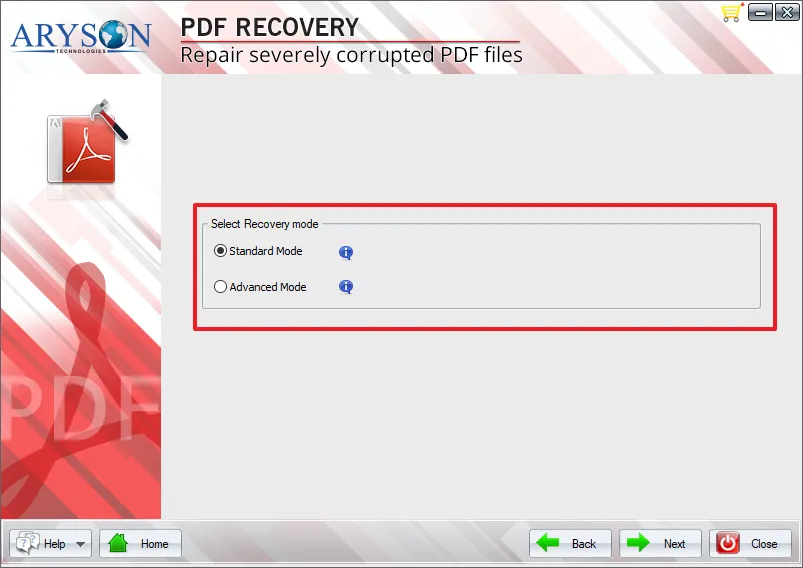
  • Repairs corrupted PDF file using dual recovery modes - Standardard & Advanced.
  • Let users recover images, graphics, texts, tables with ease.
  • Simple & easy GUI.
  • Compatible with all versions of PDF files created by Adobe Acrobat Reader.
  • Save the corrupt Portable Document Format (PDF) in a new location as workable documents.
  • Run smoothly on all versions of MS Windows operating system.
  • Free version software allows you to save recovered PDF file with watermarks.
 Download Now100% safe    Purchase Now

Free Live Demo - Download free PDF File Recovery Tool to Exctract PDF Image, Text and and Font

Repair Corrupted PDF File with High Perfection

Aryson PDF Repair tool is a professional Corrupt PDF File Recovery that allows us to repair & restore the corrupted PDF file with high perfection. It saves recovered documents data as new PDF documents, including all components like image, font, text, media etc.

Steps to Repair Damaged PDF File

Simple Eight Steps to Perform PDF File Recovery

  • Step 1: Download & Run PDF Recovery Tool
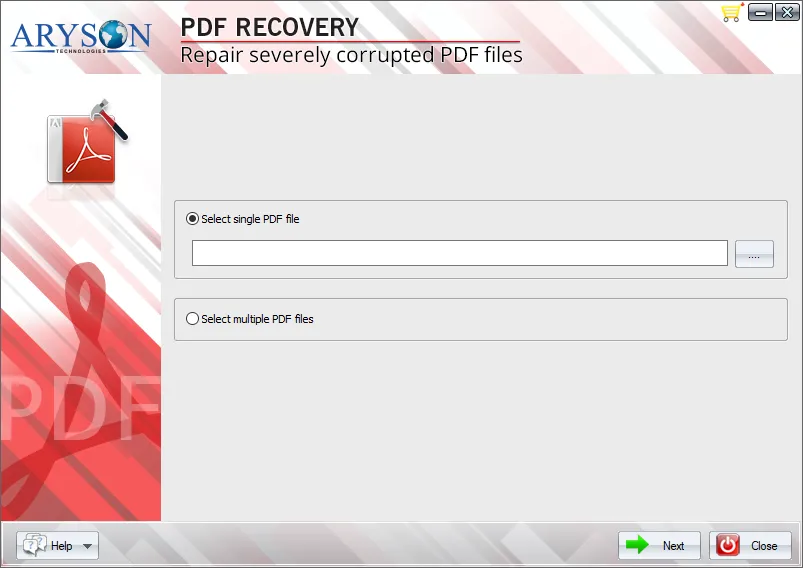
  • Step 2: Select Single PDF File option then click on the "Browse" button to add PDF file.
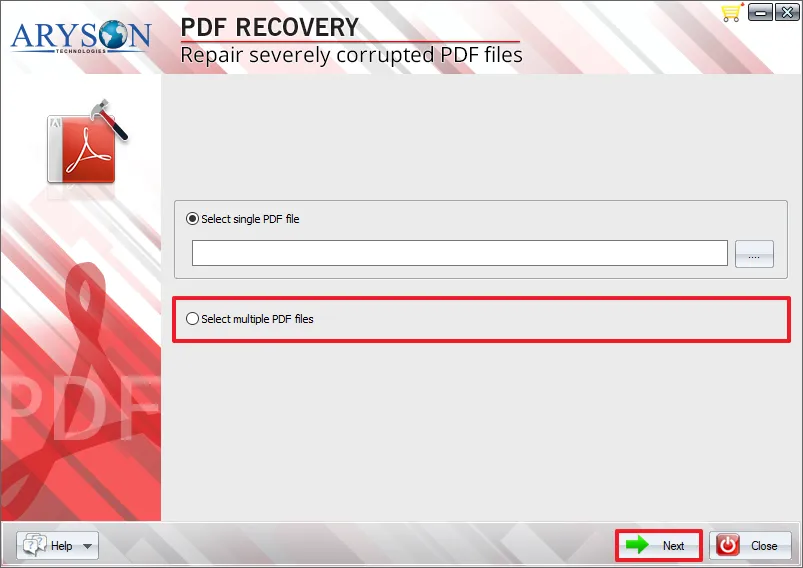
  • Step 3: Select Multiple PDF Files option then click on Next button.
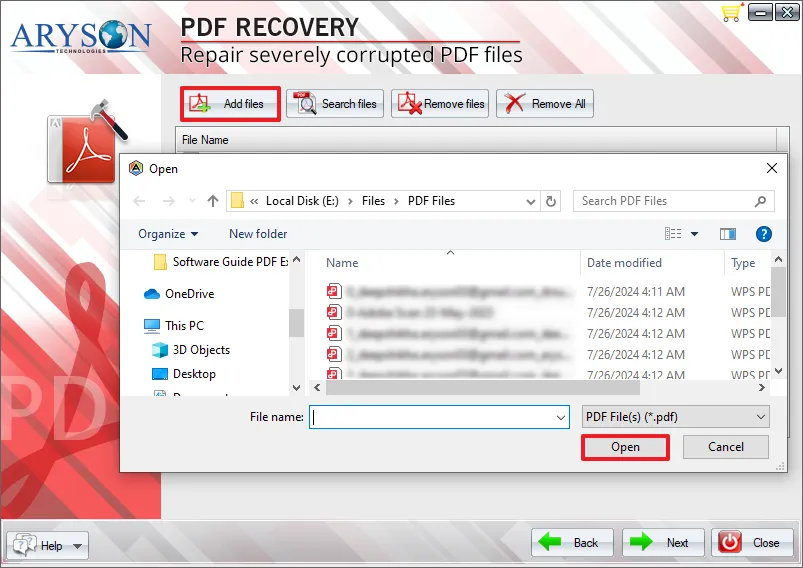
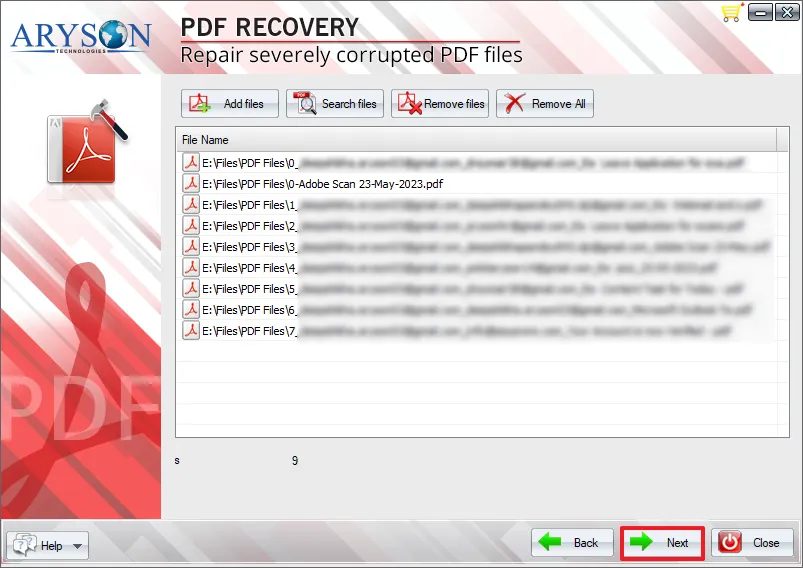
  • Step 4. Click on Add files and open multiple PDF files.
  • Step 5. Now scans selected PDF file with Standard & Advance recovery mode options.
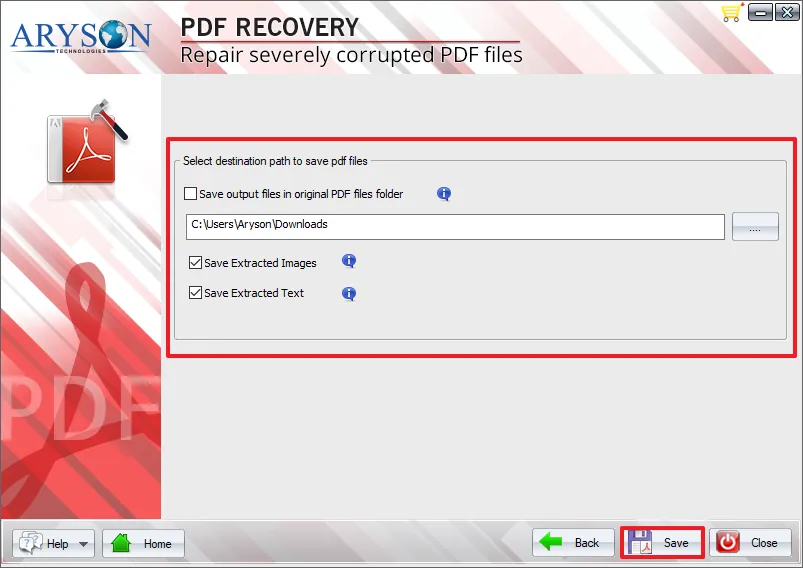
  • Step 6. Select Destination Path to Save the PDF Files.
  • Step 7. Check out Save Extracted PDF Images and Text options.
  • Step 8. Click on the "Save" button to successfully save the recovered PDF file at the destination path.
PDF Recovery

Prominent Features of PDF Recovery Tool

Recover Text & Images

Recover Text & Images

The PDF recovery software from Aryson Technologies can repair and recover all your contents, including texts, graphs, images, and so on. So this way, if you have a PDF file which is highly corrupted and it contains images, documents or any kinds of graphics, then this application can be your answer.

Create New PDF Document

Create New PDF Document

Even after complete recovery, the PDF file recovery application not only recovers your files but also restore the data into a new PDF file.

Repair Corrupt Files

Repair Corrupt Files

Aryson PDF Repair software not only helps users to tackle minor corruption in their PDF files but also supports PDF files with extreme corruption. You can recover all of your files and their data flawlessly.

Handles All Corruption Errors

Handles All Corruption Errors

PDF File Recovery software is one of the most advanced tools available online and supports all PDF file corruption errors. After the complete process, the software gives you a completely error-free PDF file.

Repair External Media Storage PDF file

Repair External Media Storage PDF file

The smart algorithm of this PDF File Repair software let users recover and restore PDF file from external hard drives as well. So if you have stored your PDF files in an external device, like CD, DVD, floppy disk or a pen drive, then this PDF file repair tool will help you to extract the image, text and object in no time.

Advanced Search & Preview

Advanced Search & Preview

Apart from being software with a good recovery algorithm, the tool also happens to be loaded with one of the most advanced search & preview features. Making it easy for the users to locate and preview the scanned files with a single click.

Simple & Easy GUI

Simple & Easy GUI

The PDF Recovery tool is no doubt to be one of the best online PDF repair software. In addition, it has also been designed with an easy to use interface for users who have less technical knowledge about the files and how to repair PDF files.

Windows Compatibility

Windows Compatibility

The application is a Windows-based application and runs smoothly on all versions of MS Windows operating system.

Technical Overview

Types of Adobe PDF Files

Portable Document Format or commonly known as PDF, is one of the popular file formats developed by Adobe to distribute compact, platform-independent documents. The file format preserves all your graphics, texts, fonts and colour regardless of the platform and application used to create it. And due to these features PDF file has become one of the most used file formats in recent times.

Unfortunately, even being developed by Adobe, PDF files are quite prone to corruption which ultimately leads to data loss. Even when you take every suggested precaution available online, there will be situations when you might have to face this issue.

And failing to save their files, users mostly turn to solve their issues by using a useful PDF file recovery tool.

Why PDF files get corrupted?

A PDF file may all of a sudden pop-up error messages sometimes and fail to open in Adobe Reader or Acrobat. These issues may occur due to any reasons, some of which are listed below:

  1. Download Error: A PDF file may get corrupt when a file is incompletely downloaded. This occurs due to an unstable internet connection which damages the file.
  2. Storage Device Failure: A hard drive/ storage device corruption results in PDF Errors. Storage device failure may occur due to overheating, short circuit or water contact.
  3. Data Transfer Issues: If the storage media is abruptly removed without the Eject command, the incomplete file is transferred, which can't be accessed.
  4. Power Failure and Direct System Shutdown: An improper system shutdown can cause a corrupt PDF by interrupting the transfer in between.

Software Specification

Comparison of Demo & Full Version

Product Features Free Version Full Version
Add Single or Multiple PDF File
Repair Corrupted or Damaged PDF File
Extract PDF Text, Document & Images
Runs with Windows 10 & All Other Previous Windows Version
Extract PDF Objects
Save as New PDF file
24*7 Tech Support & secure 100%
Price Free $49
Money-Back Guarantee
Rating & Review
Softonic

PDF File Repair - The most reliable tool to repair corrupted PDF file with its one of the best dual recovery modes - Standard & Advanced. Review by Softonic. Read More..

Softpedia

Aryson PDF Recovery tool is 100% safe and clean certified by Softpedia, and it allows to repair severely corrupted PDF file on Windows platforms. Review by Softpedia.  Read More..

cinet

PDF Repair Tool - The most downloaded application on CNET Download by Users, it helps to restore data from corrupted Portable Document Format (PDF) effortlessly.  Read More..

soft32

Aryson PDF File Recovery is the favoured software among many other brands because it resolves all the issue from corrupt PDF file and recovering multiple PDF files at a time. Reviews by Soft32.   Read More..

Frequently Asked Questions

Step Guides to Repair Corrupt PDF File Effortlessly: -

  1. Download & Install Aryson PDF Repair
  2. Select Single or Multiple PDF Files by Browse options and click on Next button.
  3. Now choose a destination path to save recovered PDF files.
  4. Check out save extract image and save extract text options.
  5. Now click on the Save button.
  6. Successfully save your repair or recovered PDF file to the desired location.

No, the PDF file repair tool is a standalone application and doesn’t need any other apps or tools to run or recover files efficiently.

It totally depends on the size of your file. If your file is of large size then it might take minutes to complete the whole scanning process.

Yes you can add multiple PDF files for recovery at a single go. Aryson PDF repair software is an advanced tool and doesn’t have any limitation in regards to file numbers and file size.

  • capgemini
  • moto
  • ibm
  • county
  • oreilly
What Our Customers Are Saying About Us
 Submit Your Review
You Might Be Interested in These Products Too

Aryson PDF Merge

Aryson PDF Merge

Read More 

Aryson PDF Unlocker

Aryson PDF Unlocker

Read More 

Aryson Archive Recovery

Aryson Archive Recovery

Read More 

Aryson Zip Repair Software

Aryson Zip Repair Software

Read More 
Service

At Service Since
2010

Trusted

Trusted by
Millions

SSL Secure

SSL
Secure

McAfee

McAfee SECURE
100% Secure

Aryson Technologies

united states

2880 Zanker Road, Suite 203, San Jose, CA - 95134, USA

india

A-58 , 2nd Floor A Block Sector 57, Noida, Uttar Pradesh 201301, India

Find Us on

Subscribe to our newsletter to get the latest News & Update

© Copyrights 2014 by Aryson Technologies Private Limited - All Rights Reserved

DMCA.com Protection Status