




Screens

Video

Guide

Eula

Aryson Outlook Contact Export Software- Rating & Reviews

See what our users have to say about the Aryson PST Contacts Converter

Expert Reviews

Rating & Reviews

Best Outlook Contacts Export Tool with Exclusive Key Features

 Export Outlook Contacts in Other Formats

Export Outlook Contacts in Other Formats

Aryson PST Contacts Export Tool exports your Outlook contacts into vCard (VCF), CSV, and PST formats to manage contacts in Excel or share them across databases. Along with that, this utility will also help you to MBOX, EML, MSG, EMLX, PDF, XLSX, ICS, MHTML, JSON, DOC, GIF, TIFF, DOCX, HTML & DOCM as well.

Export Multiple Contacts in a Single Process

Export Multiple Contacts in a Single Process

Instead of wasting time exporting one contact at a time, this Outlook Contact Export Tool can export multiple contacts in a single go. Whether you’re dealing with hundreds or thousands of contacts, the process remains fast and efficient. This bulk export option is quite valuable for organizations or users managing large address books.

Use Advanced Filters for Selective Export

Use Advanced Filters for Selective Export

The built-in filters of Aryson Outlook Contacts Export Tool allow you to refine your Contact export process. You can filter contacts based on date, subject line, or specific folder selection. Also, you can remove duplicates based on fields like To, From, Subject, Bcc, and Body. These features are quite helpful when you want to migrate only recent or project-specific contacts.

Maintain Complete Contact Information

Maintain Complete Contact Information

During your Outlook contact export process, no data is lost or misplaced. The Aryson export Outlook Contacts Software keeps all contact details intact, including name, email address, phone number, company name, notes, and job title. So that, you’ll get an exact copy of your Outlook contacts in whichever format you choose.

 Save Contacts with a Custom Folder Name

Save Contacts with a Custom Folder Name

For better organization of exported contact data, the Aryson Outlook Contact Export Software allows you to assign custom folder names while saving the exported contacts. This way, you can categorize contacts according to projects, teams, or personal needs. Along with that, it can make sure that they remain easy to locate.

Beginner-Friendly and Professional Layout

Beginner-Friendly and Professional Layout

The Aryson Outlook Contacts Export Tool is designed with a clean and intuitive interface. Even first-time users can quickly understand how to use this software, while IT professionals can benefit from its advanced options. There is no technical expertise is required, which makes it suitable for both beginners and experts.

 Export Outlook Contacts Without Outlook

Export Outlook Contacts Without Outlook

One of the major advantages is that you don’t need to have Outlook installed. This Contact Export Software works independently with all versions of PST files. It gives you complete freedom to extract contacts even if you’ve lost access to your Outlook application. Also, you can import Contacts to Outlook from Excel Sheets with ease.

Wide Support For Outlook and Windows OS

Wide Support For Outlook and Windows OS

The Aryson Outlook Contacts Export Tool is designed for maximum compatibility. It supports all major versions of MS Outlook, including Outlook 2021, 2019, 2016, 2013, 2010, and earlier editions. Along with that, the tool is fully compatible with Windows 11, 10, 8, and 7 (both 32-bit and 64-bit). This broad support guarantees a smooth experience across different Outlook environments.

How to Use Aryson PST Contacts Export Tool

How to Use Aryson PST Contacts Export Tool

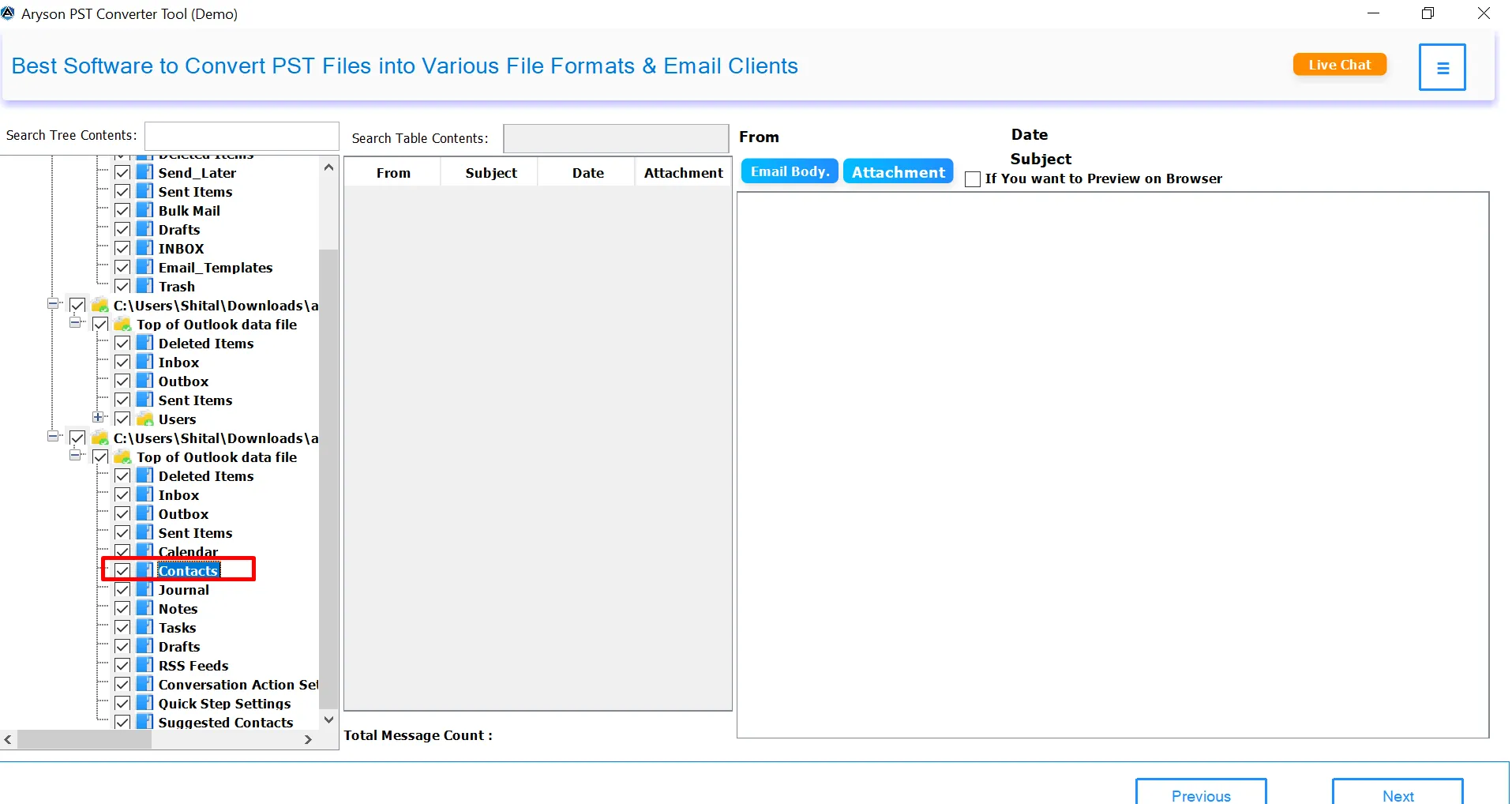
The Aryson PST Contacts Export Tool is designed with a simple interface, so even non-technical users can operate it without difficulty. This software follows a straightforward process to extract and export Outlook contacts into multiple formats. With just a few clicks, you can preview, select, and save your contacts in the desired file type.

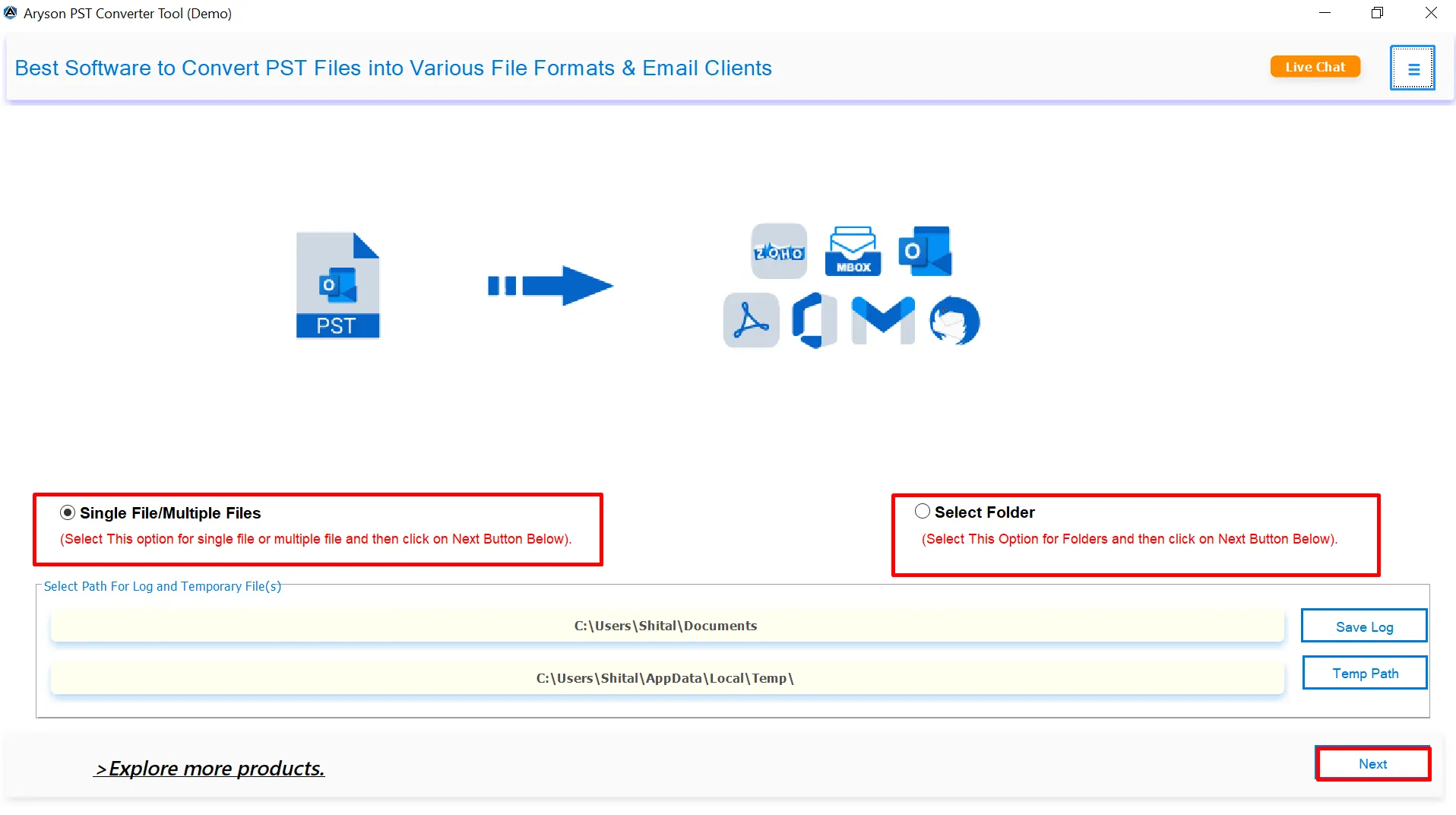
  • Step 01: Download and install the Aryson PST Contacts Export Tool on your system.
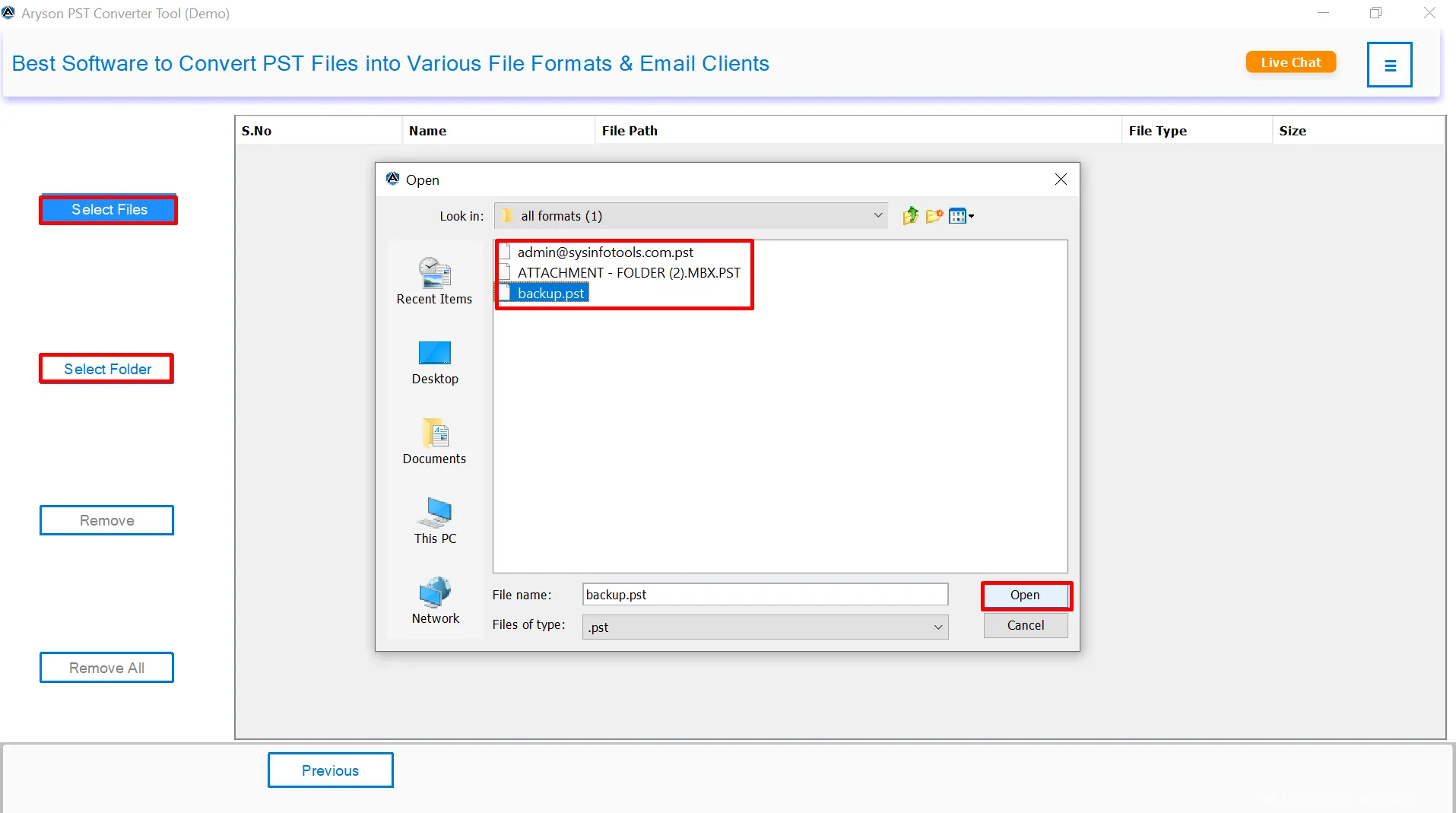
  • Step 02: Click on Select File/Select Folder to upload your PST/OST file.
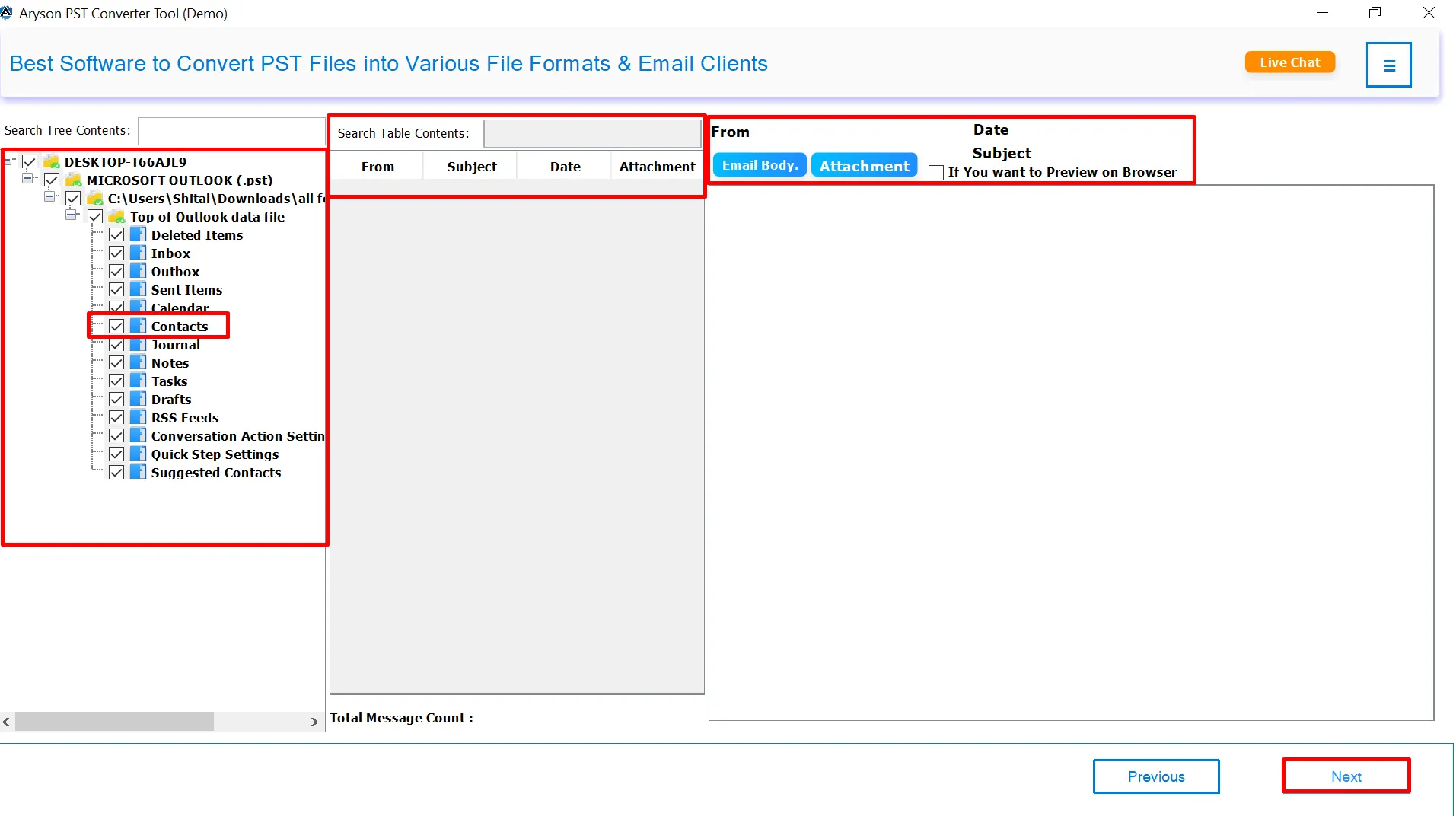
  • Step 03: Preview all Outlook contacts and select the ones you want to export.
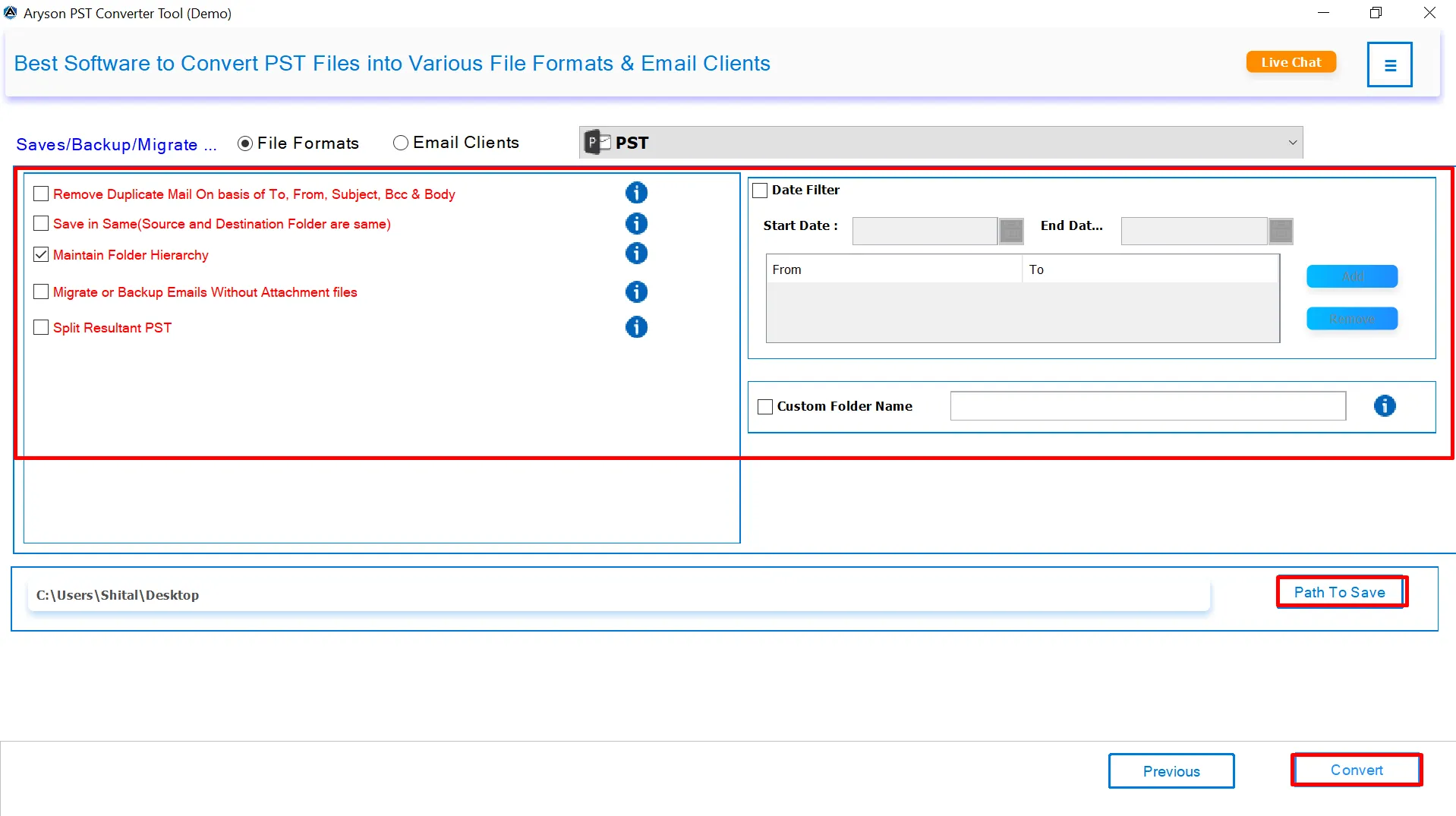
  • Step 04: Choose the desired export format (CSV, vCard, PST, etc.) and apply filters.
  • Step 05: Set the destination path and click on the Convert button to save the contacts.

Aryson Outlook Contact Export Tool: System Specifications

Make sure that all the requirements of the software mentioned below are fulfilled to operate it smoothly

Software Download

(Windows)

Download Now


(Linux)

Download Now


Size: 259MBVersion: 25.08(Updated On 25 August 2025 )

Trial Limitations

The free version of Aryson PST Contacts Export Tool offers the same features and benefits as the full version. However, the demo version includes a single limitation: users can convert only 50 items per folder from each PST contacts file.

Requirements & Supported Versions

Hard Disk Space: 500 MB of free hard disk space required

RAM: 4 GB of RAM (4 GB is recommended)

Processor: Intel® Core™ 2 Duo CPU E4600 @ 2.40GHz 2.39GHz"

Supported Platforms

Window OS: 11/ 10/ 8.1/ 8/ 7/2008/ 2012 (32 & 64 Bit), and other Windows versions.

Outlook Versions: Office 365, 2021, 2019, 2016, 2013, 2010, 2007, 2003, 2002, 2000, 98 and 97.

Software Prerequisites

  • If you are operating Windows OS 11, 10, 8, or 7 (32-bit or 64-bit) then you must launch the tool as an Administrator.
  • Turn off the Windows Firewall for proper installation.
  • Disable the Antivirus programs.

FAQ

Request For Software Customization

If you need to customize Aryson Software or need additional some specific features then, provide the software customization Request Quote

Aryson Outlook Contacts Export Tool: Free & Premium Version

Get an overview of the Free and Premium versions of the Outlook Contacts Exporter to Export Outlook Contacts:

Product Features Free Version Full Version
Add PST/OST files and Preview Contacts
Export Outlook Contacts to CSV 50 Emails per folder Complete Mailboxes
Export Outlook Contacts to vCard (VCF) 50 Emails per folder Complete Mailboxes
Export Outlook Contacts to PST
Batch Export Multiple Contacts
Date Filter for selective export
Remove Duplicate Contacts
Maintain Folder Hierarchy
Custom Folder Naming
Compatible with all Windows Version
24*7 Tech Support Available
Outlook Version Support
Price Free $39
Money Back Policy

Frequently Asked Questions: Outlook Contacts Export Tool

Ans.Yes, the Aryson Outlook Contacts Export Tool allows you to export PST/OST contacts even without Outlook. Here are the steps:

  • Open the Aryson Outlook Contacts Export Tool on your system.
  • Browse and select the Outlook PST file containing contacts.
  • The software will scan and display all contact details for review.
  • Select the desired format like CSV, VCF (vCard), or PST.
  • Use advanced filters to export specific contacts if required.
  • After that, choose a location to save the exported contacts.
  • Click on Export to begin the process and save your contacts.

Ans. You can export contacts into CSV, vCard (VCF), and PST formats for easy accessibility across different platforms. Along with that, it can export Outlook contact into other formats as well.

Ans. Yes, the PST Contacts Export Tool works with both PST and OST files to backup Outlook contacts easily

Ans. The free demo version allows you to export up to 50 contacts per folder only. To unlock unlimited export, you need the full version.

Ans.Yes, by exporting contacts in vCard (VCF) format, you can easily import them into Android, iPhone, Gmail, and other apps.

Ans.Absolutely. It keeps all fields intact including name, phone number, email address, company, notes, and address.

Ans.Yes, the Outlook Contact Export Software provides a duplicate removal option to clean your contact list before saving.

Ans. The Aryson PST Contacts Export Tool supports all major Outlook editions including Outlook 2021, 2019, 2016, 2013, 2010, and earlier versions.

Ans.Yes, you can apply a date range filter to export only the specific contacts according to your need.

Ans.Yes, Outlook Contact Export Software is fully compatible with Windows 11, 10, 8, and 7 operating systems.

Trusted by IT Professionals & Enterprises Worldwide

See what IT professionals and businesses say about their experience with our software!

review-rating