

Secure Data Handling & Compliance
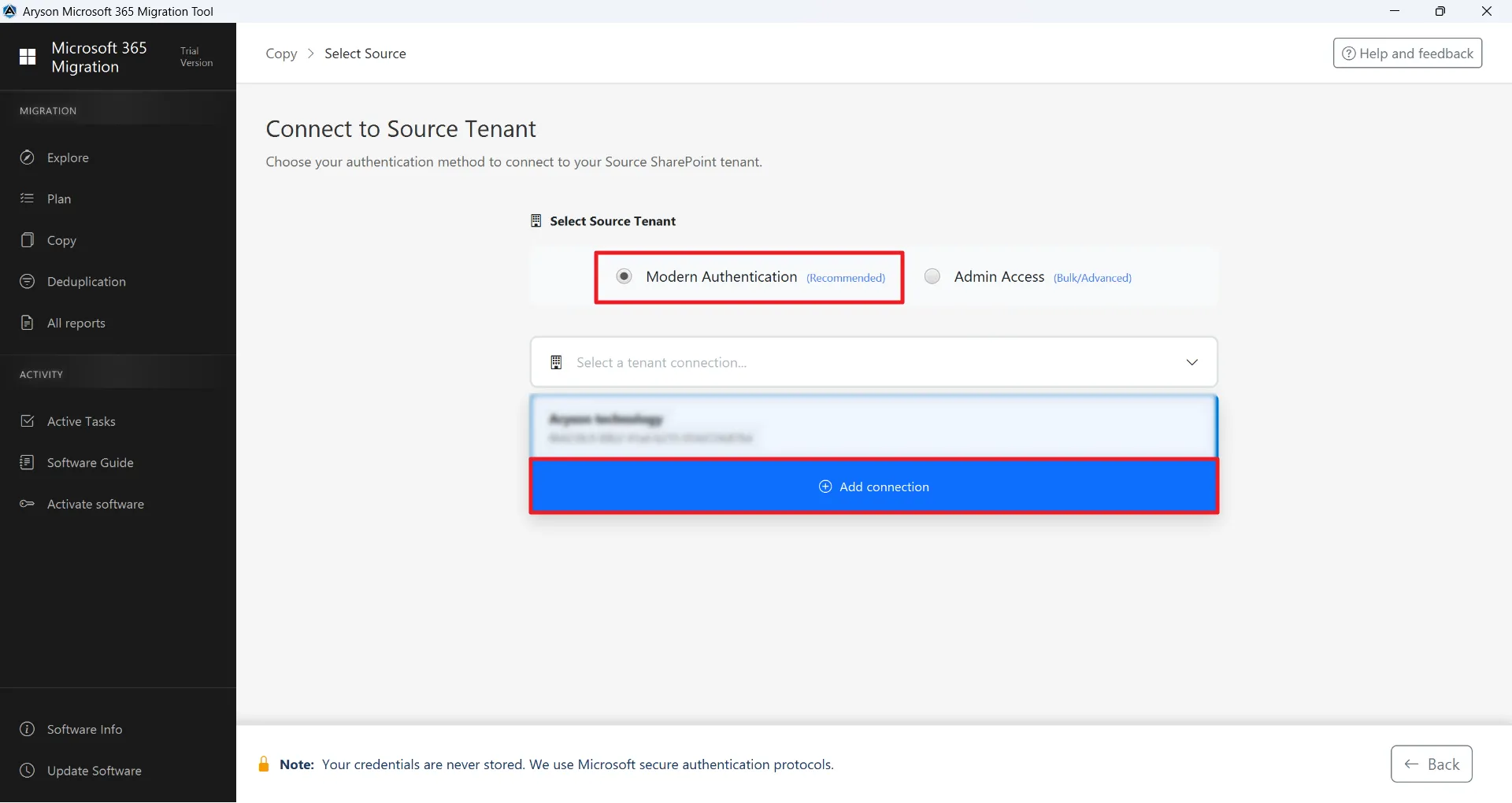
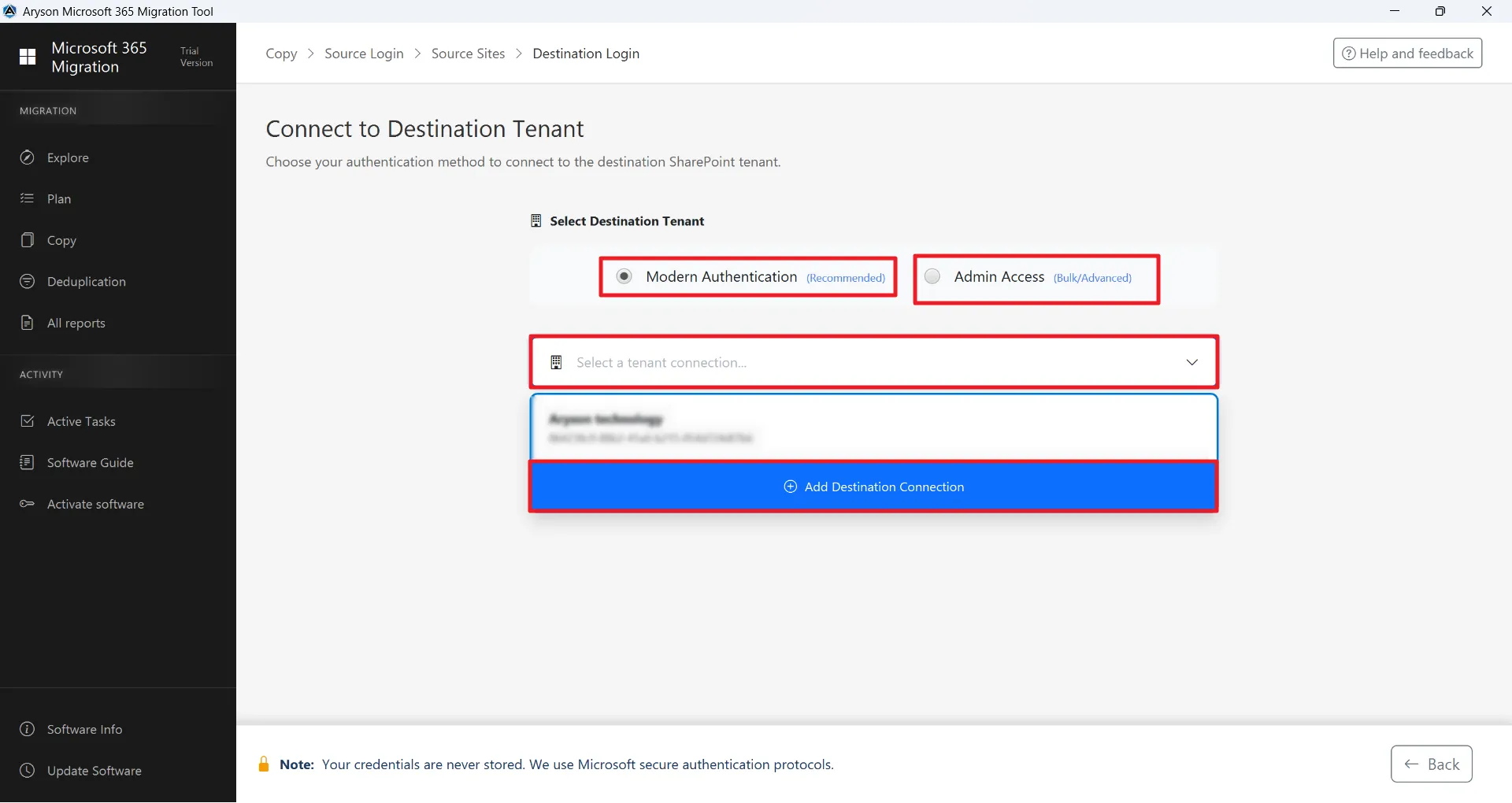
Ensures end-to-end encryption of data during migration, aligning with enterprise security policies and GDPR compliance, with secure login using modern authentication.
Trusted tenant-to-tenant migration platform to execute secure and controlled data transfers across same-tenant and cross-tenant Microsoft 365 environments with full structural integrity and compliance alignment.

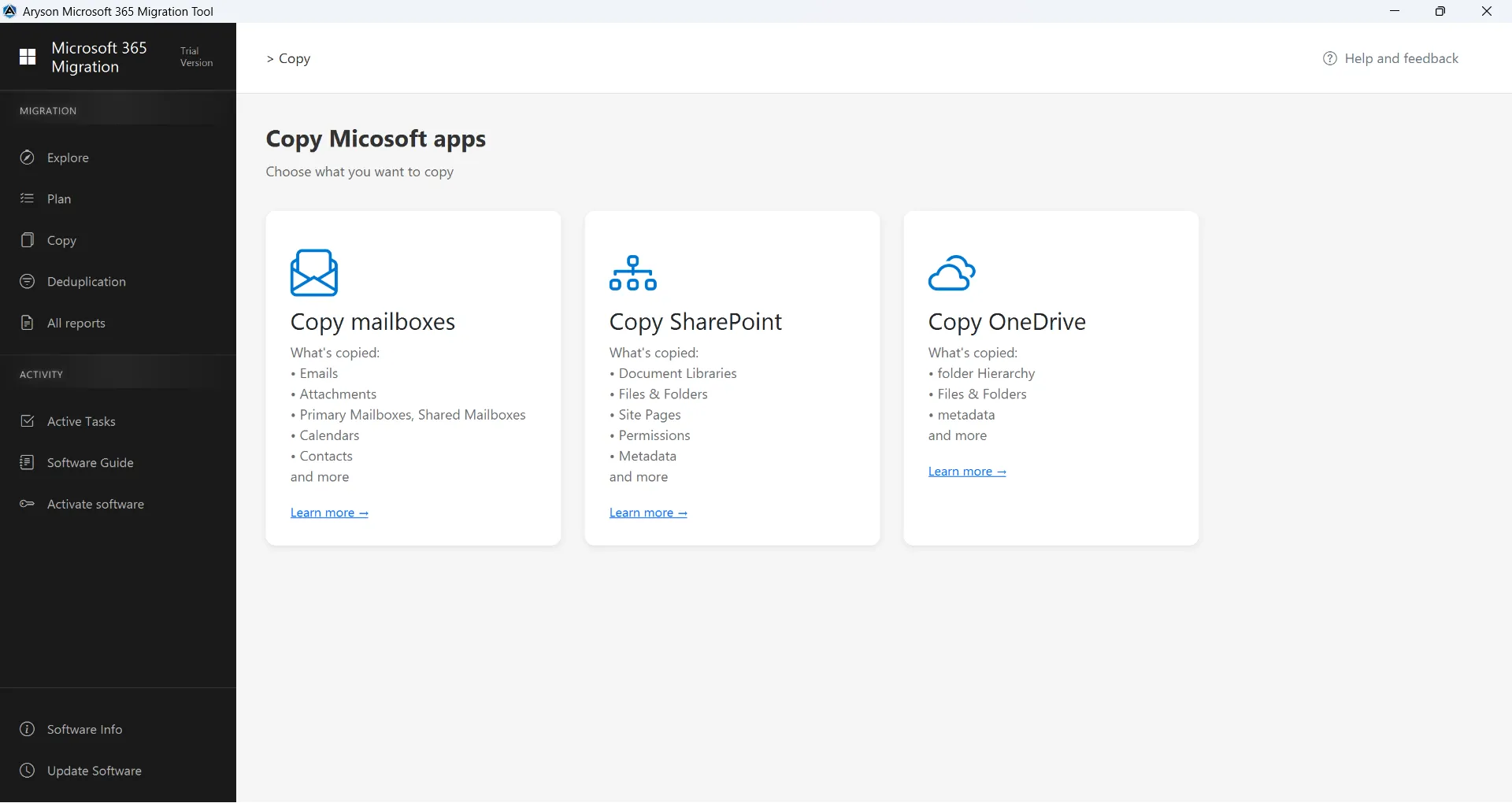
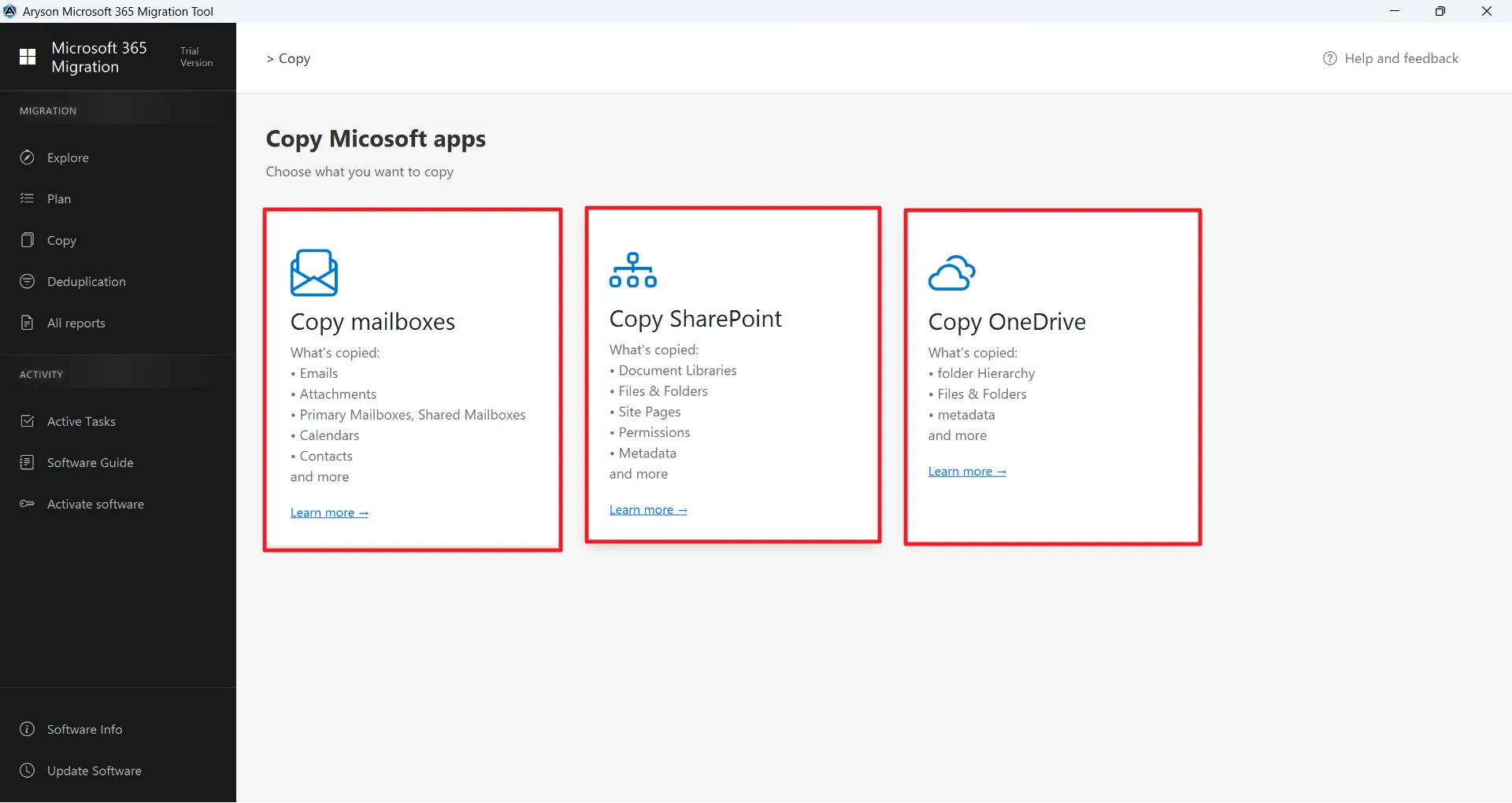
Executes secure migration of Microsoft 365 primary and shared mailboxes, including emails, attachments, calendars, contacts, and full metadata, with full metadata and hierarchy preservation across tenants.
Read More
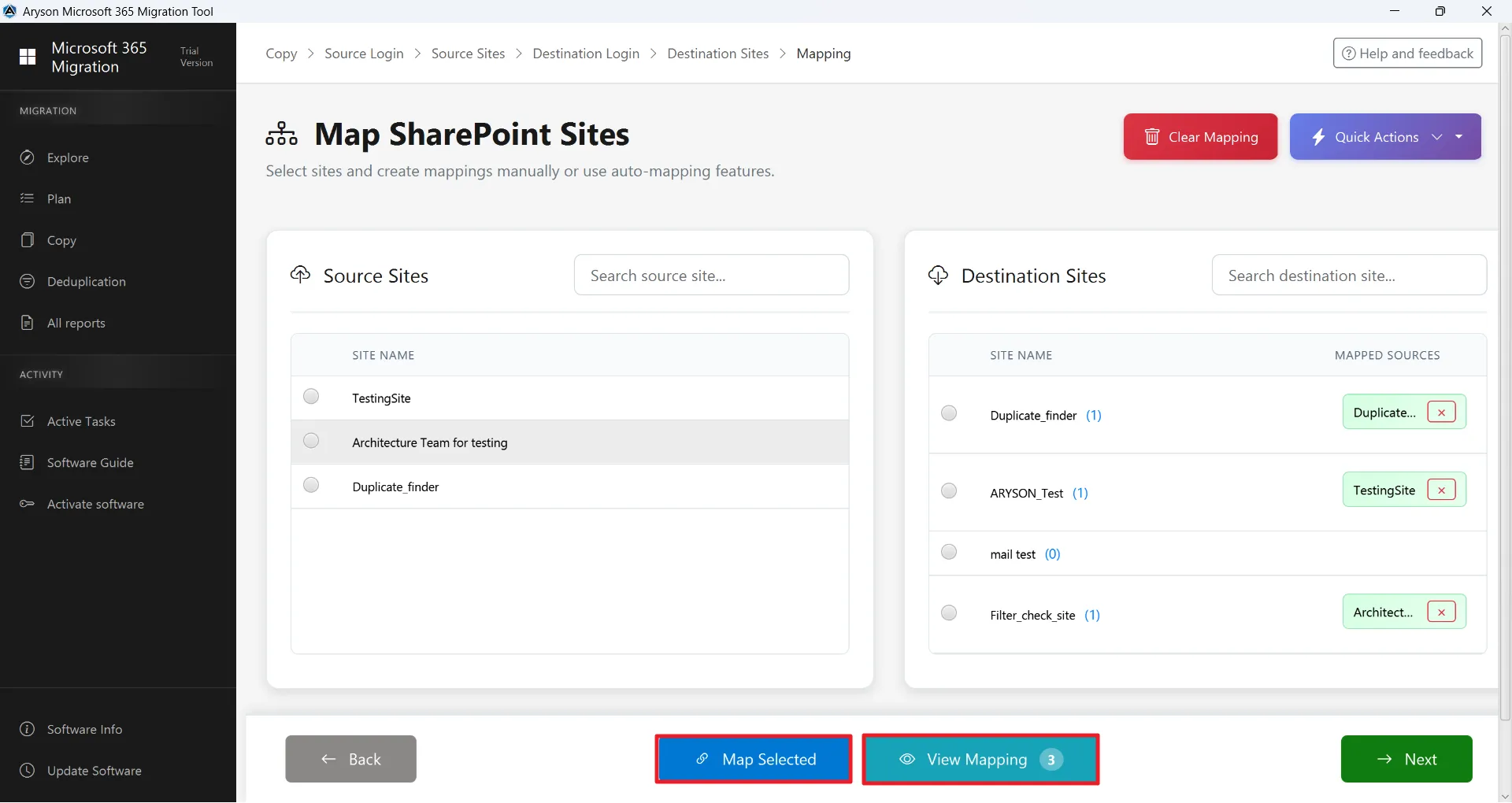
Supports comprehensive migration of SharePoint sites, online document libraries, and lists with data preservation. Maintains mappings, metadata consistency, and site architecture across the same-tenant or cross-tenant. Environments.
Read More
Facilitates secure transfer of OneDrive files and directory structures while preserving metadata attributes. OneDrive tenant-to-tenant migration of this utility ensures continuity of user storage environments.
Read MoreSee what our users have to say about the Tenant to Tenant Office 365 Migration with Aryson
Expert Review

James Thornton
IT Infrastructure Manager
Aryson Migrate Tenant to Tenant Office 365 Software demonstrates strong architectural design with granular filtering, structured mapping, and incremental migration capabilities. Its support for Mailbox, SharePoint, and OneDrive within a single console makes it highly suitable for enterprise-level tenant-to-tenant migrations.
Amelia Clarke
Senior Microsoft 365 Consultant
The solution delivers secure authentication, advanced duplicate detection, and precise permission handling, ensuring data integrity throughout the migration lifecycle. Its modern authentication support and detailed mapping controls reflect a robust and professionally engineered tenant to tenant sharepoint migration framework.
Rating & Reviews

Softpedia reviewed the software and highlighted its strong performance in migrating Mailboxes, SharePoint sites, and OneDrive data without compromising folder hierarchy or metadata. They appreciated the duplicate detection mechanism and praised its ability to maintain data integrity during large-scale migrations.

Software Informer mentioned that Aryson Office 365 Migration Software provides a well-designed interface combined with enterprise-grade authentication support. They emphasized its incremental migration capability and detailed configuration controls that make complex migrations manageable for IT administrators.
Ensure policy-driven backup across Exchange Online, Office 365, SharePoint, and OneDrive with automated scheduling and immutable storage. Enable granular, point-in-time migration, end-to-end encryption, and role-based access control to meet strict compliance requirements. Built for scalability and high availability, it secures business-critical data with complete data integrity and reliability.
GET A DEMO →Aryson delivers a next-generation migration framework purpose-built for modern Microsoft 365 ecosystems.
Here is why strategic IT teams trust Aryson to deliver secure, large-scale Microsoft 365 migrations

Ensures end-to-end encryption of data during migration, aligning with enterprise security policies and GDPR compliance, with secure login using modern authentication.

OneDrive Migration Tenant to Tenant Software of Aryson easily migrates OneDrive files and SharePoint libraries while maintaining file structure, permissions, and metadata.

Aryson’s M365 tenant-to-tenant migration software supports both tenant-to-tenant and same-tenant migration scenarios with structured workload segmentation.

Tenant-to-Tenant Migration supports intelligent mailbox mapping and customizable folder alignment to ensure precise source-to-destination configuration.

Secure Modern Authentication Framework
This utility implements OAuth 2.0 and modern authentication protocols to establish encrypted and compliant source-destination connectivity.

Incremental Data Transfer
Embedded with advanced algorithms to transfer only new or modified data during repeated migrations. This avoids duplication and reduces downtime.

Metadata & Permissions Preservation
Maintains original email properties, permissions, attachments, folder hierarchy, and other metadata during migration without data loss.

24/7 Enterprise Support
Aryson provides round-the-clock technical assistance to resolve complex migration challenges, ensuring smooth and uninterrupted tenant-to-tenant migrations.

Saves Migration and Deduplication Reports
Provides a live dashboard to monitor migration progress, mailbox status, and errors, with Migration Reports and Deduplication Reports panels for insights.
Eliminate redundancy & optimise storage with the deduplication feature of M365 Migrator
Users can identify & manage duplicate files across SharePoint sites using an advanced detection mechanism. The software leverages Microsoft Graph API to securely connect and scan document libraries, folders, and files. Moreover, it ensures accurate detection using metadata, file properties, and content-based analysis while maintaining the integrity of original SharePoint data.
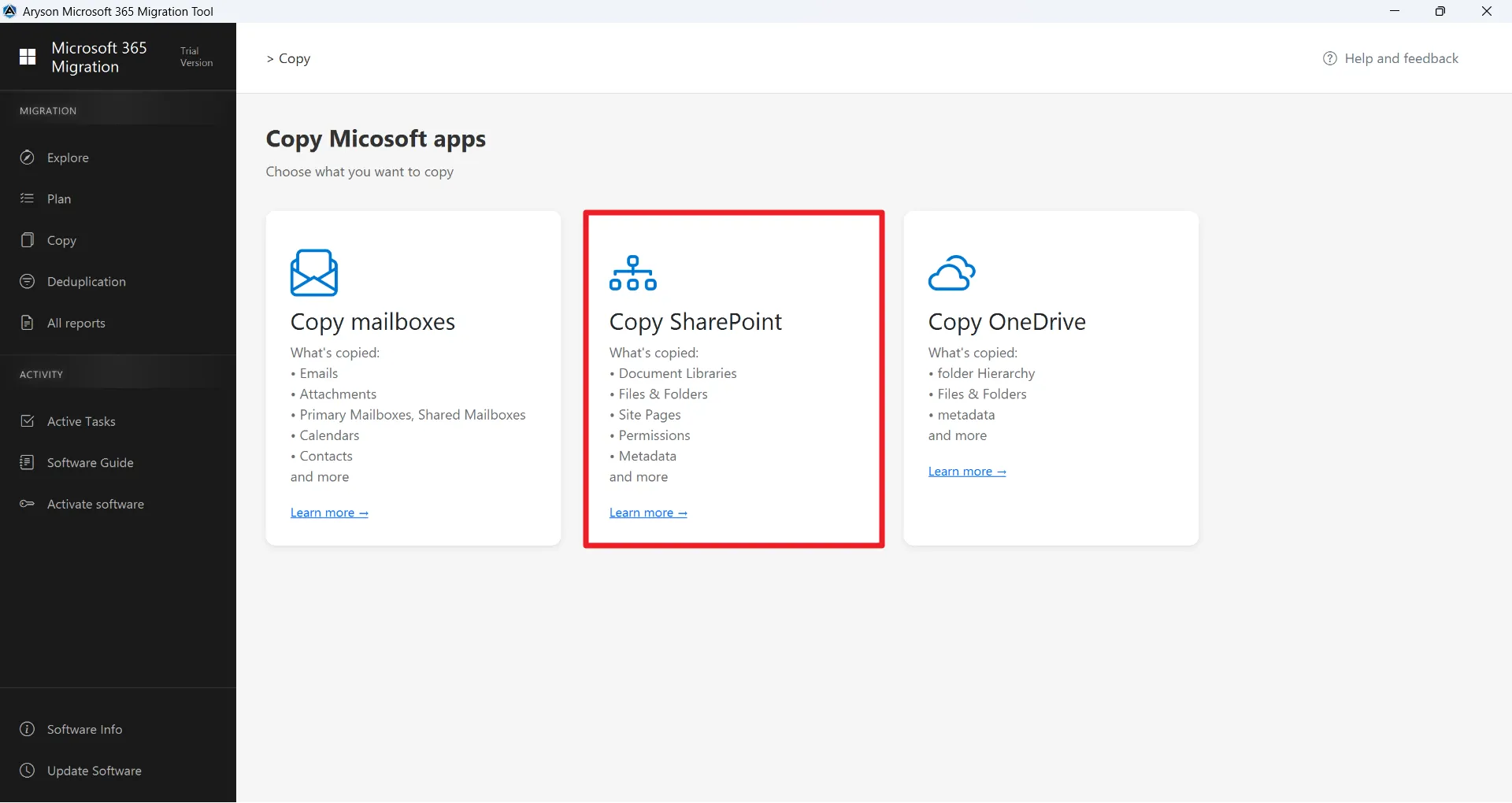
Aryson OneDrive Deduplicator efficiently detects duplicate data across OneDrive accounts using an advanced detection mechanism. It is based on Graph API, and it will work well even after the retirement of EWS. It securely connects & scans files, folders, and directories. Moreover, it ensures accurate detection using metadata, file properties, and content-based analysis while maintaining the integrity of original OneDrive data.
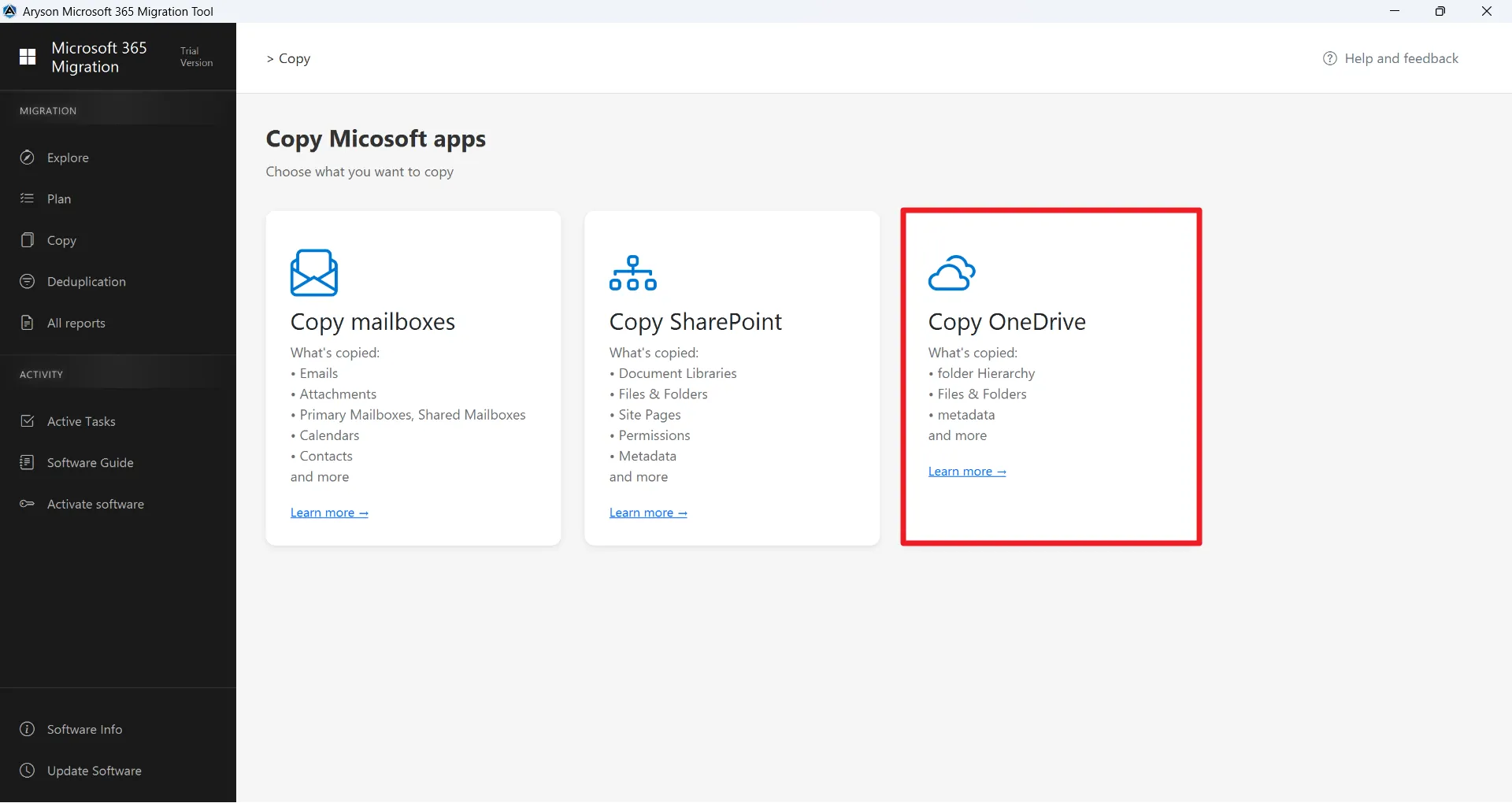
Users can find and manage duplicate emails across mailboxes through a smart detection process. The software connects securely using modern authentication and scans emails, folders, and attachments comprehensively. It ensures accurate results using header data, metadata, and content comparison while maintaining complete mailbox consistency.
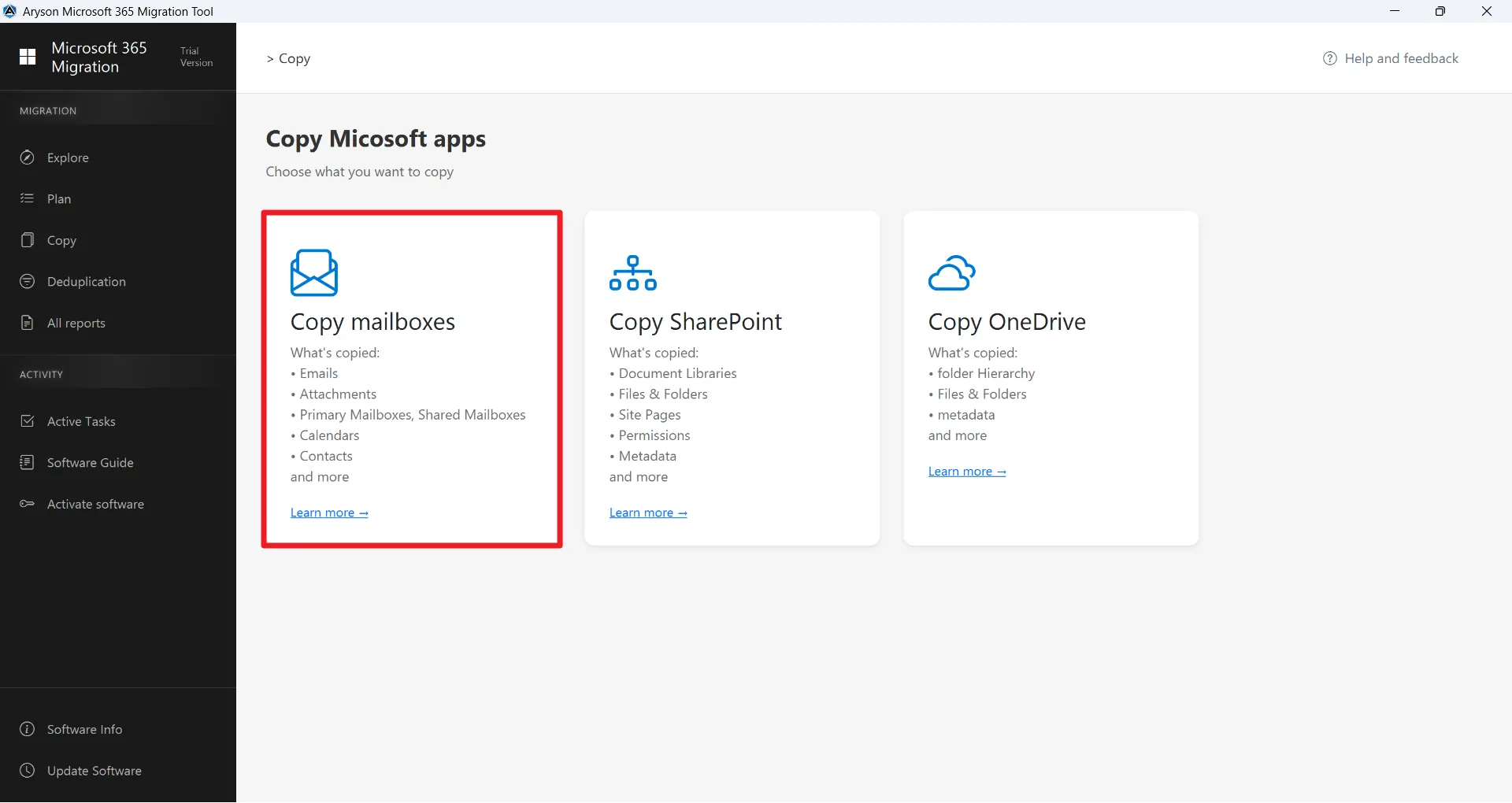
Migrate Mailboxes, SharePoint, and OneDrive effortlessly in 3 Steps with Zero Downtime:

Download the Aryson Microsoft 365 Migration Tool and securely connect your source and destination tenants using modern authentication. Then, it lists all mailboxes, SharePoint sites, and OneDrive accounts, providing full visibility of data for migration.

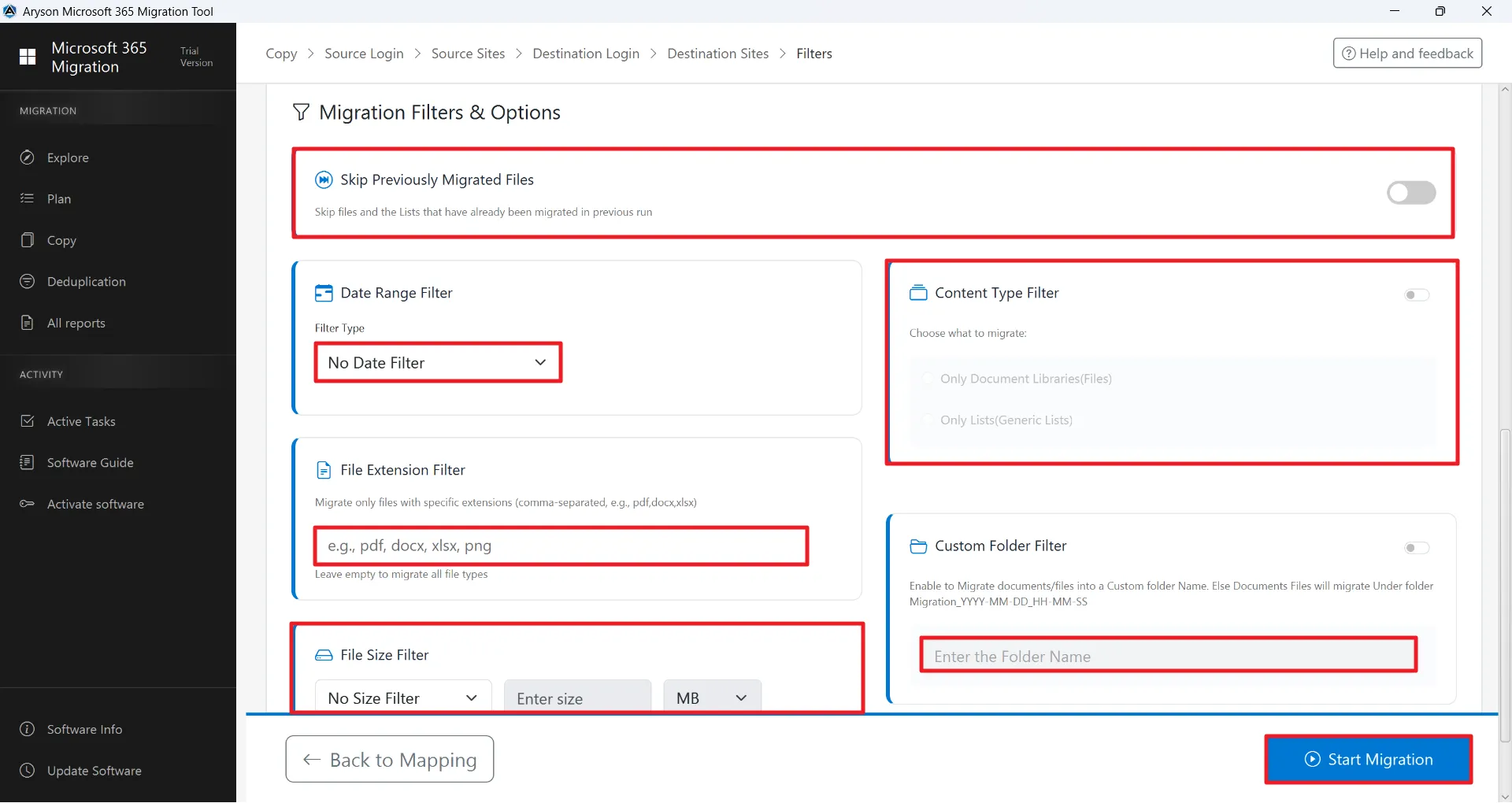
Use advanced filters to move only the data you need. Apply date ranges, select specific file or item types, exclude empty or deleted folders, and skip previously migrated items. These options ensure precise, migration for both small and large-scale environments.

Now, you can monitor migration in real-time via the Active Tasks dashboard and review detailed logs in the All Reports panel. Verify mailboxes, SharePoint, and OneDrive data in the destination tenant to ensure complete data integrity.

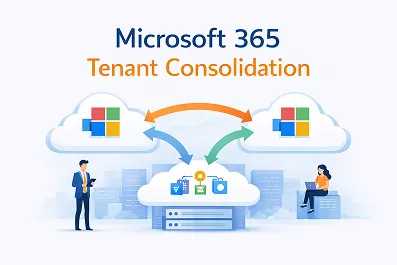
Aryson allows organisations to migrate data between multiple Microsoft 365 tenants easily and securely. It helps businesses merge tenants, restructure domains, or move users from one tenant to another without data loss. This feature supports the migration of mailboxes, SharePoint sites, OneDrive accounts, and other Microsoft 365 data. It ensures proper user mapping, maintains folder hierarchy, and keeps permissions intact during the transfer.

Microsoft 365 Migration Tool mapped the source to the required destination for migrating your data. This mapping makes sure that each email and folder is transferred to the correct mailbox without confusion. It helps users to avoid data loss and duplication issues, ensuring a secure and accurate data migration within the ecosystem. The mapping feature is available for the mailbox, SharePoint, and OneDrive.

With the help of the Aryson Microsoft 365 Migration Tool, you can prevent the transfer of duplicate data. When you enable these features, it will detect the duplicate files or emails that have already been migrated in a previous migration. Hence, it saves your time and reduces the storage, and makes sure that only new or missing data is transferred.
Aryson's Microsoft 365 Migration Tool allows you to migrate data for a specific time period. When you select the Start Date and End Date, it can migrate only the emails or files received or sent during the chosen range. This feature is available in OneDrive, SharePoint, and Mailbox to save migration time and focus on only the important data for migration.

Custom/Parent Folder Name
The Custom Folder Name feature allows users to define a specific folder name for easy recognition in the destination. Instead of merging data into existing folders, it creates a new folder with the user-defined name, keeping migrated content separate and well organised. Helpful to maintain clarity with current mailbox data, and makes it easier for users to identify.

Embedded with File Size Filter
SharePoint and OneDrive have a File Size Filter option. It allows administrators to set minimum and maximum file size limits before starting the migration. This means you can choose to migrate only files within a specific size range while skipping very large or very small files. So, you can optimise migration speed, reduce bandwidth consumption, and ensure better control over SharePoint and OneDrive.

Remove/Duplicate Email Detection
Once you enable this feature, it automatically identifies and skips duplicate emails during the transfer process. However, it is only available in mailboxes and transfers emails based on subject, body, recipients, from sender & to recipients. This prevents multiple copies of the same email from being migrated to the destination mailbox. It helps maintain mailbox cleanliness and reduces storage usage.

File Extension Filter
Aryson Tenant to Tenant Migration SharePoint Software has a File Extension Filter. Although it is available only for SharePoint and OneDrive migrations, to include or exclude specific file types based on their extensions, such as .pdf, .docx, .xlsx, or .jpg. So, you can migrate only the required files while skipping unnecessary ones. By filtering file extensions, users can reduce migration time with data accuracy.

Advanced Content Type Filter
The Content Type Filter (Only Documents or Only Lists) in the Microsoft 365 Migration Tool is a feature available only for SharePoint migrations. It allows administrators to choose whether to migrate only document libraries, only lists, or both. Its selective option helps you to move specific SharePoint content based on your requirements. By filtering content types, users can avoid transferring unnecessary data and ensure an organised SharePoint migration process.

Destination Path to Save Resultant File
When you convert mailbox emails to PST. It allows users to choose the specific folder within the destination mailbox where the migrated emails will be stored. Instead of merging data directly into the primary inbox or existing folders, administrators can define a custom folder path to keep migrated emails separate and organised. It helps you to maintain the mailbox structure and prevents confusion.

Split Resultant Outlook PST File
There is an advanced option for PST output, which is Split resultant PST. It allows you to divide large PST files into small and manageable parts based on size or date range before or during migration. So, you can prevent issues caused by oversized PST files. Also, it improves migration performance and reduces the risk of file corruption.

Flexible Attachment Options
Aryson Microsoft 365 Migration Tool has a different option to manage attachments. As a result, you can manage how email attachments are handled during the migration process. Administrators can choose to migrate emails with attachments, exclude attachments to reduce mailbox size, or apply specific controls as required. It helps optimise storage usage, speed up migration, and ensure better control over mailbox data.

Migrate into Mapped Default Folder
The Migrate into Mapped Default Folder option is used only for mailbox migration in Microsoft 365. It moves emails into the same default folders, like Inbox, Sent Items, Drafts, and Deleted Items, in the new account. So, everything stays where it should be. It doesn’t create extra folders or mix things up. Your mailbox looks familiar after migration, and your emails stay properly arranged.

Migrate (Emails, Contacts, Calendars & Events)
You can migrate Emails, Contacts, Calendars, and Events, which is available only for mailbox migrations in Microsoft 365. This means you can move complete mailbox data, not just emails. Along with your messages, it also transfers contact lists, calendar entries, meeting schedules, and events. Everything moves together to the new mailbox. It helps users keep their important communication and scheduling data intact.
Simple UI with Trial Version
This O365 tenant-to-tenant migration software offers a simple and user-friendly interface that makes the migration process easy, even for non-technical users. All options are clearly organized, so you can complete the process step by step without confusion. It also provides a trial version. So that the user can test features, evaluate performance, and analyze the features of this software.

Compatible with Windows and Office 365
Aryson Microsoft 365 Migration Tool is fully compatible with Windows operating systems and supports various versions of Microsoft Office 365. It works smoothly on different Windows editions, ensuring stable performance during migration. This software also integrates well with Outlook and other Office applications, allowing users to manage and migrate data without facing compatibility issues.
Microsoft 365 offers basic migration capabilities, but these are often insufficient for enterprise needs. Under the Shared Responsibility Model, Microsoft ensures the platform’s infrastructure is secure, but data migration, remains the user’s responsibility. Emails, files, and SharePoint content lost due to expired recycle bins, inactive accounts, accidental deletions, or overwritten data may be permanently unrecoverable using native tools.
Aryson Microsoft 365 Backup Solution leverages Microsoft Graph API, the official interface for accessing Microsoft 365 services, to provide granular, secure, and scalable backup and migration. Graph API enables direct access to mailboxes, SharePoint libraries, and OneDrive accounts, allowing incremental backups, and detailed metadata preservation—capabilities that Microsoft’s native recovery cannot guarantee.
By using a dedicated Graph API-powered solution, organizations gain complete control over their Microsoft 365 data, eliminate the risk of permanent loss, and strengthen compliance and data retention strategies beyond Microsoft’s built-in protections.
Download →
Ensure your system fulfills the mentioned requirements of the software for hassle-free migration:
Software Download
Size: 201MBVersion: 26.04 ( Updated On 02 April 2026 )
Trial Limitations
The Demo Version of Aryson Office 365 Tenant-to-Tenant Migration can migrate 50 emails per folder, skips SharePoint and OneDrive files larger than 20 MB, and migrates only 5 list items per SharePoint list. Moreover, the free version can preview the duplicates, but not delete them. Mailbox and OneDrive limits apply per user, while SharePoint limits apply per site.
Product Guides
Requirements & Supported Versions
Processor: Intel® Core™ 2 Duo CPU E4600 @ 2.40GHz 2.39GHz
Hard Disk Space: 1 GB of free hard disk space required
RAM: 4 GB of RAM (8 GB is recommended)
Supported Platforms
Window OS: Windows 11, 10, 8.1, 8, 7, Vista, XP, 2000, 98, NT, and 95.
Microsoft 365 and Office 365 Plans: Enterprise (E1, E3, E5), Business, Academic (A1–A5), Frontline (F1), and Exchange Online.
Outlook Versions: Office 365, 2019, 2016, 2013, 2010, 2007, 2003, 2002, 2000, 98, and 97.
Software Prerequisites
FAQ
Get an overview of the Free and Premium versions of the O365 Tenant to Tenant Migration Tool
| Product Features | Free Version | Full Version |
|---|---|---|
| Complete Mailbox Migration | 50 items per Folder | Complete Mailbox |
| Migrate SharePoint Lists & Files | Migrates only files Smaller than 20 MB | Complete SharePoint |
| Migrate OneDrive Files Securely | Migrates only files Smaller than 20 MB | Complete OneDrive |
| Folder Hierarchy & Metadata Preservation | ||
| Incremental Migration (Skip Previously Migrated Items) | ||
| Migration of Emails, Attachments, Calendars, Contacts & Shared Mailboxes | ||
| Date Range & File Filter Options | ||
| PST Export with Custom Folder Mapping | ||
| High-Volume Migration Support | ||
| Compatibility with All Windows & Outlook Versions | ||
| 100 % Secure & 24/7 Technical Support | ||
| Price | Free | $499 |
 |
Download | Buy Now |
Ans. This software can migrate Exchange Online mailboxes, including emails, attachments, contacts, calendars, and shared mailboxes. It also supports SharePoint Online sites (document libraries, lists, permissions) and OneDrive accounts, ensuring comprehensive Microsoft 365 migration.
Ans. Yes. Aryson supports secure tenant-to-tenant migration using API-based authentication and modern protocols like OAuth 2.0. This ensures data integrity and avoids exposure of credentials during migration.
Ans. Absolutely. It implements incremental migration logic, skipping previously migrated items. This helps save time, bandwidth, and storage while avoiding duplication of data.
Ans. Yes. The tenant to tenant office 365 migration software provides granular filtering options, including:
Ans. Yes. The 0365 tenant-to-tenant migration Tool allows direct export to PST, with features like custom destination folders, parent folder naming, PST splitting, and selective attachment migration for better management and archival purposes.
Ans. Admin consent is required if the application requests permissions beyond an individual user’s data, such as organization-wide or multi-user access. In these cases, only a Microsoft 365 administrator can approve the login for security reasons.
Ans. Yes. Aryson Microsoft 365 Migration Software is compatible with all major Windows operating systems and comes with 24/7 technical support to assist with migration challenges.
Ans. Yes. Aryson supports cross-domain or tenant-to-tenant migrations, allowing enterprises to consolidate Microsoft 365 accounts across multiple domains or migrate to a new tenant securely.
Ans. Absolutely. All migrations are API-based, encrypted, and follow secure authentication protocols, ensuring that sensitive business data is protected during transfer.
Ans. Aryson provides an Active Tasks dashboard and detailed migration logs, allowing administrators to track progress, check for errors, and verify completed items in real-time.
Ans. Yes. Aryson preserves complete folder structures, email metadata, and document properties, ensuring that all data remains organized and intact in the destination tenant.
Ans. Yes. Aryson supports bulk migrations of high-volume mailboxes, SharePoint sites, and OneDrive accounts. It also provides centralized administrative control for monitoring tasks and managing users efficiently.
Ans. Yes. Migration o365 Tenant to Tenant supports the migration of shared mailboxes, primary mailboxes, and application access accounts. This ensures collaborative environments are fully preserved during tenant-to-tenant or backup migrations.
See what our IT professionals and businesses say about their experience with the Aryson Microsoft 365 Migration Tool

The Aryson Microsoft 365 Migration Tool made our cross-tenant migration incredibly smooth. The incremental migration feature ensured no data was missed, and the delta sync option saved us hours of rework. Its intuitive dashboard gave real-time progress updates, which was a huge relief for our IT team managing a 500-user migration.
James Carter, IT Administrator,
London
We relied on Aryson's tool for migrating our entire SharePoint and OneDrive data between tenants. The selective migration filters and permission mapping feature preserved folder structures and user access rights flawlessly. The Azure AD authentication integration made it fully compliant with our enterprise security policies.
Sophia Mendes, Cloud Solutions Architect,
Toronto
What impressed me most was the tool's ability to handle bulk mailbox migration with zero downtime. The auto-mapping feature for users and groups eliminated manual errors entirely. Its built-in deduplication ensured no redundant data was migrated, while detailed reports helped us audit every step effortlessly.
Ragz Vam, Senior Network Engineer,
California