




Screens

Video

Guide

Eula

Explore What the Aryson OLM Viewer Tool Can Access

With Aryson OLM Viewer Tool, you can easily view and read the content inside your Outlook for Mac OLM files without depending on Outlook itself. Free OLM Viewer software gives you a smooth preview of every mailbox item associated with your Mac Outlook data file. Along with that, you do not need Outlook installed on your system to view and read the OLM file. Here is what you can access with this software:

Emails OLM Viewer can open and read all your emails with original formatting, headers (To, From, CC, BCC, Subject), and time stamps.
Attachments You can view attached files such as documents, PDFs, spreadsheets, and images without any issues.
Contacts Also, it can check address book details, including names, phone numbers, email IDs, and saved notes.
Calendars Access scheduled events, meetings, and reminders directly from the OLM file.
Tasks Review both completed and pending tasks for better productivity tracking.
Notes Read personal notes and saved information without Outlook dependency.
Journals Open journal entries and logs of activities stored in your mailbox

Aryson Free OLM Viewer- Rating & Reviews

See what our users have to say about the Aryson OLM File Reader

Expert Reviews

Rating & Reviews

Aryson OLM Viewer Tool with Unique and Exclusive Capabilities

 Open and Read OLM Files without Outlook

Open and Read OLM Files without Outlook

The best OLM Viewer Tool can open and read OLM files created in Outlook for Mac without the Outlook application. Hence, it is highly useful for users who no longer have Outlook installed. So that they can effortlessly read, scan, and convert OLM files into various file/document formats within a few clicks.

Preview All OLM Mailbox Items

Preview All OLM Mailbox Items

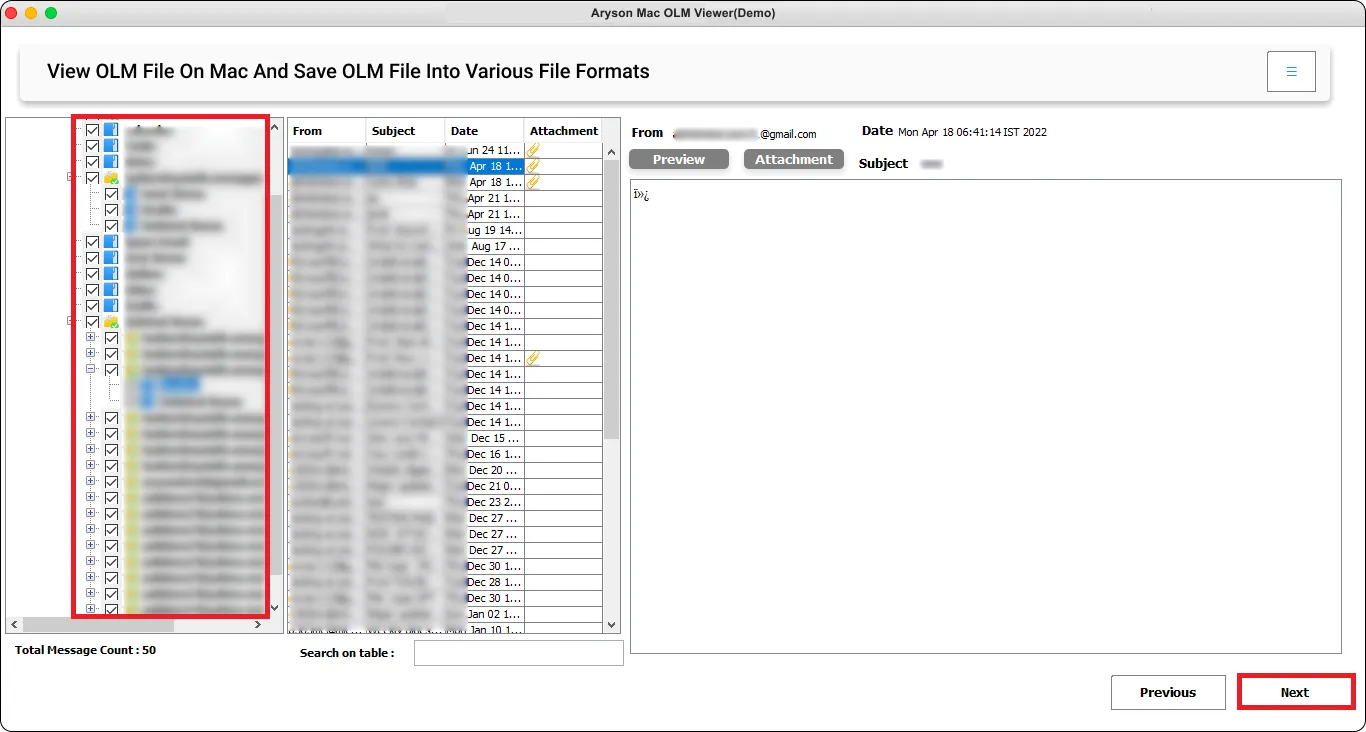
With this Free OLM Viewer, you can preview every item stored in your OLM file, including emails, contacts, calendars, tasks, notes, and journals. The structured preview panel is easy to browse through folders and access the required information quickly. On the right side of the tool, you can observe attributes such as To, From, Date, Subject, and size (KB) of the scanned emails.

 View OLM Attachments Securely

View OLM Attachments Securely

The OLM Viewer Portable Free Tool not only previews emails but also allows you to view all attachments, such as documents, images, and other embedded files. It ensures you don’t miss any critical information while accessing your OLM data. Also, it provides an option to save or migrate emails, excluding attachment files, and keep the OLM data safe.

Save & Migrate OLM Data Easily

Save & Migrate OLM Data Easily

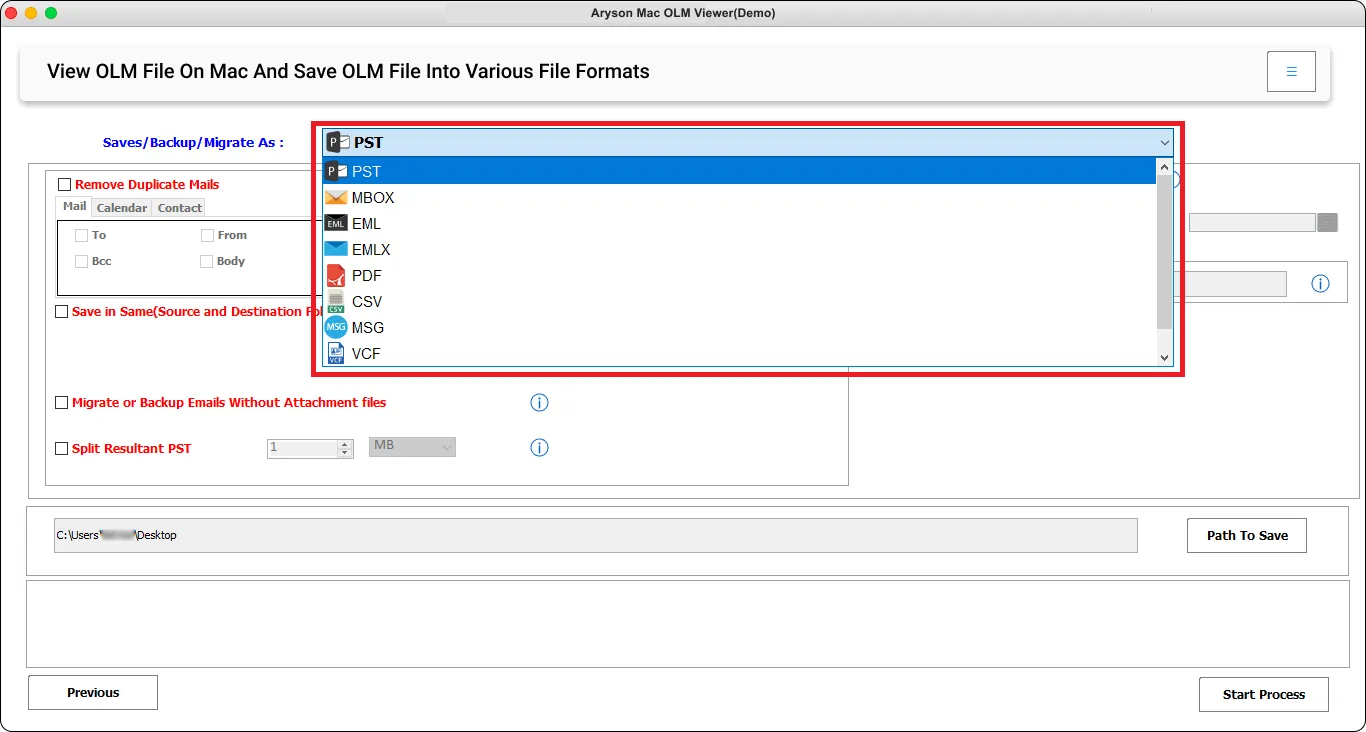
Aryson OLM Viewer Premium offers complete flexibility. It can export OLM files into formats like PST, MBOX, EML, MSG, PDF, HTML, and CSV. Along with conversion, it supports direct migration to Gmail, Yahoo Mail, Office 365, Thunderbird, IMAP, and other platforms. Also, it provides secure access and hassle-free management of OLM data across devices.

 Scan OLM Files From All Versions of Outlook

Scan OLM Files From All Versions of Outlook

Aryson OLM Viewer Pro is a complimentary OLM Viewer that meticulously scans each item within OLM files, including Inbox, Sent Items, Deleted Items, and more. When you follow the scanning process, it allows you to view the scanned OLM emails, no matter which version of Mac Outlook you are using.

Maintain Original Data Integrity

Maintain Original Data Integrity

One of the biggest concerns of the users is data loss or format alteration. Aryson OLM Viewer preserving the original folder hierarchy, metadata (To, From, Date, Subject), formatting, and attachments. It provides 100% data integrity. So, you can view and convert OLM data with ease.

  Custom Folder Name & Destination

Custom Folder Name & Destination

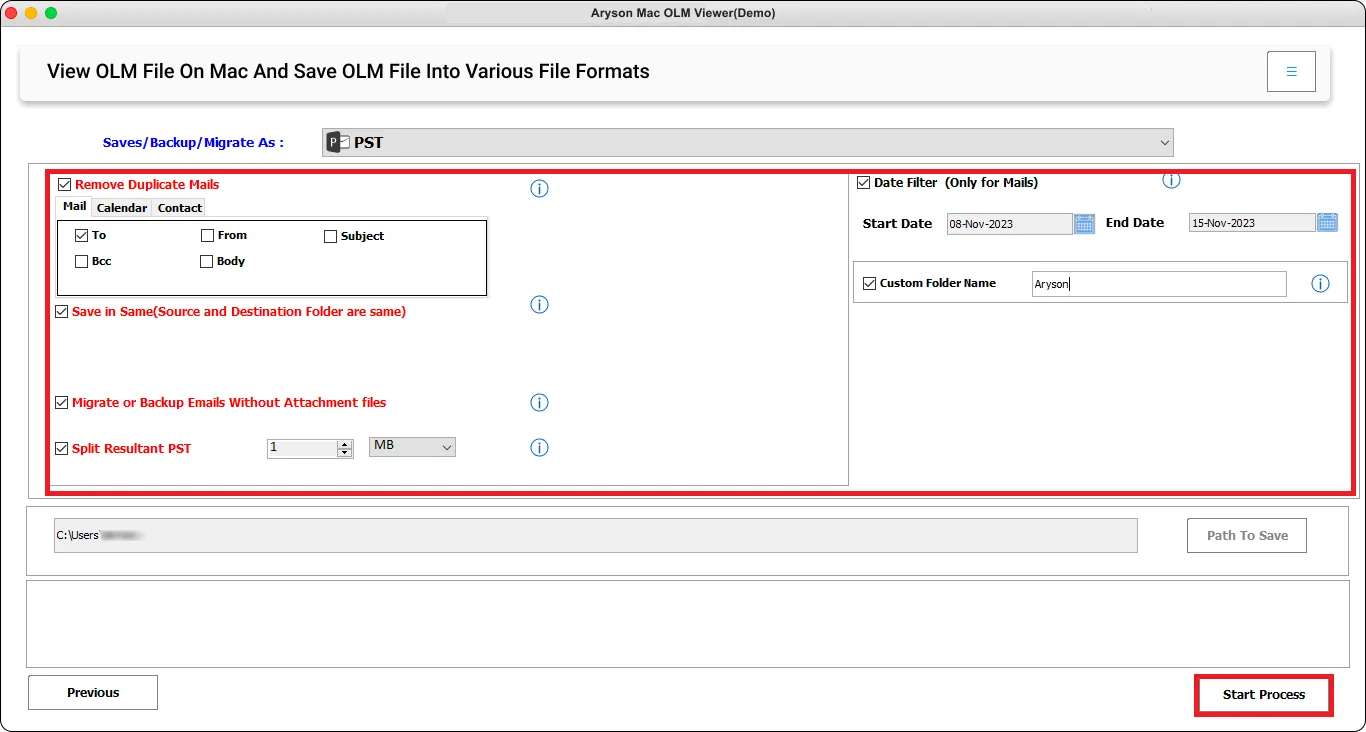
To make your exported data easy to organize, this software allows you to assign a custom folder name before saving the files. After finishing the file viewing process, you can convert them and designate a unique name and destination for the resulting file or folder. You can utilize any combination of letters and alphabet, excluding special characters.

Filter with Date Range

Filter with Date Range

If you don’t need the entire mailbox, OLM File Opener lets you apply a Date Filter to select only specific emails. You can set a start and end date, and the software will process only those emails that fall within the chosen time frame. It is very useful for project-specific data retrieval or any compliance requirements.

Easy-to-Use Interface for All Users

Easy-to-Use Interface for All Users

Even if you are not that technically expert, you can use Aryson OLM Email Viewer effortlessly. This software comes with a clean and user-friendly interface. And a step-by-step wizard that guides you through the entire process. From the loading OLM files to exporting or migrating them, every step is simple and easy to navigate.

Compatibility with All Mac Versions

Compatibility with All Mac Versions

Basically, Aryson OLM Viewer Tool is dedicated to the Mac users. It works flawlessly with all major versions of macOS. Whether you’re using the latest macOS or an old version of Mac OS, the OLM File Reader make sure the smooth installation and reliable performance. So, individuals with any version of Mac OS can frequently use this software.

How to Use Aryson PST Contacts Export Tool

How to Use Free OLM Viewer Software

Aryson OLM Viewer Tool is a free and reliable utility that allows Mac users to open and read Outlook for Mac OLM files without requiring Outlook installation. It provides a clear preview of emails, contacts, calendars, tasks, journals, and attachments. Follow the mentioned steps to view OLM files without Outlook.

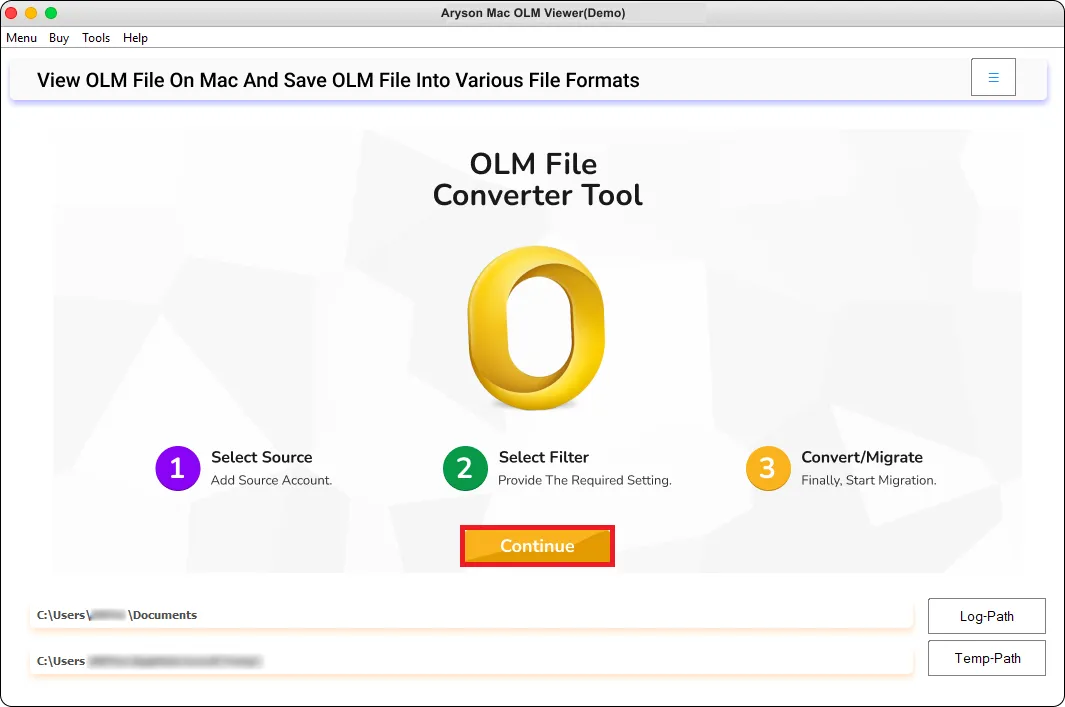
  • Step 01: Download and install the Aryson OLM Viewer Tool on your Mac OS>>Continue.
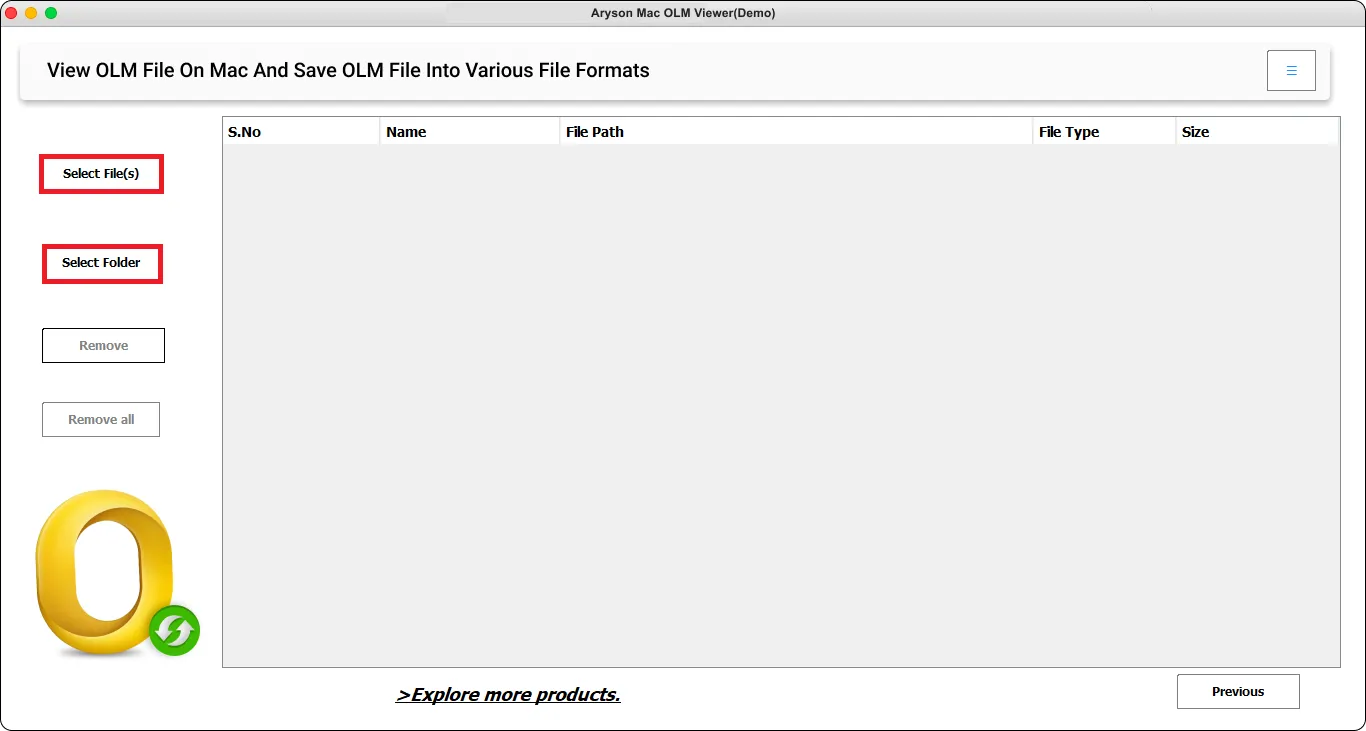
  • Step 02: Click on the Select File button. Browse and select the OLM file you want to open.
  • Step 03: Next, it will display all mailbox items (emails, contacts, calendars, tasks, journals, etc.) in a tree-structured view.
  • Step 04:Pick any of the given outputs accordingly.
  • Step 05: Also, enter the path to save and click the Convert button to save OLM files.

Aryson Free OLM Viewer Software: System Specifications

Software Download

Size: 204 MBVersion: 25.8

Trial Limitations

The Free Mac OLM Viewer Tool is the same as the full versions and offers equal features and benefits. However, there is a single restriction in the demo versions, as it convert only 50 items per folder.

Requirements & Supported Versions

Hard Disk Space: 500 MB Required (1 GB Recommended)

RAM: 8 GB (16 GB Recommended)

Processor: Mac System with Apple Silicon Processor M1, M2, M3, and M4 series

Supported Platforms

Supported OLM Versions:Mac Outlook versions 2021, 2019, 2016, and earlier.

Mac OS: macOS 13 Ventura, OS 12 Monterey, OS 11 Big Sur, and below versions.

Operating System:

MacOS X 10.8 (Mountain Lion), MacOS X 10.9(Mavericks), MacOS X 10.10 (Yosemite), MacOS X 10.11 (El Capitan), MacOS X 10.12 (Sierra), MacOS X 10.13 (High Sierra), MacOS X 10.14 (Mojave), MacOS X 10.15 (Catalina), MacOS X 11.0 (Big Sur), MacOS X 12.0 (Monterey)

Software Prerequisites

  • If you are operating Windows OS 11, 10, 8, or 7 (32-bit or 64-bit) then you must launch the tool as an Administrator.
  • Turn off the Windows Firewall for proper installation.
  • Disable the Antivirus programs.

FAQ

Request For Software Customization

If you need to customize Aryson Software or need some additional specific features, then provide the software customization Request Quote.

Best OLM Viewer Tool: Comparison of Free & Premium Versions

Get an overview of the Free and Premium versions of the OLM Viewer to view OLM files without Mac Outlook:

Product Features Free Version Premium Version
Open & Read OLM Files (Emails, Contacts, Calendar, etc.)
View OLM Attachments
Save the OLM file in another format 50 Emails Only Complete mailbox
Migrate OLM to Office 365, Gmail, Yahoo & others. 50 Emails Only Complete mailbox
Remove Duplicate Emails
Date Filter
Save Emails Without Attachments
Split Large PST Files
Support large OLM files.
Compatibility with Mac Outlook
24/7 tech support & 100% secure
Price Free $39
Money Back Policy

Frequently Asked Questions:

Ans.Yes, the basic version of Aryson OLM Viewer is completely free. You can open, scan, and preview OLM files without Outlook. To save or migrate data, you need the premium version.

Ans. You can view all mailbox items, such as emails, attachments, contacts, calendars, tasks, notes, and journals, from your OLM file.

Ans. Yes, OLM File Viewer gives you full access to email attachments such as images, documents, and other embedded files within the OLM emails.

Ans. Yes, the Aryson OLM File Viewer offers a Date Range Filter option that allows you to select only specific emails within a chosen date range for export or migration.

Ans.Yes, Aryson OLM File Opener software keeps the original folder structure, email formatting, metadata (To, From, Date, Subject), and attachments during preview, export, or migration.

Ans.Yes, Aryson OLM Viewer is compatible with all latest macOS versions, and ensuring smooth performance.

Ans.Yes, this software supports large OLM files as well as opens them efficiently, including all email items.

Ans. Yes, you can view and export OLM data to PDF within the same software. All you need to do: Pick PDF from the given export options.

Ans.Admin consent is required if the application requests permissions beyond an individual user’s data, such as organization-wide or multi-user access. In these cases, only a Microsoft 365 administrator can approve the login for security reasons.

Ans. Yes, it is compulsory to enable user sign-in for Modern Authentication. Modern Authentication requires that the user account has sign-in access enabled to generate the authentication token. If the user sign-in is disabled, the tool or application will not be able to connect to the account or access its data.

To ensure successful login and data access, please verify that user sign-in is enabled for all accounts before using Modern Authentication.

Trusted by IT Professionals & Enterprises Worldwide

See what our IT professionals and businesses say about their experience with our Free OLM Viewer Tool

review-rating