How Linux Gmail Backup Tool Works? Aryson Linux Gmail Backup Tool is a top-notch software for Linux users to back up Gmail email into various file formats and email clients. It is a proficient utility that allows you to download or save Gmail Contacts, Calendars, Drives, and Photos onto a Computer and PC. Step By Step Guide to Backup/Migrate Gmail Emails on Linux:-
  1. Download, Install and Run Linux Gmail Backup Tool on your PC.
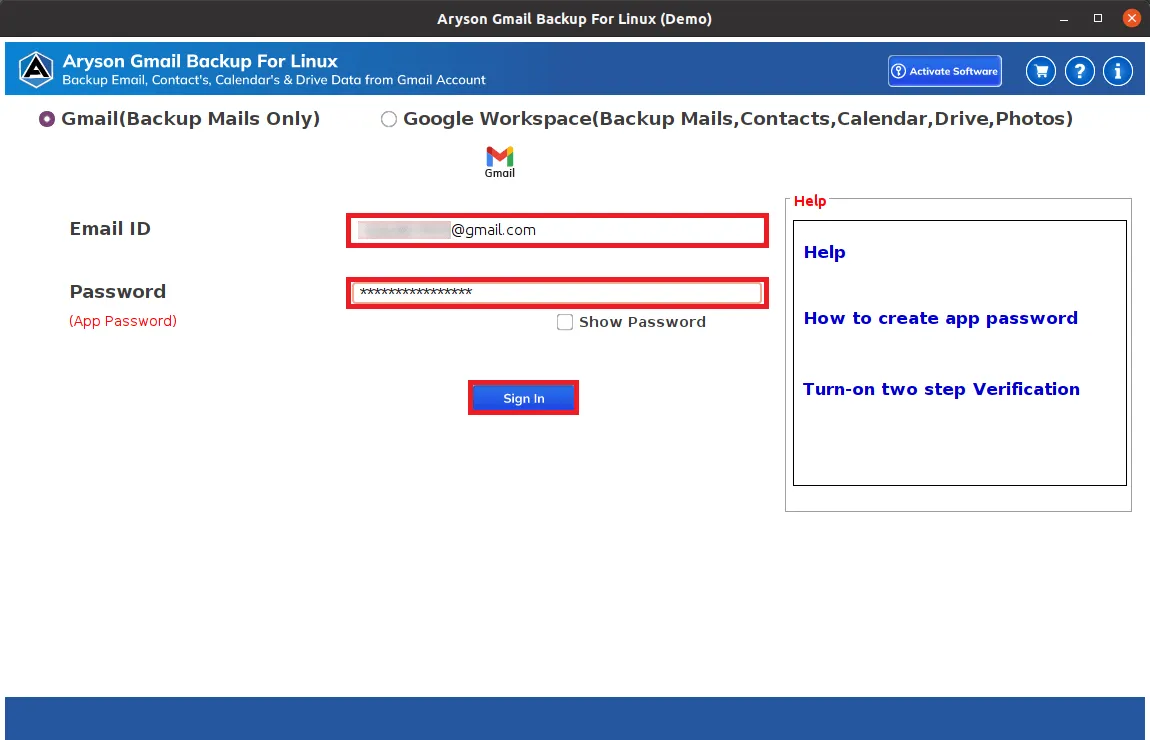
  2. Choose Gmail (Backup Mails Only) to backup or migrate Gmail emails.
  3. Once you select, enter your Gmail email address and App Password to Sign in.
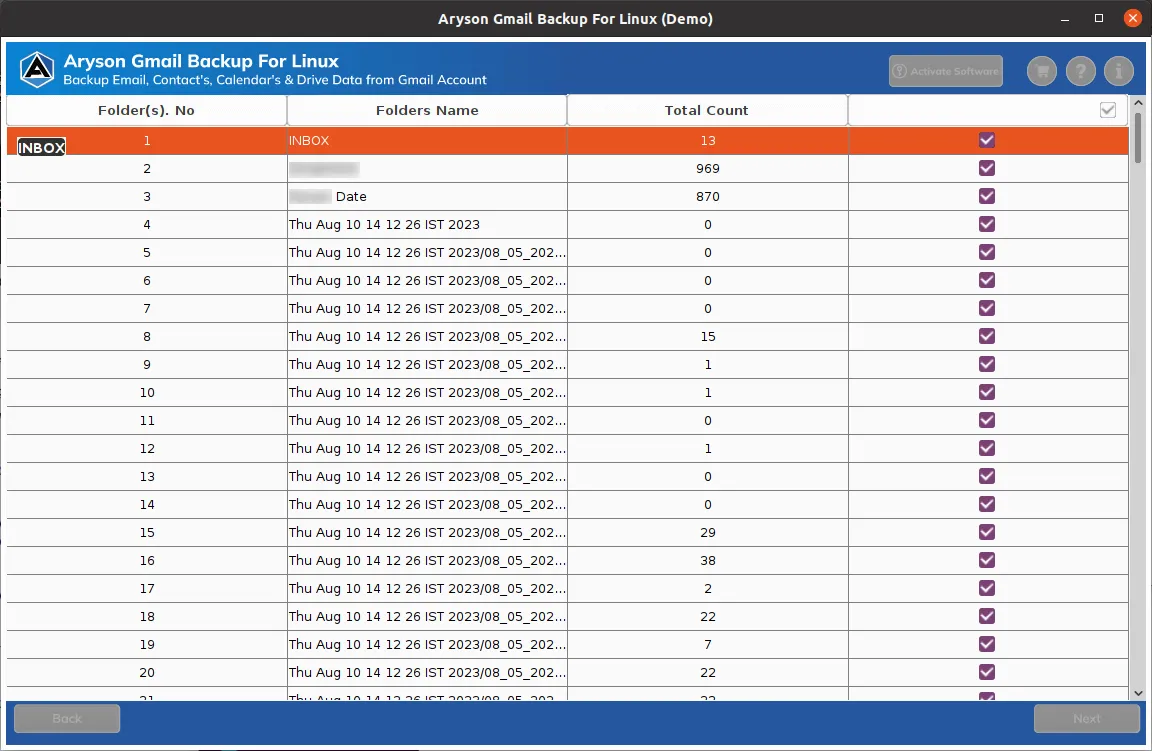
  4. Here, you can see Gmail folder's details like No, Name, and Count on the tool's interface. After that, click Next.
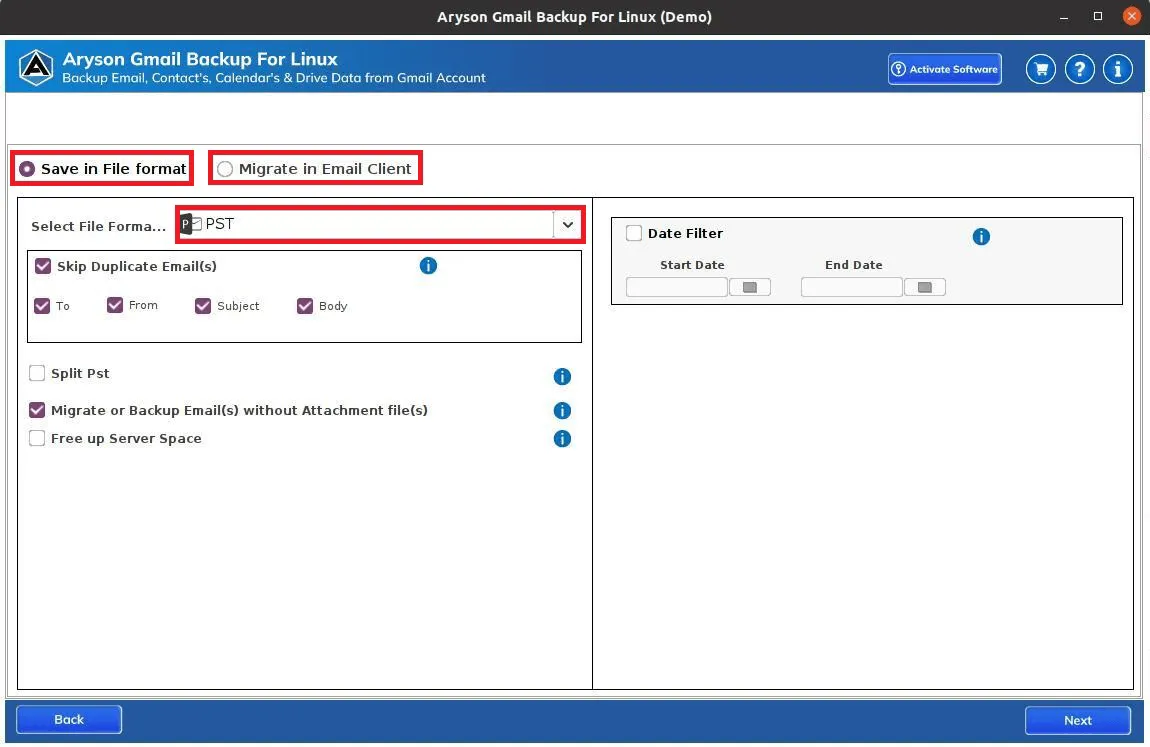
  5. Select PST, EML, PDF, or others from the drop-down list.
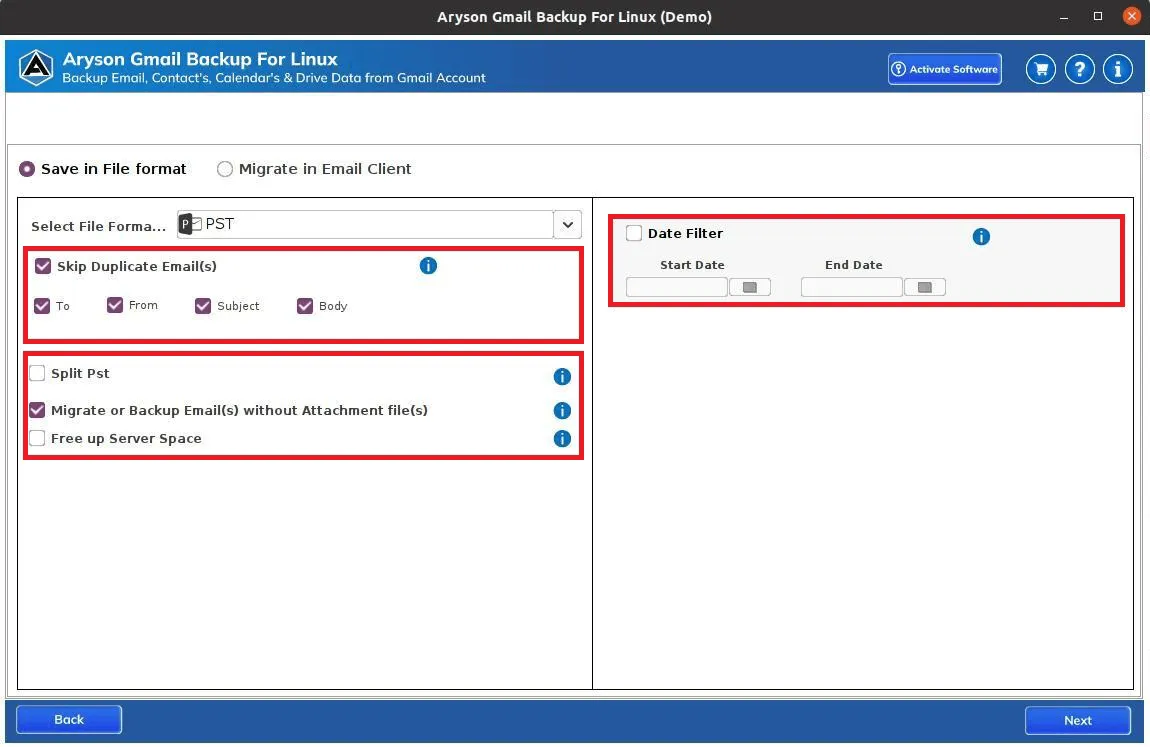
  6. Include additional features provided by the software and click Next.
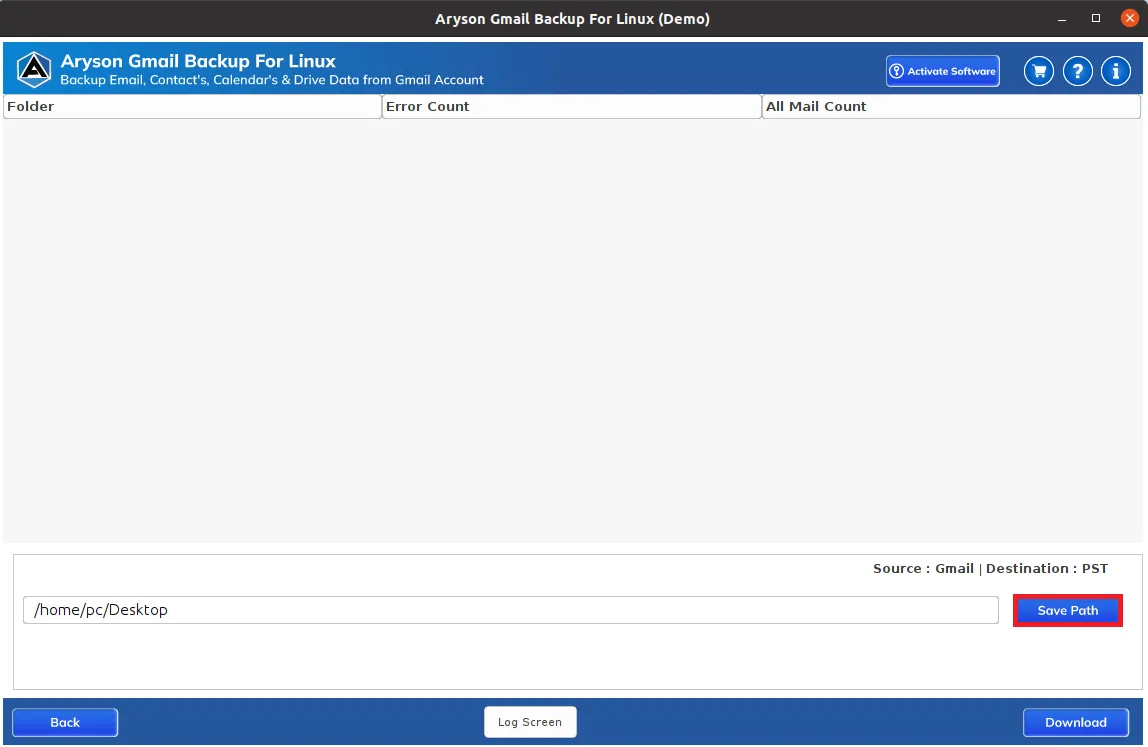
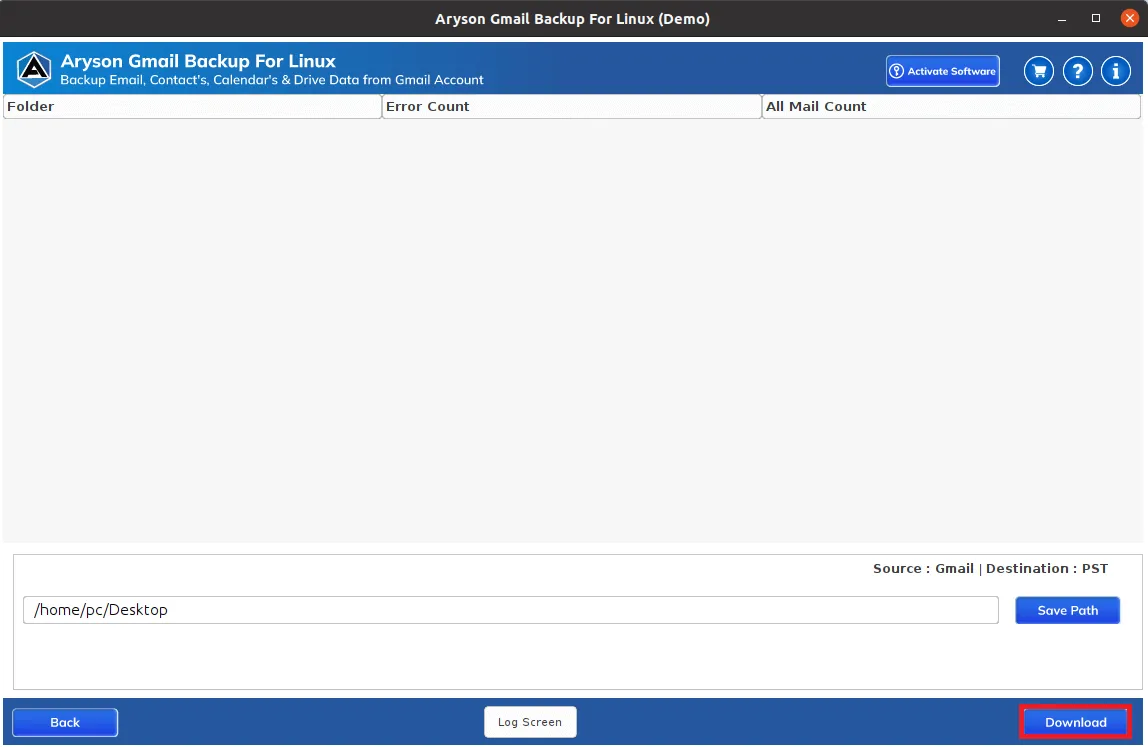
  7. Go to the Save Path button to set a location to save the resultant file, and click the Download button.
  8. Finally, all your Gmail emails will be saved into a selected file format.
Benefits of Using Aryson Linux Gmail Backup Software
  • This tool save your Gmail emails in various formats like, PDF, PST, EMLX, HTML, RTF, XPS, and MBOX.
  • Option to split large Outlook PST files into smaller PST files.
  • Migrate or backup emails without attachments.
  • Date Filter feature that helps you selectively save Gmail emails within a specific date range.
  • Allows users to download Google Mails, Contacts, Calendars, Drive, and Photos.
  • Feature to save or backup Gmail data to External Hard Drives, Local Drives, PCs, or Computers.
  • Transfer emails from Gmail accounts to Office 365, IMAP, Hotmail, iCloud, Zoho Mail, and more.
  • Users can free up space on their Gmail server after backing up the Gmail data.

What does Linux Gmail Backup Tool do?

The Problem
I am a small business owner and I'm concerned about the safety of my important business emails stored in her Gmail account. I want to create a backup of my Gmail data on Linux to ensure its security, but I'm not very tech-savvy. I am unsure about how to go about the backup process, what tools to use, and how to manage the backup files. Can you suggest me a reliable solution to solve my problem?

The Solution
The Linux Gmail Backup Tool allows users to easily create backups of their Gmail data on Linux systems. It supports saving emails, contacts, calendars, and other content in various formats, freeing up server space. The tool offers options for selective backup, attachment management, and data migration, providing a user-friendly solution for safeguarding Gmail data.

Aryson Linux Gmail Backup Tool - Rating & Reviews

When to Use Google Mail Backup Tool?

Use When Data Security Concerns When you're worried about the security of your Gmail data and want to have a copy stored locally on your Linux device in case of any unexpected data loss or breaches. So to protect your data you can backup or migrate your Gmail data using Aryson Linux Gmail Migrator Tool.
Use When Switching Devices In case you're switching to a new Linux device or reinstalling your operating system and want to ensure that you don't lose your important Gmail emails, contacts, and other data. Hence, use the outstanding Gmail Backup Tool for Linux that can back up all your data with 100% efficiency and accuracy.
When Need to Freeing Up Server Space in Gmail Account When your Gmail account is running out of storage space, you need to free up space on the server while still keeping your data accessible locally. In this situation, Aryson Linux Gmail Backup Tool is the best solution that can easily backup your Gmail account and allows you to free up the server space.
When Need to Migrate or Switching Accounts When you're transitioning from one email service to another (e.g., Gmail to Office 365) or switching between Gmail accounts, you need to transfer or retain your emails, contacts, and other data using the backup tool on your Linux machine.

Prominent Features of Aryson Linux Gmail Backup Tool

Backup Gmail to Various File Formats on Linux

This Gmail Email Backup Software offers a wide range of options to save Gmail emails in numerous file formats on Linux. You can export Gmail to formats like PST and more others, including PDF, MSG, MBOX, and EML. It's versatile and allows you to choose how you want to back up your Gmail account.

Save Gmail Emails to Various Documents on Linux

The software provides various document formats to save Gmail email such as CSV, DOCX, EMLX, HTML, RTF, XPS, EMF, DOCM, and many more. It has various features to help users to conduct a smooth and straightforward conversion of Gmail data with data safety. Additionally, it has an easy saving process for instant and safe conversion.

Migrate Gmail Mailboxes to Cloud-Based Emails on Linux

Linux Gmail Backup Tool is proficient designed to migrate Gmail Mailboxes to cloud-based email like Office 365, IMAP Server, G Suite etc. It can easily transfer all your Gmail emails into your chosen email client with 100% authenticity and data integrity.

Transfer Gmail Email to Webmail Clients on Linux

Aryson Gmail Backup Tool for Linux is a proficient utility that allows users to migrate Gmail emails into various webmail clients such as Gmail, Yahoo, Outlook.com, Zoho Mail, iCloud Mail etc. The software is highly capable of transferring emails from Gmail to webmail clients without any data loss.


Technical Overview


The Aryson Linux Gmail Backup Tool is a program designed to help users on Linux systems create backups of their Gmail data. It allows you to save emails, contacts, calendars, and other content from your Gmail account to your computer. The tool supports various file formats, giving you flexibility in how you want to save your data. It's a useful solution for ensuring the safety of your Gmail information.

Software Prerequisites & Recommendations

Request For Software Customization

Note: If you need to customize Aryson Software or need additional some specific features then, provide the software customization Request Quote

Trial Limitations

Aryson Linux Gmail Backup Tool offers a free version that allows users to back up or download up to 50 emails per folder. Similarly, for Google Contacts, Calendar, Drive, and Photos, allows you to save 50 items from your Gmail account to your local storage. If you need to save all your Gmail data, the option is available to purchase and download the full version of the Gmail Backup Tool.

Download  

Size: 178MB Version: 23.08

Required System Specification
  • Hard Disk Space: 500 MB of free hard disk space required
  • RAM: 4 GB of RAM (4 GB is recommended)
Supported Platforms

Linux:- Ubuntu, Fedora, Debian, FreeBSD, and OpenBSD

Software Prerequisites
  • Make sure Thunderbird Application is installed on your system.
  • Pentium class processor required.
  • Disable the Antivirus programs.
FAQ
Aryson Linux Gmail Backup Tool Demo and Full Version Comparison

Have a look at the features and limitations between the demo and the full version of the software

Product Features Free Version Full Version
Backup Gmail emails into PST, MSG, MBOX, EML, DOC, PDF and other formats. 50 Items per folder All
Migrate Gmail emails into Office 365, Zoho Mail, Hotmail, IMAP, iCloud, etc. 50 Items per folder All
Download Google Contacts, Calendar, Drive and Photos 50 Items per folder All
Remove Duplicate Emails Based on To, From Bcc, Subject, and Body
Free Up Server Space(Mails, Contacts, Calendars and Drive)
Migrate or Backup Emails Without Attachments files
Date Range & Set Path for Output folder
24*7 Tech Support & secure 100%
Price Free $49
Money Back Policy
What Our Customers Are Saying About Us

Aryson Gmail Backup Software Verified Purchase Reviews

review-rating
Frequently Asked Questions

To back up your Gmail emails, follow these steps:

  1. Download and Install Aryson Backup Tool.
  2. Launch and Login Gmail account you need to backup.
  3. Select Folders you require and click Next.
  4. Choose Backup Format such as PDF, PST, MBOX, etc.
  5. Select Destination path to save the resultant file.
  6. Click on the Download button to initiate backup.

Absolutely, the Aryson Linux Gmail Backup Tool is fully compatible with G-Suite and business accounts. This tool empowers you to effortlessly download all your essential data from Google Workspace, encompassing Mails, Contacts, Calendars, Drive, and Photos.

Admin consent is required if the application requests permissions beyond an individual user’s data, such as organization-wide or multi-user access. In these cases, only a Microsoft 365 administrator can approve the login for security reasons.