






Screens

Video

Guide

Eula

Aryson IMAP Backup Tool VS Manual Methods

See how Aryson IMAP backup software outperforms Manual Approaches

Hands-On Approach Aryson IMAP Backup Tool
The manual IMAP email backup process may take hours or even days for large mailboxes. You can back up single or multiple IMAP mailboxes in one batch operation; no need to process accounts individually.
There are no advanced options to select emails based on date range, sender, folder, or attachments. This utility provides advanced filters like date range, sender, folder selection, and attachment options.
Users cannot preview their IMAP mailboxes before backing them up, increasing the risk of incomplete backup. Users can cross-verify all IMAP folder emails, attachments, contacts, and calendars before starting backup, minimizing errors.
Manual backup methods often disrupt the original folder structure, leading to disorganization. The software keeps the original folder structure, email threads, and metadata intact.
You might lose important emails, attachments, and email metadata during manual backup. Aryson IMAP Backup Tool includes a built-in duplicate removal option to avoid redundant data & ensures all emails with attachments are backed up without loss.
The manual process typically requires proper IMAP configuration expertise, making it inaccessible for non-technical users. The software provides a simple & intuitive interface to help IT professionals and complete beginners perform the backup.
6 Critical Limitations
Manual approaches lack consistency and accuracy
6 Complete Solutions
Aryson resolves every challenge automatically
Get Demo

Aryson IMAP Backup Tool - Reviews & Ratings

Discover what IT professionals say about the IMAP Email Backup Solution

Expert Reviews:

Rating & Reviews:

How Enterprises Use Aryson IMAP Backup Tool

Look how Big Firms manage large-scale IMAP email backup without Outlook

Imap Backup

Centralized IMAP Mailbox Backup

IT professionals can effortlessly back up their multiple IMAP mailboxes from different email servers into legacy servers, hosting providers, and other servers.

Security

Secure Local Backup

This utility possesses secure authentication methods & encrypted IMAP protocols to ensure enterprise-grade data protection. No confidential information or passwords are stored.

Date Range

Advanced Selection

It consists of various advanced filters, such as date range and folder selection. This allows organisations to back up only relevant business data instead of entire mailboxes, saving time and storage costs.

Data Integrity

Compliance & Data Integrity Preservation

The IMAP Backup Software helps professionals to keep the original email properties, such as headers, metadata, and attachments, intact. Moreover, it helps them to meet the compliance & audit needs.

Bulk Conversion

Bulk & Large Mailbox Processing

It can back up the large IMAP mailboxes, including emails with attachments. Enterprises can download thousands of emails per account without any performance issues.

Efficiency of IT Admins

Efficiency of IT Admins

This software allows IT teams to perform bulk IMAP email backup using CSV-based account imports. This eventually minimizes the need for manual efforts.

Archiving

Enterprise Email Data Archiving

This utility allows organizations of different IMAP-based email services to create centralized email archives. Hence, it helps businesses to maintain the standardized backup repositories.

innovation

Scalable for Growing Enterprises

Aryson IMAP Backup Tool is built for organizations that deal with frequent backup operations or expanding teams. Hence, it scales efficiently to accommodate increasing mailbox volumes.

When to Use the IMAP Backup Tool?

To save IMAP emails locally

For users who want to back up their emails from their required IMAP account to their PC or hard drive, this software works well. It allows backup in different formats like PST, MBOX, EML, MSG, PDF, CSV, and more.

To archive IMAP emails offline

If you need to create offline archives of your IMAP account, this Aryson IMAP Backup Tool can do it. It downloads all emails with attachments without losing data and keeps everything organized.

To convert IMAP emails to PST

If you want to keep a copy of your IMAP emails in Outlook, you can use this tool to download emails in PST format. This lets you access your emails in MS Outlook anytime.

To manage multiple email accounts

If you have multiple IMAP email accounts, this software can back up emails from all of them at once. You can save emails in 6+ file formats, making it easier to handle multiple accounts without extra effort.

Advanced Features of Aryson IMAP Backup Tool

Get access to a Complete Suite of Advanced Features to securely back up IMAP emails in bulk.

Secure

Secure IMAP Email Backup without Outlook

Aryson IMAP Backup software allows IT professionals to directly download IMAP mailboxes to multiple file formats. It maintains complete data integrity & and keeps the folder hierarchy, email properties, & metadata intact. Moreover, it connects several IMAP-based servers to the software via modern authentication & Impersonation methods for efficient encrypted communication & prevention of unauthorized access.

Backup

Export IMAP to Multiple File Formats

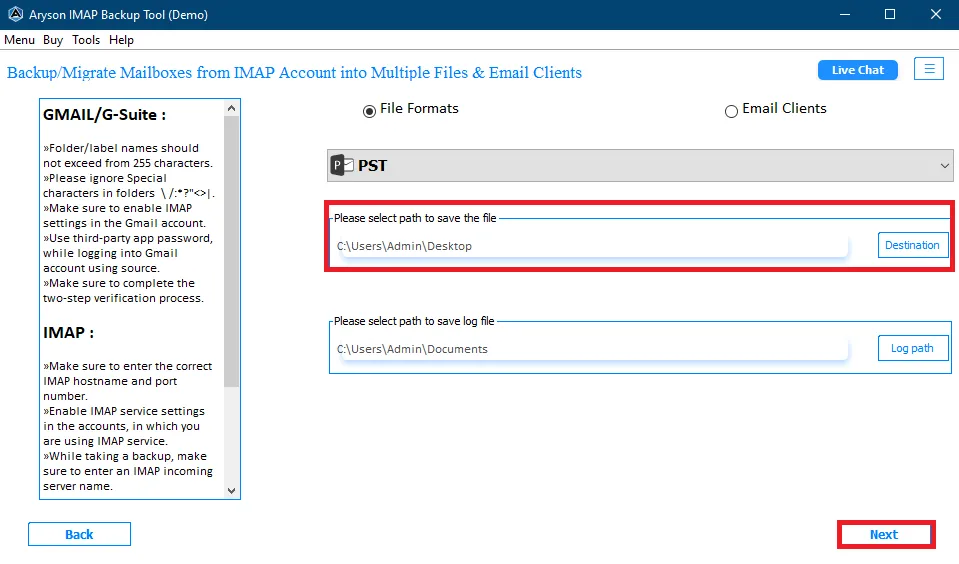
With the help of the Aryson IMAP Backup Tool, you can save your IMAP emails into different formats like PST, MBOX, MSG, CSV, PDF, EML, DOC, and DOCX. This is helpful because different email applications support different file types. All you need is to convert emails into the required file formats & use them in your email client.

Email Clients

Compatible with 75+ IMAP Email Platforms

IT professionals can back up their data from numerous IMAP-enabled sources. This includes Gmail, Yahoo Mail, Outlook, AOL Mail, Microsoft Office 365, Zoho Mail, iCloud Mail, GMX Mail, ProtonMail, Microsoft Exchange Server, Amazon WorkMail, Zimbra, Kerio Connect, and many hosting providers like GoDaddy, HostGator, Bluehost, and cPanel-based webmail platforms.

Batch Migration

Different Backup Modes: Single and Bulk

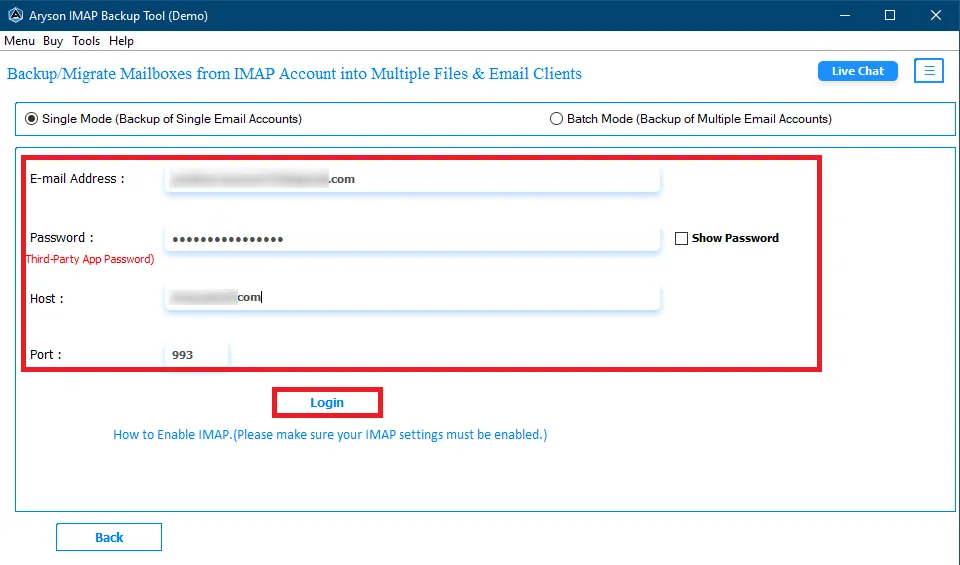
The Aryson IMAP backup software provides its users with two different login options: Single and Batch Mode. Single-mode is particularly used to back up one email account at a time. On the other hand, the batch mode is suitable if you only need to save data from one mailbox. Instead of logging in to each account one by one, you can upload a CSV file with all the account details.

Preview

Advanced Features and Search Functionality

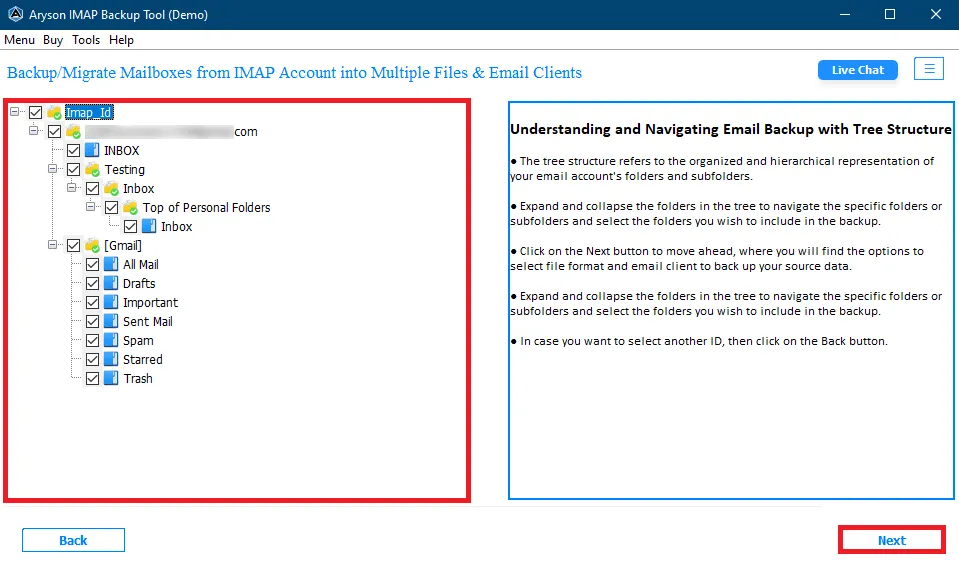
Users can efficiently search for the required emails in the data table based on Subject, To, From, and File Name fields. The software will highlight the matching emails within the table interface. In addition, the preview panel allows users to cross-verify the IMAP folder emails, attachments, contacts, and calendars before starting the backup.

Remove duplicate

Eliminate Duplicate Emails

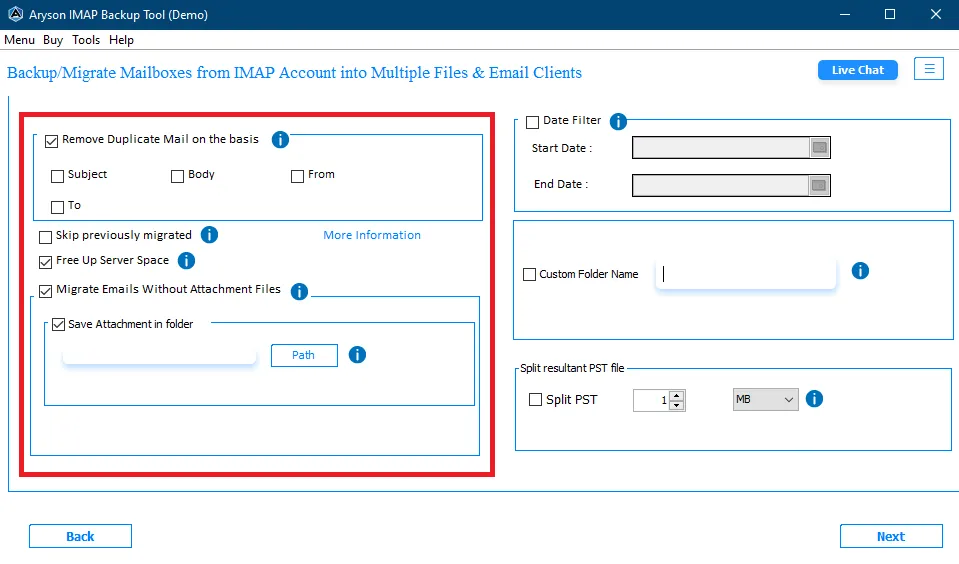
With the help of this feature, you can eliminate duplicate emails during the backup process. It checks emails based on details like From, To, Subject, and Date. If two emails have the same information, this software keeps only one copy. This helps avoid repeated messages in your backup. It keeps your data clean and organized. Thus, you don't have to manually search & delete duplicate emails later. It saves time and reduces clutter after backup.

Without Attachments

Backup Emails Without Attachments Option

If you do not want to back up attachments along with associated emails, you can use this feature of the Aryson IMAP Backup tool. This feature reduces the size of backup data, since attachments consume significant storage space. Thus, the backup process speeds up and saves both time and storage resources.

Structure Preservation

Custom Folder Naming and Structure Preservation

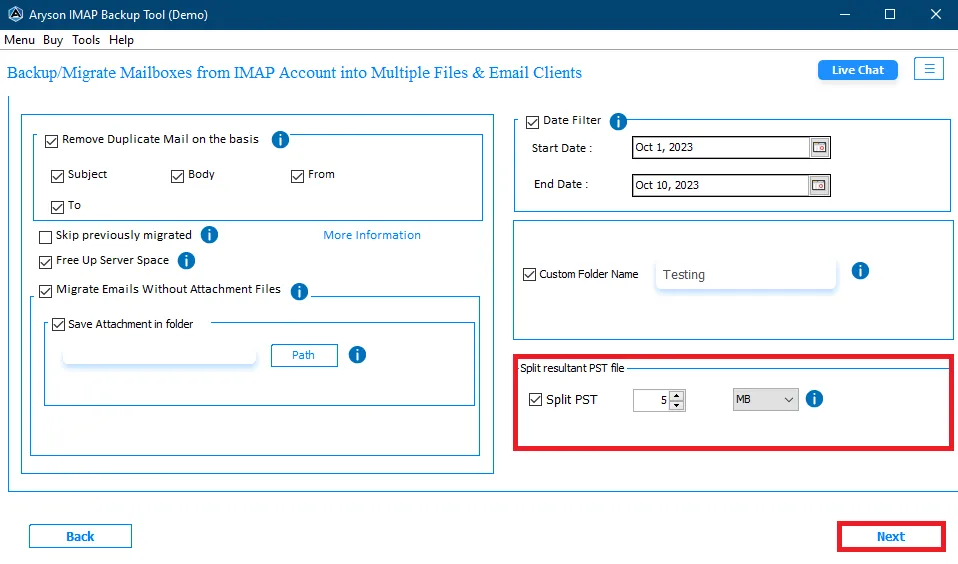
The Aryson IMAP backup software maintains the original IMAP folder hierarchy and structure during backup completely. Additionally, users can assign custom folder names for backed-up emails, making it easy to recognize and organize them. This flexibility helps administrators identify emails and keep things systematized.

Free Up Space

Free Up Source Server Space Post-Backup

Users can move backed-up emails to trash or permanently delete them from the source IMAP server. This feature of the Aryson IMAP Backup Tool full version significantly reduces overall server storage consumption & helps administrators optimize their infrastructure after successful backup completion.

Compatible

Free Demo Version with Comprehensive Technical Support

The demo version of Aryson IMAP backup tool free download allows users to back up up to 50 emails per folder, providing hands-on evaluation before purchasing. Moreover, the licensed version includes all features available in the trial version with 24/7 technical support & personalized assistance. The software is compatible with Windows 11, 10, 8.1, 8, 7, Vista, XP, and earlier versions for wide accessibility.

How to Use Aryson IMAP Backup Tool

Screenshot

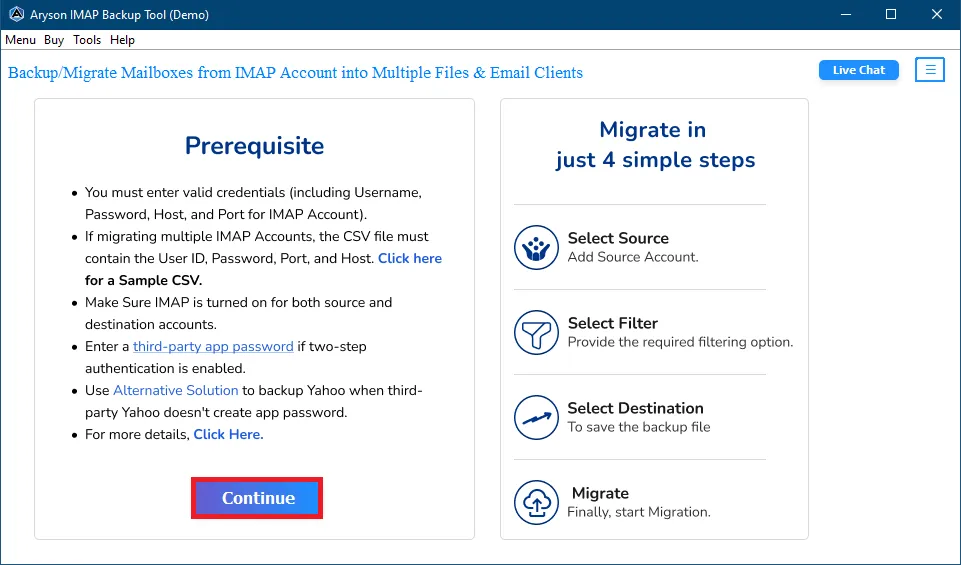
The Aryson IMAP backup software is a cost-effective solution to back up emails from any IMAP-enabled email server directly to your computer or any other client. It allows users to download mailbox data from webmail, hosted email services, cPanel accounts, and others to perform IMAP email backup without Outlook.

  • Step 01: Download & launch the Aryson IMAP Backup Tool.
  • Step 02: Select Single or Batch Mode & enter the required login credentials.
  • Step 03: Preview the IMAP mailboxes and select the required data to back up.
  • Step 04: Select the desired file format or email client as the backup destination.
  • Step 05: Apply filters for selective backup and click Start Process.

Who Benefits from the Aryson IMAP Backup Tool

Real-world scenarios where the Aryson IMAP Backup Tool is used

IT Departments

Managing large-scale IMAP mailbox backups across an organization becomes significantly easier with bulk backup support. IT teams can back up multiple IMAP accounts in one operation using a CSV file, organize mailbox data by folder or date, and preserve the original folder hierarchy fully intact throughout the process.

Legal & Compliance Specialists

Backing up archived IMAP emails based on date range or specific folders makes it straightforward to retrieve records for audits, litigation, or GDPR compliance. Email metadata, headers, and properties are fully preserved during backup, ensuring nothing is altered, lost, or missing in the archived data.

Data Security Officers

For organizations that handle sensitive mailbox data, the software runs entirely offline during the backup process — no cloud intermediary, no third-party server access. All IMAP account data is processed locally on the desktop before being saved to your chosen location, giving security teams full control over data handling at every step.

Enterprise & Large-Scale Businesses

Businesses dealing with hundreds of IMAP mailboxes across multiple departments can process all accounts in a single bulk backup operation. The duplicate email removal feature helps keep the backup data clean, organized, and free of redundant data - saving both storage space and administrative effort.

Aryson IMAP Backup Tool: System Specifications

Software Download

(Windows)

Download Now


(Linux)

Download Now


Size: 327 MBVersion: 25.07

Trial Limitations

The free demo version of the IMAP Backup Tool includes all the features and functionalities available in the Aryson IMAP Backup Tool full version, allowing users to thoroughly evaluate the software before purchase. The only limitation of the trial version is that it allows backup of up to 50 emails per folder from the IMAP server.

Requirements & Supported Versions

Hard Disk Space: 500 MB of free hard disk space required

RAM: 4 GB of RAM (4 GB is recommended)

Processor: Intel® Core™ 2 Duo CPU E4600 @ 2.40GHz 2.39GHz

Supported Platforms

Windows OS: 11, 10, 8.1, 8, 7, Vista, XP, 2000, 98, NT, and 95.

Outlook Versions: Office 365, 2019, 2016, 2013, 2010, 2007, 2003, 2002, 2000, 98, and 97.

Software Prerequisites

  • If you are operating Windows OS 11, 10, 8, or 7 (32-bit or 64-bit), then you must launch the tool as an Administrator.
  • Turn off the Windows Firewall for proper installation.
  • Disable the Antivirus programs.

FAQ

Request For Software Customization

Note: If you need to customize Aryson Software or need additional specific features, then provide this software customisation.

Aryson IMAP Backup Tool: Demo VS Full Version

Check the differences between the Demo and Full Version of the IMAP Backup Tool

Software Features Demo Version Full (Licensed) Version
Multiple File Formats & Email Clients 50 items per folder
Remove Duplicate Emails
Free up Server Space
Exclude Delete Mails
Exclude Empty Folder
Migrate Email Without Attachments
Date Filter Option
Advanced Email Filters
Skip Previously Migrated Emails
Incremental Backup
Compatible with Windows
24/5 Tech Support
Price Free $39
Money Back Policy

Frequently Asked Questions

Ans. The Aryson IMAP backup software supports standard IMAP authentication and modern authentication (OAuth 2.0), depending on the server configuration.

Ans. Port 993 is used for IMAP with SSL, and 143 is used for non-SSL connections.

Ans. Yes, it supports SSL/TLS to ensure secure email transfer during backup.

Ans. It processes data in batches to avoid server overload and ensures a stable backup of large mailboxes.

Ans. Yes, Aryson IMAP backup software preserves email properties like To, From, Subject, Date, CC, BCC, and attachments intact.

Ans. Yes, using the CSV import feature in Batch Mode, you can back up multiple accounts in one operation.

Ans. The IMAP Backup Tool creates a detailed log report that records successful, failed, and skipped items for review.

Trusted by IT Professionals & Enterprises Worldwide

Aryson IMAP Backup Tool Verified Purchase Reviews

review-rating