-

Written By Harshita Sachdeva
-
Updated on May 29th, 2026
Outlook Out of Memory or System Resources: How to Fix It?
User Query: Got a brand new laptop, 32GB RAM, Windows 10 x64, and Outlook keeps throwing an out-of-memory error—randomly, but mostly around the calendar. Reinstalled Office, wiped profiles, and tried online mode; nothing works. Completely stumped. Is there any reliable and quick way to solve this issue?
Summary: Microsoft Outlook is a widely used email client, but sometimes, users encounter an error stating, “Outlook Out of Memory or System Resources,” which disrupts workflow and causes inconvenience. This error usually indicates that Outlook lacks the necessary memory or system resources to perform certain actions, especially in resource-heavy tasks. This guide will explore the possible reasons behind the error and provide solutions to resolve it. Additionally, we’ll introduce the Aryson OST Recovery tool for situations where Outlook’s OST file becomes inaccessible or orphaned.
Understanding the ‘MS Outlook Out of Memory or System Resources’ Error
The ‘Out of Memory or System Resources’ error can occur due to various reasons, such as the following:
- Large Mailbox Size: Overloaded mailboxes can consume excessive memory, leading to performance issues.
- Corrupted OST File: Outlook uses an Offline Storage Table (OST) file to store offline data, but this file can become corrupted, causing memory errors.
- Conflicting Add-ins: Some add-ins may consume substantial resources, causing conflicts within Outlook.
- Outdated Software: Using outdated versions of Outlook may cause compatibility issues, leading to memory errors.
- System Resource Limitations: Low available RAM or disk space can cause Outlook to run out of resources.
Step-by-Step Solutions to Fix the ‘Outlook Out of Memory’ Error
Let’s go through some effective methods to fix this error.
1. Close Unnecessary Applications
Running multiple applications simultaneously can cause your system to run out of memory. Close any unnecessary applications running in the background to free up system resources.
Steps to Fix the ‘Outlook Out of Memory or System Resources’ Error
- Right-click on the taskbar and select Task Manager.
- Under the Processes tab, locate any applications consuming high memory.
- Select the application and click End Task to close it.
- This simple step can often resolve the error if it’s related to limited system resources.
2. Reduce Mailbox Size
A large mailbox can slow down Outlook and consume significant memory. By deleting or archiving old emails, you can reduce the mailbox size and improve performance.
Steps to Reduce Mailbox Size and Fix ‘Outlook Out of Memory’
- Open Outlook and go to File > Cleanup Tools > Mailbox Cleanup.
- Use the Archive option (File > Archive) to manually archive older emails.
- Delete large attachments or move them to external storage.
This process helps keep your mailbox manageable and reduces memory usage.
| Note: AutoArchive is not available in the new Outlook (2023+). |
3. Disable Problematic Add-ins
Add-ins can enhance Outlook’s functionality but may also consume excessive memory. Disabling problematic add-ins can help alleviate the ‘Out of Memory’ error.
Steps to Fix Out of Memory or System Resources Error in Outlook Error
- Open Outlook and navigate to File > Options.
- Select Add-ins on the left side.
- Click Manage COM Add-ins and uncheck any add-ins you suspect may be causing issues.
- Click OK and restart Outlook.
- By disabling add-ins, you can assess whether one of them is the root cause of the memory issue.
4. Update Microsoft Outlook
Outdated versions of Outlook may contain bugs that can lead to performance issues. Updating to the latest version may resolve the error.
Steps to resolve ‘Outlook Out of Memory or System Resources‘ error
- For Classic Outlook: Open Outlook and go to File > Office Account > Update Options.
- Select Update Now.
- Restart Outlook after the update completes.
| Note: For new Outlook (2023+), updates are pushed automatically. Go to Settings > General > About Outlook to check the current version. No manual update trigger available. |
5. Increase Virtual Memory
Virtual memory on your system acts as an extension of physical memory. Increasing the virtual memory can provide more resources for Outlook, reducing the likelihood of memory-related errors.
Steps to Fix the Out of Memory or System Resources Outlook Error
- Right-click on This PC and select Properties.
- Go to Advanced System Settings > Settings > Advanced tab.
- Under Virtual Memory, click Change and uncheck Automatically manage paging file size for all drives.
- Select Custom size and increase the initial and maximum size based on your system’s specifications.
- Click OK and restart your computer.
- Increasing virtual memory allows the system to allocate more resources, helping Outlook run smoothly.
6. Repair Outlook Data Files
Corrupted OST files can contribute to the ‘Out of Memory’ error. Microsoft Outlook offers a built-in tool called the Inbox Repair Tool (Scanpst.exe) to fix corrupted data files.
Steps to Fix Outlook cannot display the folder out of memory or system resources error
- Locate Scanpst.exe on your computer (usually found in the Outlook installation folder).
- Open Scanpst.exe and browse to the OST file location.
- Click Start to initiate the scan, and follow the prompts to repair any issues.
- Repairing the OST file can resolve corruption issues, potentially eliminating the error.
7. Use the Aryson OST Recovery Tool to Repair Corrupted OST Files
In cases where your OST file becomes inaccessible, corrupted, or orphaned, the Aryson OST Recovery tool can be highly beneficial. This software allows you to convert OST files to PST format, ensuring you can access your important emails and data. With the help of the same utility, you can restore deleted emails from Outlook OST file. This software comes up with a free trial version that allows users to recover up to 50 emails/folders.
Key Features of Aryson OST Recovery:
- Converts OST files to PST format, which is accessible in Outlook.
- Recovers emails, contacts, calendars, and other OST file items.
- Supports encrypted and large OST files.
- Compatible with multiple Outlook versions, including the latest.
- By converting an inaccessible OST file to PST, you can restore your data and avoid memory errors caused by a damaged file.
Steps to Repair Outlook Out of System Resources While Sending Email.”
- Download and install the Aryson OST Recovery tool.
- Open the software and select the corrupted or inaccessible OST file.
- Select the required recovery mode and specify the destination of the resultant file.
- Choose PST as the output and click ok to save the converted file and import it into Outlook.
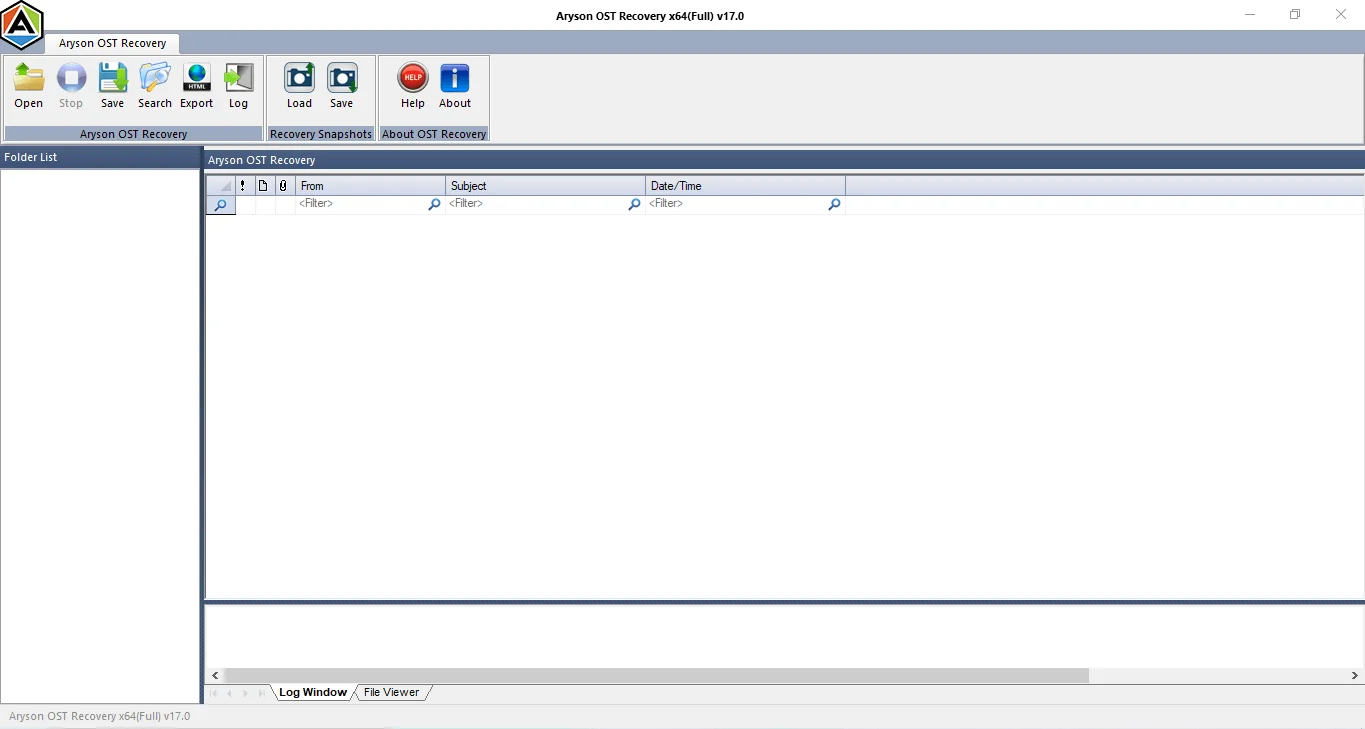
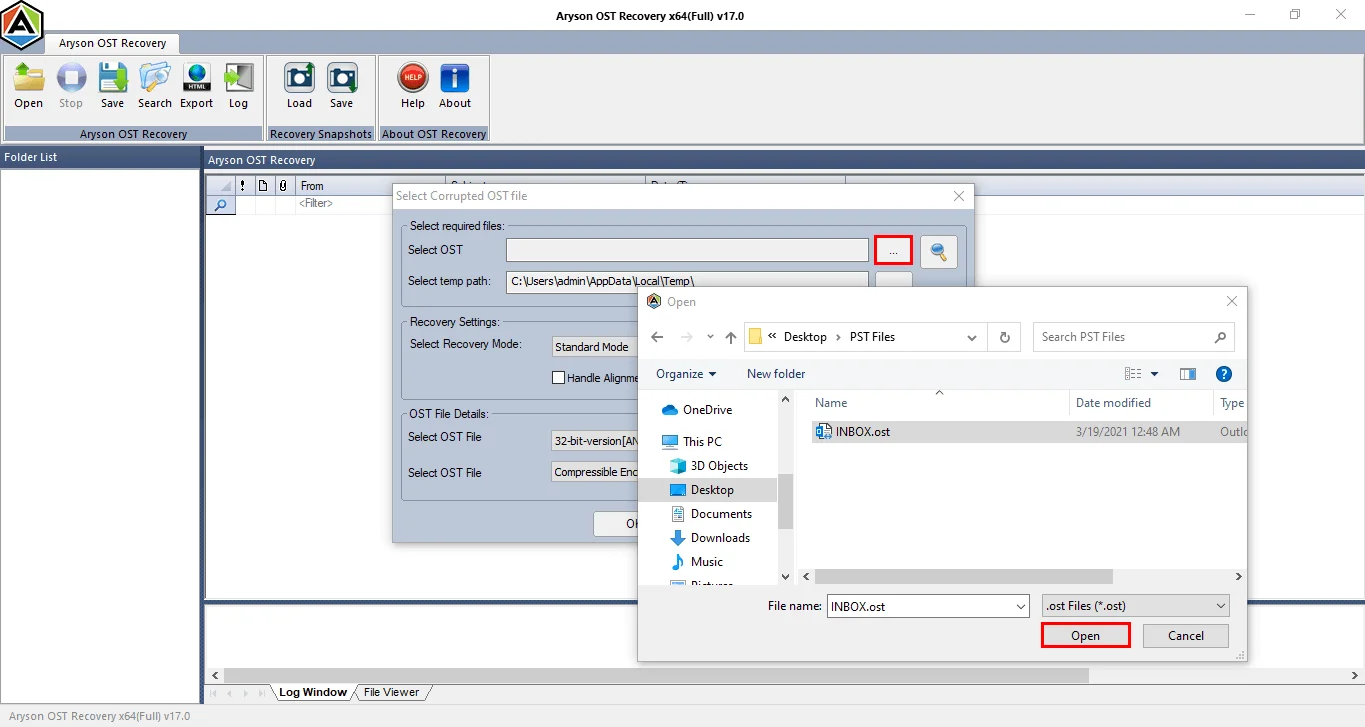
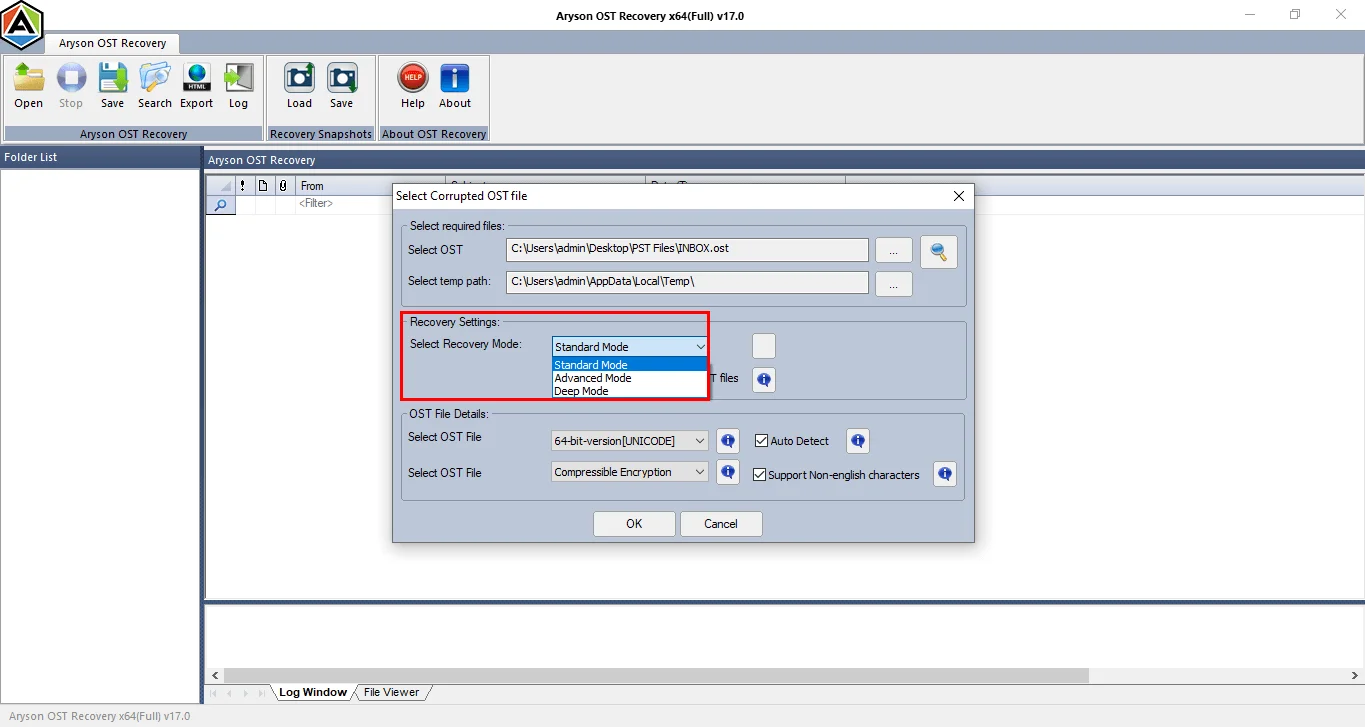
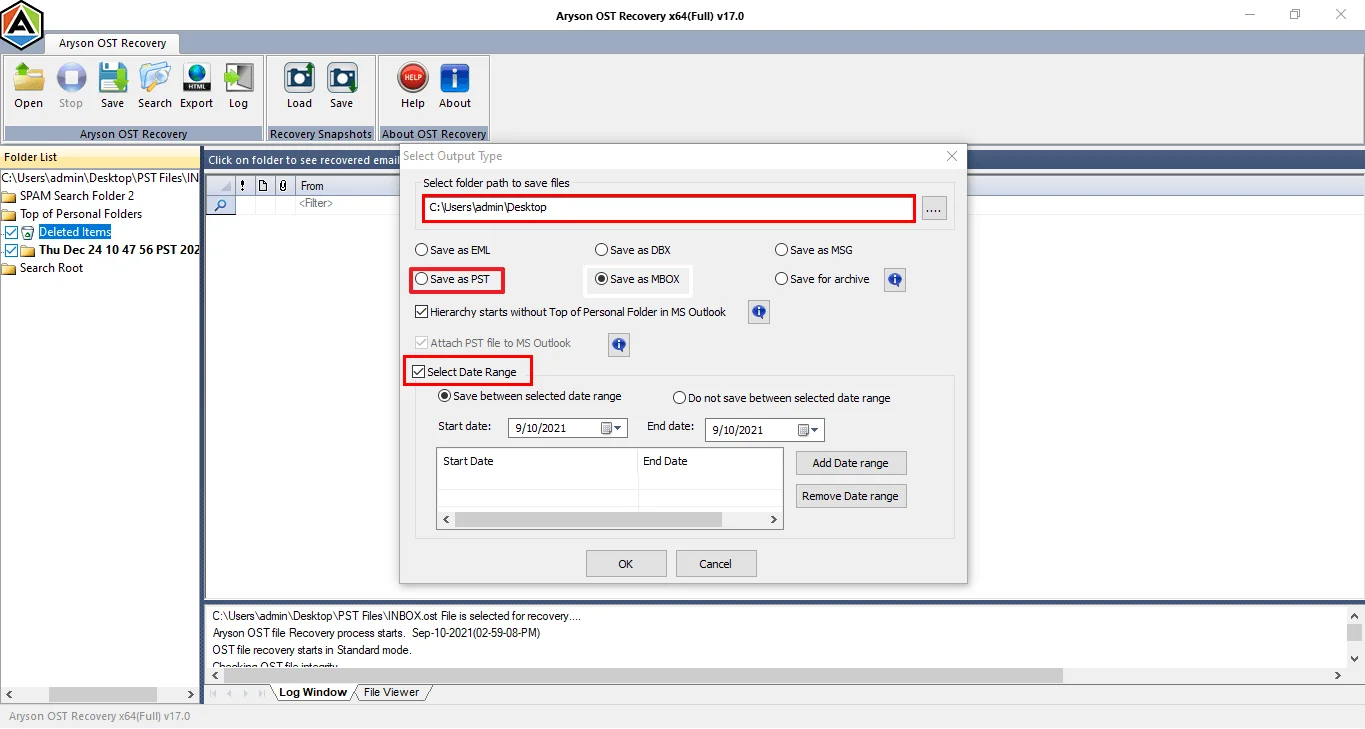
Using this tool can be a quick and reliable way to resolve issues related to inaccessible OST files, restoring functionality without complex troubleshooting.
Conclusion
The ‘Microsoft Outlook Out of Memory or System Resources’ error can be complicated for some users, but it’s typically solvable with some adjustments to system resources, mailbox management, and Outlook settings. If the problem persists, consider using the Aryson OST Recovery tool to repair and access your OST files, ensuring your data remains accessible.
By following these steps, you can maintain an efficient Outlook experience, free from memory-related disruptions, and ensure your data remains safe and accessible.
Frequently Asked Questions
Q.1 Why is Outlook saying “out of memory”?
Outlook may show an “out of memory” error due to oversized PST/OST files, corrupted profiles, faulty add-ins, or insufficient system resources.
Q.2 How to fix out of memory or system resources error in Outlook?
You can fix this error by reducing mailbox size, disabling add-ins, repairing Outlook data files, or creating a new Outlook profile. If the issue resides in the OST files, then using the Aryson OST Recovery Tool is recommended.
Q.3 Does the size of my PST or OST file cause the “out of memory” error in Outlook?
Yes, large PST or OST files can overload Outlook performance and commonly trigger “out of memory” or resource-related errors.
Q.4 Can a corrupted Outlook profile cause the “out of memory or system resources” error?
Yes, a corrupted Outlook profile can prevent proper resource allocation and lead to memory or system resource errors.
Q.5 Is there a permanent fix for the Outlook out of memory error, or does it keep coming back?
A permanent fix is possible if the root cause is resolved properly, though the issue may reappear without regular mailbox maintenance.
Q.6 Do I need a separate license for each computer where I want to fix the Outlook out of memory error?
Yes, most Outlook repair tools require a separate license for each computer, depending on the vendor’s licensing policy.
Q.7 Is chat support available if I cannot resolve the Outlook out of memory error on my own?
Yes, Aryson provides its users with live chat, emails, and phone support for 24/7 personalized assistance.
Q.8 Is there a free trial available before purchasing a license to fix Outlook memory issues?
Yes, the Aryson OST Recovery tool comes with a free trial version that allows users to recover up to 50 emails per folder. To recover more files, upgrade to the premium version.
About The Author:

Harshita Sachdeva, a professional technical writer at Aryson Technologies, specialize in delivering clear, hands-on documentation for data management, migration, and recovery solutions. With a meticulous, reader-first approach, I break down complex technical processes into simple, actionable content - helping IT professionals and decision-makers tackle challenges efficiently.
Related Post