-

Written By Rohan Wiese
-
Updated on June 30th, 2025
How to Export Outlook Calendar to PDF Using 3 Different Ways
Summary:-Outlook is a powerful scheduling tool. But sometimes, users don’t want to open Outlook just to view their calendars again and again. Hence, they often look for ways to convert or export their calendars in a more portable format. In such cases, PDF is an easy-to-read format you can pull up anytime. From business meetings to personal planning, it can share or store information easily. In this blog, we’ll guide you through simplified solutions, including PST to PDF Converter to export Outlook calendar to PDF on both Windows and Mac.
Some Major Reasons to Export Calendar from Outlook to PDF:
Sometimes, it’s more convenient to have your calendar outside of Outlook. Maybe you’re prepping for a meeting, planning a trip, or just want a quick backup of everything on your plate this month. Below are a few practical reasons to export your Outlook calendar as a PDF both practical and useful:
- Even without Outlook or internet access, you can open your schedule on any device that supports PDFs.
- There are no unexpected layout issues or misplaced details between what you see and what others get.
- PDF calendars are print-ready. So, you can stick your schedule on your desk, pinboard, or notebook.
- A PDF is a safe format that can’t be changed, and everything remains the same as it was.
Now you know why a PDF version is so useful. Let’s look at how you can save your Outlook calendar in just a few quick steps.
Best Ways to Export Outlook Calendar as PDF
Outlook doesn’t offer a one-click PDF export button to simplify the task. Although, there are some simple ways around that. With just a few steps, you can convert your entire calendar to a PDF file. Below are some of the easiest methods to accomplish the task:
Method 01: Export Outlook Calendar to PDF Via MS Outlook
This method works directly within the Outlook desktop application. Follow these steps to export your Outlook calendar to a PDF manually:
- First, open Microsoft Outlook and switch to the Calendar view.
- Next, in the left pane, select the calendar you wish to save.
- Then, click the File tab at the top-left corner of the screen.
- After that, choose Print from the list of options.
- In the list of available printers, select Adobe PDF.
- Now, choose your preferred print style, such as Calendar Details Style.
- Under the Printer section, choose Microsoft Print to PDF.
- Once selected, click the Print button to continue.
- Lastly, choose a location, name your file, and click Save.
After saving, go to the selected folder and open the PDF to view your Outlook calendar details.
Point to Remember: To open the saved calendar file, make sure you have Adobe Acrobat or any compatible PDF reader installed.
Another Alternative to Export Outlook Calendar to PDF
You can pick this method when your Outlook doesn’t support the direct PDF print option:
- Launch Microsoft Outlook and go to the Calendar section.
- Now, pick your preferred calendar view to display the schedule.
- Next, select the specific calendar you want to save.
- To proceed with the next step, click on the File tab.
- From the list of options, click Save Calendar.
- Now, browse and choose the location to store the file, then click Save.
- The calendar will be saved in ICS format successfully.
Note: To turn it into a PDF, simply convert ICS to PDF. It will help you generate a readable, printable PDF version of your Outlook calendar.
Method 02: How to Export a Shared or Group Calendar as PDF
Outlook also supports shared calendars, which are commonly used in office settings or team environments. You can export these to PDF, just like your personal calendar.
- Again, open Outlook and switch to the Calendar view.
- In the left panel, find the Shared or Group Calendar listed under “Shared Calendars.”
- Thereafter, click on the calendar to open it.
- Go to File>> Print, pick a layout, and choose Microsoft Print to PDF as the printer.
- Lastly, click Print and save the calendar as a PDF file.
Note: If you can’t see the print option, you may not have full permission to that calendar. Ask the calendar owner to give you Can View All Details access.
Limitations Associated With the Manual Method
The manual is free and quite helpful for small-scale data. However, there are some pointers that we should consider while going through these manual solutions:
- You have to export one calendar at a time. Exporting multiple calendars requires repeating the steps manually.
- The manual method only works if you have Outlook installed and your account is active.
- You can’t customize the design or layout beyond basic print styles like Daily, Weekly, or Monthly.
- There’s no way to export calendar entries by date range or category without exporting the entire calendar.
- If your Outlook data file is damaged or disconnected, the manual steps won’t help you retrieve the calendar.
- Manual export doesn’t include calendar item attachments, notes, or extra metadata.
These drawbacks can affect users who need more flexibility or advanced features. Hence, it’s better to proceed with the automated solution to simplify the saving process with ease.
Method 03: Simplified Solution to Export Outlook Calendar to PDF
If you manage multiple calendars or large periods, manual export can be quite complex. In such cases, consider Aryson PST to PDF Converter can convert Outlook Calendar to PDF without Outlook. This utility lets you extract calendar data directly from the PST and turn it into a well-formatted PDF file. It’s very helpful when Outlook isn’t installed or when you’re working with old backup files. You can also convert emails, contacts, tasks, and other items using this tool. Additionally, it supports bulk conversion, lets you pick what to export, and keeps your data safe and organized. Now, we will go through the simple steps to get the Outlook calendar as a PDF:
Quick & Simple Steps to Export Outlook Calendar to PDF Format
Step 01: Download and run the Aryson PST to PDF Converter on your system.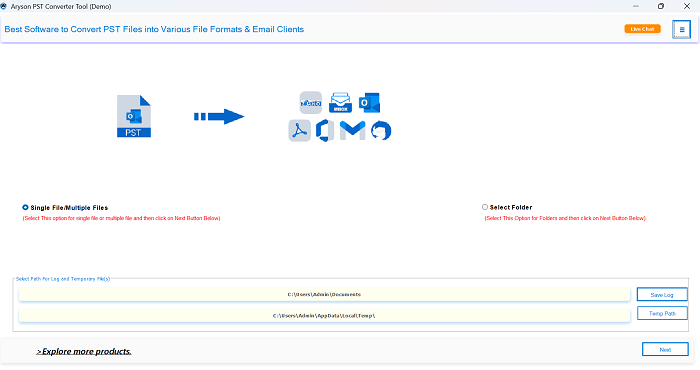
Step 02: After that, tap on Select File and pick the PST calendar data to add to the software.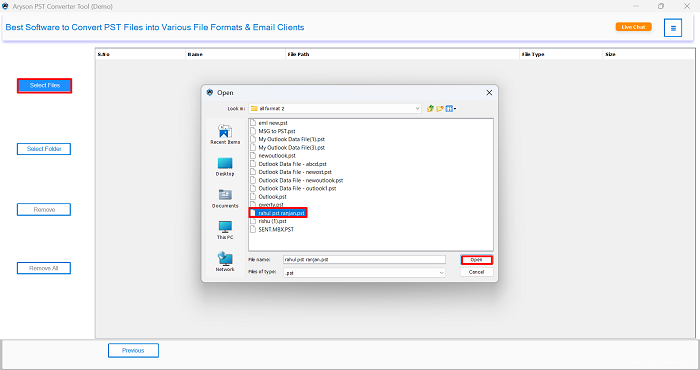
Step 03: Now, select the Calendar folder from the tree-structured list of Outlook PST data.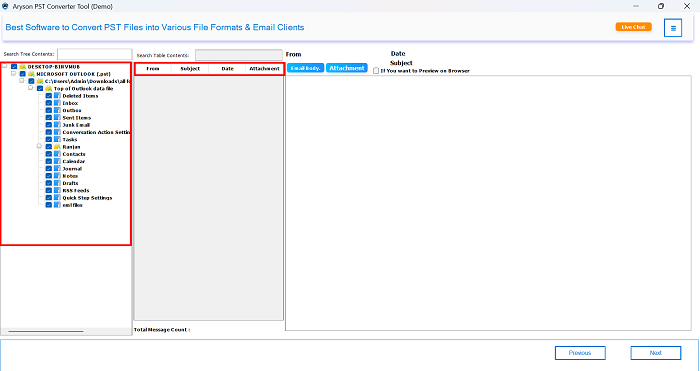
Step 04: Later, choose PDF as your desired output format from the available export options.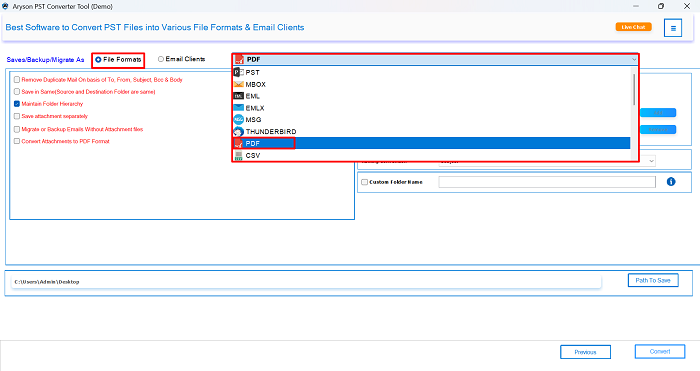
Step 05: Also, you can proceed with the additional features of the software according to your requirements.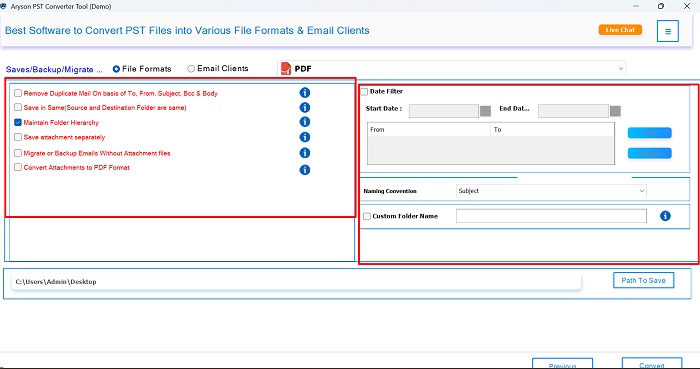
Step 06: Next, set the destination path where you want to save the final PDF file.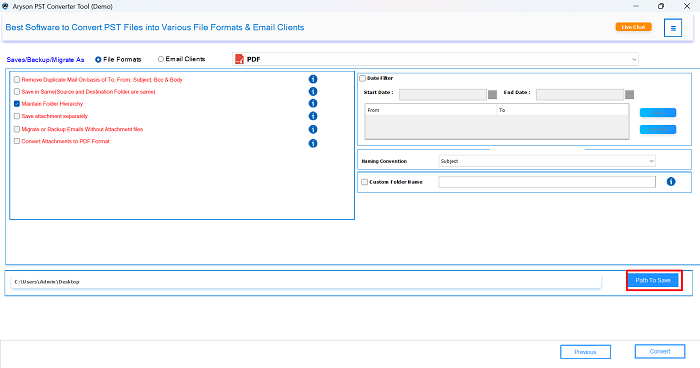
Step 07: Lastly, click on the “Convert button to download the Outlook calendar as a PDF.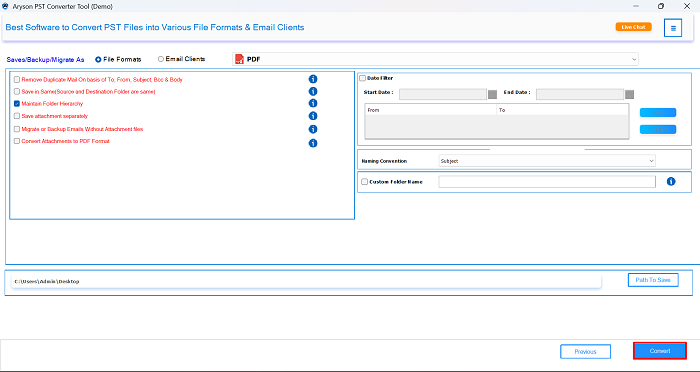
When the process is completed, it will show a confirmation message and save the calendar data as a PDF at your selected location.
Conclusion
In this guide, we explored the different ways to export Outlook calendar to a PDF. However, the manual method works well for basic needs, and the tool-based approach offers more flexibility and accuracy. With the demo version of this utility, you can download your calendar data as a PDF for free. In case you face any issues while using the software, you can frequently connect to our tech support team for further assistance.
Frequently Asked Questions:-
Q1. How can I convert a calendar into a PDF file without Outlook?
Ans: You can use the Aryson PST to PDF Converter Tool to export your calendar without
Outlook.
✅ Download and install the PST to PDF Converter Tool.
✅ Open the tool and add your PST file.
✅ Select the Calendar folder from the preview pane.
✅ Choose PDF as the output format.
✅ Set the destination path to save the file.
✅ Click Convert to export the calendar as a PDF.
Q2. Can I export my Outlook calendar as a PDF on Mac?
Ans: Yes, with the above-recommended utility, you can export your Outlook calendar as a PDF on Mac as well. Along with Windows, this software is compatible with all earlier and major versions of Mac OS.
Q3. The ‘Microsoft Print to PDF’ option isn’t showing. How can I fix this?
Ans: Go to Control Panel>>Programs>>Turn Windows features on or off, and enable Microsoft Print to PDF.
Q3. Does Outlook web support export calendars to PDFs?
Ans: Outlook Web App (OWA) doesn’t offer a direct PDF export. However, you can use your either browser’s Print option or Aryson Hotmail Backup Tool to select export as PDF to download your calendar view.
About The Author:

Rohan Wiese is a Technical Writer at Aryson Technologies. He is an expert Email Forensic, Cloud Computing, and a passionate nerd with over 10 years of experience in technical content writing. He writes about Cloud Migration, Database Recovery, Email Backup, Windows, Mac, and Tech.
Related Post