-

Written By Mithilesh Tata
-
Updated on August 28th, 2025
How to Convert EML File to MSG Format in Bulk on Mac & Windows
Many email clients like Thunderbird, Apple Mail, and Windows Live Mail save emails in EML format. However, EML files cannot open directly in Microsoft Outlook, which uses the MSG format. To access your emails in Outlook without issues, you need to change EML files to MSG.
You are definitely not alone who wants to perform this conversion. In this complete blog, we will discuss the best methods, including the Aryon EML Converter Tool to follow any of the methods. Individuals can proceed with the given methods that meet their requirements to easily convert eml to msg file format.
EML vs MSG
|
Features |
EML |
MSG |
|
File Extension |
The extension of the EML file is .eml. |
The file extension of the MSG file format is .msg. |
|
File Format |
Plain text |
Binary |
|
Size |
It is smaller in size than the MSG files. |
MSG Files are larger in size. |
|
Capabilities |
EML can contain attachments, but some Outlook-specific properties are not supported. |
It can contain attachments and all Outlook-specific properties also. |
|
Use Cases |
Importing into non-Outlook email clients and archiving email messages. |
Importing into Outlook, creating backups of Outlook messages. |
User Query: “A few days ago, I was facing an issue with my Windows Live Mail application. Then, I resolved the issue, but I want to avoid any problems in the future, so I planned to export my EML to MSG format. As I have MS Outlook installed on my system and MSG is best for storing single email messages of Outlook. But the main problem is, I do not know how to convert EML files to MSG. Please help me by providing the best software for resolving my issue.”
Best Ways to Save EML to MSG
We are going to discuss here the top techniques for the conversion of EML files to MSG in bulk for Mac or Windows. The best way to save EML files to MSG will depend on your needs and preferences. If you want a quick and easy way to convert the EML files, then using the Automated solution is a good option. Let’s discuss the manual method first for the conversion of EML files.
Method 01: Convert EML to MSG Manually
The manual method for exporting the EML files in bulk is not sufficient. So if you want an easy and error-free method, then you can skip this solution and move on to the automated solution.
Steps by Step Glance to Export the EML Files to MSG
- Open MS Outlook on your PC.
- Drag and drop your EML files into Outlook, and EML files will be saved in the Draft Folder.
- Right-click on the EML files and select Move to Inbox, and then Go to File >> Save As.
- Then, in the Save As dialog box, select Outlook Message Format (*.msg) from the Save as type drop-down list.
- After that, browse to the location where you want to save the converted MSG files.
- Enter a name for the MSG files and click Save.
- At Last, the MSG files will be saved in the specified location.
Important Note: However, this method is free to use, but this manual method is time-consuming. Along with that, you have to go through the long process that requires technical knowledge. If you don’t have technical knowledge, you may find it difficult to follow these steps. Another, there is another method that is easier to use and does not require as much technical knowledge.
Method 02: Export EML to MSG with the Aryson EML to MSG Converter
Aryson EML Converter Tool is a user-friendly software that can be used to convert EML files to PST, HTML, MSG, MBOX, and CSV also. This software offers a variety of features, including the ability to exclude attachment files from EML emails. Also, you can filter emails by date and year, and save the converted files in a specific format. Additionally, it is compatible with Mac and all versions of Windows, including Windows 11, 10, 8.1, 8, 7, Vista, and XP, to change EML to MSG in Bulk.
Simple Steps to Convert EML to MSG in Bulk on Mac & Windows
- Simply, install and run the EML Converter Tool on your system.
- Select either the Single File or the Multiple File/Folder option >>Next.
- Then, browse the EML files that you need to convert EML to MSG.
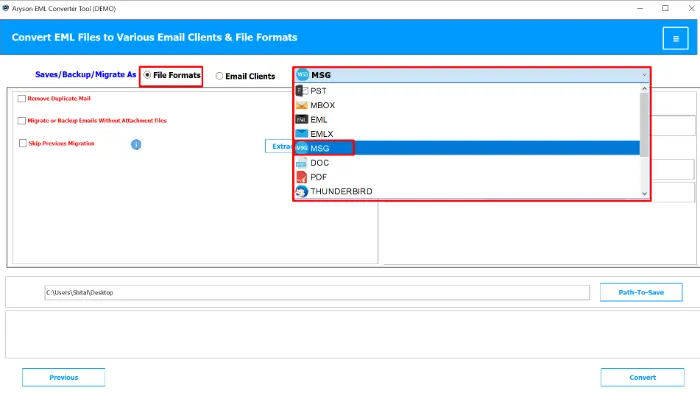
- Choose the result format as MSG from the displayed drop-down.
- After that, check all the required features and set the Saving Path.
- Click Convert to start the EML to MSG file conversion process.




Conclusion
I hope this technical blog will help to know everything about how to convert EML to MSG. Here, we also discussed the best ways for this migration. Converting EML to MSG files is a common task for Outlook users who need to quickly access their email data. Pick the above-mentioned method according to your requirement.
Frequently Asked Questions
Q1. How do I change an EML file to a MSG file?
Ans – Follow the Given Steps to convert EML to MSG using Outlook:-
✔️ Install and launch the Aryson EML Converter Tool.
✔️ Add single or multiple EML files/folders.
✔️ Preview the emails and select the ones you want to convert.
✔️ Choose MSG as the saving format.
✔️ Select the destination path.
✔️ Click Convert to start the process.
Q2. Which is the best software to convert EML to MSG file?
Ans – If you want to convert EML files to MSG format in bulk, then you can use the Aryson EML Converter software that converts EML files in bulk into MSG format.
About The Author:

Mithilesh Tata is dedicated to making the lives of his customers as simple as possible. He enjoys learning about new applications and utilities that can help people protect their data. Mithilesh also has a strong grasp on email migration & data recovery. He enjoys validating every component of the software, technical materials, and anything else that has to do with his working life.
Related Post