-

Written By Rohan Wiese
-
Updated on March 18th, 2026
How to Convert MSG to OFT (Outlook Template) File Easily
Generally, Outlook users often deal with different file formats such as MSG and OFT. An MSG file stores a single email message. But the OFT file is an Outlook template that you can reuse to create standardized emails. Most people prefer to convert MSG to OFT so that they can draft their similar emails without typing everything again. Through this blog, we will explore different methods, including Aryson MSG Viewer, to save MSG as OFT within a few clicks. Download Now Purchase Now
Overview of MSG and OFT Files
Both MSG and OFT are Outlook-related file formats. However, both file formats are used for different purposes:
- MSG File – Outlook saves the single email as an MSG file. It stores one email along with details like sender, receiver, subject, message text, attachments, and other information. Also, you can save a copy of the email in this format.
- OFT File – It is an Outlook template file used to make reusable emails. It can create emails with ready-made text, subject, formatting, and even attachments. When you open an OFT file, Outlook creates a new email from that template. So you can send similar messages again with ease.
General Scenario where You need to Export MSG to Outlook Template
There are many times when you need to convert MSG files into OFT templates, which can be useful. Some examples are given below:
- Companies often send the same type of messages, like welcomes, reminders, or follow-ups. Turning them into templates saves time.
- Support teams can create ready-made answers for common customer questions.
- If you often invite people to events, meetings, or webinars, templates make it quicker.
- Templates help keep company news or announcements consistent.
- You can save greetings, thank-you notes, or holiday wishes as templates to avoid typing them again and again.
Simply put, if you send similar emails many times, exporting MSG to OFT makes your work easier and keeps your messages consistent.
How to Convert MSG to OFT
If you want to turn your MSG files into reusable Outlook templates, there are mainly two ways to do it. The first is the manual method, where you use Microsoft Outlook to open and save the email as an OFT file. The second is the professional method, where you use a reliable MSG converter tool to handle the process more quickly and in bulk. Both methods work, but the right choice depends on how many files you need to convert and whether you want to save time and effort.
Direct Solution: Arson MSG Viewer for MSG to OFT Conversion
The Aryson MSG Viewer is reliable solution for MSG to OFT conversion. You can turn Outlook emails into ready-to-use templates without hassle. Users do not need to waste hours. You just need to select the bulk of the MSG files and convert them into OFT format. It carefully keeps every detail of your emails intact, including attachments, formatting, and metadata, so nothing gets lost in the process. Even users with little technical knowledge can manage the conversion smoothly. For the better understanding of the software, just download the demo version and utilize the free version of the software:
Simplified Steps to Convert MSG File to OFT Format
- Download the Aryson MSG to OFT Converter and install it on your system.
- Simply, select the single or multiple MSG file accordingly>>Open.
- Now, cross-verify the selected MSG content along with the preview.
- From the available list of formats, choose OFT (Outlook Template).
- After that, provide specific path where you want to save the OFT file.
- Now, proceed with the additional feature of the software accordingly.
- At last, click on the Convert Button to convert .msg to .oft format.


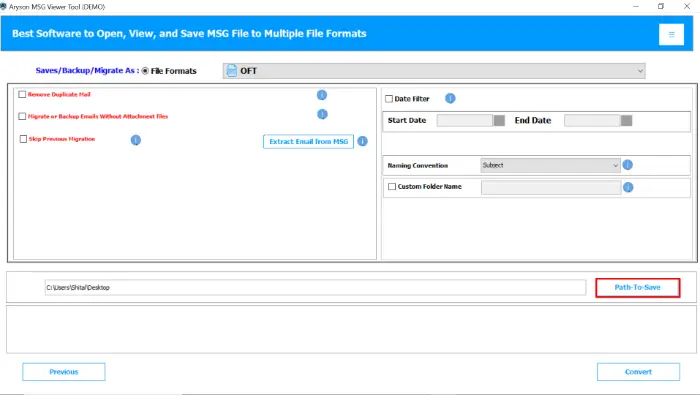


Note: The above-mentioned simple steps are quite helpful for users to create OFT file from MSG with ease. Although the MSG user comes with different file conversion needs. So, you can easily convert MSG to EML, MBOX, PST, PDF, CSV, and others as well. Users with deep technical knowledge and a small data set can proceed with the manual method as well. But if you prefer the accuracy of data, then accomplish it carefully.
Alternative Solution: Manual Method to MSG to Outlook Template File
Regular Outlook users can accomplish the MSG to OFT conversion with the help of Outlook manually. But they have to convert the MSG file one by one separately. Also, it completely depends on the Outlook version you are using. If you use the classic Outlook, then just go through the given steps:
- First, open Microsoft Outlook on your system.
- Next, locate the MSG file stored on your computer.
- Then, drag and drop the MSG file into Outlook to open it.
- After that, click on the File menu from the opened email.
- Now, select Save As from the available dropdown options.
- In the next step, choose Outlook Template (*.oft) from the Save as type field.
- Finally, pick the destination folder and click Save to complete the process.
Conclusion
In the end, the best method to convert MSG to OFT depends on your needs. With the appropriate solution, you can handle Outlook emails more easily and keep your messages consistent. Everyone is needy of time and data accuracy, so they rarely depend on the manual solution. Although if you face any technical issues while running the software, frequently connect to our tech support team, and they will guide you for further assistance.
Frequently Asked Questions:
Q1. Can I convert MSG to OFT without Outlook?
Ans: No, the manual method requires Outlook. However, the Aryson MSG viewer allows you to convert MSG files to OFT even without installing Outlook.
Q2. How do I manually convert MSG to OFT in Outlook?
Ans: Open Outlook>>Drag and drop the MSG file>>Go to File>>Save As>>Select Outlook Template (.oft)* >>Save.
Q3. Is there a way to convert multiple MSG files to OFT at once?
Ans: Outlook does not support bulk conversion. To convert many MSG files at once, you need Aryson MSG viewer to accomplish the task in a batch.
Q4. Will the formatting and attachments be preserved after conversion?
Ans: Yes, if you use Aryson MSG viewer, it will keep the original formatting, email body, subject line, and attachments intact in the OFT file.
About The Author:

Rohan Wiese is a Technical Writer at Aryson Technologies. He is an expert Email Forensic, Cloud Computing, and a passionate nerd with over 10 years of experience in technical content writing. He writes about Cloud Migration, Database Recovery, Email Backup, Windows, Mac, and Tech.
Related Post