-

Written By Harshita Sachdeva
-
Updated on June 11th, 2026
Convert PST File to ICS Format: Best Methods to Use in 2026
Query: Will my recurring calendar events, scheduled reminders, and associated notifications remain intact after migration, archiving, or data transfer?
Summary: PST, or Personal Storage File, is an open-proprietary file format that stores copies of the data items of MS Outlook on the computer or hard drive for future use. An ICS file, or iCalendar, on the other hand, is a calendar file saved in the universal calendar format. These are the text files used to store events, journal entries, etc. There are multiple email clients like MS Outlook, Apple Calendar, and Google Calendar that use these ICS files. This guide covers the effective methods to convert PST file to ICS format, including the Aryson PST File Converter to maximize data integrity.
Quickly Convert PST to ICS
- Download & Open the Aryson PST Converter on Windows or Mac.
- Load the PST files into the software >> preview them >> Next.
- Select ICS as the output format >> specify the destination location.
- Apply the required filters >> click Start Export to begin the conversion
What Calendar Data Is Retained After PST to ICS Conversion?
- Meeting titles and descriptions are fully preserved inside each exported event.
- Start and end dates transfer accurately across all calendar entries without alteration.
- Time zone data embeds correctly so events display right in every region.
- Reminders and alert settings carry over with their original trigger configurations intact.
- Recurring event patterns export with complete recurrence rules per RFC 5545.
- Organizer and attendee details remain preserved within each individual event record.
Effective Solutions to Convert PST File to ICS
Review both the manual method and the expert solution carefully before deciding. If neither fits your archive size, the professional tool below resolves it instantly.
Solution 1: Manual Approach to Convert Outlook PST to ICS
MS Outlook itself provides a built-in function to convert the calendar in the ICS format and some other additional details. The steps to convert PST to ICS are as follows:
Steps to Perform Manual PST to ICS Conversion
- Open the Microsoft Outlook application.
- Go to the Calendar button and select it.
- Now, choose the calendar that you want to convert to ICS format.
- Next, open the File menu.
- Select the Save Calendar option.
- Now, in the Save As window, type the file name and choose the destination where you want to save the file.
- You can also click on More Options for additional details.
- Here in the Date Range drop-down menu, you can select Today, Tomorrow, Specify dates, or Whole Calendar.
- Apply the required configuration and click OK.
- Now press the Save button.
Drawbacks of Manual Methods
- Users can only export one calendar at a time; no batch processing at all.
- Moreover, Microsoft Outlook must be installed on your system to perform this method.
- Large calendars take a very long time to export and often fail midway.
- Even the complex recurring events & custom reminders might get skipped during data transfer.
- Also, there is no way to filter by folder; either everything gets migrated or nothing.
Solution 2: Professional Method to Convert PST File to ICS
In order to avoid the above drawbacks, organizations and IT admins prefer Aryson PST Converter to convert their confidential Outlook data in bulk. It reads PST files directly without any need to install MS Outlook. Moreover, it exports clean, RFC 5545-compliant ICS files for any calendar platform. Even the recurring events, time zones, reminders, and attendee data are kept intact. With the help of the same software, you can import PST file into Gmail, Thunderbird, Yahoo Mail, and other email clients. Users can try the free demo version for pre-evaluation purposes.
Step-By-Step Guide to Convert Outlook Calendar to ICS
- Install and run the Aryson PST Converter >> run it as administrator.
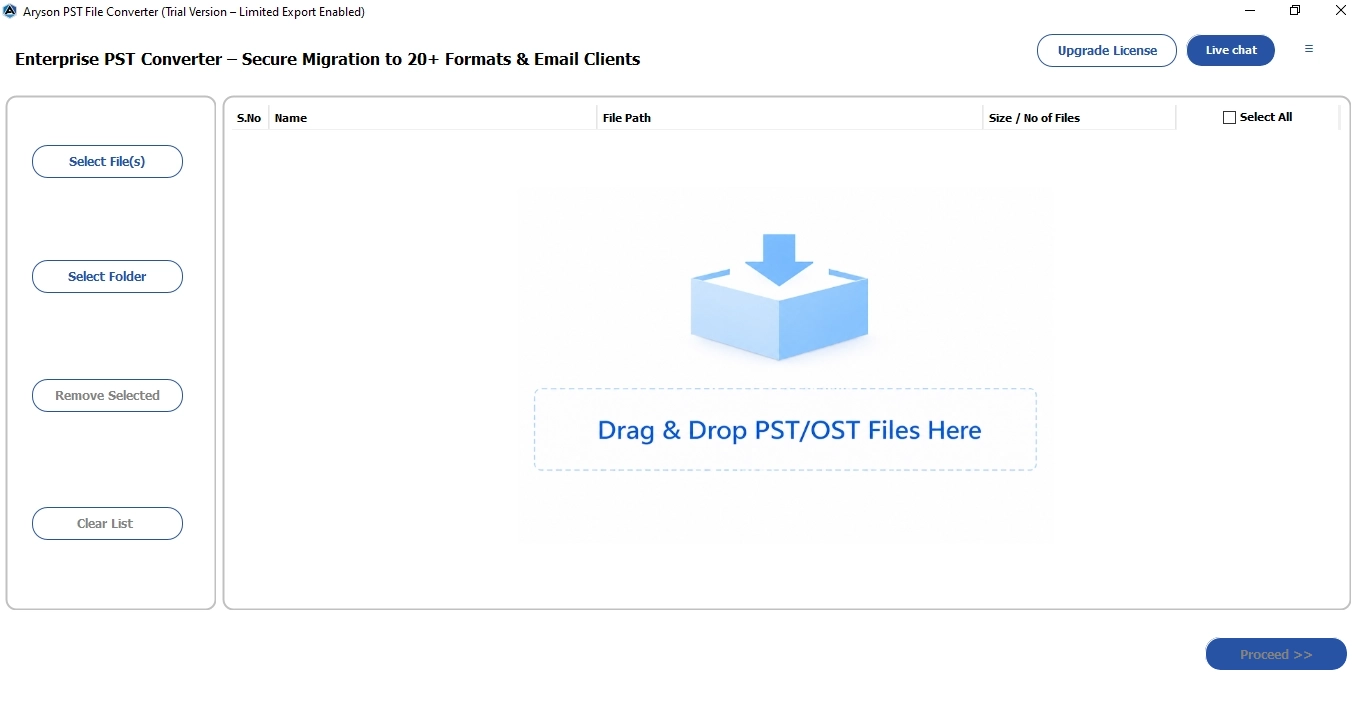
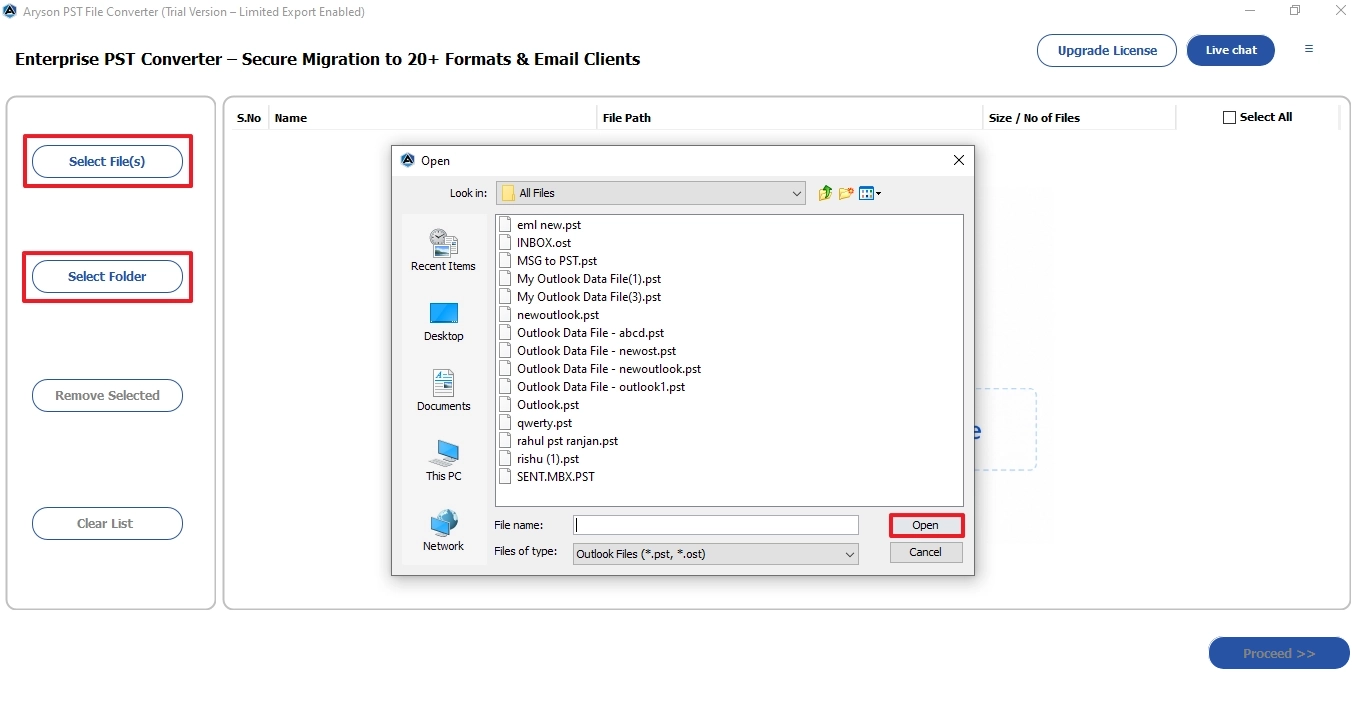
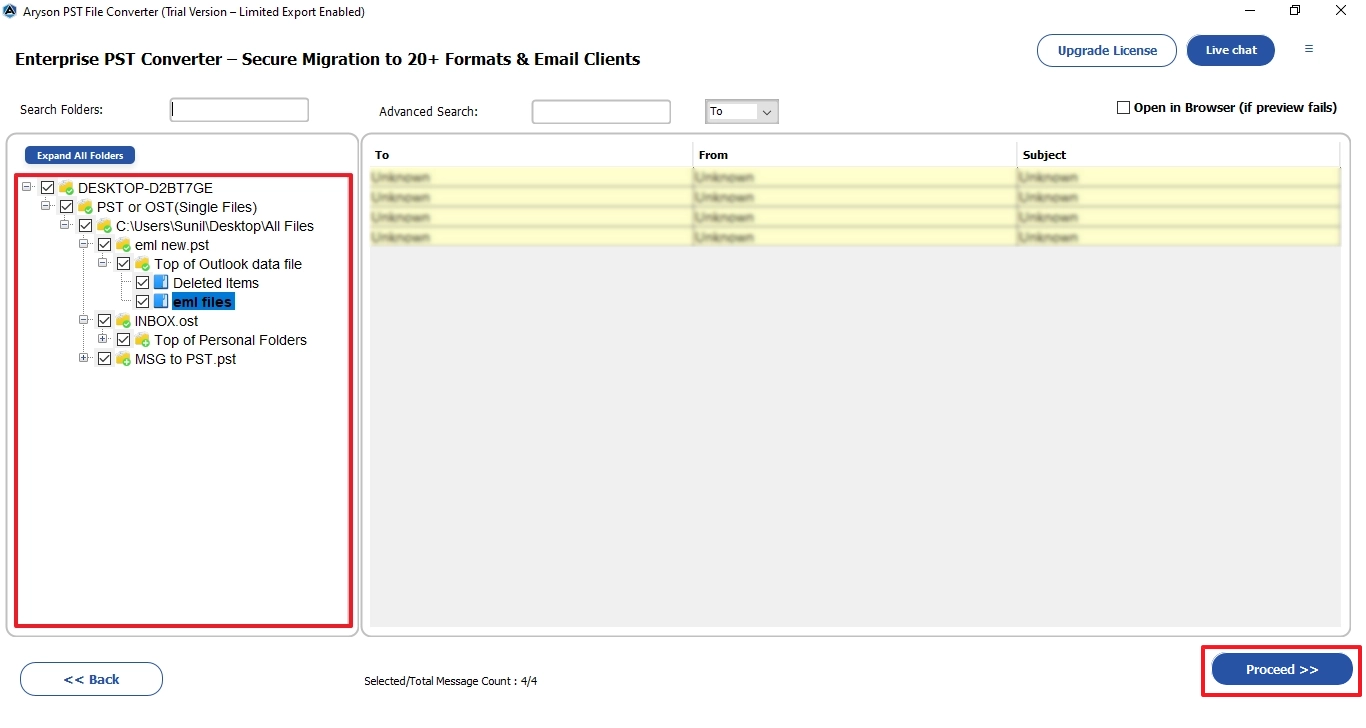
- Load the required PST files via the file selector or drag-and-drop method.
- Select the email and preview its HTML, calendars, plain text, attachments, etc.
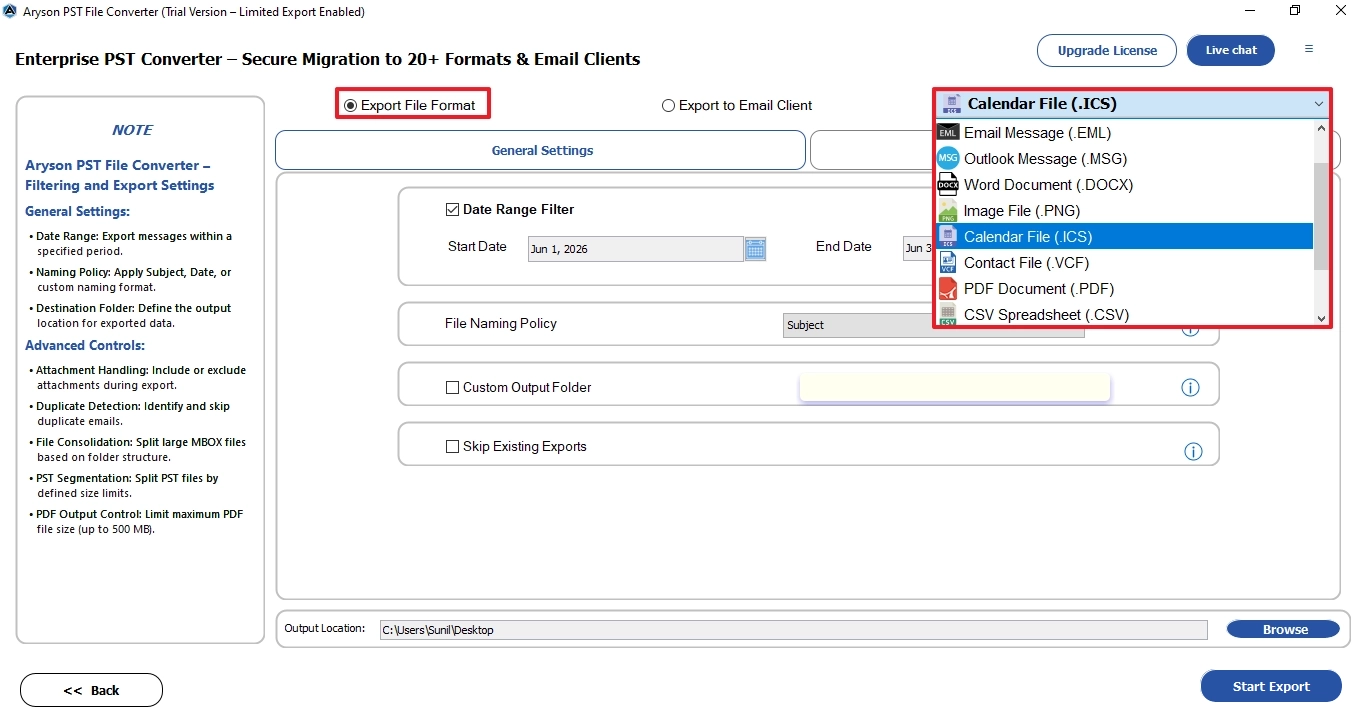
- Select ICS from the Export Format dropdown.
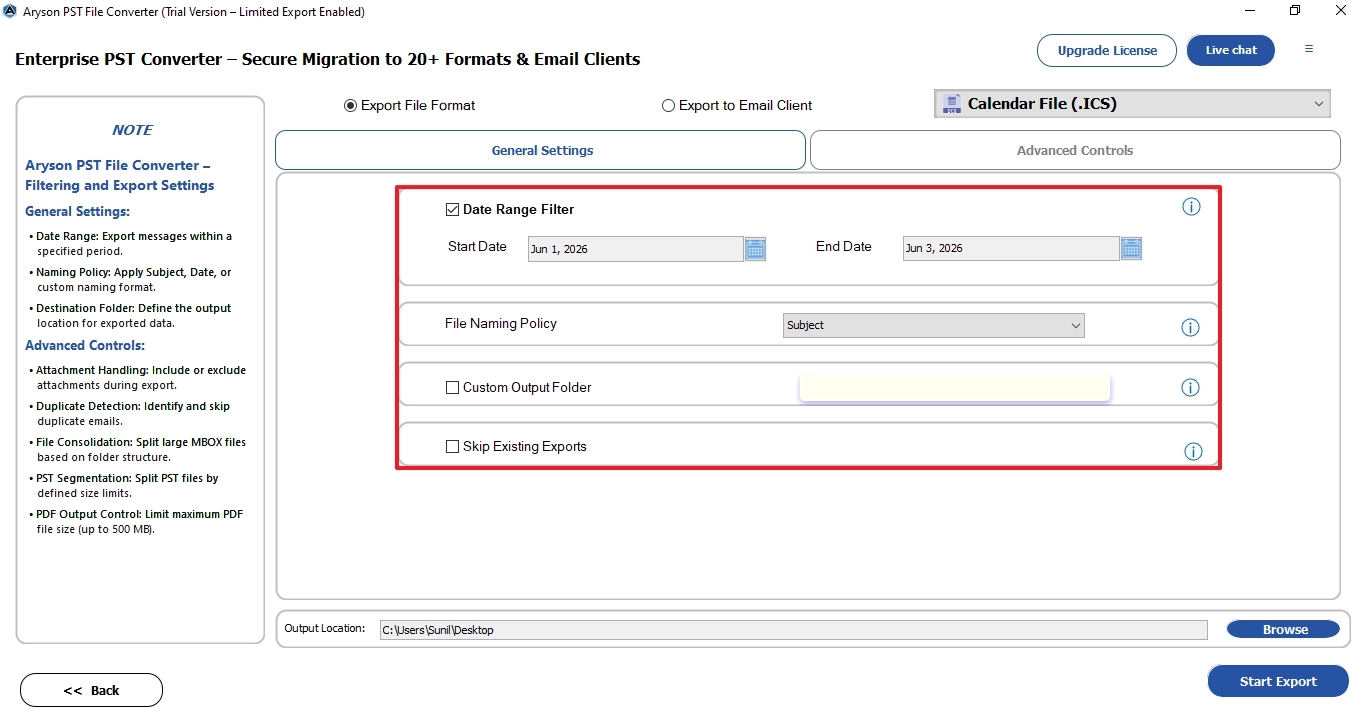
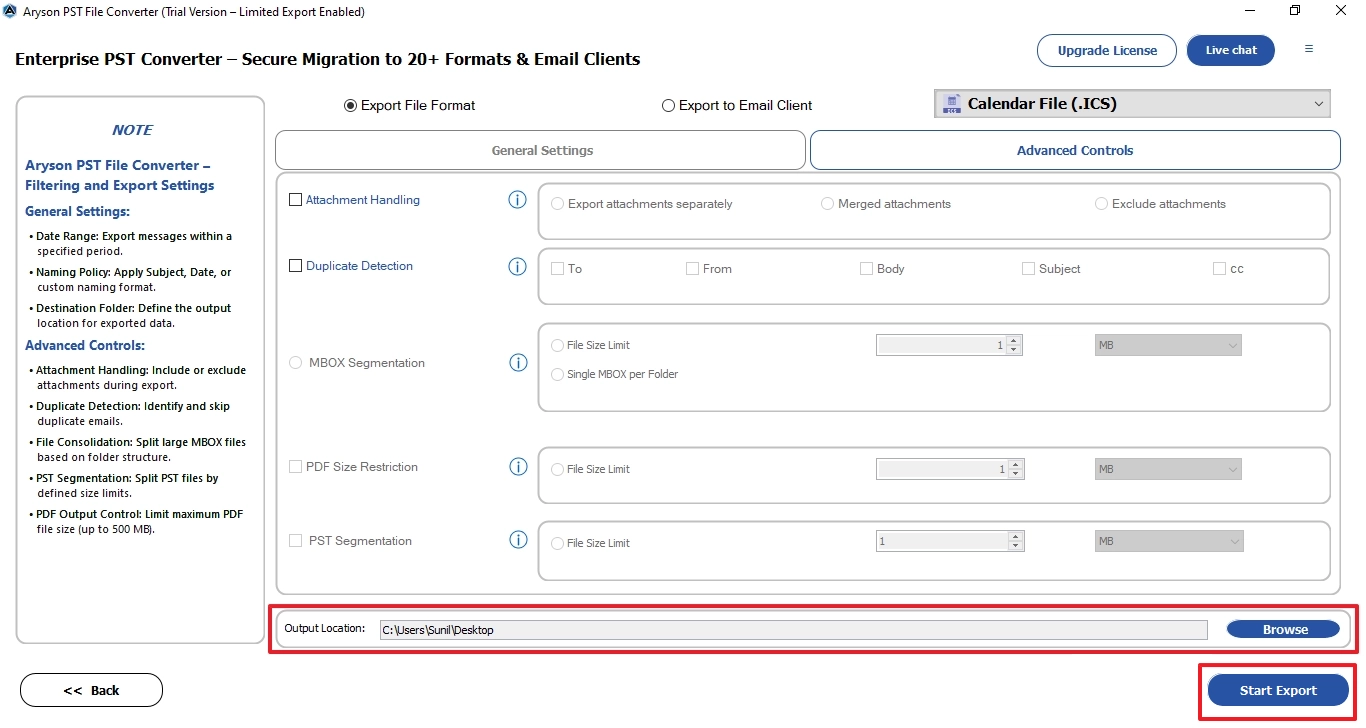
- Apply the required filters as per your requirements >> specify location.
- Click on the Start Export button to complete the conversion instantly.
Key Features of the Aryson PST Converter Tool
- You can convert PST file to JSON, CSV, PDF, MSG, etc. within one tool.
- It keeps the recurring events, time zones, reminders, & all event metadata.
- You can process multiple files at once with no size restrictions applied.
- There is no need to install Microsoft Outlook to read/export any PST calendar data.
- Advanced date-range filters allow selective conversion of specific calendar periods only.
- Using the same software, users import PST to shared mailboxes.
- Free demo lets IT experts verify export accuracy before committing to a paid license.
Oliver’s Success Story
Oliver, an IT admin from Chicago, had to migrate 3 years of Outlook calendar data—over 4,200 recurring events—to Google Calendar after her company switched platforms. Manual export kept stopping at 800 events. She used Aryson PST Converter to convert PST file to ICS (iCalendar) format, and everything was kept fully intact in under 6 minutes.
Conclusion
To convert PST file to ICS, you can use Outlook’s built-in functionality, but it could lead to disruption of calendar data. Hence, opt for the professional tool that guarantees that your data will remain safe. For personalized assistance, reach out to the tech support team via live chat and phone support.
Common Questions Asked by Real Users
Q.1 How to Convert PST to ICS With & Without Outlook?
Ans: However, you can use the manual method, but it is recommended to use the Aryson PST Converter. Simply load the PST file, preview calendar data, select ICS as the output format, and click Start Export. No Outlook installation required.
Q.2 Which calendar data gets included when converting PST to ICS?
Ans: The Aryson PST Converter exports all calendar data from PST files—appointments, meetings, recurring events, reminders, event descriptions, attendee details, and timestamps. The entire calendar folder structure is preserved during conversion so nothing is left behind in the output ICS file.
Q.3 How do I convert a PST file to ICS and import it into Google Calendar?
Ans: Use Aryson PST Converter to export the PST calendar as an ICS file. Then open Google Calendar >> Settings >> Import >> upload the ICS file >> select the destination calendar >> click “Import.” All events transfer directly into your Google Calendar account.
Q.4 Does the conversion process preserve recurring events and reminders from Outlook?
Ans: Yes. Aryson PST Converter fully preserves recurring events, reminder settings, event frequencies, and exception dates during PST to ICS conversion. The output ICS file reflects the original Outlook recurrence rules so the events appear correctly in any calendar application that supports the ICS format.
Q.5 Can I filter calendar events by date range when converting PST to ICS?
Ans: Yes. Aryson PST Converter includes a built-in date-range filter that lets you select a specific start and end date before conversion. Only the calendar events falling within that range get exported to ICS – useful when you need a selective migration.
Q.6 Does the software have a skip duplicate or skip option during conversion or migration?
Ans: Yes, Aryson PST Converter includes a built-in duplicate-skip option. Before starting the conversion, you can enable this setting so the software automatically identifies and skips duplicate calendar entries. This prevents repeated events from appearing in the output ICS file or the destination calendar application.
Q.7 What licensing options are available for the PST to ICS converter software?
Ans: Aryson PST Converter is available in a free demo version and a paid licensed version. The demo lets you preview PST calendar data before purchase. The paid licence unlocks full conversion with no item count restrictions. Licensing options typically include single-user and enterprise plans for organizations.
Q.8 Does the PST to ICS software offer customization options during conversion?
Ans: Yes. Aryson PST Converter offers several customization options—date-range filtering, selective folder conversion, duplicate skipping, and destination path selection.
Q.9 Converting PST to ICS is showing errors midway. How do I get help?
Ans: First, verify the PST file is not password-protected or corrupted. Try reloading it in the software’s preview mode to check accessibility. If errors persist, contact the Aryson support team directly via their official website – they provide technical assistance for mid-conversion failures, file-specific issues, and licensing queries.
Q.10 How does the software handle large PST files with thousands of calendar entries?
Ans: Aryson PST Converter is built for large-scale conversions. It processes PST files of any size without freezing or crashing, handles thousands of calendar entries in a single run, and maintains full metadata integrity throughout. The batch-processing engine ensures speed and stability even when working with enterprise-grade PST archives.
About The Author:

Harshita Sachdeva, a professional technical writer at Aryson Technologies, specialize in delivering clear, hands-on documentation for data management, migration, and recovery solutions. With a meticulous, reader-first approach, I break down complex technical processes into simple, actionable content - helping IT professionals and decision-makers tackle challenges efficiently.
Related Post