




×

Your Aryson download task is in progress here

Screens

Video

Guide

Eula

EML Components and Data Displayed by Aryson EML Viewer

Aryson EML Viewer lets you explore every aspect of your EML files. It provides a clear view of all essential email components and associated data for easier analysis and management.

Component Description
Sender Email Displays the sender’s email address and name.
Recipient Email Shows the recipient(s) of the email (To, Cc, Bcc fields, if available).
Subject Line Displays the subject of the email.
Date & Time Shows the exact date and time the email was sent or received.
Email Preview Displays the full message body for reading directly in the tool.
Attachments Lists all attached files with file name and type; allows previewing attachments.
Attachment Type Indicates the type of the attached file (e.g., PDF, DOC, Image).
File Details Table Shows a structured list of attachments including Serial Number, File Name, and File Type.
Folder Structure Shows the location of the EML file within the folder hierarchy on your system.
Search Function Allows searching emails by sender, subject, or date within the loaded EML files.
Preview on Browser Option to view email content in a web browser for better readability.

Aryson Free EML File Viewer Tool- Rating & Reviews

See what our users have to say about the Aryson Free EML File Viewer Tool

Expert Reviews

Rating & Reviews

Best EML Viewer Software with the Advanced Key Feature

Open EML Files Without Email Client

Open EML Files Without Email Client

Aryson EML Viewer allows you to easily open, view, and read EML files without any email application, like Outlook, Thunderbird, or Windows Live Mail. You can directly load and access your EML emails within the software interface. This makes it a perfect solution for users who don’t have an email client installed but still want to view their EML messages securely.

View Complete Email Components Clearly

View Complete Email Components Clearly

The EML File Opener provides a detailed view of every email element such as sender, recipient, subject line, date, and message body. It ensures users can read their emails in their original layout without missing any information. Every component is displayed in an organized way for better readability and understanding.

High Speed

Preview EML Attachments

With Aryson EML Viewer, you can open and preview attachments like images, documents, and other files directly from the interface. There’s no need for external tools to check your attached files, making the viewing process seamless and time-saving. It is completely free to use and reads EML files locally without saving or sharing your data externally.

Inspect Full Email Headers and Metadata

Inspect Full Email Headers and Metadata

This Thunderbird EML viewer allows users to access and analyze complete header details, including message ID, routing path, sender’s IP, and email source. Such information is essential for forensic experts, investigators, or IT professionals who need to verify the authenticity or trace the path of an email.

Export EML Files to Multiple Formats

Export EML Files to Multiple Formats

Aryson EML Viewer not only previews emails but also lets you export EML files into various formats like PST, MBOX, EML, MSG, DOC, PDF, CSV, EMLX, and Thunderbird. This flexibility helps users easily move their data between different platforms or email clients without data loss.

Supports EML Files from All Email Clients

Supports EML Files from All Email Clients

The Free EML File Viewer Tool supports EML files generated from various email platforms, including Outlook Express, Thunderbird, Windows Live Mail, Apple Mail, and eM Client. No matter which client your EML file comes from, Aryson EML Viewer ensures full compatibility and a smooth viewing experience.

Maintains Original Folder Structure and Formatting

Maintains Original Folder Structure and Formatting

During the viewing and export process, Aryson Free EML File Viewer Tool retains the original folder hierarchy and email formatting. This means your data remains organized just like in the source email client. So that you can easily read EML files online.

Filter with Date Range

Save All PDF Attachments in a Separate Folder

This feature extracts all attachments from emails and saves them in a dedicated folder when converting EML files to PDF. It simplifies file management and keeps attachments separate. As an outcome, it becomes easy to locate and use them without opening individual emails.

Convert Attachments to PDF Format

Convert Attachments to PDF Format

Aryson EML Viewer provides an option to convert Attachments to PDF Format. This functionality automatically converts email attachments to PDF during migration. It ensures compatibility across different devices and software. An individual can share, view, or print attachments in a hassle-free manner.

Export Emails Without Attachments

Use the Date Filter to Export Select Emails

Aryson EML Viewer includes an advanced Date Filter option that lets you select a specific date range. You can set a start and end date to export only the required emails. This feature helps users save time by avoiding unnecessary data conversion.

Split Large PST Files During Export

Split Large PST Files During Export

When exporting EML files to PST format, the EML file reader provides an option to split oversized PST files into smaller, more manageable parts. This prevents Outlook performance issues and ensures your data remains well-organized.

Export Emails Without Attachments

Export Emails Without Attachments

If you only need the email content and not the attachments, you can use the tool’s “Exclude Attachments” feature. This saves time and reduces file size, especially when exporting large batches of EML data. With the help of this feature, you can free up space and delete unnecessary attachments.

Remove Duplicate EML Emails

Remove Duplicate EML Emails

Aryson EML Viewer includes an additional feature to detect and remove duplicate emails before saving or migrating your EML files. It ensures that your final output remains clean, organized, and free from redundant data. Simply mark the Remove Duplicate Feature and utilize this option for your output formats.

Skip Previously Migrated Emails

Skip Previously Migrated Emails

The “Skip Previous Migration” feature allows users to avoid re-exporting the same emails. It helps prevent duplication and ensures that only newly added emails are saved or migrated. As a result, this best EML Viewer Software makes future exports faster and more efficient.

Extract Targeted Data from EML Files

Extract Targeted Data from EML Files

Aryson EML Viewer offers a powerful data extraction option that lets you extract specific elements such as email addresses, phone numbers, URLs, or attachments. You can save this extracted data into CSV or XLSX formats for quick access or analysis.

Compatible with All Windows Versions

Compatible with All Windows Versions

Aryson EML Viewer works perfectly on all Windows operating systems, including Windows 11, 10, 8, 7, Vista, and XP. Its broad compatibility ensures that every user can access their EML files without facing system limitations.

How to Use Aryson PST Contacts Export Tool

How to Use the Aryson Free EML File Viewer Tool

The Aryson Free EML File Viewer is a powerful yet simple tool that lets users open, view, and read EML files. Whether your EML files come from Outlook Express, Thunderbird, Windows Live Mail, or Apple Mail, this software ensures smooth and secure access. Follow the steps below to learn how to use the Aryson Free EML File Viewer effectively:

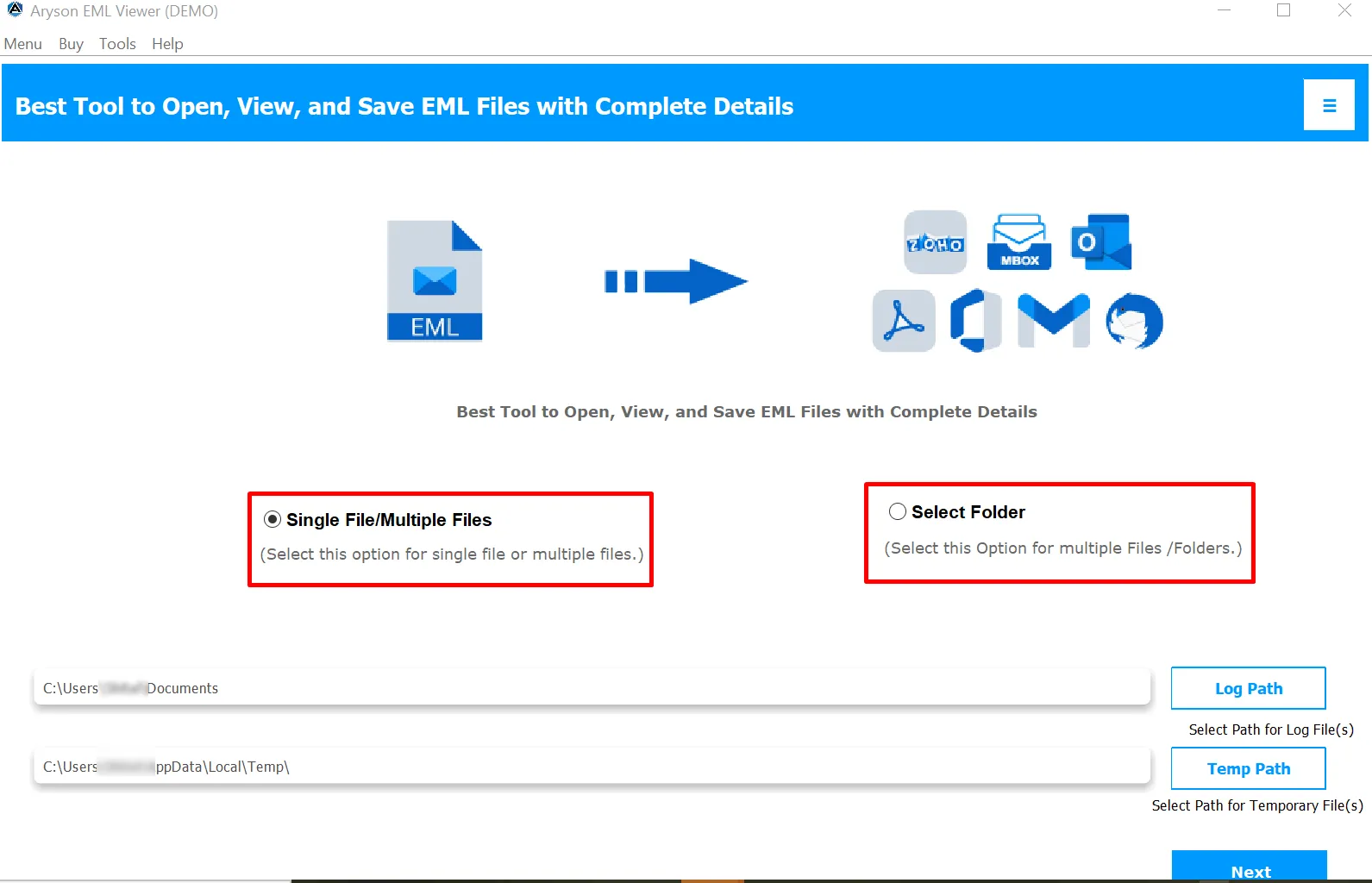
  • Step 01: Download the Aryson Free EML Viewer Tool on your system.
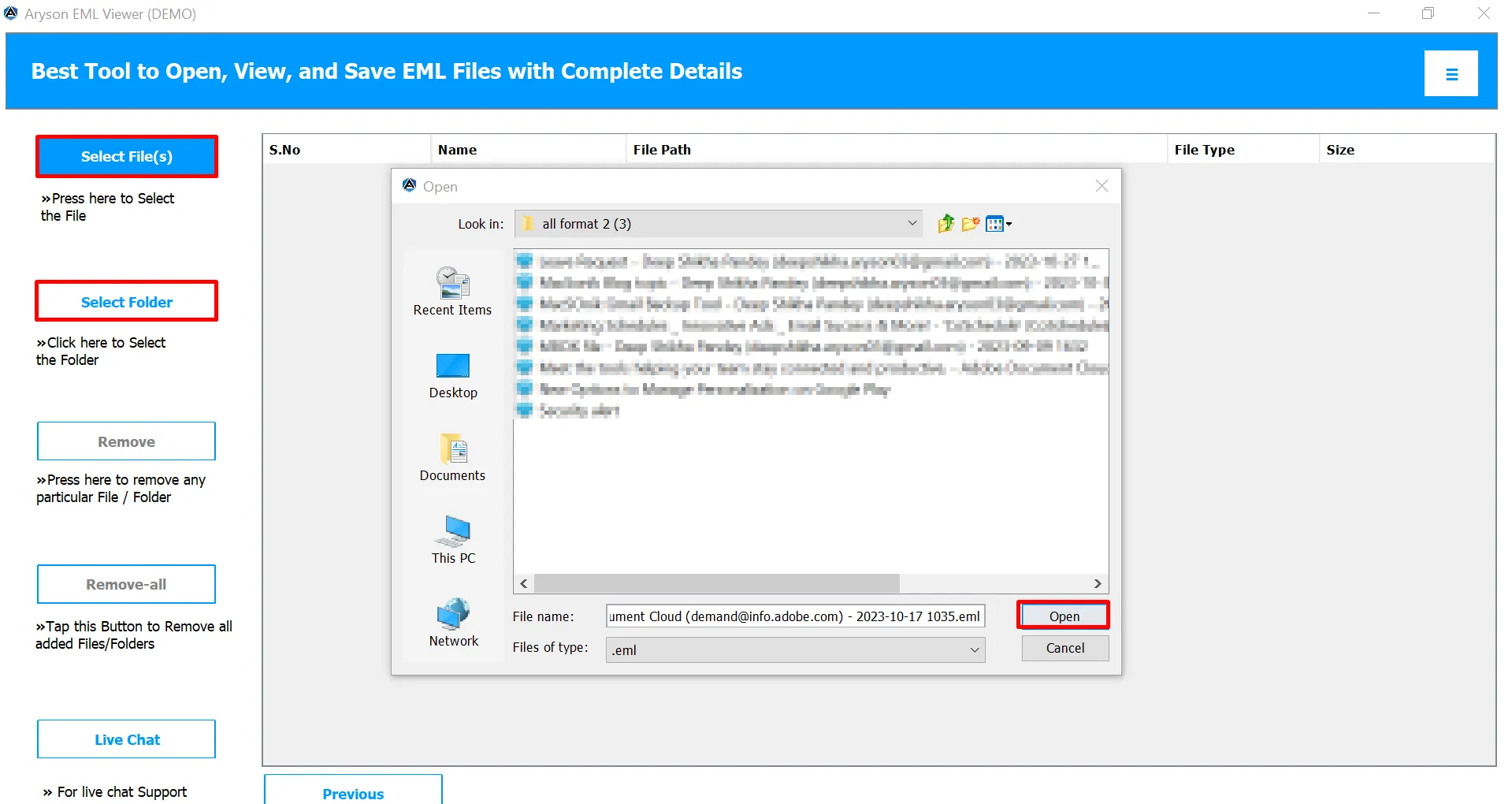
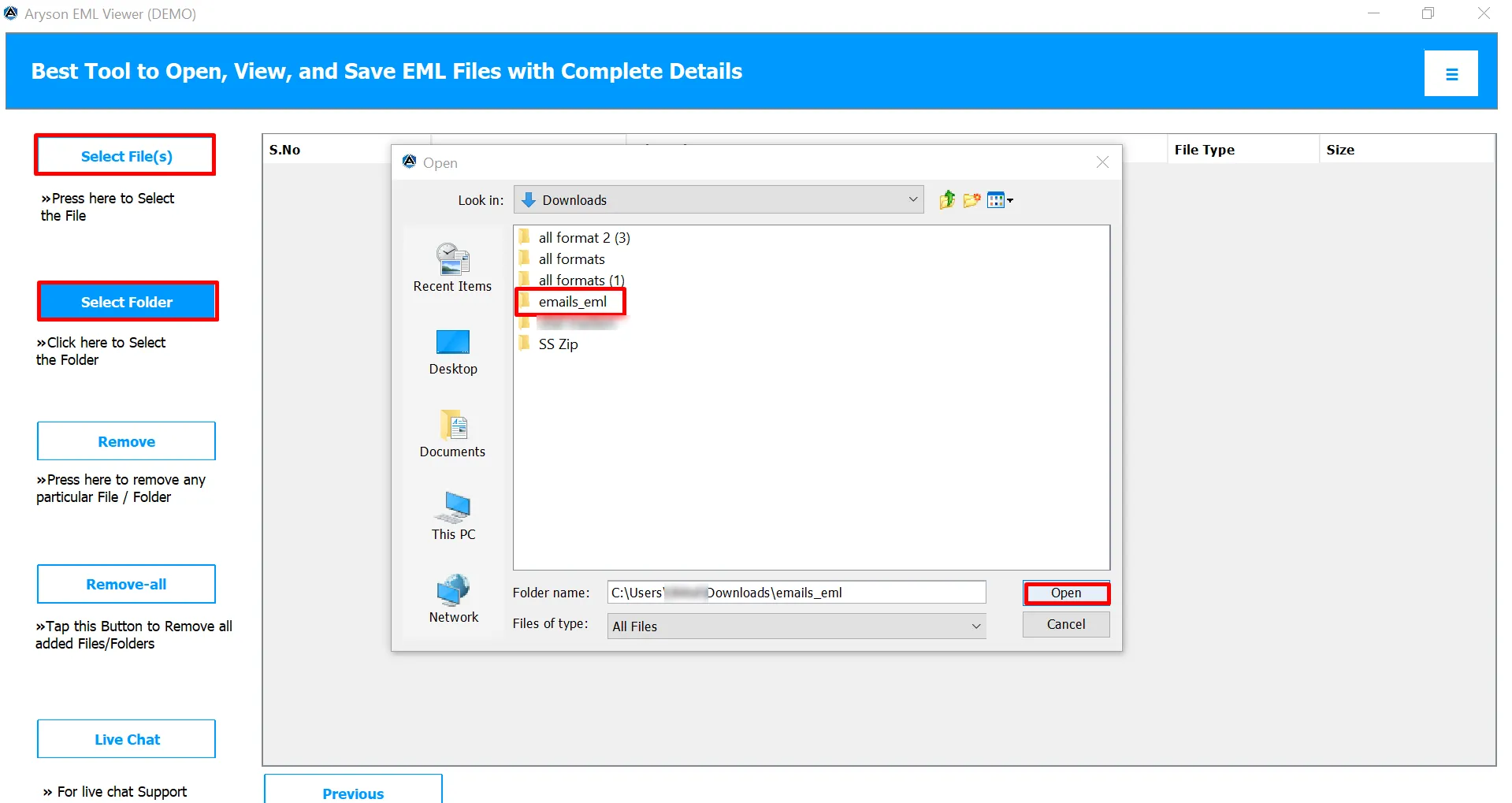
  • Step 02: Click on the Select File or Select Folder button to browse and select your EML files.
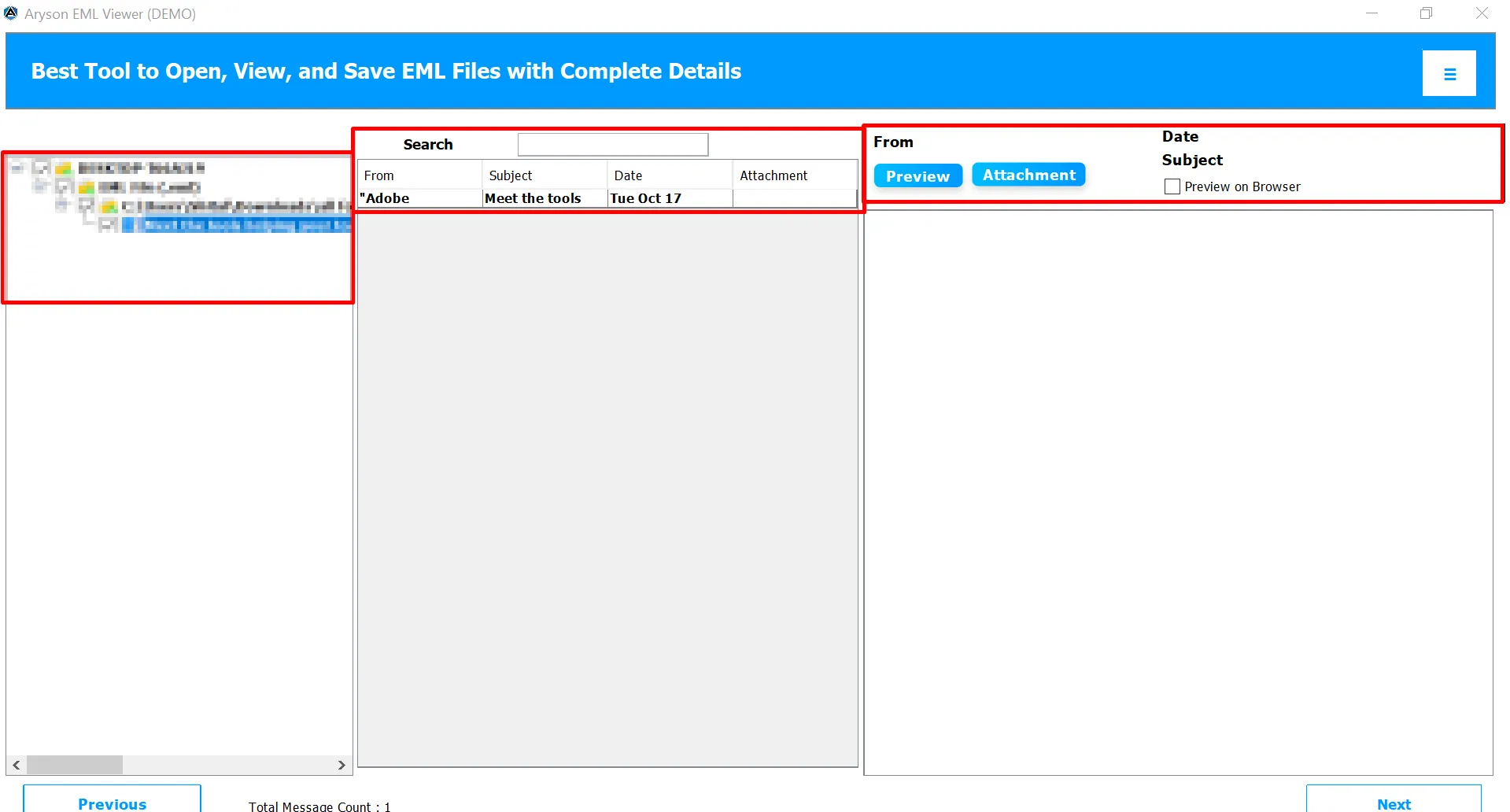
  • Step 03: Now, it displays complete details like sender, recipient, subject, date, message body, and attachments.
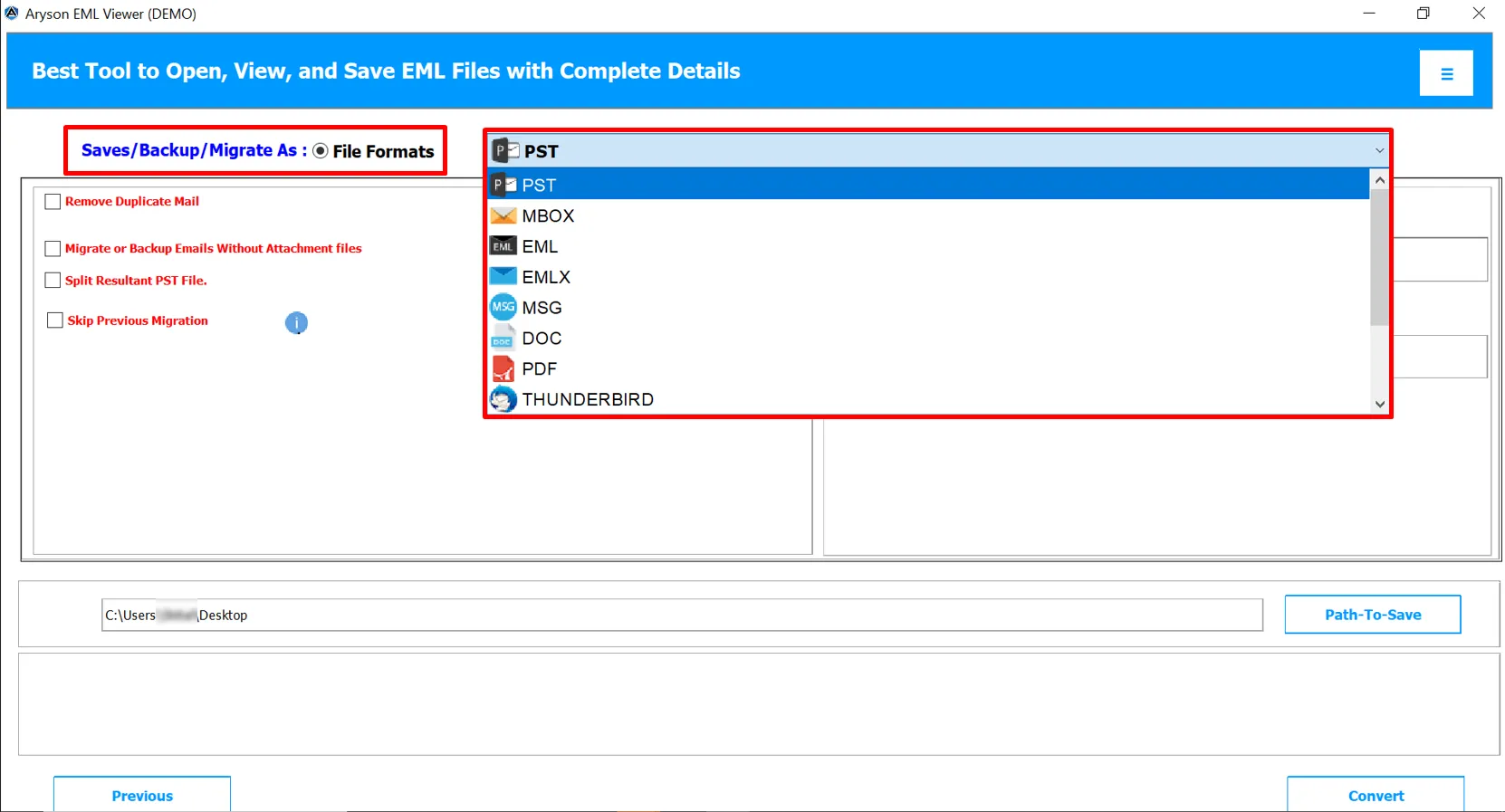
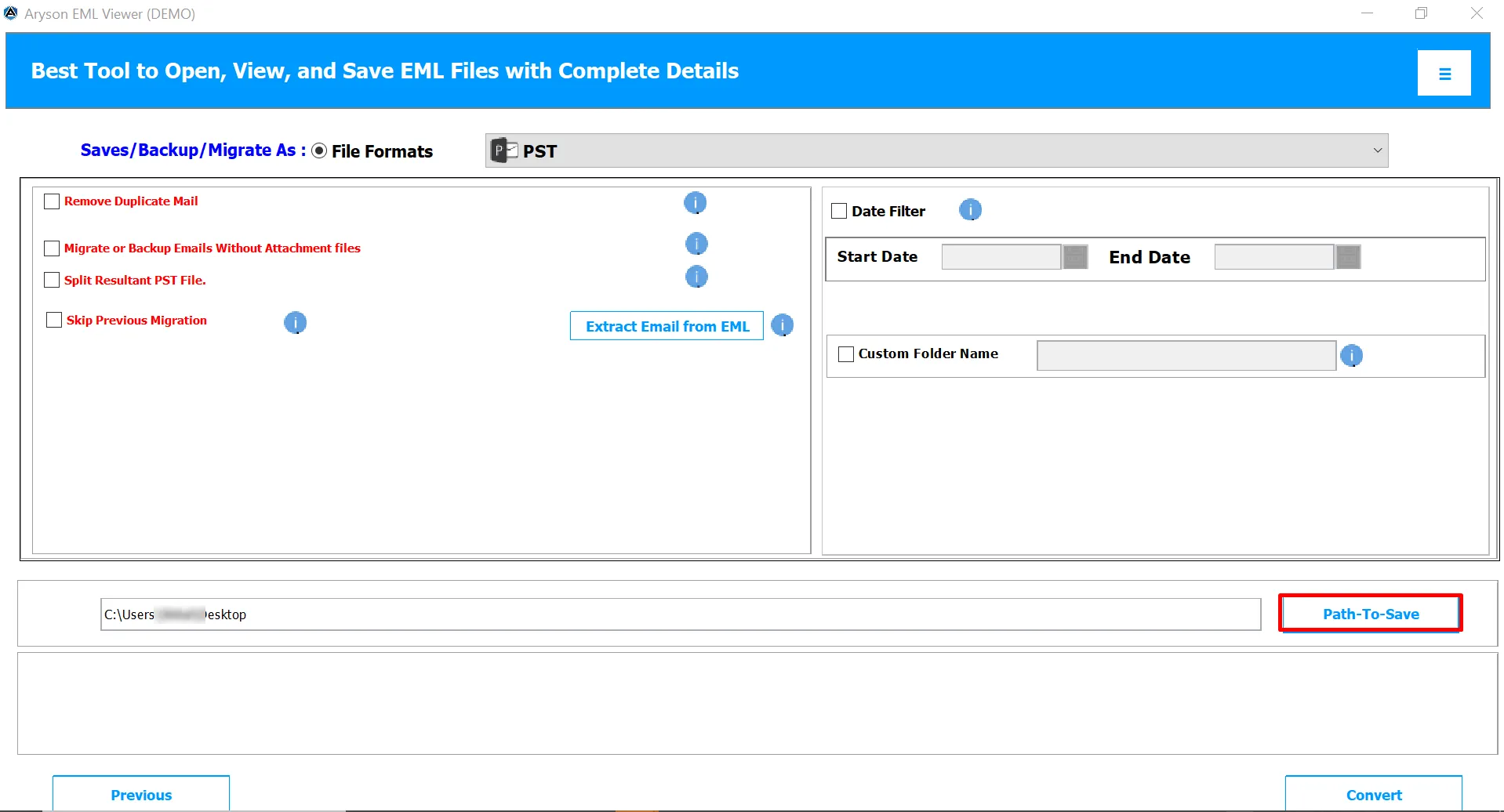
  • Step 04: If you wish to export your EML files into other formats, select from the dropdown.
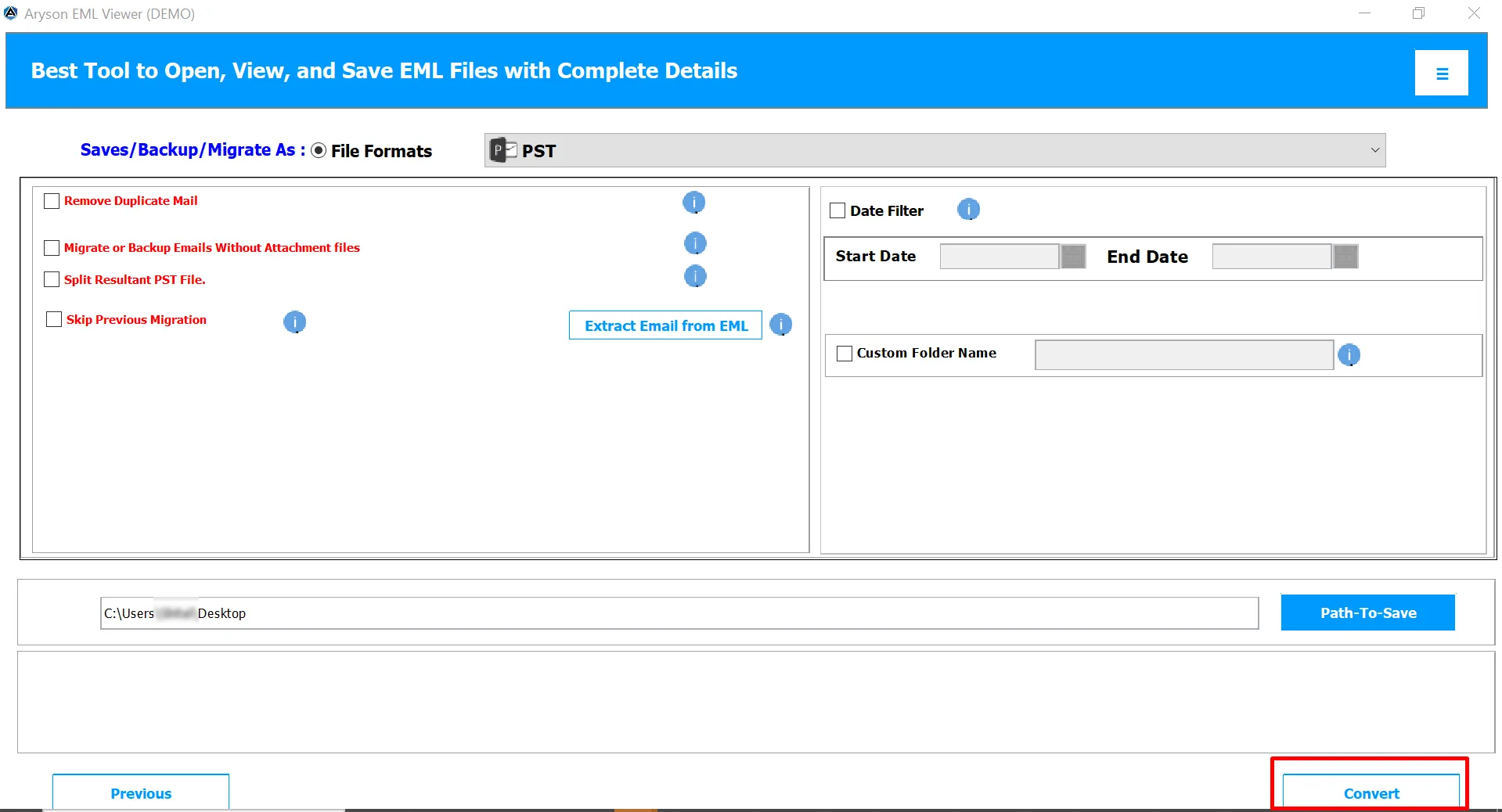
  • Step 05: Assign a path to save and click on the Convert button to begin the process.

Aryson Free EML File Viewer Tool: System Specifications

Software Download

(Windows)

Download Now


Size: 284MB Version: 25.10

Trial Limitations

The Aryson EML Viewer Free Version allows users to open, view, and read unlimited EML files with complete details such as sender, subject, date, and attachments. However, the free version lets you convert only the first 50 EML emails to other file formats like PST, MBOX, MSG, PDF, and DOC. To remove this restriction, along with full access to all advanced features, you need to upgrade to the Aryson EML Viewer Premium Version.

Requirements & Supported Versions

Processor:Intel® Core™ 2 Duo CPU E4600 @ 2.40GHz 2.39GHz

Hard Disk Space: 500 MB of free hard disk space required

RAM: 4 GB of RAM (4 GB is recommended)

Supported Platforms

Windows OS: Windows 11, 10, 8.1, 8, 7, Vista, XP, 2000, 98, NT, and 95.

Software Prerequisites

  • If you are operating Windows OS 11, 10, 8, or 7 (32-bit or 64-bit) then you must launch the tool as an Administrator.
  • Turn off the Windows Firewall for proper installation.
  • Disable the Antivirus programs.

FAQ

Request For Software Customization

If you need to customize Aryson Software or need some additional specific features, then provide the software customization Request Quote.

Aryson EML Viewer Software: Free & Premium Version

Get an overview of the Free and Premium versions of the EML Viewer to view EML Files:

Product Features Free Version Premium Version
Open and View EML Files Without Email Client
Preview Attachments (Images, Documents, etc.)
View Full Email Headers and Metadata
Supports EML Files from All Email Clients
Advanced Search Option for Specific Emails
Export EML Files to PST, MBOX, MSG, PDF, DOC, CSV, and More 50 Emails Per Folder Export Complete Mailbox
Apply Date Filter
Exclude Attachments Feature
Skip Previously Migrated Emails
Save Output with Custom Folder Name
Remove Duplicate Emails Before Export
Compatible with All Windows Versions
Technical Support
Money Back Policy

Frequently Asked Questions:

Ans.Yes, the Aryson EML Viewer supports batch viewing. You can load and open multiple EML files simultaneously, making it easier to review large sets of email data quickly.

Ans. Absolutely. The software lets you preview all attachments, such as documents, images, or other files, directly from the interface without any additional tools.

Ans. Yes, the advanced version of Aryson EML Viewer allows you to export EML files into different formats such as PST, MBOX, PDF, MSG, DOC, and more. This makes email migration or conversion easier for users.

Ans. No. Aryson EML Viewer is a read-only tool. It ensures that the original data, folder hierarchy, and email formatting remain completely intact.

Ans. Yes, it supports EML files created by various email platforms, including Thunderbird, Windows Live Mail, Outlook Express, eM Client, and Apple Mail.

Ans. Yes. Aryson EML Viewer is fully compatible with all Windows operating systems, including Windows 11, 10, 8, 7, and earlier versions.

Ans. No, there’s no file size restriction. This software can easily handle small as well as large EML files without affecting performance.

Ans. Yes, you can extract targeted data such as email addresses, attachments, URLs, or phone numbers and save them into CSV or XLSX format.

Ans. Yes, Aryson EML Viewer offers a free version that allows users to open and read EML files. For advanced features like export and migration, you can upgrade to the full version.

Ans. Admin consent is required if the application requests permissions beyond an individual user’s data, such as organization-wide or multi-user access. In these cases, only a Microsoft 365 administrator can approve the login for security reasons.

Trusted by IT Professionals & Enterprises Worldwide

See what our IT professionals and businesses say about their experience with the Portable EML Viewer.

review-rating