How EDB to PST Converter Works

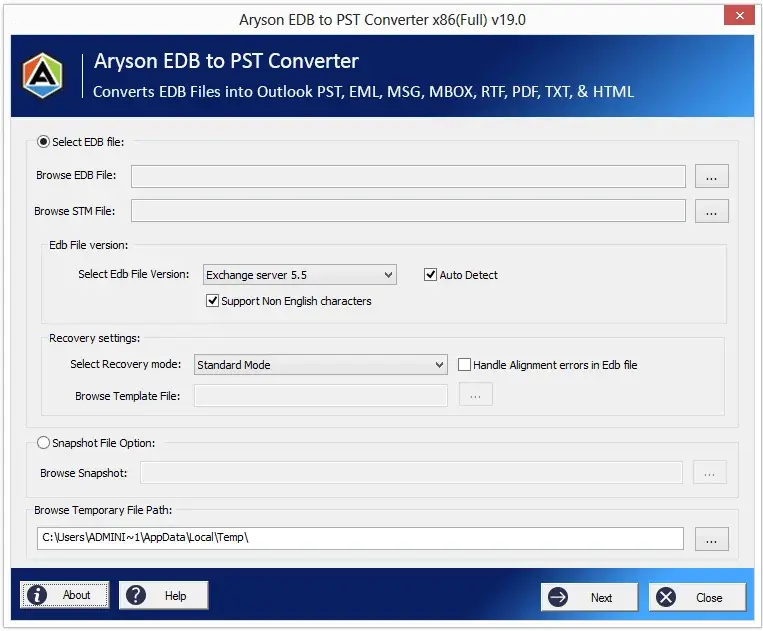
Aryson EDB to PST Converter is the most trusted tool designed with a user-friendly comfortable interface that the software takes only a few steps to convert Exchange EDB mailboxes to PST files.

Convert EDB File to PST step by step using software:

  • Install Aryson EDB to PST Converter.
  • Click on the "Browse" button and select Exchange EDB and STM File.
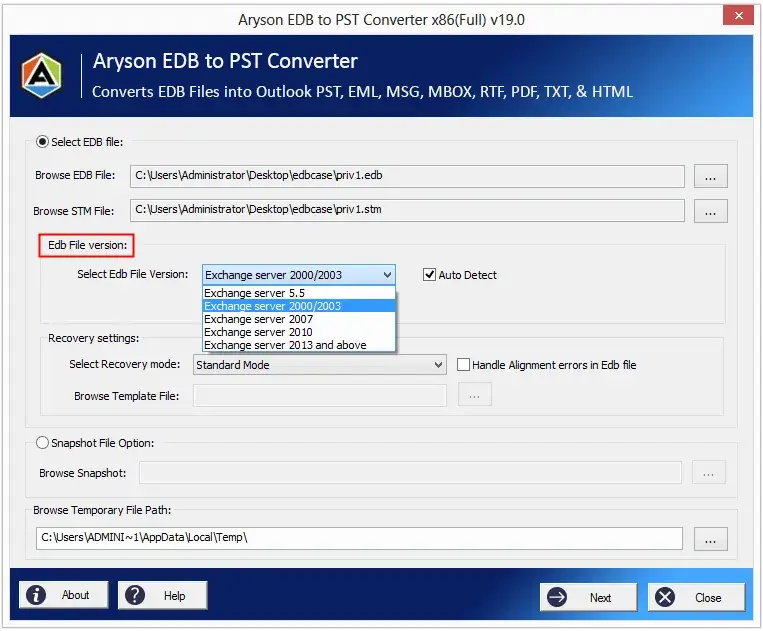
  • Choose the Exchange Server version of the EDB file.
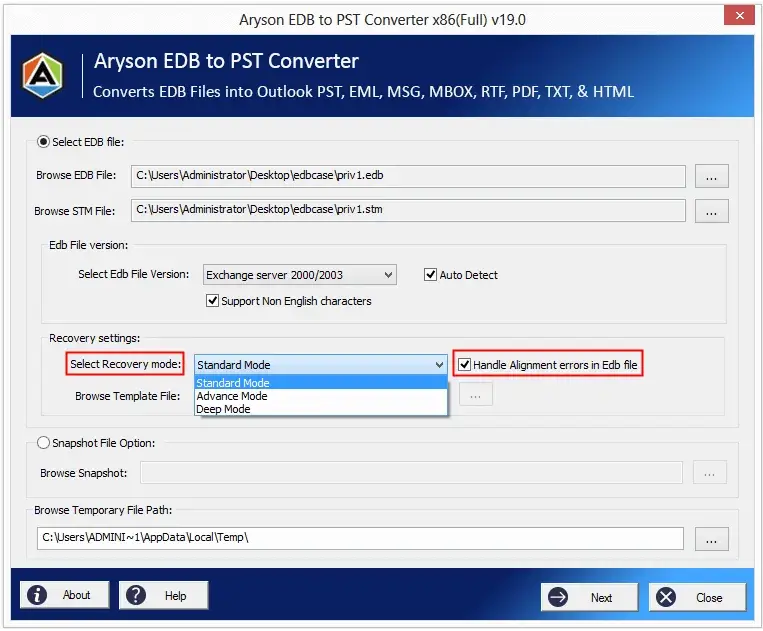
  • Select the recovery modes options to handle the alignment error in the EDB file.
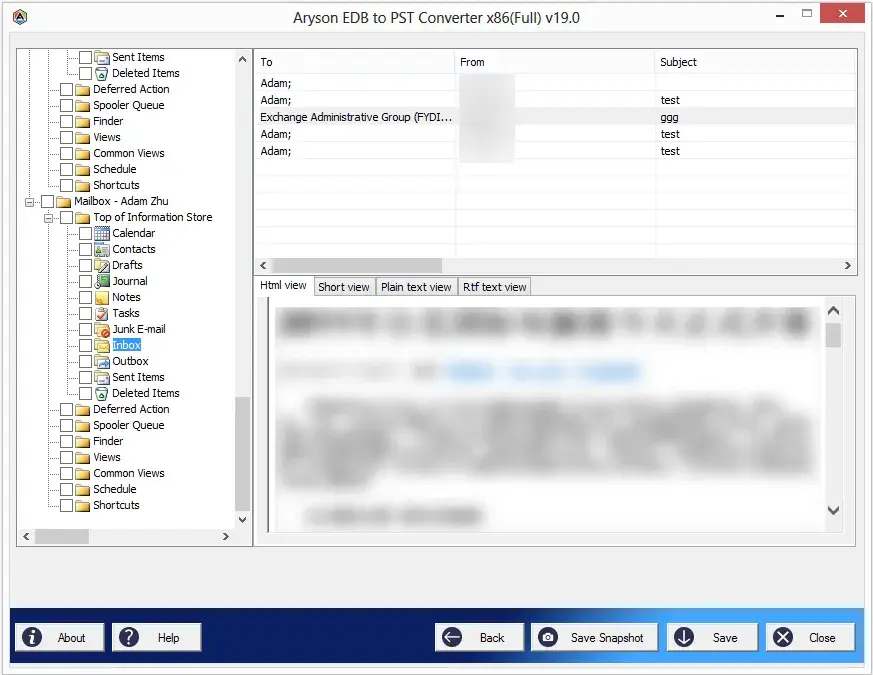
  • Click on the Next button to preview the mailboxes of the Exchange EDB file.
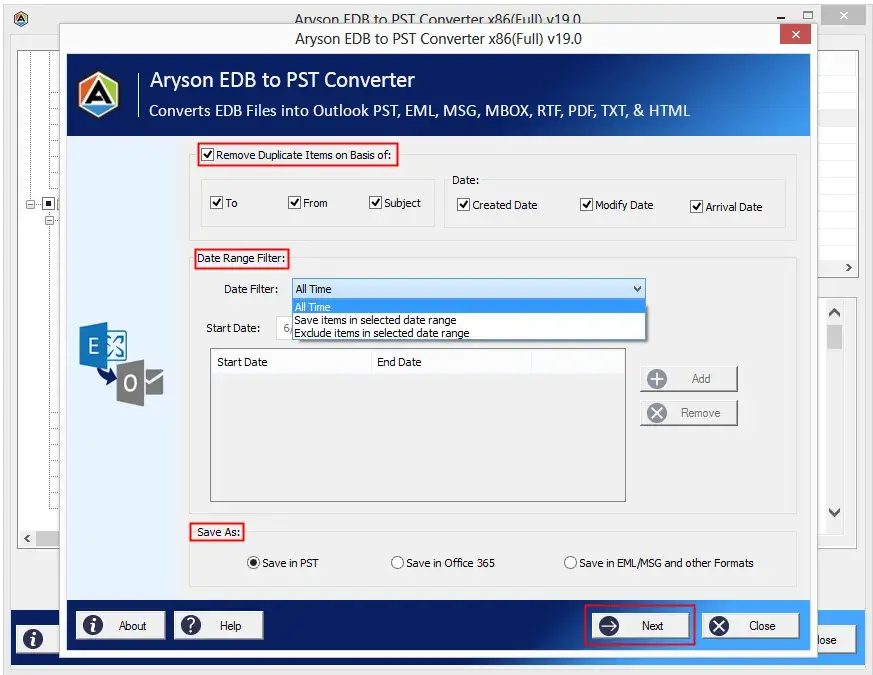
  • Now remove duplicate items from the recovered Exchange EDB.
  • Select Save as PST options and Click on the Next button.
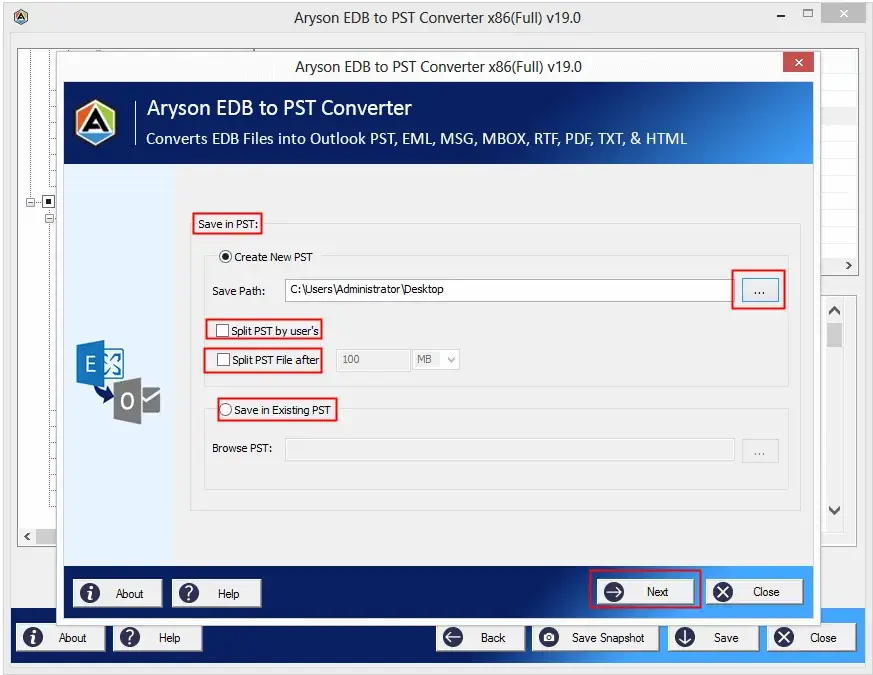
  • Click on the Browse button, and choose a location to save recovered mailboxes.
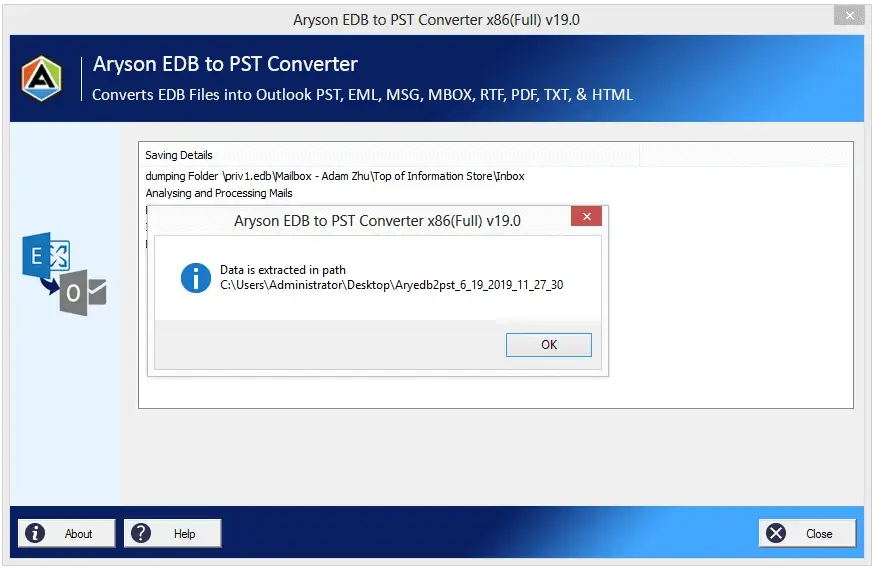
  • Click on the Save button, and convert Exchange Mailbox into a new or existing PST file.

Key Features:

  • Exports Exchange EDB mailboxes to Windows Live Mail (EML).
  • Save Exchange Server mailboxes as PDF Files.
  • Convert Exchange mailboxes to MSG and Unicode MSG formats.
  • Supports corrupt database files for performing the conversion.
  • Perform EDB to PST conversion using EDB & STM file or any previous mailbox snapshot of Exchange database.
  • Convert recovered Exchange mailboxes into the new or existing PST file.
  • Supports converting non-English characters of Exchange mailboxes to Outlook PST format.
  • Three recovery modes, such as Standard, Advanced, and Deep, are options to scan the level of corruption from the EDB file.
  • Uses the template file to perform the deep recovery for the best possible results.
  • Preview the mailboxes of Exchange EDB files before conversion.
  • Convert Exchange mailboxes to MBOX files with all email properties.
  • Removes duplicate email items from recovered Exchange EDB mailboxes based on To, From, Subject, and Date.
  • Supports exporting mailboxes from Exchange Server 2019, 2016, 2013, and 2010 Database files.

What does EDB to PST Converter do?

The EDB to PST Converter tool used to convert mailboxes of unmounted Exchange EDB into Outlook PST without dismounting the database. It is 100% safe and the most trusted software for users to convert corrupt Exchange EDB files to PST, Office 365, EML, MBOX, MSG, PDF, TXT, RTF, and HTML file formats. The EDB to PST converter tool can export single or multiple mailboxes into Outlook PST formats at a time

Aryson EDB to PST Converter Tool - Review & Ratings

When to Use Aryson EDB to PST Converter Tool?

When recover mailbox from corrupted EDB file?

The software provides a top-notch solution to recover corrupt EDB files. If the file gets damaged or corrupted, this tool can fix the corruption with great ease. Users can go for different recovery modes depending upon the level of corruption.

Read More

When Importing EDB to Office 365?

If users want to import all their data to Office 365, it can be easily achieved by an impeccable EDB to the PST converter tool. The utility can directly import EDB to Office 365 without any hassle. The EDB to PST Converter software can be performed by just using the login credentials of the Office 365 account.

Read More

When does Powershell Command fail to Exporting EDB to PST in Bulk?

Sometimes when PowerShell commands fail to export the mailbox data to PST in bulk because various jobs are working behind the Exchange Server, therefore, does not perform all tasks simultaneously. Aryson EDB to PST Converter tool performs the version task and maintains the mailbox items and their previous hierarchies after exporting mailboxes. The utility has the feature to export EDB files to PST in bulk.

Read More

When Exporting Exchange 2019, 2013, 2016 & 2010 Mailbox to PST?

Many users work with different versions of Exchange Server, but sometimes many users need to export mailboxes from different versions of Exchange Server into Outlook. The EDB to PST Converter software has been designed and developed with highly advanced algorithms which facilitate the conversion of mailbox items of all versions of the exchange server in PST file format.

Read More

Prominent Features Of Aryson EDB to PST Converter Software

Convert Offline EDB to PST

Aryson Converter for EDB is professional software that extracts mailboxes from offline Exchange EDB files and converts them into Outlook PST files without any data defeat. It supports all versions of the Exchange Server database .edb file and export all mailboxes from them into .pst file format and other file formats.

Save Exchange Resources and Time

Administrators of the Exchange Server use PowerShell commands to export mailboxes into PST files. If an admin tries to run multiple export commands at once, it can slow down the speed and performance of the server. The EDB to PST Converter performs this task offline, saving exchange resources and time.

Convert Mailboxes to PST

MS Exchange Server always stores mailboxes in EDB files that may be corrupted when Exchange Server goes to be downtime, offline mode, and Exchange server failure. The software restores your mailboxes from EDB files in such conditions and exports them into Outlook PST file format. After that, you can use it again with the Live Exchange server.

Import EDB to Office 365

This software exports all mailboxes with their whole attachments from the EDB file directly into Office365 in a few steps. First of all, install the software and select the EDB file; after scanning, enter the login credentials of the Office 365 profile, then directly import successfully.

Saving EDB Mailboxes in Multiple Formats

EDB to PST converter tool converts EDB files into multiple file formats other than PST files. It allows users to save mailboxes from EDB files to formats like MBOX, EML, MSG, TXT, PDF, RTF, etc. So if a user wants to export all the data to another client, it will be easy for him.

Supports Corrupt EDB File

If somehow the EDB file of the Exchange server goes corrupt, then the tool can easily fix the corruption issues in the EDB file. Users can go for the recovery modes provided with the software and choose Standard or Advanced, or Deep recovery mode as per the level of corruption to recover EDB data.

Take a Snapshot of the Database

Save snapshot feature allows the user to take the snapshot image of the database so that in the future, if the user faces any corruption, then s/he can roll back to a known useful data set at a specific point in time. It also helps a lot if a user is willing to roll back to a previous database state.

Convert Non-English Characters

If a user has non-English-character email items in the EDB mailbox, then s/he can easily convert that file without any data loss. No data will get changed or altered during the EDB conversion process, and all the file hierarchies will remain the same as the original file.

Removes Duplicate EDB Mailbox Items

The software gives facilities to remove duplicate mailbox items from the Exchange Server database after scanning the EDB file. Sometimes mailboxes are filled with duplicate items, and it takes extra space; therefore, the performance of the exchange server gets degraded. Users can use this tool and remove the duplicates based on To, From, Subject and Date.

Widely Compatible and Supportive

The EDB to PST converter is widely compatible with all the major Windows operating systems. It supports the EDB file of Exchange server 2019, 2016, 2010, 2007, 2003, and 5.5. So there will be no issue regarding the compatibility of the software during conversion.


Technical Overview


Microsoft Exchange Server uses EDB files to store the mailboxes of its users. It saves in-process and non-SMTP messages. MS Exchange Server is always prone to corruption from malware, viruses, hardware failures, crashes, etc. So to recover it in case of an Exchange disaster, a backup of the EDB file is the best option. EDB is a backup file of Exchange Server data, and it is easy to retrieve emails from this file in case of an Exchange Server disaster. You can save email from EDB to PST using PowerShell, but this process is time consuming and difficult. But EDB to PST Converter easily converts the exchange .db file to pst and saves your important time.

Software Prerequisites & Recommendations

Request For Software Customization

Note: Please provide a software customization request quotation if you need to add some extra special features to customize Aryson Software

Trial Limitations

Download EDB to PST Converter demo version to preview all email items of Exchange EDB mailboxes in detail.

Download  

Size: 140MBVersion: 22.0

Required System Specification
  • Enough Hard disk storage to save the resultant file size
  • 500 MB RAM (1 GB Recommended)
  • Pentium Class Processor, Intel, etc.
Supported Platforms
  • Compatible with Windows 11, 10, 8, 8.1, (32 bit & 64 bit) and other below versions.
  • Support Outlook Versions 2003, 2007, 2010, 2013, 2016, 2019 (32-Bit & 64-Bit) etc.
  • Compatible with Exchange Server 2019, 2016, 2013, 2010, 2007, etc. (32 & 64-bit)
Software Prerequisites
    FAQ
    Know the Full Version and Demo Version of Aryson EDB to PST Converter
    Product Features Free Version Full Version
    Add or Select EDB & STM File
    Choose or Auto-Detect Version of Exchange Server
    Scans EDB file with recovery modes
    Previews EDB Mailboxes
    Save EDB Mailboxes to PST
    Import EDB Mailboxes to Office 365
    Save EDB Mailboxes to PDF, EML, MSG, and MBOX
    24*7 Tech Support & secure 100%
    Price Free $99
    Money Back Policy
    What Our Customers Are Saying About Us

    Aryson EDB to PST Converter Verified Purchase Reviews

    review-rating
    Frequently Asked Questions

    Follow the below steps for EDB conversion:

    • Download & Run Aryson EDB to PST Converter
    • Browse and Add EDB and STM files.
    • Select the Exchange Server version of the EDB file and recovery mode.
    • Click on the Next button.
    • Take the preview of the database and select folders to import.
    • Now, click on the Save button.
    • Select 'Remove Duplicacy' and 'Date range' if needed.
    • Choose PST as the saving format.
    • Click on the Next button.
    • Select 'Save in PST' or 'Save in Existing PST' and click on the Next button.
    • Now, convert the EDB file to PST format.

    With the help of Aryson EDB to PST Converter, you can convert Exchange 2010, 2013 & 2016 EDB files to Outlook PST file format.

    Yes - this software supports offline Exchange EDB files and easily converts them into Outlook PST file format.

    Yes, this software converts EDB to PST, Office 365, EML, PDF, MBOX, MSG, TXT, RTF, and HTML file formats. You can choose the EDB file conversion option according to your requirement.

    Follow the below steps to import the EDB file:

    • Launch the tool and add EDB & STM file.
    • Select the EDB version and recovery mode.
    • Click on the Next button.
    • Take the preview of the Mailboxes and select the folders to import.
    • Now click on the Save button.
    • Select "Remove Duplicacy" and "Date Range" if needed.
    • Choose" save in Office 365" and click on Next.
    • Provide the login credential of the Office 365 profile.
    • Click on the Login button.
    • Now, will import the EDB file to Office 365 successfully.

    The conversion time depends on the size of the EDB file. This software quickly scans any size of EDB file in a short time and exports them into PST files with the original folder hierarchy and data formatting.

    Yes, the software has inbuilt features to save single and multiple EDB mailboxes to PST and Office 365 according to your need.

    You can convert unlimited Exchange Server EDB mailboxes to PST, EML, MSG, and Office 365.

    If you have faced any problems during EDB file conversion or after the conversion, you can quickly contact our technical support team. We provide free live technical support.

    Yes, we have a 30-day money-back guarantee; when our software fails, you can check our Refund policy.