-

Written By Rohan Wiese
-
Updated on August 22nd, 2025
Restore BKF Files on Windows – Simple & Quick Steps
Data loss is one of the biggest concerns for both individuals and organizations. To deal with this, many users relied on backup files in older versions of Windows. These backups were saved in BKF (Backup) file format, which was originally created using the NTBackup utility available in Windows XP and Windows Server 2003.
However, if you have recently upgraded your system to Windows 10 or Windows 11, you might face a problem. These versions of Windows no longer support the NTBackup utility, which means you cannot directly restore BKF files. To resolve this, we will guide you with the simplified Aryson BKF Recovery Tool to restore BKF Files on Windows 10/11. Download Now Purchase Now
You’ll learn what BKF files are, why they are important, and most importantly, how to restore BKF files on Windows 10/11 using simple and quick methods.
What is a BKF File?
A BKF file is a backup file created by the NTBackup utility, which was a built-in backup application provided by Microsoft in earlier Windows versions. These files typically store a wide range of data, such as:
- System state files
- Registry data
- User profiles
- Business documents
- Emails and databases
Since Windows Vista and later versions removed NTBackup, users cannot directly access or restore these files in Windows 10 and 11. That’s why you need alternative methods.
Why Do You Need to Restore Windows Backup (BKF) Files?
There are several reasons why users may need to restore BKF files, such as:
- You can recover the old business records and save them as backup
- When you repair your file, it can access personal documents from earlier Windows versions.
- Along with that, this process can restore your system files. So that you can set your data after deletion as well.
- To safely keep a backup of important information during hardware or OS upgrades.
- When you import BKF to Windows 10/11, it can prevent permanent data loss from old storage devices.
How to Restore BKF Files on Windows 10/11?
You can restore BKF files in two main ways to restore NTBackup BKF Windows 10/11
- Using Microsoft’s NTBackup Tool (Manual Method)
- Using Professional BKF Repair Tools (Automated Method)
Now, we will go through both methods one by one individually:
Method 1: Restore BKF Files Using NTBackup Utility
The NTBackup tool is not officially available in Windows 10/11, but Microsoft provided a way for backward compatibility in some cases. By downloading and installing NTBackup, you can try restoring your BKF files.
- Download the NTBackup installer package from a trusted source.
- Simply, install the utility on your Windows 10/11 system.
- Now, open the NTBackup and click on Restore and Manage Media.
- Next, click Browse and select the BKF file you want to restore.
- After that, choose the specific files or folders to recover.
- Select the destination path where the data will be restored.
- Click Start Restore and wait until the process is complete.
Note: Just keep in mind that this method works if the BKF file is healthy and not corrupted. As a troubleshooter, you can backup your data using NTBackup regularly.
Limitations of the NT Backup Method:
- NTBackup is outdated and may not run properly on all modern systems.
- If the BKF file is damaged, NTBackup cannot repair it.
- The installation process is tricky and not user-friendly.
- Sometimes Windows 10/11 blocks execution due to compatibility issues.
Method 2: Restore BKF Files Using Professional Aryson Software
If the manual method fails or your BKF file is corrupted, the Aryson BKF Recovery Tool is the software that helps restore BKF files easily without data loss. This method ensures that you can restore even severely damaged BKF files without technical hassle. Just go through some of the some proficient features of this software:
Key Benefits:
- Efficiently repairs corrupted or damaged BKF files and recovers all data.
- Quick Scan for minor corruption and Deep Scan for severely corrupted files.
- Displays the recovered data before saving, ensuring accuracy in restoration.
- Restore only the required files or folders instead of the entire backup.
- Supports BKF files created by NTBackup and Symantec Backup Exec.
- Simple & easy for beginners to perform recovery without technical expertise.
- This software works on all versions, including Windows 10 and 11.
Follow these Simple Steps to Use the Aryson BKF Recovery Tool:
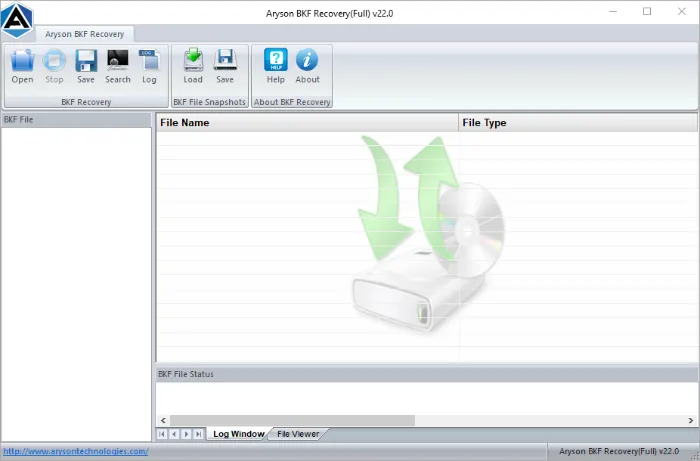
- Download and install the Aryson BKF Recovery Tool on your system.
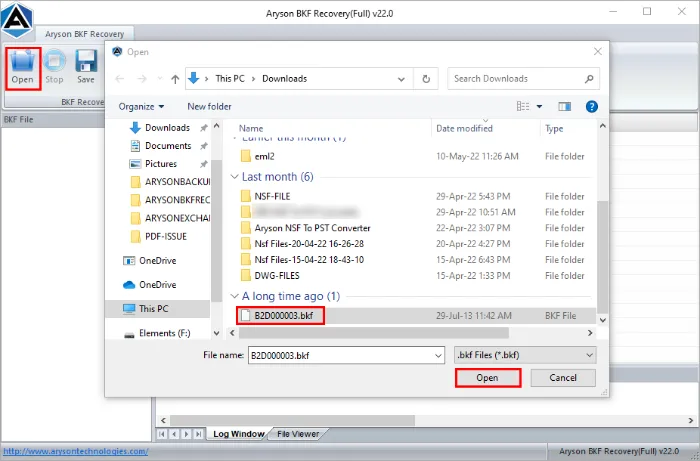
- Tap on the Open button and select the corrupt BKF file to add>>Next.
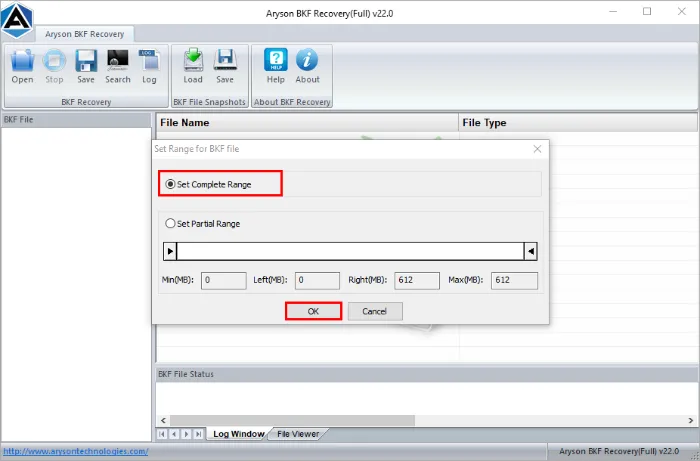
- Choose Scan Mode and set the complete or partial range accordingly.
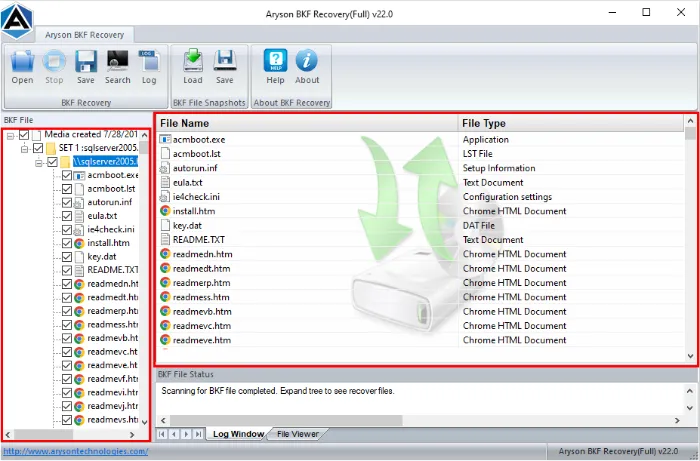
- In the next panel, preview the recovered data inside the software.
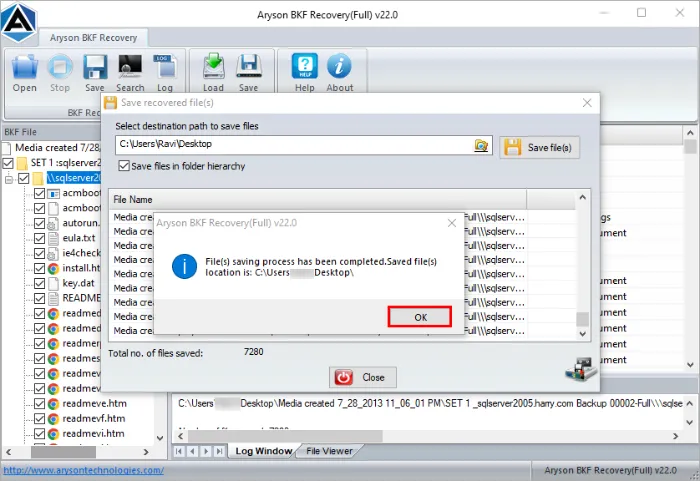
- Select the required items and click Save to restore them at your chosen location.
Final Words
If your Microsoft does not support your NTBackup utility, it becomes difficult to restore BKF Files on Windows 10/11. However, you do have options. If your BKF file is healthy, you can try using NTBackup manually. But if the file is damaged, BKF Recovery Tool is highly recommended. This option is fast and reliable solution to fix the recovery files. Overall, the conclusion is that you can quickly access your old backups and protect your valuable data from loss.
Frequently Asked Questions
Q1. Can I open BKF files directly in Windows 10/11?
Ans: No, Windows 10 and 11 do not have built-in support for BKF files since the NTBackup utility has been removed. You need either the NTBackup installer package or a professional BKF repair tool.
Q2. How do I restore BKF files without NTBackup?
Ans: You can use a third-party BKF recovery tool, which allows you to open, repair, and restore BKF files easily on Windows 10/11.
Q3. Why are my BKF files not opening in Windows 10?
Ans: BKF files may fail to open if they are corrupted, incomplete, or if you are trying to access them without a compatible tool like NTBackup or BKF Recovery software.
Q4. Is it possible to repair corrupted BKF files?
Ans: Yes, corrupted BKF files can be repaired using a professional BKF repair tool. It can scan the file, recover data, and allow you to restore it safely.
Q5. Can I preview the contents of a BKF file before restoring?
Ans: Yes, Aryson BKF Recovery Tool provide a preview feature. So, you can check files before saving them.
Q6. Does NTBackup still work in Windows 10 or 11?
Ans: Not directly. NTBackup is outdated, but with compatibility packages or manual installation, you may be able to run it. However, success is not guaranteed.
About The Author:

Rohan Wiese is a Technical Writer at Aryson Technologies. He is an expert Email Forensic, Cloud Computing, and a passionate nerd with over 10 years of experience in technical content writing. He writes about Cloud Migration, Database Recovery, Email Backup, Windows, Mac, and Tech.
Related Post



