-

Written By Rohan Wiese
-
Updated on May 21st, 2025
Recover Lost or Deleted Emails From a PST File – Quick Fix
Summary: In businesses and professional spaces, any kind of issue with email communication is a big issue. Emails contain important commitments, bills, invoices, etc. Whether you have accidentally deleted emails or the PST file got corrupted, this blog has covered it all. Read the blog to find the best ever solution to recover deleted emails from PST file. You can troubleshoot the issue through manual steps or directly recover data using Outlook PST Recovery Software. Well, the software is competent enough to recover all the mailbox items from the PST file, including emails. Download Now Purchase Now
Why is Need to Recover Deleted Emails PST?
Emails from the PST file are deleted due to various causes, and thus, you need to recover them to balance the workflow. Here are the major reasons why and how emails are lost:
- Among all, the most common reason for email loss is accidental deletion. Users often unintentionally delete crucial emails while decluttering mailboxes.
- If deleted emails are, by any chance, saved in the Deleted Items folder, users may clean up all trash at a time. Hence, this causes permanent deletion of emails from Outlook.
- Also, PST corruption can cause the loss of important emails. If your PST file has exceeded the size limit of 2 GB, over time, it leads to errors such as missing emails or damaged data.
- Many users depend on Outlook’s Auto Archive feature to handle cluttered storage space. However, improper archive settings, archive corruption, or sometimes manual errors may be the reason.
- Another major cause is a syncing issue. If you frequently sync Outlook on various devices, changes made on one may not reflect across other devices.
- Other causes might be a virus & malware attack, software glitches, system failures, human errors, or use of outdated Outlook.
Hence, in these cases, one may need to look for methods to restore emails from PST backup.
How Can I Recover Deleted Emails from PST File?
Recovering emails from a PST or a corrupt PST is not that difficult, but finding an appropriate procedure is. In this section, we will suggest various manual methods to get back emails safely. However, if your PST file gets corrupted, Outlook PST Recovery Software is also suggested. Explore the methods one by one.
#1. Restore Emails from the Deleted Items Folder
If emails deleted from the mailbox are by any chance stored in the Deleted Items folder, you can restore deleted emails Outlook PST. Here is how:
- Open MS Outlook.
- Next, search and open the Deleted Items folder.
- Locate deleted emails in the folder.
- Move them back to your inbox or another folder.
Limitations: This method can recover emails if they are not emptied from the Deleted Items folder.
#2. Look for Emails in Recoverable Items Folder
When you fail to restore emails from the Deleted Items folder, next search the Recoverable Items folder. Wondering why? It’s because when you delete emails from the Deleted Items folder, they are saved in this folder. Follow the steps given:
- In Outlook, go to the Folder tab.
- Next, click on Recover Deleted Items.
- Select the emails you wish to recover and restore them.
Limitation: This recovery option is generally available for Exchange or Office 365 accounts. Possibly it won’t be applicable for standalone PST files.
#3. Recover Emails from Corrupted PST by SCANPST.exe
If you have lost your emails due to a corrupted PST file, download Inbox Repair Tool to recover data. Outlook has a built-in tool, called ScanPST.exe (or, Inbox Repair Tool). Here is the method:
- First of all, exit the Outlook application.
- Locate ScanPST.exe and run it. (Usually, you can find the tool in the Outlook installation directory.)
- Next, browse and select the corrupted PST file from your PC.
- Click on Start to begin the repair process.
This is a free-of-cost procedure, however, it can repair one PST file at a time. On the other hand, you can also use this tool to repair oversized PST file errors.
#4. Best Software to Recover Deleted Emails from PST File in 2025
This is an alternative to the ScanPST.exe method. If you have multiple corrupt PST files, repairing them manually is risky. You may end up deleting emails permanently. So, here is a reliable method to recover emails from damaged PST without SCANPST.
Aryson Outlook Recovery Tool will ease your workload even if you have thousands of PST files to recover. One can recover deleted mailbox items from Outlook, such as emails, contacts, calendars, etc. This is a competent software to support corrupted as well as healthy PST files. Moreover, it lets users recover emails from an encrypted PST file without data loss. The versatile software not only recovers but also restores data on the local machine as a PST.
Follow the Given Steps to Recover Dleted Emails from PST File:
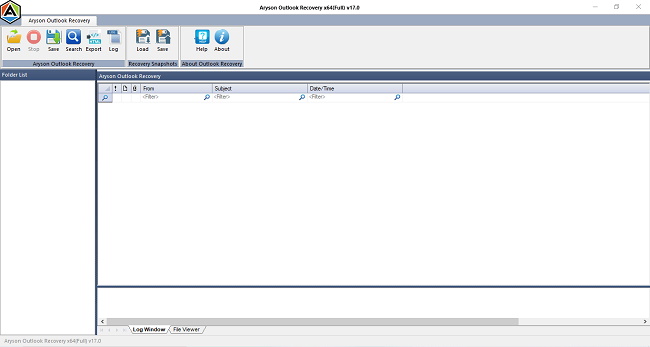
- Download the PST Repair Tool and run it as an administrator.
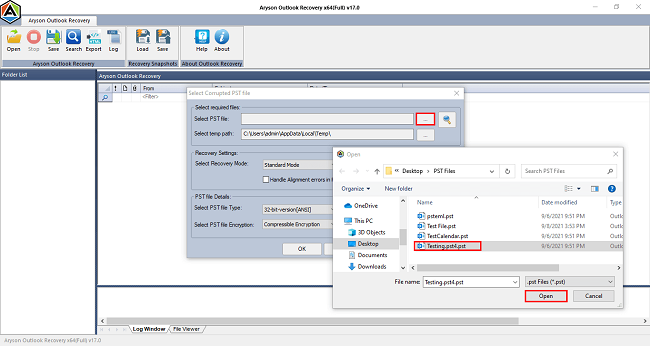
- Next, click on Open, browse, and add a corrupt PST file.
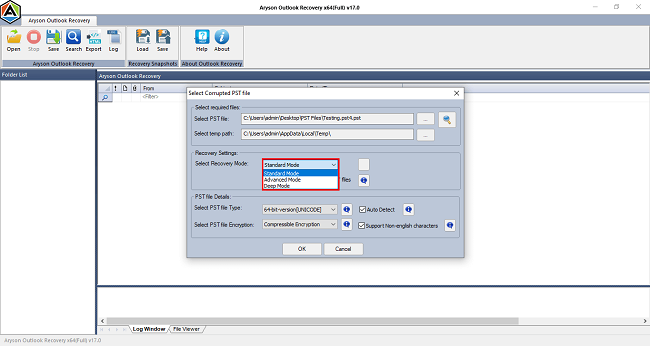
- Select the Recovery Mode to scan the PST as per the extent of damage.
- The tool will prepare a preview of your browsed PST file. Click Ok.
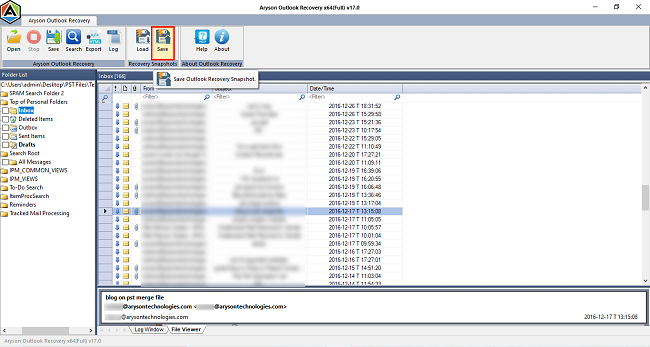
- Preview the deleted PST file data and select the folders to save.
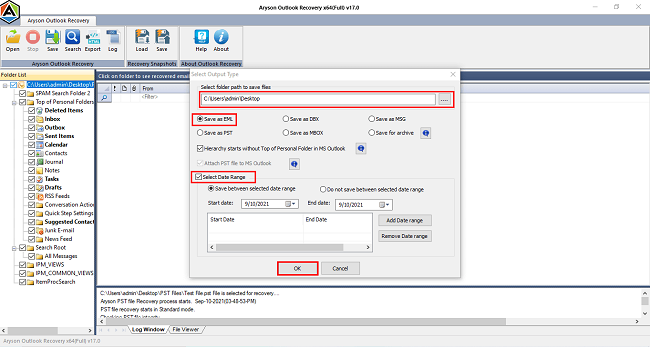
- Click on Save and choose a saving format to download emails.
- Furthermore, to get more accurate data, opt for the built-in features.
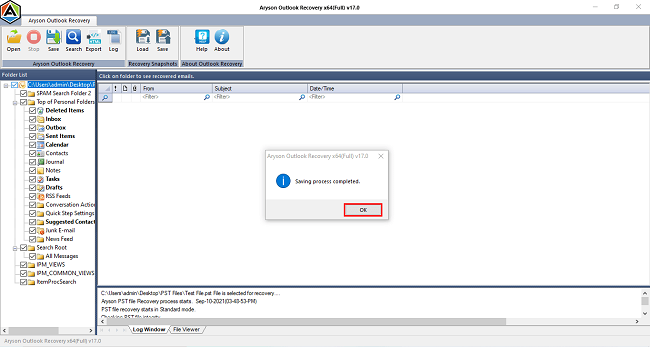
- Finally, click on the Ok button to finish the process.
What Makes the Software a Top Choice?
- The tool can restore deleted emails Outlook PST without Outlook installation.
- Supports recovery of emails from both ANSI and UNICODE PST format.
- With multiple recovery modes, one can get data back from severely corrupt files as well.
Hence, there are many such features which is why users trust this software.
Conclusion
This blog discusses various methods to recover deleted emails from PST file and corrupt PST files. If your emails are accidentally deleted, recovery is quite simple by restoring them from the Deleted Items folder. However, if you have a PST file issue, like corruption, you first need to repair it. This can be done either by using the SCANPST.exe tool or through professional software. The suggested tool is an efficient one, and even novice users can operate it with ease.
Frequently Asked Questions
Q. How can I recover permanently deleted emails from PST?
Ans- You can recover permanently deleted emails from a PST file with Aryson PST Recovery Tool. These tools scan the file and restore deleted items. However, your deleted emails should be saved in the Deleted Items folder.
Q. Can I recover emails from a corrupted PST file without Outlook?
Ans- Yes, you can recover emails from a corrupted PST file without Outlook using Outlook Recovery Software, like Aryson Software. One does not have to install Microsoft Outlook on the system. On the other hand, users can use Outlook’s built-in ScanPST.exe for minor PST corruption.
Q. Is it possible to recover emails after emptying the Deleted Items folder in Outlook?
Ans- You have deleted emails from the Deleted Items folder, there is a chance to recover them from the Recoverable Items folder. But that does not work for a standalone/orphan PST file. You must be connected to an Exchange or Office 365 account.
Q. What is the best PST Recovery Tool to recover deleted emails?
Ans- Aryson Outlook PST Recovery Tool is considered one of the best tools to recover deleted emails from PST files. It supports recovery from both corrupted and healthy PSTs, maintains folder hierarchy, and works without Outlook.
About The Author:

Rohan Wiese is a Technical Writer at Aryson Technologies. He is an expert Email Forensic, Cloud Computing, and a passionate nerd with over 10 years of experience in technical content writing. He writes about Cloud Migration, Database Recovery, Email Backup, Windows, Mac, and Tech.
Related Post