-

Written By Rohan Wiese
-
Updated on August 25th, 2025
How to Convert MBOX to EML Files: Free & Easy Guide
Different email clients use the different file formats to store their messages. For example, MBOX is a popular mailbox format used by email clients like Thunderbird, Apple Mail, and Eudora. On the other hand, EML is a single-message format supported by Outlook, Windows Live Mail, and many other applications. Sometimes, users need to access their MBOX emails in clients that only support EML files. In such cases, all you need to convert MBOX to EML. This guide explains free manual methods and a professional Aryson MBOX Migrator Tool so that you can choose the best approach based on your needs.
Brief About MBOX & EML
MBOX File: MBOX is a mailbox storage format used by many email clients like Thunderbird, Apple Mail, Eudora, and Postbox. It stores all the emails of a folder in a single text-based file. For example, your entire inbox is saved inside one MBOX file.
EML File: EML is a single-message format supported by clients like Outlook, Windows Mail, and Thunderbird. Each email, along with its attachments, subject, sender, and receiver details, is stored separately as an .eml file.
Explore Key Reasons to Convert Thunderbird MBOX to EML
Before we move to the methods, it is important to know why users often convert MBOX files into EML format.
- Better Compatibility: The EML files are supported in Microsoft Outlook, Windows Mail, and Thunderbird. Along with that, in several other platforms as well.
- Easy Backup Management: Since EML stores emails individually, users can back up specific messages instead of the entire mailbox.
- Simple Share Process: Sharing one email becomes easier when it is saved as a separate EML file.
- Data Portability: EML files can be transferred, stored, or migrated without the need for a specific email client.
Because of these reasons, many individuals and businesses look for ways to convert MBOX files into EML.
Best Ways to Convert MBOX to EML
Although, the different situations need a different kinds of solutions. Some users prefer free manual tricks. Many of you want a quick professional tool. Here are the best ways to convert MBOX file to EML format based on your needs.
Method 1: Batch Convert MBOX to EML using Aryson’s Software
Arsyon MBOX Migrator is simple and the best solution to convert MBOX files into EML format without requiring Thunderbird or any add-ons. Moreover, it supports both single and multiple MBOX files at once. During the process, the tool ensures that every email’s details, such as subject, sender, recipient, date, and attachments are preserved. Apart from EML, it can also convert MBOX to PDF, PST, MSG, and others. Along with that, this utility is compatible with all email clients that use EML as their native format. Additionally, it supports all types of Windows versions and is embedded with a simple and smooth user interface.
Simple Steps to Convert MBOX to EML Free
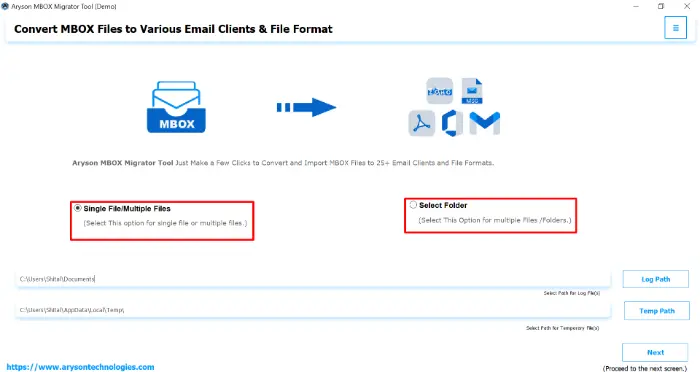
- Download and install the Aryson MBOX Migrator Tool on your system.
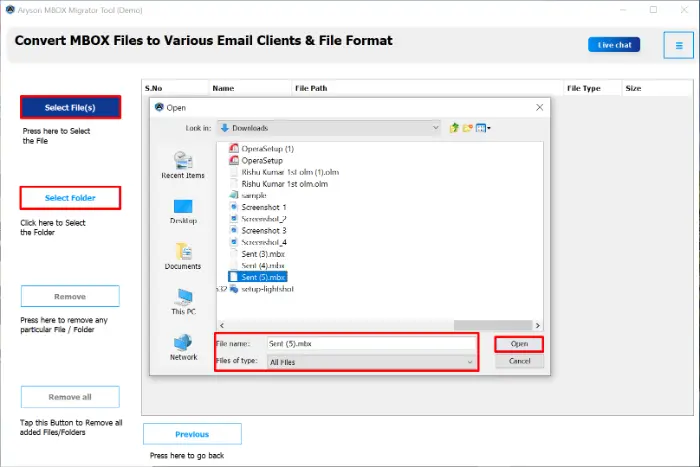
- After that, click on the Select File(s)/Folder to upload your MBOX files.
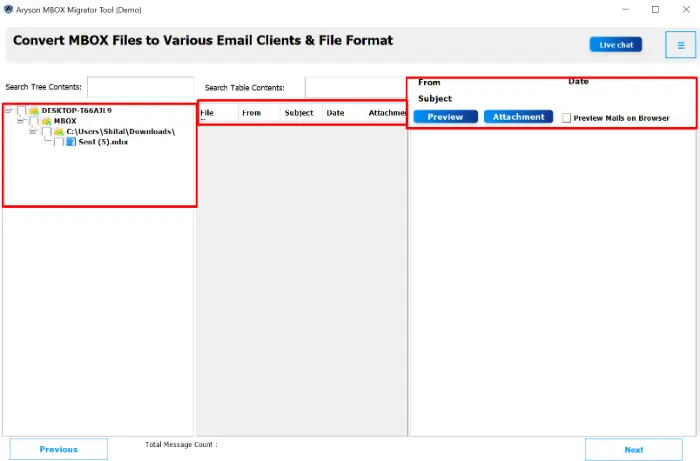
- Now, you can preview all the selected MBOX mail data and click Next.
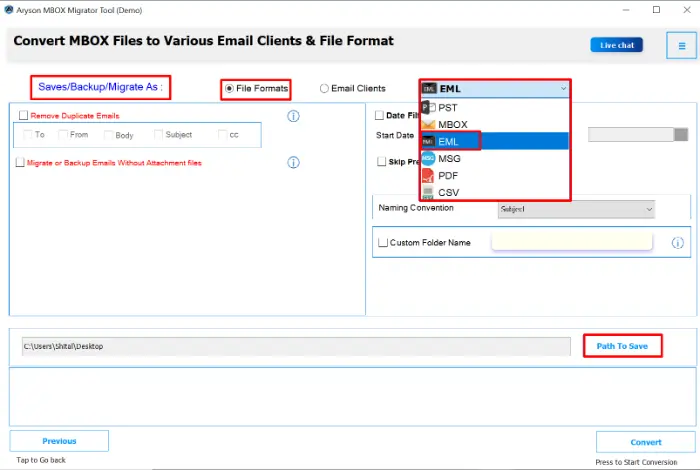
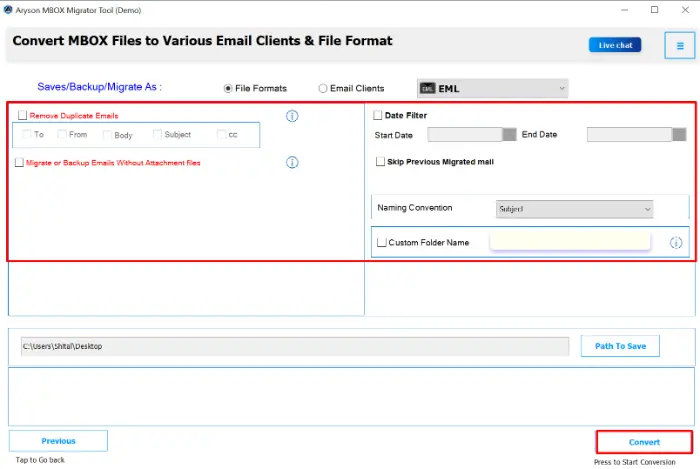
- Choose EML as the output format along with the destination path to save.
- Utilize the additional feature and click the Convert Button to begin conversion.
Method 2: Using the “Save As” Option in Thunderbird
This option is suitable if you want to export individual or selected emails into the EML format. It is best for small email selections or when you need only a few EML files.
- Launch Mozilla Thunderbird on your system.
- Now, open the mailbox folder that contains the emails you want to convert.
- After that, right-click on the selected emails and choose Save As.
- Browse and select the destination folder where you want to store the EML files.
- After that, ta on the Save, and your emails will be exported in .eml format.
Method 3: Utilize the “Save Selected Messages” Feature for Conversion
Thunderbird also has a built-in feature that provides direct export options, along with EML. When you need to perform the export process multiple times, then you can proceed with this method:
- Firstly, open Mozilla Thunderbird.
- Then, move to the mailbox folder containing the required emails.
- After that, choose the emails (press Ctrl+A to select all messages).
- Right-click on the selected emails and choose Save Selected Messages.
- From the drop-down menu, select EML Format.
- Choose the location where you want to save the converted files.
- Click Save to complete the process and convert mbox to eml.
Method 4: Using the ImportExportTools NG Add-on
If you want a more advanced and streamlined process, especially for bulk conversions, the ImportExportTools NG add-on in Thunderbird is highly effective.
- Download the add-on from the official Thunderbird Add-ons page:ImportExportTools NG.
- Open Mozilla Thunderbird and go to the Menu bar >> Tools >> Add-ons.
- In the Add-ons Manager, search for ImportExportTools NG and click Add to Thunderbird.
- When prompted, click Add and then select Restart Now to activate the add-on.
- Once Thunderbird restarts, right-click on the mailbox folder you want to export.
- From the menu, choose ImportExportTools NG > Export all messages in the folder > EML format.
- Now, the user can select the folder where you want to save your files.
- After performing these steps, your emails from the selected MBOX folder will be converted into .eml files.
Method 5: Simply, Drag and Drop Emails from Thunderbird
If you already have MBOX files which is imported in Thunderbird, you can use the drag-and-drop method to accomplish the import process:
- Open Thunderbird and load your MBOX mailbox.
- Now, pick the MBOX data one by one individually.
- At last, drag and drop the emails into a folder on your system.
- The emails will automatically save mbox emails as EML files.
Conclusion
Throughout this blog, we explored several methods to convert MBOX to EML. The manual options in Thunderbird are useful for task in which you have just a few emails. But they may not be convenient for large-scale conversions. On the other hand, the MBOX Migrator Tool is quick and allows bulk MBOX to EML conversion while keeping every detail of your emails intact, including attachments and formatting. With its simple steps, the tool makes the process smooth for beginners as well as professionals.
Frequently Asked Questions (FAQs)
Q1. Can I convert MBOX to EML without software?
Ans: Yes, you can use Mozilla Thunderbird with the ImportExportTools add-on or the drag-and-drop method to accomplish the task without software.
Q2. Is Thunderbird necessary for the conversion?
Ans: For manual methods, Thunderbird is necessary. But the Aryson MBOX Migrator Tool does not require Thunderbird is not necessary.
Q3. Will attachments be preserved in EML format?
Ans: Yes, automated tool-based methods preserve attachments. Along with that, it ensures 100% accuracy.
Q4. Can I batch convert multiple MBOX files to EML at once?
Ans: Aryson MBOX Migrator Tool can convert multiple MBOX files to EML at once.
Q5. Is the conversion process free?
Ans: Manual methods are free but time-consuming. Tools may be paid, but they save time and reduce effort.
About The Author:

Rohan Wiese is a Technical Writer at Aryson Technologies. He is an expert Email Forensic, Cloud Computing, and a passionate nerd with over 10 years of experience in technical content writing. He writes about Cloud Migration, Database Recovery, Email Backup, Windows, Mac, and Tech.
Related Post



