-

Written By Harshita Sachdeva
-
Approved By
Shivam Rathore -
Updated on June 9th, 2026
Yahoo Email Not Working? Fix Common Issues Fast in 2026
User Query: Yahoo Mail won’t load on my iPhone and desktop since yesterday. Emails aren’t sending, and the inbox won’t refresh. Is my account blocked or the server down?
Summary: In this era of digitalization, there are millions of users who rely on Yahoo Mail daily for personal and enterprise communication. But sometimes, the workflow gets disrupted due to sudden access failures, missing emails, and login errors. It is essential to determine the root causes behind Yahoo email not working in order to resolve them. This article covers common triggers, manual troubleshooting steps, and the effective use of the Aryson Yahoo Backup Tool to restore full Yahoo Mail functionality without data loss.
Why is Yahoo Mail Not Working? – Common Reasons
Before you troubleshoot Yahoo email not working issue and it’s helpful to understand what could be causing the problem. Here are the usual suspects:
- Unstable internet connection can prevent Yahoo Mail from loading or syncing.
- Corrupted cache or cookies may block proper functioning of the mail interface.
- Using an outdated or unsupported browser can cause display or login issues.
- Incorrect IMAP/POP settings affect email syncing in third-party apps.
- Browser extensions or ad blockers might interfere with Yahoo Mail’s features.
- Outdated Yahoo Mail app can lead to crashes or sync problems on mobile.
- Account security issues or temporary lockouts may restrict access.
- Yahoo server outages or maintenance can cause temporary service disruption.
Types of Yahoo Mail Problems Users Face
Here are the most common types of problems Yahoo Mail users frequently encounter the following:
- Login issues: Forgot password, account locked, or incorrect credentials.
- Mail not loading: Inbox stuck on loading screen or showing a blank page.
- Can’t send or receive emails: Messages fail to deliver or arrive late.
- Yahoo email stopped syncing: New emails not appearing on mobile devices.
- Error messages: Temporary Error 15, Error 19, and other technical alerts.
- Buttons not working: Reply, compose, or delete options are unresponsive.
- Account not recognized: Yahoo says the email address doesn’t exist.
- No email notifications: Alerts for new emails not showing on device or app.
- Stuck in redirection loop: Repeatedly redirected between login and homepage.
Best Fixes to Troubleshoot Yahoo Email Issues
If you’re facing issues with Yahoo Mail, there’s a high chance it’s due to a browser glitch, app error, or misconfigured setting. Let’s explore each fix in detail so you can troubleshoot. Yahoo email issues step by step:
1. Check Your Internet Connection
Yahoo Mail requires a stable and active internet connection. If your Wi-Fi or mobile data is slow or disconnecting frequently, the mail interface might not load or sync.
- Try to visit other sites to confirm whether the internet is working or not.
- After that, restart your modem/router.
- Then, switch between Wi-Fi and mobile data to test.
- Try using a different device on the same network.
These steps can help fix Yahoo Mail slow or not loading issues caused by unstable connectivity
2. Clear Browser Cache and Cookies
Cached data can interfere with how Yahoo loads if the cache is outdated or corrupted.
- Go to Settings >> Privacy and security >> Clear browsing data.
- Select cookies and other site data and cached images and files.
- After that, choose All time and click Clear data.
- Restart the browser and log in again.
It helps remove any conflicts that could prevent Yahoo from functioning smoothly.
3. Update or Change Your Browser
An outdated browser may not support the latest Yahoo Mail features. Similarly, browser bugs can stop Yahoo Mail from loading correctly.
- Update your browser to the latest version.
- Then, switch to a supported browser like Chrome, Firefox, Safari, or Microsoft Edge.
- Avoiding unsupported browsers that may not render Yahoo Mail properly.
4. Disable Browser Extensions
Extensions like ad blockers, VPNs, or privacy tools may interfere with Yahoo’s scripts, causing elements not to load or function properly.
- Type chrome://extensions in the address bar.
- Toggle off extensions one by one.
- Refresh Yahoo Mail after disabling each to test.
If Yahoo starts working after disabling an extension, consider removing or replacing it.
5. Check Yahoo Mail Server Status
Sometimes, the issue is on Yahoo’s end. Server outages, maintenance, or technical errors can prevent users from accessing their email accounts.
- Visit websites like DownDetector or IsItDownRightNow.
- Look for real-time outage reports or user complaints.
If there’s an outage, wait for Yahoo to resolve it. There’s nothing you need to do on your end.
6. Verify IMAP/POP Settings
If you’re accessing Yahoo Mail through a third-party app (like Outlook, Thunderbird, or Apple Mail), incorrect server settings may cause sync errors. Hence, you should perform secure Yahoo Mail settings to fix Yahoo Mail login not working.
Correct settings for IMAP:
- IMAP Server: imap.mail.yahoo.com
- Port: 993
- SSL: Yes
Outgoing (SMTP):
- SMTP Server: smtp.mail.yahoo.com
- Port: 465 or 587
- SSL: Yes
- Authentication: Required. For some third-party email clients, Yahoo may require an
App Password instead of your regular Yahoo account password.
Double-check these settings in your mail client and update them if needed.
7. Update the Yahoo Mail App
Outdated apps can lead to crashing, freezing, or syncing issues, especially after new OS updates. Perform these steps to fix Yahoo email not working:
- Go to Play Store (Android) or App Store (iPhone).
- After that, search for Yahoo Mail.
- Now, tap Update if available.
- Restart the app and try logging in again.
8. Temporarily Disable Antivirus or Firewall
Some security software mistakenly blocks email ports or prevents websites from loading. If Yahoo Mail works after disabling your firewall or antivirus, you may need to whitelist Yahoo.
To test:
- Temporarily disable your antivirus or firewall>> Reload Yahoo Mail.
- If it works, add Yahoo Mail to the software’s allowed list.
- Make sure to re-enable security software after testing.
9. Try a Different Device or Browser
Still facing problems? The issue might be specific to your current browser or device.
What to try:
- Open Yahoo Mail on another device (phone, tablet, or computer).
- So, you should use a different browser.
- Try incognito or private mode to rule out extension conflicts.
If Yahoo works on another platform, your main device may need a reset or deeper troubleshooting.
Why Manual Fixes May Not Be Enough
Here are some common issues you get when using manual ways to fix Yahoo Mail not working error:
- Firstly, they can be time-consuming and may require trying multiple steps.
- Moreover, they often fail to resolve deeper technical or server-related issues.
- In many cases, a basic user may find the steps too technical or confusing.
- Additionally, mobile-specific issues may not get fully resolved with desktop fixes.
- Even if they work, the solutions are usually temporary, not long-lasting.
- Most importantly, manual methods do not protect or back up your email data.
Protect Your Yahoo Data with Aryson Yahoo Backup Tool
If manual fixes don’t solve the issue or you want to keep your Yahoo emails safe during troubleshooting, using an Aryson Yahoo Mail Backup Tool is the best alternative. This software offers a professional and secure way to back up your entire Yahoo Mail account with just a few clicks. This software is specially designed to download Yahoo emails and attachments to your system in multiple formats. It also ensures you never lose important data, even if your account gets locked or faces server errors. So, you can download Yahoo Email to Hard Drive as PDF and other formats as well.
Follow these Steps to Troubleshoot Yahoo Email Issues
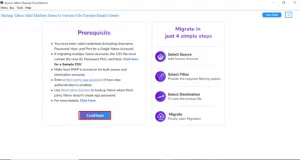
- Launch and open the Aryson Yahoo Backup Tool on your system.
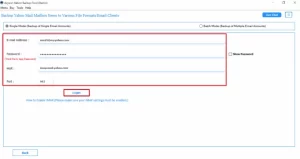
- After that, click Continue and log in using your Yahoo Mail credentials.
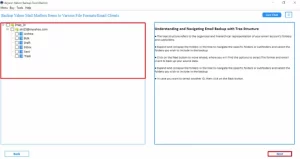
- In the next panel, you will get all your mail associated with your Yahoo account.
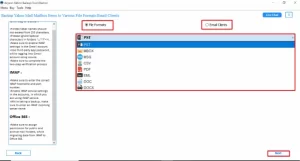
- Select the format in which you want to save your emails (e.g., PST, PDF).
- Configure additional features and click Start Backup to begin the process.
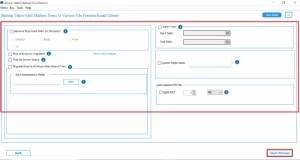
Additional Tips: In addition to backups, the tool also allows you to easily export Yahoo Mail from one Yahoo account to another without any data loss.
Rachel’s Success Story
Rachel Monroe, a marketing executive from Florida, relied on Yahoo Mail for all client communication. One day, her Yahoo account stopped loading entirely, blocking access to critical campaign threads. She tried clearing the browser cache and disabling extensions. On using the Aryson Yahoo Mail Backup Tool, the entire issue resolved, and every email, contact, and folder appeared exactly intact.
Final Thoughts
Yahoo Mail may stop working due to various reasons, from slow connections to server-side glitches. Hopefully, most issues can be resolved by following the simple steps listed above. Whether you’re facing login trouble, sync failure, or loading errors, this guide helps you fix Yahoo email not working. Stay proactive by keeping a safe backup of your Yahoo emails. The above recommended quick fix can save you hours of time and effort, too.
Frequently Asked Questions
Q.1 Is there a problem with Yahoo email today?
Ans: Yahoo Mail may occasionally experience temporary outages, server maintenance, or regional service disruptions. You can check outage-monitoring websites or Yahoo’s official status updates to confirm if the issue is widespread.
Q.2 Why can’t I log in to my Yahoo Mail account?
Ans: Login issues can occur due to incorrect credentials, forgotten passwords, browser problems, or security verification requirements. Resetting your password or clearing your browser cache often resolves the issue.
Q.3 How do I fix Yahoo email not working?
Ans: Start by checking your internet connection, clearing your browser cache and cookies, and updating your browser or Yahoo Mail app. If the problem persists, verify your account settings and check for Yahoo server outages.
Q.4 How do I recover missing emails in Yahoo Mail?
Ans: Check the Spam, Trash, and Archive folders first, as emails may have been moved accidentally. If they are still missing, use Yahoo’s Mail Restore feature to recover recently lost messages.
Q.5 Incoming emails on Yahoo are delayed by hours. What causes this?
Ans: Delayed emails can result from server congestion, poor internet connectivity, syncing issues, or incorrect mail client settings. Temporary Yahoo server problems may also affect email delivery times.
Q.6 What should I do if Yahoo Mail is permanently not working or being shut down?
Ans: Back up your Yahoo emails immediately to your local system or another email account. This ensures your important messages remain accessible even if account access becomes unavailable.
Q.7 How do I get my Yahoo email back to normal?
Ans: Clear browser cache, disable conflicting extensions, update the Yahoo Mail app, and sign out before signing back in. These steps often restore normal Yahoo Mail functionality and performance.
Q.8 Why are my incoming Yahoo emails not showing up in my inbox?
Ans: Emails may be redirected to Spam, Filters, Archive, or other folders instead of the Inbox. Review your filter settings and blocked addresses to ensure messages are delivered correctly.
Q.9 Is the software license valid for lifetime use or does it expire?
Ans: The software license is generally valid for lifetime use based on the purchased edition. However, users should review the specific licensing terms provided with their purchase for complete details.
Q.10 Is there a free trial version available before purchasing the full license?
Ans: Yes, a free trial version is available to evaluate the software’s features and performance. It allows users to test the application before upgrading to the full licensed version.
About The Author:

Harshita Sachdeva, a professional technical writer at Aryson Technologies, specialize in delivering clear, hands-on documentation for data management, migration, and recovery solutions. With a meticulous, reader-first approach, I break down complex technical processes into simple, actionable content - helping IT professionals and decision-makers tackle challenges efficiently.
Related Post