-

Written By Rohan Wiese
-
Updated on February 9th, 2026
Convert XML to CSV: Easy Methods Explored
Summary: XML files hold structured data but are often difficult to view or work with directly. On the other hand, CSV files are simple, organized in rows and columns, and easy to open in Excel or other spreadsheet tools. That’s why users need to convert XML to CSV and get their XML data into a more usable format. In this blog, we’ll explore easy methods to convert an XML file to CSV, both manually and with the help of the XML Converter Tool. So, you can handle your data more efficiently. Download Now Purchase Now
Simplified Reasons to Convert XML Data to CSV
Not everyone finds XML files easy to work with. They’re filled with tags and nested elements, which can be confusing if you’re just trying to view or analyze the data. Here are a few clear reasons why converting XML to CSV can be helpful:
- CSV files are easy to open in tools like Excel, Google Sheets, or even Notepad, without any special setup.
- Moreover, it works with most apps and tools, so they’re easier to use in daily tasks.
- With CSV, you can analyze the data easily, whether you want to sort, filter, or create reports.
- Additionally, CSV files show data in clear rows and columns, so it’s easy to understand quickly.
- Also, CSV files are easier to share because they are smaller and use less space than XML files.
So, if you want a simpler and more flexible way to handle XML data, converting it to CSV is a reliable alternative.
How to Convert XML to CSV
There’s no fixed way to convert an XML file to CSV. It depends on your file type, technical comfort, and time. So, you can choose from several methods. Below, we’ll walk you through the most effective ways to accomplish the task with ease.
Method 01: Use Microsoft Excel to Transform XML to CSV
This method works best when your XML file has a simple structure and doesn’t contain deeply nested elements.
Following Steps to Convert XML to CSV in Excel
- First, open Microsoft Excel on your computer.
- Then, click on File >> Open and browse your XML file.
- Next, when Excel prompts you, choose the option “As an XML table” to load the file correctly.
- After that, your XML data will appear in rows and columns in the Excel sheet.
- Now, navigate to the File tab>> Save As.
- From the file type list, select CSV (Comma-delimited) (*.csv).
- Finally, choose your desired save location and click Save.


Alternatively, you can use these Steps as well to convert XML to CSV in Excel.
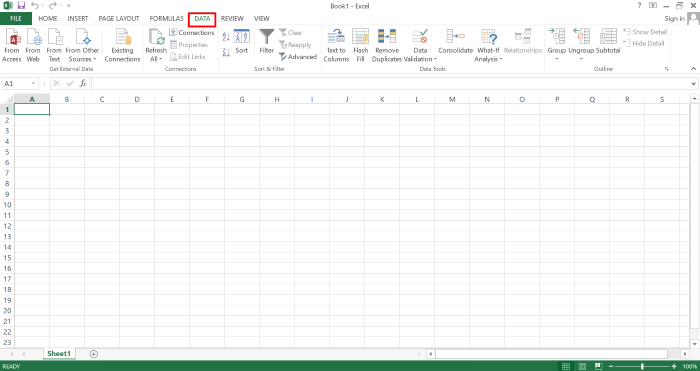
- Stay in Microsoft Excel and open a blank spreadsheet>>Click on the Data tab.
- In the Data tab on the left side, expand the dropdown from From Other Sources>> Hit From XML Data Import.
- Next, select the XML file from your system and click the Open button to add it.
- Now, perform the 5th to 7th steps from the above-mentioned steps using Excel.


Method 02: Use Notepad++ to Convert XML File to CSV Format
If you don’t want to use Excel, Notepad++ with an added plugin can help you manually convert XML to CSV. Notepad++ is a free and lightweight text editor, and by adding the XML Tools plugin, you can view and format your XML file easily.
- Open your XML file in any basic text editor and copy the entire content using Ctrl + C.
- Launch Notepad++, then paste the copied data into it by pressing Ctrl + V.
- In Notepad++, tap on “Language>> choose “XML” to apply proper formatting.
- To perform the next step, navigate to File >> Save As, and save your file.
- Now, open Microsoft Excel on your computer and click “Open”.
- From the left menu, choose “Browse” to find and select your saved XML file.
- When prompted, select the option “As an XML table” and hit OK.
- Now, confirm any additional pop-ups by clicking OK again.
- Your XML data will now be displayed as a structured table in Excel.
- Finally, go to File >> Save As, select CSV as the format, and save the file.
Method 03: How to Convert XML File to CSV Format via Python
If you’re comfortable with coding, using Python is a flexible way to convert XML data to CSV format. Python provides built-in libraries like xml.etree.ElementTree and external ones, like pandas to simplify the conversion process.
- Open your terminal or command prompt and install pandas (if not already installed):
- Now, save your XML file in the same folder where you’ll run your Python script.
- Use the following sample script to convert XML to CSV:
- Save the script with a .py extension and run it.
- After successful execution, a new file named output.csv will be created in your folder.


Method 04: Utilize Online XML to CSV Converter
Another convenient option is using the online tools to convert XML to CSV. These web-based tools are easy to use and perfect for one-time or small conversions. Most online converters let you upload your XML file and instantly download the CSV version.
- Open your browser and visit any trusted XML to CSV converter accordingly.
- Click on “Choose File” or “Upload,” and select the XML file from your computer.
- After that, select “CSV” as the output format.
- Click the “Convert” button to start the conversion process.
- Once the process is complete, download the CSV file to your system.
Drawbacks Associated with the Manual Methods
Let’s look at some common drawbacks you should be aware of while using the manual method:
- Firstly, it can be time-consuming when converting multiple files.
- Moreover, complex XML structures are hard to handle manually.
- As a result, formatting errors may occur during copy-paste.
- In most cases, batch conversion isn’t supported.
- Additionally, manual tools offer limited formatting control.
- Sometimes, basic technical knowledge is still required.
- Finally, extra cleanup is often needed after conversion.
These drawbacks can affect speed, accuracy, and overall ease of use. Hence, expert recommended to use the automated solution to simplify the task.
Method 05: All-in-One Solution to Convert XML to CSV Format
If you’re looking for a quick and reliable way to convert XML files into CSV format, the Aryson XML Converter Tool offers an all-in-one solution. It’s built to simplify the process for every user, no matter their technical background. With this tool, you can convert single or multiple XML files at once, even if they contain complex or deeply nested data. It also gives you the option to export your XML into other formats like JSON, PDF, or TXT, depending on your needs. The built-in preview feature lets you check your data before conversion, and it ensures that the structure and content remain intact. It’s a time-saving and error-free way to handle XML data professionally.
Simple Steps to Batch Convert XML to CSV Format
- Firstly, launch and run the Aryson XML Converter Tool on your PC.
- Click the Add File Button to upload your XML file from your computer.
- Now, preview of your XML data so you can review it before converting.
- Next, select CSV as your desired output format from the available list.
- According to your requirement, proceed with the given additional features.
- Assign a Path to Save and click on the Convert button to begin conversion.


Conclusion
Above, we discussedeverything from simple manual methods like Excel and Notepad++ to more flexible solutions like Python scripts or online tools. There’s something for every type of user. Each method has its own benefits depending on your file size, structure, and comfort with technology. But if you need a more reliable option with minimal effort, a dedicated XML converter can helpto convert XML to CSV. No matter which method you choose, the key is to pick the one that fits your needs best and ensures your data stays accurate and well-formatted.
Frequently Asked Questions:-
Q1. What is the difference between XML and CSV?
Ans: XML is a markup language used to store structured data with tags, while CSV is a plain text format that stores data in rows and columns separated by commas. CSV is easier to read and use in tools like Excel or Google Sheets.
Q1. What if my XML file is too complex to convert manually?
Ans: If your XML file contains deeply nested elements or is too large for manual methods, using an automated tool like Aryson XML Converter is recommended. It simplifies the process and preserves data accuracy.
About The Author:

Rohan Wiese is a Technical Writer at Aryson Technologies. He is an expert Email Forensic, Cloud Computing, and a passionate nerd with over 10 years of experience in technical content writing. He writes about Cloud Migration, Database Recovery, Email Backup, Windows, Mac, and Tech.
Related Post

