-

Written By Harshita Sachdeva
-
Approved By
Shivam Rathore -
Updated on July 20th, 2026
Convert OST File to Single PDF Without Outlook: 2026 Guide
Fact-checked and reviewed in accordance with our
Editorial Policy
User Query: I have a few OST (Offline Storage Table) files from my Outlook account that I need to convert OST file to single PDF for easier storage and access. I’ve tried searching online for converters, but I’m unsure about which one is reliable and works well for OST to PDF conversion. Could someone suggest the best tool or method to convert these files without losing any data?
Summary: OST files, aka Offline Storage Tables, store offline copies of Outlook mailboxes and become inaccessible once disconnected from Exchange or corrupted. Converting an OST file to PDF gives users a portable, universal format that opens on any device without Outlook. This blog explains why users need this conversion, covers manual methods using HTML and Word, and introduces the Aryson OST to PST Converter for fast and error-free conversion.
Instant Way to Backup Outlook emails in PDF format
- Install and run the Aryson OST to PST Converter >> select single or multiple OSTs.
- Preview the files /folders to be migrated >> select PDF as the output.
- Configure the required filters and features and click Start Export to begin conversion.
Can You Convert OST File to Single PDF Manually?
Yes, you can use Outlook and Word to convert OST to PDF manually, without any third-party software. There are multiple steps to be followed to perform this process. Moreover, it works only for small mailboxes and results in a significant risk of data loss.
Manual Methods to Save Outlook OST Emails as PDF
OST files cannot be directly saved as PDF since Outlook does not offer this export option. Instead, to accomplish the conversion, users must first convert the OST data into an intermediate format. HTML is one such file format we will consider here. You can use Word or a similar application to save OST file as HTML. You can follow either of the methods below carefully to convert OST file to Single PDF and make sure Outlook stays connected to the OST file throughout the conversion.
Method 1: Use Intermediary File Format ( Used HTML Here)
This method takes place in two sequential steps. First, save the OST file as HTML and furthermore, convert HTML to PDF format.
Step 1: Save OST as HTML
- Open Microsoft Outlook on your system.
- Select the file that you want to save into PDF.
- Click on the File tab >> click Save As.
- Select the Save as type drop–down list and select HTML.
- Give the file name and select the location to save the file.
- Click the Save button to start the process.
Step 2: Save HTML as PDF Format
- Next, go to the HTML file you saved in Step 1 >> right-click on it.
- After that, navigate to Open With >> select Microsoft Word to open it.
- Next, go over to the File tab >> click Save As >> select PDF from Save As drop-down.
- Click Browse >> select the path to save the PDF file >> click Save.
Why Do Enterprises Do Not Prefer The Above Method?
The manual method works well, but most users avoid to use them once the mailbox size grows beyond a small number of emails.
- This method requires repeating steps for every single email individually.
- Moreover, formatting, headers, or embedded images may not transfer correctly.
- Additionally, attachments are not merged into the same PDF automatically.
- Also, users risk losing folder structure when handling large mailboxes.
- Furthermore, merging hundreds of separate PDF files becomes a tedious extra task.
Professional Way to Convert OST File to Single PDF
The Aryson OST to PDF converter is one of the most recommended software programs that allows users to convert their single or multiple OST files. This software converts entire OST mailboxes into a single, structured PDF without scripting or repeated manual steps. Moreover, this software keeps the folder hierarchy, headers, and attachments intact, which eventually makes it suitable for large mailboxes with thousands of stored items. Even if you are a complete beginner, you can efficiently use this software to convert OST to PST without Outlook. Now, you can follow the steps given below.
Simplified Steps to Open OST Emails without Outlook in Readable Format
- Install the newly launched Aryson OST Converter and then run it as administrator.
- After that, import the single or multiple OST files into the software.
- Then, expand the folder hierarchy in the left panel and select files/folders to convert.
- Now, mark the File Formats radio button and select the PDF format as the output.
- Apply the advanced filters and features as per your requirement and specify the path of the resultant file.
- At last, click on the Next button to begin the conversion process.
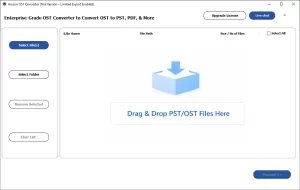
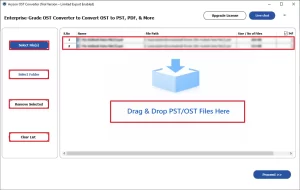
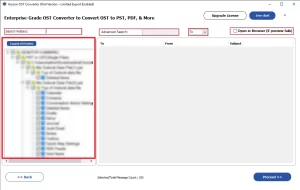
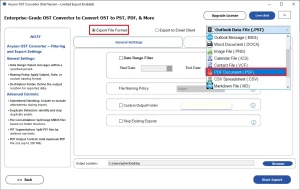
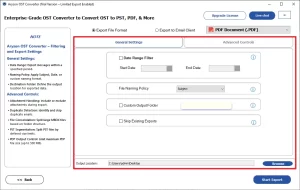
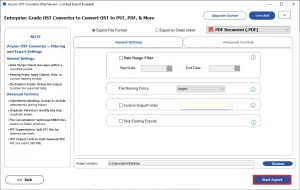
To convert OST to other formats (e.g., convert OST to HTML), you have to change the file format. The rest of the steps will remain the same.
Mark’s Success Story
Mark Reynolds, an IT admin in Dallas, needed to convert multiple old OST files to PDF after a server migration left them orphaned. He first tried the manual HTML method, but formatting broke on large mailboxes. Therefore, he switched to the Aryson OST to PDF converter, and he exported all the required data within an hour. Even he used the same utility to further convert OST Calendar to ICS files for sharing calendar events across different email and calendar applications.
Conclusion
In the above article, we discussed that many users convert OST file to Single PDF once the mailbox becomes inaccessible or a portable format is required. To achieve an accurate conversion, it is important to choose the right approach between the manual method and the automated method. However, the manual method works fine for a small number of emails; large-scale users should rely on the automated solution since it offers several features for a fast, error-free conversion.
Frequently Asked Questions
Q.1 Why would I need to export OST file to PDF?
Ans: When users export OST to PDF, it creates a universally accessible document. Moreover, it helps users with legal records, compliance, sharing, archiving, printing, and long-term preservation without requiring Outlook or Exchange access.
Q.2 How to convert OST file to single PDF?
Ans: You just have to install the Aryson OST to PDF Converter. First, select the OST file and choose PDF as the output format. Enable the single PDF option, apply preferences, and start conversion to generate one consolidated document.
Q.3 Can this software convert both single and multiple OST files into PDF?
Ans: Yes, the software supports converting individual OST files and multiple OST files simultaneously. Batch processing saves time and simplifies large-scale mailbox export requirements efficiently.
Q.4 Does the tool export other mailbox elements besides emails?
Ans: Yes, the software exports emails, contacts, calendars, tasks, journals, and notes. It preserves mailbox content while maintaining folder hierarchy and associated metadata accurately.
Q.5 Is it possible to export only emails within a specific date range to PDF?
Ans: Yes, the software includes a date range filter. Users can define start and end dates, exporting only relevant emails while excluding unnecessary mailbox content.
Q.6 Does the software support batch export of OST to PDF for bulk migration?
Ans: Yes, batch export functionality allows multiple OST files to be processed together. This reduces manual effort and accelerates large mailbox migration or archiving projects.
Q.7 Can I customize the naming of PDF output files or folders?
Ans: Yes, the software provides naming convention options for exported files. Users can customize file and folder names for improved organization and easier management.
Q.8 Does the software offer incremental exports to avoid re-exporting the same data?
Ans: Yes, incremental export features help prevent duplicate processing. Previously exported items can be skipped, reducing export time and avoiding unnecessary duplication across migrations.
Q.9 Can I split large PST files after the migration is complete?
Ans: Yes, the software offers PST splitting options after migration. Large PST files can be divided by size, improving manageability, storage efficiency, and Outlook performance.
Q.10 Does the tool depend on an Exchange Server to process mailbox data?
Ans: No, the software processes OST files independently without Exchange Server dependency. It accesses mailbox data directly, enabling conversion even when servers are unavailable.
Q.11 Where can I get help if I face technical issues while using the software?
Ans: You can reach out to our tech support team in case of inconvenience. The technical assistance is available through live chat and email support. Users can contact experts via email, live chat, or support channels for troubleshooting guidance.
Q.12 How is data integrity maintained during the conversion process?
Ans: The software preserves the original mailbox structure and properties throughout conversion. Emails, attachments, metadata, and folder hierarchy remain unchanged, ensuring accurate results consistently.
About The Author:

Harshita Sachdeva, a professional technical writer at Aryson Technologies, specialize in delivering clear, hands-on documentation for data management, migration, and recovery solutions. With a meticulous, reader-first approach, I break down complex technical processes into simple, actionable content - helping IT professionals and decision-makers tackle challenges efficiently.
Related Post