-

Written By Rohan Wiese
-
Updated on July 15th, 2025
Quick & Free: Convert EML to PDF with Attachments in Minutes!
Summary:- Do you have a bunch of EML files saved on your system but don’t know how to open, share, or print them easily? One of the most effective solutions is to convert them into PDF format. But what about the attachments, those important documents or images inside the email? In this blog, we’ll guide you through free methods to convert EML to PDF along with attachments. We will use both manual techniques and the best EML to PDF Converter to save email as PDF with attachments without any hassle.
EML files are commonly used to store individual email messages, especially from email clients like Windows Live Mail, Thunderbird, and Outlook Express. Although they’re useful to keep the original email content intact. But not always convenient to open or share, especially if you don’t have the right application installed. In that case, all you need to do is get EML data in an easy-to-read and share format as a PDF.
Understanding the Need to Convert EML File to PDF Format
Here are some common reasons why users choose to convert EML files to PDF format.
- To start with, EML files are not universally supported and usually need specific email clients to open.
- That’s why converting them into PDF makes them easier to access across any platform or device.
- For those who want better readability, PDF offers a clean layout that remains intact regardless of the system.
- Moreover, PDF files are easier to share and print, which is ideal for professional or legal purposes.
- In many situations, attachments are just as important as the email itself, and converting to PDF helps preserve both.
Now that we’ve seen why it’s worth converting, let’s look at some free and easy methods to get it done.
Top Methods to Convert EML to PDF with Attachments
There are several ways you can turn your EML files into PDF documents, but not all of them preserve attachments. To make things easier, we’ve listed the most effective methods that let you convert EML to PDF without losing any important details.
Method 1: Convert EML File to PDF via Thunderbird Application
One of the most effective free ways to convert .eml email messages to PDF is by using Mozilla Thunderbird. It’s a free, open-source email client that supports EML file import and allows export in PDF format using an add-on.
- Download and install Mozilla Thunderbird from thunderbird.net.
- Open Thunderbird and skip or create a dummy email account if prompted.
- Right-click Local Folders and select New Folder, then name it (e.g., “EML Files”).
- Click the ☰ menu (three lines) in the top-right and go to Add-ons and Themes.
- Search for ImportExportTools NG, then click Add to Thunderbird and install it.
- Once installed, right-click your new folder under Local Folders.
- Go to ImportExportTools NG > Import EML Files > Import individually.
- Select one or more .eml files from your computer and click Open.
- The emails will appear inside the folder you created.
- Select the email(s) you want to convert.
- Press Ctrl + P or go to the More (☰) menu > Print.
- In the print dialog, choose Microsoft Print to PDF as your printer.
- Click Print, then enter a name and location to save the PDF file.
- Finally, click Save to complete the process.
Method 2: Use MS Outlook to Convert EML to PDF Format
While MS Outlook doesn’t offer a direct “Save as PDF” option, you can still convert EML emails to PDF using the Print to PDF feature. This method works well if you already use Outlook and have EML files ready to import.
- Locate the EML file you want to convert on your computer.
- Right-click the EML file and select Open with >> Outlook.
- Once the email opens in Outlook, go to the File tab at the top left.
- From the menu, click on the Print option.
- Under the Printer section, choose Microsoft Print to PDF from the list.
- Click the Print button. A Save Print Output As dialog box will appear.
- Choose a destination folder, enter a file name, and click Save.
- Your email will now be saved as a PDF at the selected location.
Drawbacks of Using the Manual Methods
- Limited to single file conversion: Most methods don’t support batch processing.
- Attachments may be excluded: Many manual ways don’t preserve attached files.
- Formatting issues: Email layout may change or break during conversion.
- Lacks advanced features: No filters, naming options, or folder structure retention.
- Time-consuming process: Each email must be converted manually.
- Privacy concerns: Online tools may risk exposing sensitive email data.
- Not beginner-friendly: Some methods require technical steps or add-ons.
Method 3: Best Alternative to Convert Multiple EML to PDF Format
The Aryson EML to PDF Converter is a powerful and user-friendly solution to convert EML files into PDF format with complete accuracy. It supports batch conversion, allowing users to process multiple emails at once. Also, it gives you the flexibility to embed attachments directly into the PDF or save them separately, depending on your needs. With its simple interface and smooth navigation, even non-technical users can use it comfortably. In addition to PDF, it can convert EML to PST, MSG, MBOX, and HTML. Follow the given steps to accomplish the task with ease.
Easy Steps to Convert EML to PDF in Bulk with Attachment:
- Install the Aryson EML Converter Tool on your Windows or Mac system.
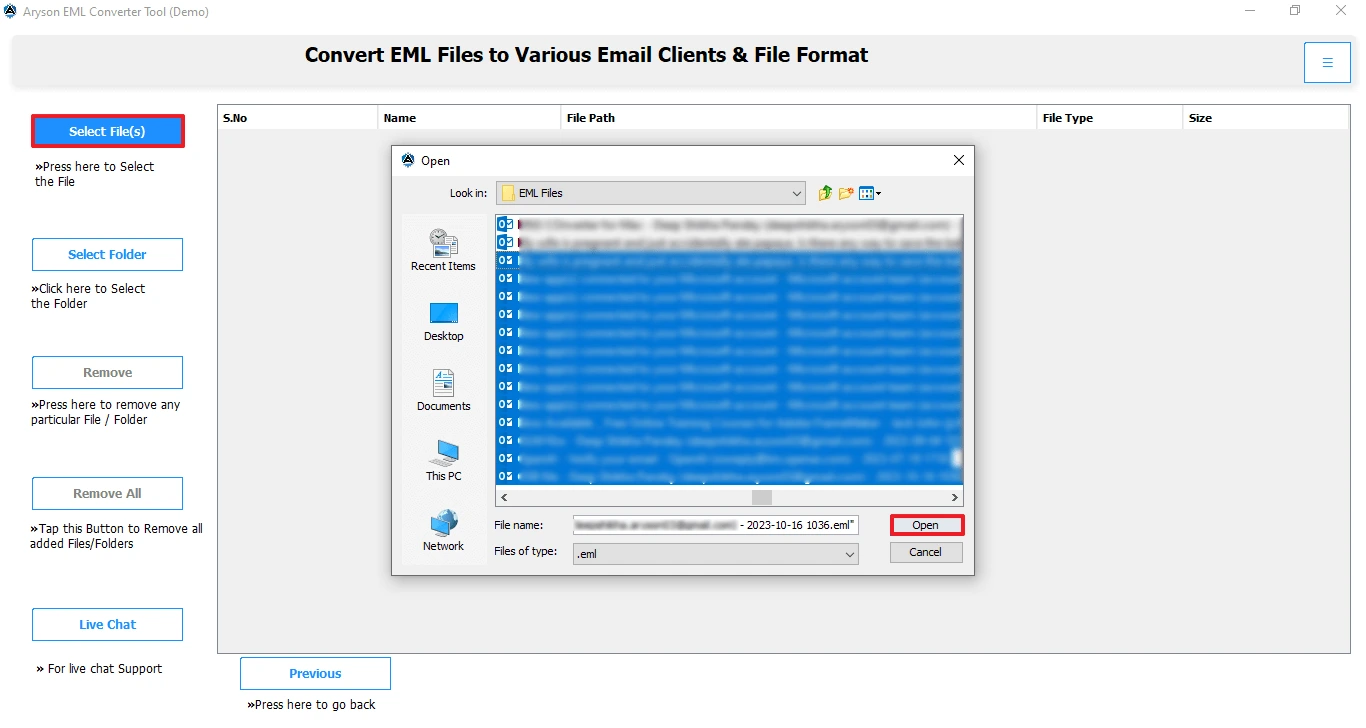
- Click on the Add File or Add Folder button to load your EML files>>Open.
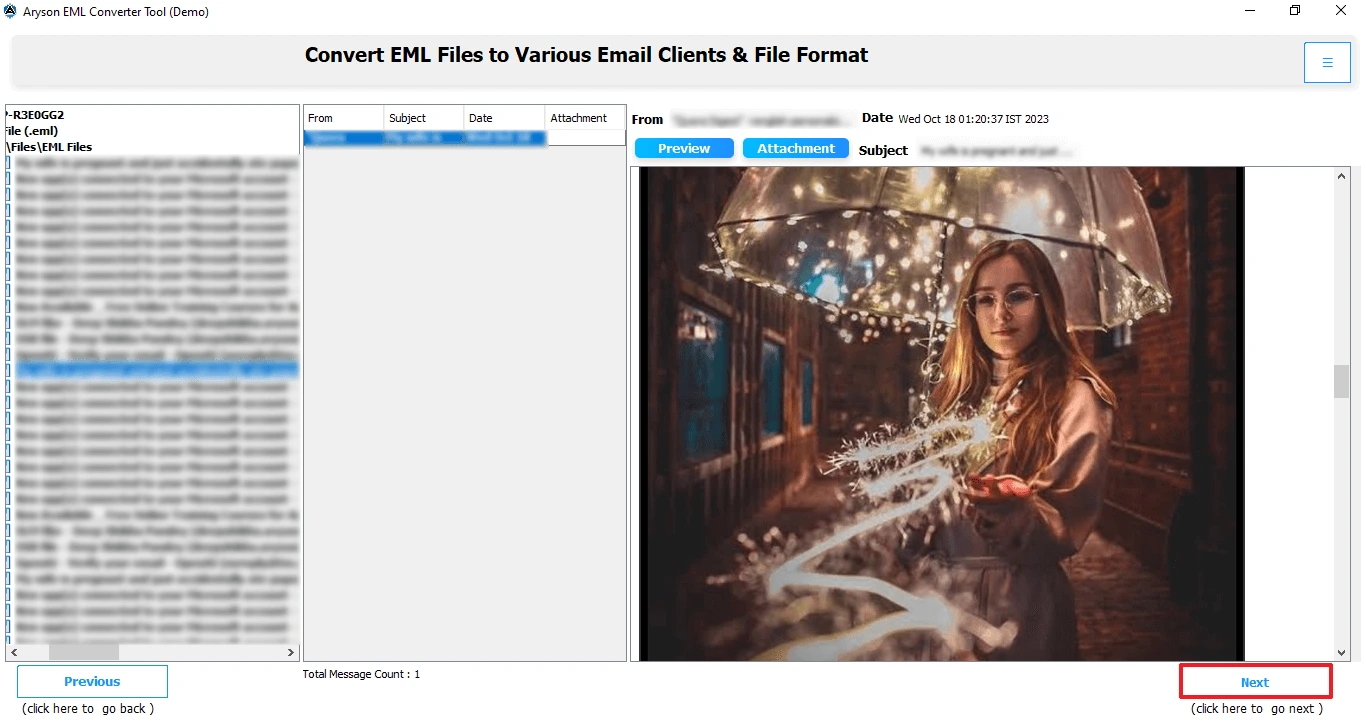
- After importing, preview the emails if needed, then click Next to proceed.
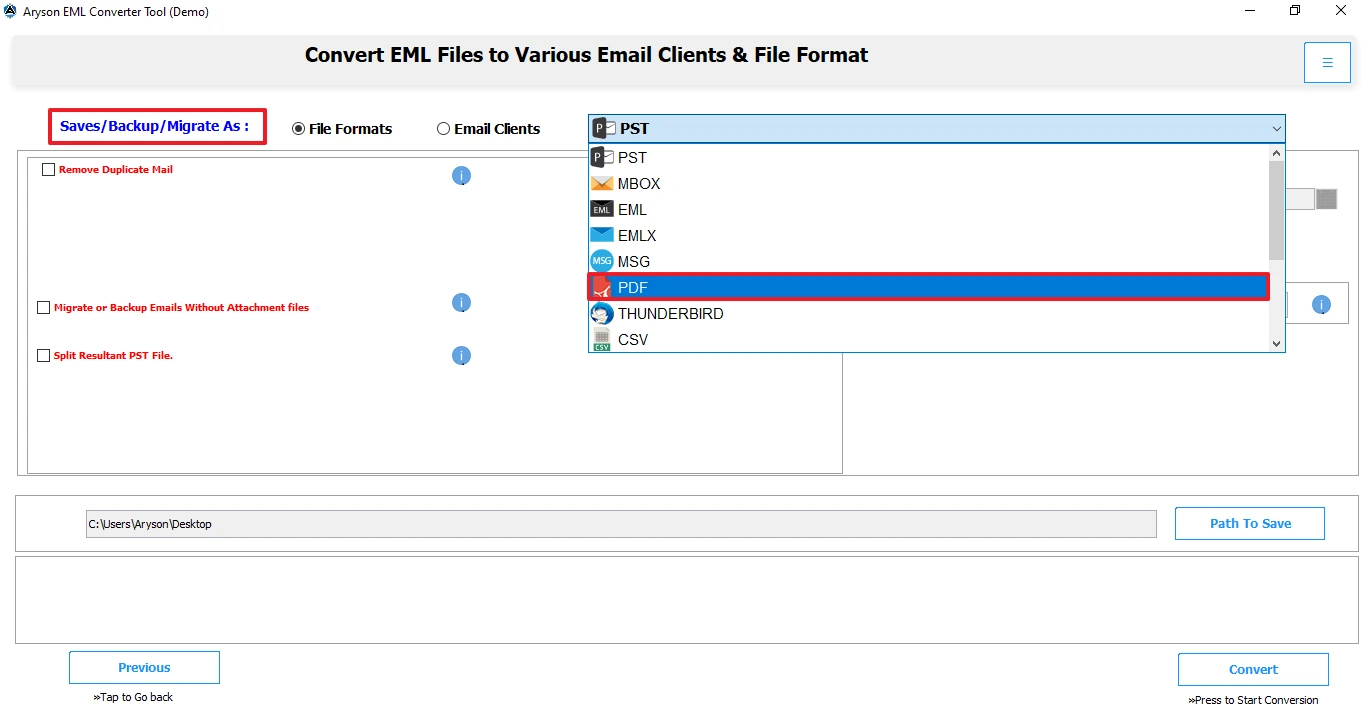
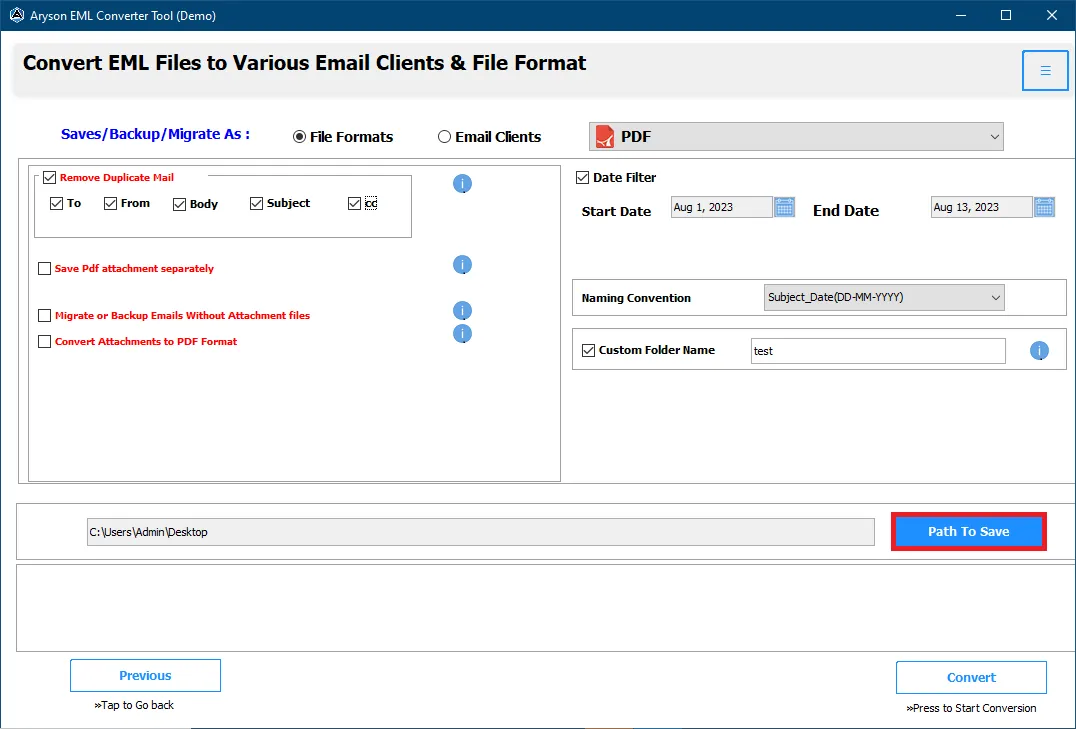
- From the list of saving formats, select PDF as the output option.
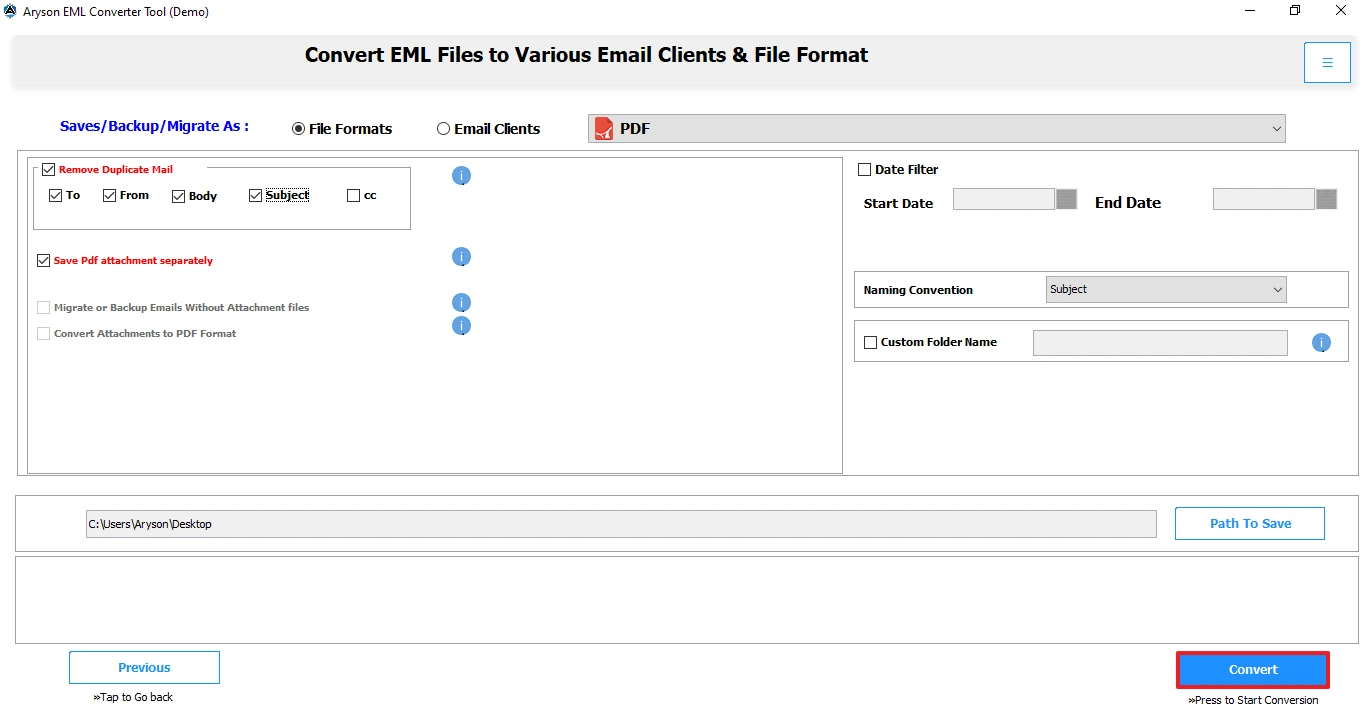
- Apply advanced settings along with the destination path to save PDF files.
- Finally, click on the Convert button to start the conversion process.

Conclusion
No matter which approach you choose, converting emails more accessible and secure PDF format is always a smart move. There are several effective ways to convert EML to PDF format, depending on your needs. If you only need to convert a few emails, free methods like Thunderbird or Outlook can do the job. However, they come with limitations, especially when dealing with multiple files. For a smooth experience, a professional solution can save time and ensure accuracy.
Frequently Asked Questions:-
Q1. How do I batch convert multiple EML files to PDF for free?
Ans: You can batch convert multiple EML files to PDF using the Aryson EML to PDF Converter.
✅ Install and open the Aryson EML to PDF Converter.
✅ Click Select Folder to load all your EML files.
✅ In the next panel, preview the selected EML data.
✅ After that, choose PDF as the output format.
✅ Apply filters or handle attachments if needed.
✅ Now, set the destination path for output.
✅ Click Convert to start the batch process.
Q2. Are online EML to PDF converters safe to use?
Ans: Online tools may work for small files, but they pose privacy risks since you’re uploading personal emails to external servers. It’s safer to use desktop-based solutions for confidential data.
About The Author:

Rohan Wiese is a Technical Writer at Aryson Technologies. He is an expert Email Forensic, Cloud Computing, and a passionate nerd with over 10 years of experience in technical content writing. He writes about Cloud Migration, Database Recovery, Email Backup, Windows, Mac, and Tech.
Related Post