-

Written By Rohan Wiese
-
Updated on June 18th, 2025
BKF File Extractor to Extract Corrupted Windows Backup File Data
Summary: Data backup is a business-critical requirement, particularly for enterprises that handle large-scale operations. If one loses access to backup file data due to corruption, this results in significant downtime, financial loss, and compliance issues. No worries if you are struggling through any such situation; here is the help. Know how to restore or extract data from corrupted Windows backup files! Explore some effective manual procedures and a dedicated Advanced Backup BKF Repair Tool to extract data from corrupted Windows backup (BKF) files. Download Now Purchase Now
What Causes BKF File Corruption?
If you are a first-time user, get a detailed insight before you recover files from corrupted backup files.
A BKF file (recognized by the .bkf extension) is a Windows backup file. It is created using built-in tools like NTBackup Utility or Symantec Backup Exec (Earlier known as VERITAS). Well, these utilities allow users to create a backup of essential Windows files and data. Ultimately, data is saved in .bkf format. If your original file is lost, deleted, or corrupted, the BKF file facilitates easy restoration.
Although a BKF file helps in disaster recovery, it can also get corrupt and inaccessible. But how does a BKF file get corrupt? It may be due to:
- If your BKF file is stored in a virus-infected storage.
- If your PC shuts down while the backup is running.
- Also, physical damage to the hard drive can harm backup files.
- Power failure, human error, or conflicts during backup.
- Issues like outdated software or faulty hardware components.
- If the backup tool used is infected, it can cause corruption.
Error Message When BKF File Is Corrupted
When your BKF file is damaged or inaccessible, you may encounter diverse error codes. Thus resulting in the need to extract data from corrupted Windows backup files.
Hence, if you encounter any such errors while accessing BKF files, proceed to repair the corrupted Windows backup file. Explore how?
|
Error Code |
What Does It Mean? |
|
0x80070005 |
Access is denied. |
|
0x80070724 |
Incompatible version of the serializing package. |
|
0x8007007B |
The filename or path is incorrect. |
|
0x80040154 |
Volume Shadow Copy Service error. |
|
0x8007000E |
Not enough storage or system restore fails. |
|
0x81000109 |
Internal system error prevents creating a restore point. |
|
0x800423F4 |
Backup fails due to a non-transient writer error. |
|
0x80070057 |
An incorrect parameter was used during file backup. |
How Can I Extract Data from a Corrupted Windows Backup File?
For extracting data on Windows 7 or Windows 8.1, you need to install a special utility NTBackup utility from Windows XP. So, download or copy the following files from a Windows XP machine:
- Ntbackup.exe
- Ntmsapi.dll
- Vssapi.dll
You will find these files typically in the Program Files folder on a Windows XP system. Let us begin to explore various manual procedures discussed in the section below.
1. Using NTBackup Utility on Legacy Systems
As you know, the NTBackup utility was the default backup tool in Windows XP and earlier versions. Here is how to use it:
- Locate and run ntbackup.exe.
- Follow the Backup or Restore Wizard to select and restore BKF files.
Note: NTBackup is not available in Windows Vista and later versions.
2. Restoring BKF Files in Windows 7, 8, and 10
While NTBackup isn’t natively supported in newer Windows versions, you can still use it by:
- Download the nt5backup.cab file. It contains ntbackup.exe, ntmsapi.dll, and vssapi.dll.
- Next, you need to extract these files to a folder.
- Double-click the ntbackup.exe file to launch the Backup Utility.
- Click OK on the prompt. Further, follow the wizard to recover files from corrupted Windows backup files.
- Tap on the Browse button to locate and select your BKF file.
- Choose Restore files and settings, then click Next.
- The Backup or Restore Wizard will open. Click Next again.
- Browse and select the BKF file location to load it into the utility. Click OK.
- A tree-structured folder view of your backup will appear. Expand and preview it, then click Next.
- Review all available data files listed in the right pane.
- Click the Advanced button for more options.
- From the Restore files dropdown, select Alternate location and specify where to save the restored files.
- Click Next, then click Finish to recover files from corrupted backup files.
Note: Ensure that the necessary services, like Removable Storage Manager, are enabled.
3. Using Windows Server Features
One can also extract data from corrupted Windows backup files in the Windows Server environments. Here are the steps:
- Firstly, open the Control Panel and select Administrative Tools.
- Next, opt for the Server Manager option.
- Add the Removable Storage Manager feature.
- Here, install NTBackup and proceed with the restoration process.
For more information, this method is more suited for server editions. Therefore, it may not apply to standard desktop versions.
However, the manual method is not ideal in all cases. It has some loopholes restricting users:
- Methods depend on the NTBackup Utility, and it is not available in most of the latest Windows versions.
- It is not user-friendly. One has to understand backup tools, system configurations, and command-line utilities.
- The built-in tool cannot repair or open corrupted BKF files if it is damaged.
- Moreover, it is time-consuming, has a risk of data loss, and also has compatibility issues.
So, which method is the best? Given below is the alternative.
Easily Extract Data from Corrupted Windows Backup File
If the manual method is not practical, you still have an option. Aryson BKF Extractor and Repair Tool is a better solution than the NTBackup utility. It has neither compatibility issues nor is it difficult to perform. One can also recover split or compressed backup files with this utility.
Besides, the tool is for all technical and non-technical users. It requires no technical expertise to operate. Moreover, it can repair and recover data from severely corrupt BKF files, too. Follow the process below to recover data from the backup file:
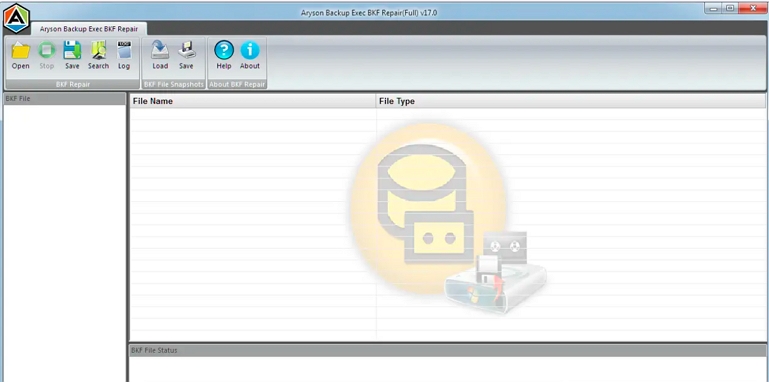
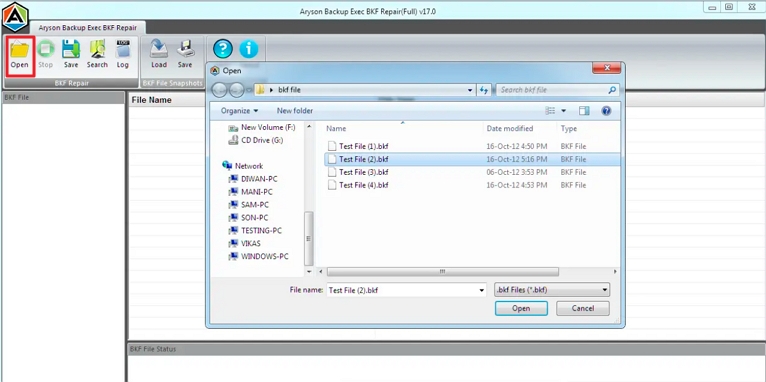
- Launch the Aryson BKF Repair Software and click Open to add the corrupt BKF file.
- Explore the BKF file on your PC to recover data from and add to the tool.
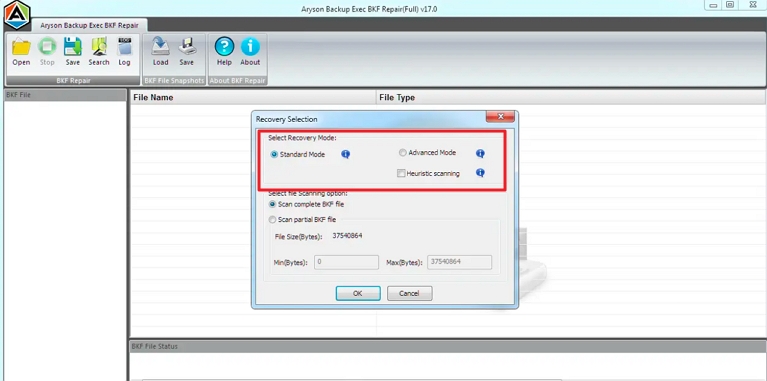
- Choose the Recovery Mode and other options, then click OK to begin scanning.
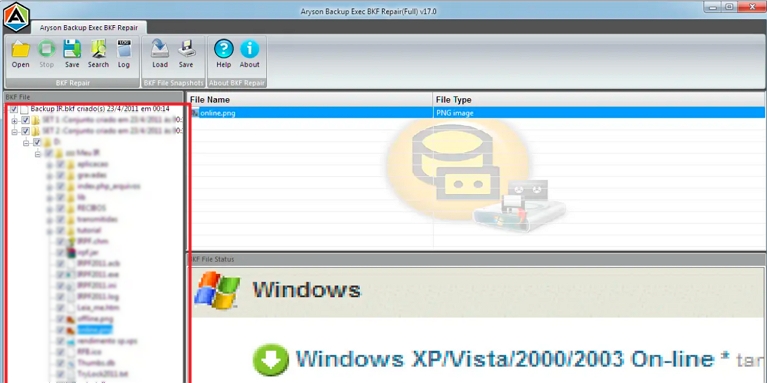
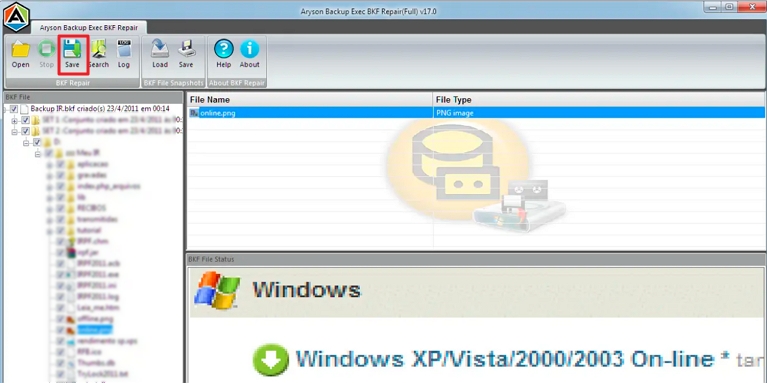
- Preview all recovered items in a tree-structured layout.
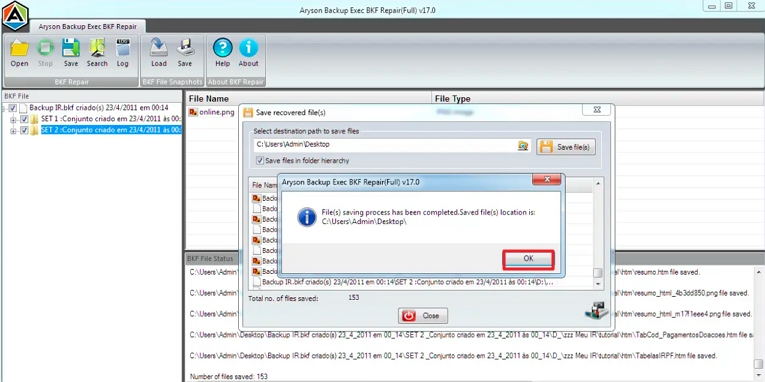
- Select files to recover, click Save, and choose a destination path.
- Click OK to save data and exit the tool after completion.
Note: You can try the functionality using free demo software. Download it from Aryson’s official website.
Conclusion
BKF files are critical to safeguard data, but they can become corrupt, too. The reason for corruption can be virus attacks, hard disk failure, or system crashes. In that case, one needs to extract data from a corrupted Windows backup file. Multiple free manual methods exist; however, they are complex, risky, and outdated. Instead of the ineffective manual method, choose a professional BKF Extractor Tool. It ensures complete data restoration with minimal effort and zero data loss.
Frequently Asked Questions (FAQs):-
Q. What is a BKF file, and how do I open it?
Ans- A BKF file is a Windows backup file created by NTBackup or Symantec Backup Exec. To open it, use NTBackup on older systems or the Aryson BKF Recovery Tool on Windows 10/11. The professional tool is helpful, primarily if NTBackup isn’t supported.
Q. How to restore a BKF file in Windows 10 without NTBackup?
Ans- The best solution to extract or restore data from a corrupted Windows backup file is Aryson BKF Recovery. This software does not require the NTBackup.exe utility to operate.
About The Author:

Rohan Wiese is a Technical Writer at Aryson Technologies. He is an expert Email Forensic, Cloud Computing, and a passionate nerd with over 10 years of experience in technical content writing. He writes about Cloud Migration, Database Recovery, Email Backup, Windows, Mac, and Tech.
Related Post



