-

Written By Rohan Wiese
-
Updated on June 24th, 2025
05 Best Email Recovery Tools for Microsoft Outlook Users – [ Tested in 2025 ]
Summary: Losing important emails can be a significant setback, whether they’re crucial work documents, personal memories, or client communications. For Microsoft Outlook users, issues like corrupted PST/OST files, system crashes, accidental deletions, or even malware attacks can lead to severe data loss. Fortunately, a range of powerful email recovery tools are available to help you retrieve your lost messages quickly and efficiently.
We’ve rigorously tested and shortlisted the top 5 Best Email Recovery tools for Microsoft users in 2025. These tools are designed to be user-friendly, offering advanced features for a swift and hassle-free recovery experience.
Why You Might Need an Email Recovery Tool
In today’s digital landscape, unexpected data loss is a common challenge. Email recovery tools become indispensable when you face scenarios such as:
- Accidental Deletion: Unintentionally deleting single emails or entire folders.
- System Crashes: Sudden operating system failures that corrupt your Outlook data.
- Malware Attacks: Viruses or ransomware that damage or encrypt your email files.
- Incomplete or Faulty Migrations: Errors during email client or system migrations.
- Hardware Failures: Issues with your storage devices leading to data inaccessibility.
- Sudden Power Cut-Offs: Abrupt power loss that can corrupt open files.
- Corrupted Outlook Data Files (PST/OST): Damage to the primary files where Outlook stores your data.
In any of these situations, robust recovery tools ensure you can restore your data swiftly, preventing permanent loss and minimizing disruption.
The Importance of Timely Email Recovery
Email deletion or data loss can severely impact businesses and individuals alike. Beyond the loss of crucial communications and contacts, delayed recovery can lead to missed opportunities, compliance violations, and potential data breaches. Here’s why prompt recovery is essential:
- Minimizing Business Disruption: If emails contain client communications, project updates, or critical approvals, quick recovery prevents project delays and maintains operational flow.
- Preventing Permanent Data Loss: Contracts, legal documentation, or customer requests can be permanently lost if not recovered promptly.
- Ensuring Compliance: Many industries have strict data retention laws. Prompt email recovery helps ensure your company remains compliant with these regulations.
- Avoiding Financial Impact: Missed invoices, delayed payments, or overlooked proposals due to lost emails can have significant financial repercussions for a business.
To avoid such circumstances, it’s always beneficial to recover lost or deleted emails as soon as possible.
Key Features of the Best Email Recovery Software for Outlook
When choosing an email recovery tool, consider the following critical features to ensure it meets your needs:
- Compatibility with Windows: The tool should be fully compatible with various Windows versions, including Windows 11, 10, 8, and older editions.
- Supported Formats (PST/OST): Ensure the software supports standard Outlook data formats, especially PST (Personal Storage Table) and OST (Offline Storage Table) files, which store emails, contacts, calendars, and other valuable data. It should recover corrupted Outlook profiles without damaging the original structure.
- Advanced Recovery Modes: A reliable tool that offers multiple recovery modes to handle different levels of file corruption. For minimal corruption, a “Standard” mode might suffice, while “Advanced” or “Deep” recovery modes are crucial for severely damaged files, providing accurate recovery with minimal data loss.
- Data Preview Functionality: The ability to preview recovered data before saving it is invaluable. This functionality ensures you only save relevant and correct data, saving time and storage space.
- Ease of Use: A good email recovery tool should feature a user-friendly interface with straightforward navigation, step-by-step instructions, and intuitive design, making the recovery process simple even for non-technical users.
- Maintain Data Integrity: The software must maintain complete data integrity throughout the recovery process. It means all emails, attachments, contacts, calendar entries, and folder structures are restored exactly as they were before corruption, without alteration or loss.
- Pricing and Demo Tool: Look for tools that offer a free demo version. It allows you to explore features and functionalities before committing to a purchase, ensuring it meets your specific recovery requirements.
Top 5 Email Recovery Tools for Microsoft Outlook Users
Here are our top picks for email recovery tools that encompass the essential features discussed above:
#1. Aryson Email Recovery Software: Comprehensive Recovery for All Scenarios
Aryson Technology’s Outlook PST Recovery Software stands out for its ability to repair corrupted PST files and restore emails, contacts, calendars, and more while preserving the original data structure. It’s effective for recovering emails lost due to system crashes or accidental deletions. This tool can also handle large-sized and encrypted PST files without compromising data integrity. Its user-friendly interface makes it accessible for both technical and non-technical users. Download Now Purchase Now
Advanced Features of Aryson PST Recovery Tool:
- Offers fast recovery of corrupt, damaged, and inaccessible PST files.
- Recovers password-protected or encrypted PST files without requiring the password.
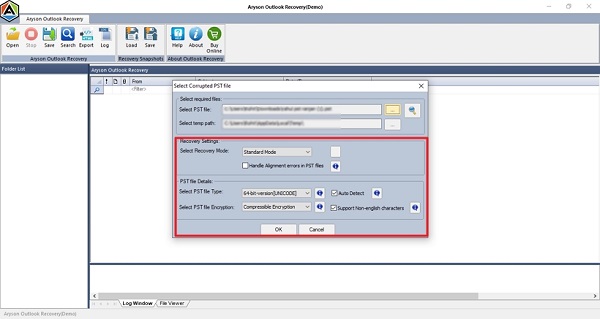
- It provides three recovery modes, Standard, Advanced, and Deep, for varying levels of corruption.
- Quickly restores Outlook mailbox items, including contacts, attachments, and more.
- Repairs oversized or bulk corrupted PST files with minimal disruption.
- Recover deleted emails from Outlook PST file without any data loss.
- Allows saving recovered PST files into new PST, EML, MSG, and MBOX formats.
- Features a preview option for recovered PST files before saving.
- Capable of handling alignment errors in PST files.
- A demo version is available to understand its functionality.
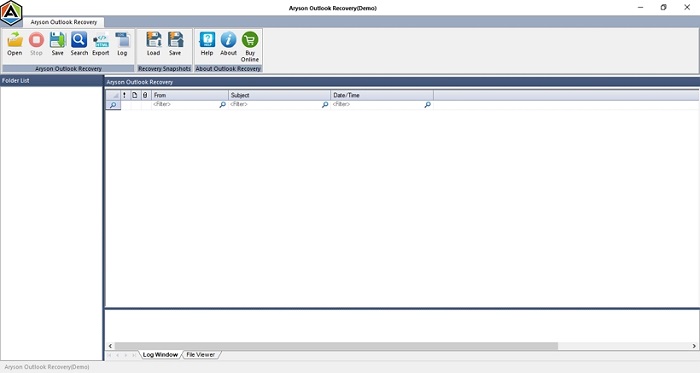
Quick Steps to Recover PST File with Aryson Utility:
- Download and launch the PST Recovery Tool on your PC.
- Click on the “Select PST file” option for recovery.
- Choose recovery options and other features. Click “Next.”
- Preview the recoverable PST file. Hit “Next.”
- Finally, click on the “Save” option and define the path to save.



#2. MS Outlook Help: Best for Corrupt PST Files
MS Outlook Help offers a straightforward Outlook PST Repair Tool designed with an advanced algorithm for fast recovery. It effectively works with corrupted or inaccessible PST files, restoring emails, contacts, notes, calendars, and more.
Features:
- A key benefit is the preview feature, allowing you to view recoverable items before saving them.
- It handles large or encrypted PST files, making it suitable for complex data issues.
- It offers similar features to the Aryson Recovery Tool.
Cons:
- The free version only allows preview; export/save options are restricted.
- It does not help recover corrupted Outlook OST files.
#3. SysInfo OST to PST Recovery Tool: User-Friendly Interface for Beginners
SysInfoTools provides a robust PST File Recovery Tool, excellent for users who desire more control over the recovery process. This tool can restore everything from emails and attachments to contacts, calendars, and journals.
Main Features of SysInfo Recovery Tool:
- Includes two scanning modes: Standard and Advanced.
- Recover large, corrupted, or damaged PST files.
- It offers an option to save recovered data in different formats like PST, EML, and more.
- A demo version is available for functionality analysis.
Cons:
- It does not help recover or repair corrupted Outlook OST files.
- The demo (free) version only allows a preview of recovered data (saving options are restricted).
#4. Cigati Best Email Recovery Tool: Advanced Features for IT Professionals
Cigati’s Outlook PST Recovery Software is designed for recovering Outlook data from damaged, encrypted, or inaccessible PST files. It helps retrieve crucial information without data loss, providing a smooth, secure, and flexible recovery experience.
Advantages of Cigati Email Recovery Tool:
- Offers options to save recovered data in new PST, EML, MSG, MBOX, and even PDF formats.
- Features bulk recovery and several advanced functionalities like Date Filter, multiple Recovery Modes, and Scanning Modes.
- Highly compatible with all Windows and Outlook versions.
#5. DRS Outlook PST File Recovery: Free/Budget-Friendly Option
The DRS PST Repair Tool provides a safe and efficient way to restore corrupted Outlook data files. It can recover deleted or inaccessible emails, notes, contacts, calendar items, and other mailbox data without affecting the original structure.
Benefits of DRS Recovery Tool:
- Wide support for multiple output formats, including PST, MBOX, MSG, EML, and PDF.
- Works securely with both small and large PST files.
- Offers strong compatibility across all versions of Outlook.
- A demo (free) version is available to analyze its features and functions.
Cons:
- The free version only allows preview; export/save options are restricted.
How to Choose the Right Email Recovery Tool for Your Needs
When selecting an email recovery tool, consider these essential factors to ensure optimal results:
- Compatibility: Verify full compatibility with your specific Windows and Outlook versions.
- File Handling: The tool must be capable of handling corrupt, damaged, and oversized PST/OST files.
- Recovery Speed: Look for tools that offer fast recovery, especially for major corruption.
- Preview Functionality: Always prioritize tools that allow you to preview recoverable data before the final recovery.
- User-Friendliness: A simple, intuitive interface is crucial for ease of use, even for non-technical users.
- Data Integrity: Ensure the software preserves the original structure, formatting, and metadata of your recovered emails.
- Demo Availability: A free demo version is highly recommended to assess the tool’s functionality before purchase.
Email Recovery Best Practices to Prevent Future Loss
While recovery tools are invaluable, adopting best practices can help prevent future data loss:
- Regular Backups: Always back up your Outlook PST/OST files regularly to an external drive or cloud storage.
- Manage PST File Size: Keep your PST files under the recommended size limit (e., 5 GB) to prevent corruption issues.
- Use Antivirus Software: A strong and updated antivirus program protects your email data from malware and other threats.
- Utilize Reliable Recovery Tools: If recovery is needed, use trusted tools like the Aryson Outlook PST Recovery Tool for a hassle-free and effective result.
Conclusion: Safeguarding Your Microsoft Emails
Emails hold invaluable information, both personal and professional. This guide has presented the top 5 Best Email Recovery Tools for Microsoft users, designed to restore mailbox items efficiently. Whether you’re an individual, a freelancer, or part of a large organization, these tools provide a reliable and hassle-free way to recover your lost data, ensuring business continuity and peace of mind.
Frequently Asked Questions (FAQs):-
Q1. Which is the best Outlook PST file recovery software?
Ans: While all the mentioned recovery tools are highly effective, many experts recommend the Aryson PST Recovery Tool for its ease of use and advanced features. It provides multiple scanning and recovery modes for fast and accurate recovery of Outlook data.
Q2. Can I recover deleted emails in Outlook with a PST Recovery Tool?
Ans: Yes, you can recover deleted emails in Outlook using the recovery tools mentioned above, such as Aryson, MS Outlook Help, SysInfo, Cigati, or DRS Recovery tools. These tools offer quick and reliable solutions to easily recover your lost data, even if it has been permanently deleted from Outlook’s “Deleted Items” folder.
About The Author:

Rohan Wiese is a Technical Writer at Aryson Technologies. He is an expert Email Forensic, Cloud Computing, and a passionate nerd with over 10 years of experience in technical content writing. He writes about Cloud Migration, Database Recovery, Email Backup, Windows, Mac, and Tech.
Related Post