-

Written By Harshita Sachdeva
-
Approved By
Shivam Rathore -
Updated on July 15th, 2026
Migrate 800 Legacy Postfix/Dovecot IMAP Mailboxes to MS 365: Preparation & Migration
Fact-checked and reviewed in accordance with our
Editorial Policy
Introduction: Email migration is critical for maintaining business communication and operational continuity. A legacy Postfix/Dovecot IMAP server is an older Linux-based email system, while Microsoft 365 provides a modern cloud email platform through Exchange Online. Due to the larger mailbox storage, better security, malware protection, and other features of Microsoft 365, organizations migrate multiple Postfix/Dovecot mailboxes to Microsoft 365. This blog covers manual methods to migrate 800 legacy Postfix/Dovecot IMAP mailboxes to MS 365. Along with that, you will learn how to use the Aryson IMAP Backup Tool to perform a secure migration.
Challenges Faced During Mailbox Migration
The organizations that aim to migrate legacy Postfix/Dovecot IMAP mailboxes to Microsoft 365 may often face some of the following challenges. Let’s have a look at a few of them.
- Broken folder hierarchy: Nested Dovecot folders often get renamed or disappear.
- Failed or crashed migration jobs: Due to large, bulky mailboxes, the migration process might crash midway through the process.
- Slow migration performance: IMAP throttling, connection limits, and limited bandwidth might result in a delay in migration.
- M365 configuration issues: The conventional login methods, expired tokens, and misaligned credentials block connections even before the migration starts.
Real World Migration Scenario
Just imagine there is a mid-sized organization that used to rely on an older Postfix and Dovecot email system to manage its email services. Now, it is looking forward to migrate Postfix Dovecot to Office 365.
- 800 legacy users spread across multiple departments, roles, and wildly different mailbox sizes.
- Postfix handles mail flow while Dovecot stores and serves each mailbox over IMAP.
- Deeply nested folder structures built up over years of daily, everyday use.
- Microsoft 365 is acting as the final destination for every single one of those mailboxes.
This is the exact kind of environment where folder hierarchy and job stability matter far more than raw migration speed, since even one small mapping mistake gets multiplied across hundreds of accounts.
How to Manually Migrate 800 Legacy Postfix/Dovecot IMAP Mailboxes to MS 365
IT admins who are technically skilled to configure IMAP settings can use manual migration. However, this method requires the user to carefully follow migration steps, pre-plan the migration, and make sure to cross-check. Listed below are the steps to perform a migration.
-
Provision Users in Microsoft 365
Every mailbox needs to be present in Microsoft 365 before any connection is established with the old server.
- First, create the Microsoft 365 tenant and verify domain ownership.
- Create user accounts and assign Exchange Online licenses.
- Then, cross-verify if the mailbox storage limits meet the user’s needs.
2. Create the IMAP Migration Endpoint
This is the actual connection Microsoft 365 uses to reach your Dovecot server—configuring Dovecot alone isn’t enough.
- In the Exchange admin center, go to Migration >> Migration endpoints >> New.
- Next, enter the Dovecot server’s FQDN or IP, along with the port (993 for SSL, 143 for TLS).
- State the maximum concurrent connections so that 800 users do not overload Dovecot all at once.
- Also, test the connection once before you save it.
3. Prepare the CSV and Map Mailboxes
It is a must for every source mailbox to map to a destination mailbox. Moreover, Microsoft is robust about the CSV formatting.
- After that, build a CSV with the exact headers EmailAddress, UserName, and Password (case-sensitive, no spaces).
- Double-check spelling and domain accuracy for all 800 entries.
- Next, split the 800 users into smaller batch files (e.g., ~100 per batch) instead of one 800-row file.
4. Run a Pilot Batch
Test the full path end-to-end before committing to bulk migration—there’s no demo mode in native IMAP migration, so this pilot is the real check.
- Create a migration batch using a pilot CSV of 10–20 users.
- Check that folder names and nesting carried over correctly.
- Fix any mapping, credential, or endpoint errors that the pilot surfaces.
5. Start the Bulk Migration
Once the pilot passes, move to full-scale batches, keeping in mind that Microsoft syncs mailboxes in limited concurrency.
- After that, create and start batches of roughly 100 users at a time.
- Remember, initial sync defaults to 10 mailboxes at once per batch—plan timing accordingly.
- Let batches run their incremental sync (every 24 hours) so live mail keeps arriving during migration.
6. Verify, Cut Over, and Close Out
The migration process is not finished at “email arrived.” The source server still needs to be fully retired.
- Compare email and folder counts between source and destination.
- Next, confirm Outlook and mobile logins work for a sample of users.
- Update the MX record and wait 24–72 hours for propagation.
- Also, once all mail routes to Microsoft 365, delete the migration batch to stop synchronization.
Limitations of the Conventional Method
When users migrate Postfix mailboxes to Microsoft 365, there is a possibility of some limitations occurring.
- This method requires the user to invest long hours to migrate 800 mailboxes.
- Moreover, even a single typing error in the CSV file might skip a mailbox.
- At a time, only 10 mailboxes can be synced simultaneously.
- Moreover, the nested folders might break or get renamed.
- Furthermore, the user gets limited error details when something fails.
- Also, there must be great knowledge of IMAP and DNS foundations.
Best Migration Practices To Perform
If you follow a few practices during the Postfix Dovecot to Microsoft 365 migration, the probability of a successful migration significantly increases.
- Test with a small batch first: Make sure to test the migration on a small number of mailboxes (10–20 users) for surface mapping and folder issues before they affect everyone else.
- Verify folder hierarchy: Make sure to check nested folders early, as it is hard to fix the disruption issues afterwards.
- Enable modern authentication: The conventional authentication is one of the most common reasons that migrations crash or fail.
- Keep a mailbox backup before migration: It is recommended to keep a backup to protect the critical data during migration.
Professional Solution to Migrate 800 Legacy Postfix/Dovecot IMAP Mailboxes to MS 365
Manual migration works fine, but it demands time, patience, and a fair amount of trial and error once you’re dealing with 800 mailboxes and years of nested folders. The Aryson IMAP Migration Tool is built to handle such a large amount of data without any issues or downtime. Moreover, it allows users to bulk migrate all 800 mailboxes with the help of the CSV import feature. Along with Postfix/Dovecot, you can also migrate from IMAP Server to Google Workspace. Also, even if this number scales to 1000+ mailboxes, this software can migrate them efficiently (although the time taken varies with the amount of data migrated).
Steps to Migrate legacy IMAP Mailboxes to Microsoft 365
- Download and run the Aryson IMAP Backup Tool on your system.
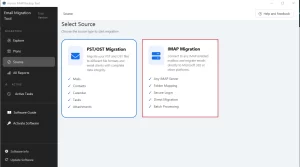
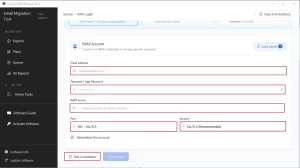
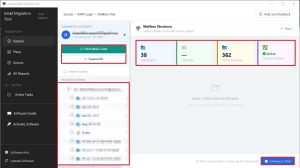
- Next, select the IMAP migration card and provide the Postfix/Dovecot credentials to log in.
- After that, cross-verify the files/folders to migrate and click on the Next button.
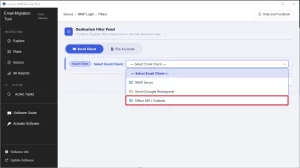
- Select Microsoft 365 under the Email Clients drop-down list and log in to it.
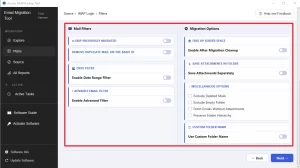
- Now, apply the built-in features of the software as per your requirement.
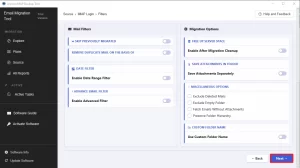
- Click on the Next button to begin the migration process.
- At last, audit the ongoing migration via the Active Tasks software panel.
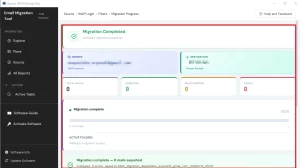
Additional Tip: Along with the email clients, the software also supports file formats. To convert IMAP emails to DOC, PST, PDF, or any other format, select the required output format under the File Formats tab.
Why Do Enterprises Prefer to Use the Aryson IMAP Migration Tool?
- Preserves folder hierarchy exactly, including deeply nested Dovecot folder structures built over years.
- Supports Postfix, Dovecot, and most other standard IMAP-based mail servers out of the box.
- Moreover, the demo version migrates up to 100 emails per folder, so admins can validate results before committing fully.
- Additionally, developers or Data Analysts can convert IMAP emails to JSON via this software.
- Furthermore, it runs as a local desktop application, giving admins direct, hands-on control over the entire process.
- Backed by dedicated technical support for the inevitable issues that come up mid-migration.
Conclusion
When users migrate 800 legacy Postfix/Dovecot IMAP mailboxes to MS 365, it is a complete project, not a few minutes’ task. The folder hierarchy, authentication, and job stability all need attention long before the first mailbox moves. Whether you migrate manually or use the Aryson IMAP Backup Tool, testing small, validating early, and keeping backups will help you through the entire process along the way.
Frequently Asked Questions
Q.1 What is the recommended method to migrate 800 Postfix/Dovecot IMAP mailboxes to Microsoft 365?
Ans: However, both the manual and automated methods work well on their own; it is considered much more secure to opt for the Aryson IMAP Backup Tool.
Q.2 Can a single tool migrate emails, contacts, calendars, tasks, and attachments from Postfix/Dovecot to Microsoft 365?
Ans: Yes, the IMAP backup tool we discussed above can efficiently migrate emails, contacts, calendars, tasks, and attachments from Postfix/Dovecot to Microsoft 365. Moreover, it takes just a few seconds without even affecting the data integrity.
Q.3 How do I start a large-scale migration from Postfix/Dovecot to Microsoft 365?
Ans: In order to begin the Postfix/Dovecot to Microsoft 365 migration, you first have to select the IMAP migration card and log in with valid Postfix/Dovecot credentials. After that, select the mailboxes to migrate, select Microsoft 365, and log in via admin credentials. Here, you can use the import CSV option of the software to migrate multiple mailboxes.
Q.4 Is deduplication available when migrating many Postfix/Dovecot mailboxes?
Ans: Yes, the software provides the users with a remove duplicate feature to eliminate any kind of redundancy during the migration. This eventually speeds up the processing and improves efficiency.
Q.5 How can I migrate only selected items or data within a date range from legacy IMAP servers?
Ans: Yes, you can choose to select and migrate specific items or data within a date range using the date range filter of the IMAP backup tool. It allows users to specify a start and end date as per their requirement.
Q.6 What attachment handling options are available when moving mailboxes to Microsoft 365?
Ans: When a user migrates mailboxes to Microsoft 365, they may skip attachments or save them in a separate folder as per your requirement. This helps enterprises to better manage their attachments.
Q.7 Can I convert or archive mailboxes to PDF for compliance during the migration?
Ans: Yes, the same software can be used to convert or archive mailboxes to PDF for compliance during the migration. You just have to select the PDF file format under the file formats.
Q.8 How do I efficiently run the migration for 800 accounts at once?
Ans: With the help of the CSV import feature of the IMAP backup tool, you can efficiently run the migration for 800 accounts at once. The software performs the migration without even affecting the data integrity.
Q.9 Will migration tools optimize source server space after migration?
Ans: Yes, the Aryson IMAP backup tool allows users to optimize the source server space after migration. With the help of the “free up server space” option, users can efficiently clear the source server’s space.
Q.10 How do I ensure message integrity and metadata are preserved during migration?
Ans: You can enable the “preserve the folder hierarchy” option to preserve the message integrity and folder hierarchy during the migration process.
Q.11 What 24×7 chat support do you provide during large migrations?
Ans: Aryson provides the user with 24/7 live chat support to allow them to efficiently migrate data and resolve their migration-related queries.
About The Author:

Harshita Sachdeva, a professional technical writer at Aryson Technologies, specialize in delivering clear, hands-on documentation for data management, migration, and recovery solutions. With a meticulous, reader-first approach, I break down complex technical processes into simple, actionable content - helping IT professionals and decision-makers tackle challenges efficiently.
Related Post