-

Written By Harshita Sachdeva
-
Approved By
Shivam Rathore -
Updated on July 3rd, 2026
Convert IMAP Emails to JSON: Best for IT Admins & Enterprise
Fact-checked and reviewed in accordance with our
Editorial Policy
Daniel Willson, Boston, Asked
I’ve got thousands of IMAP emails saved in our support inbox, and my team needs them in JSON so we can feed them into our analytics dashboard. I’m not an expert at scripting, and I don’t want to risk corrupting the data. Does anyone know a secure and reliable way to convert IMAP emails to JSON without writing code from scratch?
Summary: IMAP allows users to access mailboxes from a mail server and keeps folders synced across devices in real time. This structure is suitable for day-to-day use but is not portable. That’s why professionals export IMAP emails to JSON, a lightweight format that’s easy to parse and works with apps and scripts. This blog explains a manual method and the use of the Aryson IMAP Backup Tool to complete the conversion without any data loss.
Quick Way to Extract Emails from IMAP Server to JSON
This automated method takes just a few minutes and scales easily to accounts of any size.
- Download the Aryson IMAP Backup Tool as per your OS.
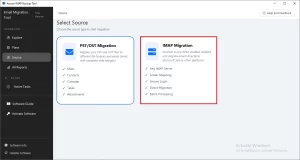
- Choose the IMAP Migration card >> log in to IMAP via valid credentials.
- Select mailbox data to migrate >> select JSON >> apply filters.
- At last, click the Start process button to begin the export.
What Information Is Stored When You Convert IMAP Emails to JSON?
|
Email Component |
Included in JSON |
| Subject | ✔ |
| Sender & Recipient | ✔ |
| CC/BCC | ✔ |
| Date & Time | ✔ |
| Email Body | ✔ |
| Headers | ✔ |
| Message ID | ✔ |
| Folder Name | ✔ |
| Attachments* | It depends on the export option |
| Read/Unread Status | ✔ |
| Metadata | ✔ |
Note: The data present in the JSON file depends on the method you choose for the export. Therefore, it is essential to cross-verify the details of the chosen solution before you begin the expert process.
Manual Method to Convert IMAP Emails to JSON
IMAP doesn’t provide its users with a direct option to perform an IMAP to JSON export. There is no built-in option for it, so users have to fetch the raw email data using a script. This method requires users to have technical expertise. This is because a simple typing mistake might result in errors. Now, follow the steps below carefully to extract email from IMAP Server to JSON.
Step 1: Extract Emails Using an IMAP Client Script
- First, install Python and the imaplib and email libraries on your system.
- After that, connect to your IMAP server using your login credentials.
- Then, fetch the required folders >> loop through each message header.
- Next, parse the subject, sender, date, and body from every email.
- Now, save each parsed message as a dictionary object in a list.
- At last, use the JSON.dump() function to write the list to a file.
Step 2: Repeat for Multiple Mailboxes or Folders
- Next, list all the folders present in your IMAP account.
- Now, run the extraction script separately & carefully for every folder you need.
- Then, merge the individual JSON outputs into a single structured file.
- After that, validate the JSON syntax using an online or local validator.
- Finally, store the completed JSON files in your required backup location.
Step 3: Check the Output Before Using It Further
- First, open the generated JSON file in any text editor or IDE.
- Then, cross-check that every email field appears without any errors.
- Next, check attachments & encoded body text closely for any corruption or gaps.
- Finally, keep a backup copy before you upload the file into any other app.
Why Do Users Avoid This Method?
- This method requires the user to have scripting knowledge.
- Moreover, there is no built-in option in IMAP clients for direct JSON export.
- Additionally, this method often results in missing attachments or broken formatting.
- Also, users risk losing important header data during minor manual script errors and typos.
Expert Solution to Convert IMAP Emails to JSON
To overcome the limitations of the manual method, you should opt for the Aryson IMAP Backup Tool. This software converts IMAP mailboxes to JSON without any errors or data loss. It skips the scripting altogether, so non-technical users can complete the same task a developer would otherwise handle manually, and it does so in a fraction of the time. Additionally, the same utility can be used to migrate 1000 mailboxes from IMAP to Office 365, Google Workspace, and IMAP. Also, the built-in features of the software boost the productivity of the end user, especially when handling accounts with thousands of stored messages.
Simplified Steps to Convert IMAP Email Body to Valid JSON
These steps stay the same whether you’re converting one mailbox or dozens of them at once.
Also, if you export IMAP to MBOX, EML, or any other format, just replace the file format.
- Download the Aryson IMAP Backup Tool as per your OS.
- Then, run the software and select IMAP Migration card >> log in via IMAP credentials.
- After that, select the required mailbox folders to export>> Next.
- Under the File Formats drop-down, select JSON as the output format.
- Use the advanced features of the software >> click Next to start the Process
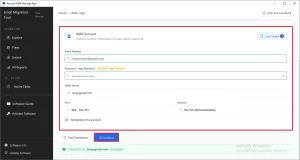
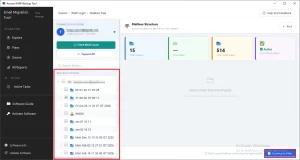
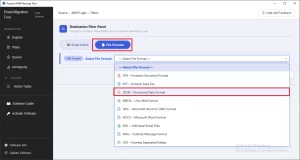
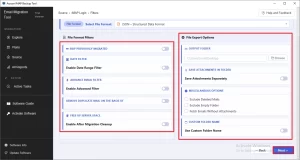
Apart from JSON, users can even convert IMAP emails to PST. Moreover, it makes sure that the data integrity is maintained.
Debina’s Success Story
Debina, a backend developer in New York, needed to convert 900+ support emails to JSON for a customer analytics dashboard that her team was building. He initially tried to use the manual method for the same process. But, eventually, when the results were not satisfactory, she switched to the Aryson IMAP Backup Tool for extracting email from IMAP server and converting it to JSON, which exported the required IMAP data to JSON format.
Conclusion
In the above article, we discussed that many users convert IMAP emails to JSON to build automation workflows and enable easier data parsing. To achieve an accurate conversion, it’s important to choose the right approach between the manual method and the automated method. However, the manual method works fine for a handful of emails; it’s suggested that large-scale users rely on the automated solution since it offers several features for a fast, error-free conversion.
Frequently Asked Questions
Q.1 How to convert IMAP email body to valid JSON?
Ans. With the Aryson IMAP Backup Tool, you simply connect your IMAP account, choose JSON as the saving format, and start the export process. The software automatically converts email content, headers, metadata, and other details into a structured JSON format.
Q.2 Does the tool offer a preview before exporting IMAP emails to JSON?
Ans. Yes, the Aryson IMAP Backup Tool provides a preview panel for single files selected. This allows you to review folders and email data before initiating the JSON export. This helps ensure that only the required emails are processed.
Q.3 How can emails be filtered by date for JSON export?
Ans. The software includes a built-in date range filter that lets you specify a start and end date. This feature helps export only the emails that fall within the selected period, reducing unnecessary data in the JSON output.
Q.4 What search options are available to find emails before JSON conversion?
Ans. The Aryson IMAP Backup Tool offers search and filtering options that help users locate specific mailbox data before conversion. This makes it easier to export only relevant emails instead of the entire account.
Q.5 Are attachments included when exporting IMAP emails to JSON?
Ans. Yes, attachments can be included during the export process. Additionally, the tool provides options to save attachments separately or exclude them altogether, depending on your requirements.
Q.6 Will folder structure and related items be preserved in the JSON output?
Ans. Yes, the software maintains the original mailbox hierarchy, folder structure, and associated email properties during export. This ensures the JSON data remains organized and easy to interpret.
Q.7 How does the tool handle duplicate emails before converting to JSON?
Ans. The Aryson IMAP Backup Tool includes a duplicate email removal feature that helps identify and skip redundant messages. This results in a cleaner JSON export and prevents unnecessary data duplication.
Q.8 Is incremental export supported to avoid re-exporting the same emails to JSON?
Ans. Yes, the software supports incremental processing through its Skip Previously Exported Data functionality. During subsequent exports, only new or modified emails are processed, saving both time and storage.
Q.9 Is the user interface suitable for beginners who want to export IMAP emails to JSON?
Ans. Absolutely, the Aryson IMAP Backup Tool features a straightforward interface with guided steps, making it easy for both first-time users and experienced administrators to perform IMAP-to-JSON exports.
Q.10 Is there a free demo to test converting IMAP emails to JSON?
Ans. Yes, Aryson provides a free demo version that allows users to evaluate the software’s features and verify the export process before purchasing the full version.
Q.11 Can custom folder names be assigned to the JSON output?
Ans. Yes, the tool offers naming conventions and folder management options that help users organize exported JSON files according to their preferred naming structure.
Q.12 Is live assistance available if a data integrity issue occurs during conversion?
Ans. Yes, users can reach the Aryson support team for 24*7 technical assistance if they encounter any issues during the export process. The team helps troubleshoot concerns and ensures the migration or backup process runs smoothly.
About The Author:

Harshita Sachdeva, a professional technical writer at Aryson Technologies, specialize in delivering clear, hands-on documentation for data management, migration, and recovery solutions. With a meticulous, reader-first approach, I break down complex technical processes into simple, actionable content - helping IT professionals and decision-makers tackle challenges efficiently.
Related Post