-

Written By Harshita Sachdeva
-
Approved By
Shivam Rathore -
Updated on June 11th, 2026
Convert Emails from BT Mail to Office 365 Fast in 2026
Fact-checked and reviewed in accordance with our
Editorial Policy
Query: Our company has 30+ BT Mail accounts, and the IT team needs to move all the important data to Office 365 without losing emails, folders, or attachments. Suggest the most reliable method to convert emails from BT Mail to Office 365.
Summary: BT Mail, also known as btinternet.com, is the BT Group’s personal email service, bundled with BT Broadband since 2014. Since it is built for low-volume personal use, it lacks collaboration tools, struggles with large mailboxes, and limits third-party client access. As users demand AI features, enterprise security, and tools like Teams and SharePoint, migration to Microsoft 365 has increased significantly. This guide covers manual IMAP methods along with the effective ways to use the Aryson IMAP Backup Tool to achieve zero data loss.
Instant BT Mail to Office 365 Migration
- Download and run the Aryson IMAP Backup Tool on your system.
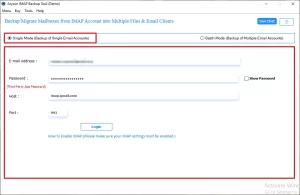
- Select Single or Batch Mode and provide the BT server login credentials.
- Preview the emails and attachments >> select Office 365 as the destination.
- Log in to Office 365 >> apply the required filters >> Next >> Start migration.
Does BT Mail support IMAP?
Yes, BT Mail fully supports IMAP. Since IMAP reads emails directly from the server rather than downloading and removing them like POP3, your source data stays completely intact during migration. IT professionals and experts prefer IMAP-based transfers for the same reason.
Here are the verified BT Mail IMAP settings:
| Setting | Value |
| Incoming Mail Server (IMAP) | mail.btinternet.com |
| IMAP Port | 993 |
| Security | SSL/TLS |
| Outgoing Mail Server (SMTP) | mail.btinternet.com |
| SMTP Port | 465 |
| Security | SSL/TLS |
Note: If your BT account uses two-factor authentication, generate an app password from BT account security settings before you connect any migration tool.
Proven Ways to Convert Emails from BT Mail to Office 365
Since we have discussed the valid IMAP settings to use, let’s explore different methods to perform the BT to Office 365 migration. If neither suits the scale of your business or technical requirements, opt for the professional solution discussed below to handle migration in one shot.
Method 1: IMAP Batch Migration via Exchange Admin Center
IT admins handling multiple BT Mail accounts should use the Exchange Admin Center (EAC). It supports native IMAP batch migration directly into Office 365 with no extra software required.
Simplified Steps to Migrate Emails from BT Mail to Office 365
- Collect BT Mail credentials for all accounts. Generate App Passwords if 2FA is enabled.
- Sign in to the Exchange Admin Center as an Office 365 administrator.
- Go to Migration >> Batches >> Add migration batch.
- After that, select IMAP migration as the migration type.
- Create a CSV file listing BT Mail addresses, usernames, and passwords. Upload it to the wizard.
- Set the IMAP server to mail.btinternet.com, Port 993, and Encryption SSL.
- Name the batch and click Start—sync runs automatically in the background.
Method 2: Drag-and-Drop Method to Convert Emails from BT Mail to Office 365
To migrate an individual account, the simplest approach is to use the Outlook desktop client. Moreover, there is no need to have admin access to perform this method. Also, this approach is suitable for individual users or IT experts with a small number of emails.
Steps to Convert BT Mail to Office 365
- Open Outlook >> add your BT Mail account using the IMAP settings above.
- Add your Office 365 account to the same Outlook application.
- Once both accounts load, create matching folders under Office 365.
- Select emails in your BT Mail folders >> drag them into the corresponding Office 365 folders.
- Wait for Outlook to sync the transferred emails to the Office 365 server.
- Log in to Office 365 webmail to confirm all emails have arrived correctly.
Limitations of the Manual Workflows
- It may take long hours for large mailboxes to sync properly in batches.
- Moreover, the attachments and images might get skipped during the migration.
- There is no way to detect and remove duplicates at the time of data transfer.
- Even the folder hierarchy might get disrupted during the drag-and-drop method.
- Also, you must have precise knowledge of IMAP to avoid authentication & connection failures.
Method 3: Expert Solution to Convert Emails from BT Mail to Office 365
For enterprises and organizations that deal with large BT Mail datasets, it is uncertain to rely on the manual methods. Therefore, IT professionals prefer Aryson IMAP Backup Tool because it handles the complete migration without timeouts, lost attachments, or broken folder paths. Moreover, it aims to provide users with a preview window to maintain 100% data integrity and security. Additionally, the advanced features like Remove Duplicates, Skip Previous Migrations, Skip Previous Mail, etc. With the help of the same software, you can also transfer BT internet emails to Gmail, Thunderbird, Yahoo Mail, and many more formats. Try the free demo to migrate the first 50 emails free of cost.
Simplified Steps to BT Internet to Office 365 Migration
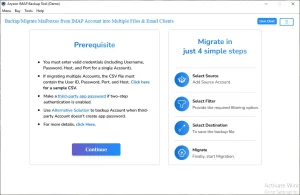
- First, download & install Aryson IMAP Backup Tool >> run as administrator.
- Enter the BT Mail credentials to log in to an active account.
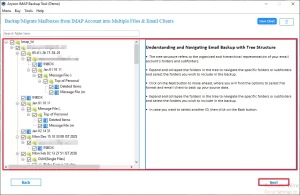
- Select the desired emails from the ones loaded, preview them >> Next.
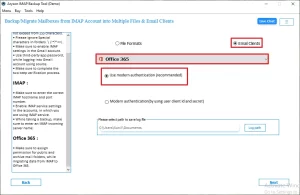
- Choose Office 365 under the Email Clients >> login to its active account.
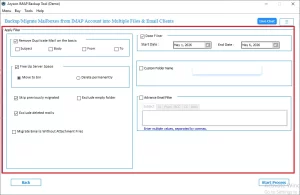
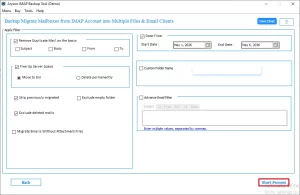
- Configure the advanced features of the software as per need.
- Click on the Start Export button to begin the migration.
Why Do Enterprises Consider the Aryson Better Than Manual Methods?
- This software migrates emails, contacts, and attachments in one go.
- Moreover, it keeps the metadata: headers, thread order & timestamps intact.
- The embedded preview window allows users to maintain 100% data integrity.
- Handles a large number of BT Mail accounts simultaneously with no size restrictions.
- Users can even transfer SquirrelMail emails to Gmail, IMAP, Thunderbird, etc. clients.
- The free demo version lets IT professionals test results before purchasing a license.
Elivia Mitchell’s Success Story
Elivia Mitchell, an IT admin at a London-based firm, had to migrate 28 BT Mail accounts to Office 365. The manual IMAP batch kept stopping at 60%. She ran Aryson IMAP Backup Software, entered credentials, and completed the full transfer—14,000+ emails, folders intact—in under 35 minutes.
Conclusion
In this blog we discussed the manual as well as the automated approach to convert emails from BT Mail to Office 365. For each user, the suitable approach might vary as per their requirement and expertise. To migrate a small number of emails, the manual workflow might work well. But as the datasets scale, they might turn tedious and time-consuming. To avoid this, opt for the professional software we discussed above. In case of any queries, feel free to reach out to our tech support team for personalized assistance.
Frequently Asked Questions
Q.1 How to migrate BT Mail Emails to Office 365?
Ans: However, there are manual methods to perform the BT to O365 migration; it is recommended to opt for the Aryson IMAP Backup Tool. Simply load the required BT mailboxes, preview them, select Office 365 as the destination, login to it, apply filters and click Next.
Q.2 Is it possible to convert emails from BT Mail to Office 365 without losing any data?
Ans: Yes, if you are using the Aryson IMAP Backup Tool, there will be no data loss during migration. The software preserves all emails, attachments, and metadata, including headers and timestamps, throughout the entire BT Mail to Office 365 conversion process.
Q.3 Does the migration tool support converting BT Mail contacts and calendars to Office 365 as well?
Ans: Yes, the software supports complete mailbox migration, including contacts and calendars, from BT Mail to Office 365. It makes sure that nothing beyond just emails is left behind during the transfer.
Q.4 Will my folder structure be preserved when converting BT Mail to Office 365?
Ans: Yes, the Aryson IMAP Backup Tool maintains the original folder hierarchy during migration. All BT Mail folders and subfolders are replicated exactly as-is inside the destination Office 365 mailbox upon transfer completion.
Q.5 Do I need technical knowledge to convert BT Mail emails to Office 365?
Ans: No, the Aryson IMAP Backup Tool is built for both IT professionals and everyday users. Its step-by-step interface guides you through the entire BT Mail to Office 365 migration without requiring any prior technical expertise.
Q.6 What should I do if the BT Mail to Office 365 migration gets stuck or fails midway?
Ans: If the migration gets stuck, re-verify your BT Mail IMAP credentials and Office 365 login details. If you are using the above software, you can reach out to the tech support team for further assistance.
Q.7 How does the software maintain data integrity during BT Mail to Office 365 conversion?
Ans: The Aryson IMAP Backup Tool uses secure IMAP connectivity with SSL/TLS encryption throughout the transfer. It validates each mailbox item before and after migration, ensuring complete data integrity with zero corruption during the BT Mail to Office 365 conversion.
Q.8 What support is available if I face issues during BT Mail to Office 365 migration?
Ans: Aryson Technologies provides dedicated customer support via email and live chat for any issues during BT Mail to Office 365 migration. A free demo version is also available, allowing users to test the tool before purchasing the full license.
About The Author:

Harshita Sachdeva, a professional technical writer at Aryson Technologies, specialize in delivering clear, hands-on documentation for data management, migration, and recovery solutions. With a meticulous, reader-first approach, I break down complex technical processes into simple, actionable content - helping IT professionals and decision-makers tackle challenges efficiently.
Related Post