-

Written By Harshita Sachdeva
-
Approved By
Shivam Rathore -
Updated on May 23rd, 2026
Import PST Files to Thunderbird: Safe Import Guide 2026
Fact-checked and reviewed in accordance with our
Editorial Policy
User Query : Hi, Is there a way to copy an old .pst archive to a Thunderbird account?
I don’t want to upload all old emails to the server via IMAP, just to connect the emails to my account in Thunderbird so I can search them and leave them on the local machine.
I know there is an import function, but I’m not sure if it copies them to the server or just to my local folder.
Is there any secure and reliable way to import PST files to Thunderbird without any data loss?
Summary: Microsoft Outlook is widely used by organizations and IT administrators for business communications. Emails, calendars, contacts, and attachments are stored in PST format by default. However, when MS Outlook users switch to Thunderbird, the import process becomes a bit complicated, as it doesn’t support PST as its native format. Therefore, to import PST to Thunderbird, this article provides users with several import methods to transfer their .pst archives and other Outlook data. Along with that, here you will learn how to effectively use the Aryson PST Converter to import your .pst archive or other data to Thunderbird without any data loss.
How to Migrate Outlook PST to Thunderbird without Outlook
- Download and install the Aryson PST Converter >> run it as an administrator.
- Click Select Files to load specific PST files>>Next.
- Preview the PST content in the advanced preview window.
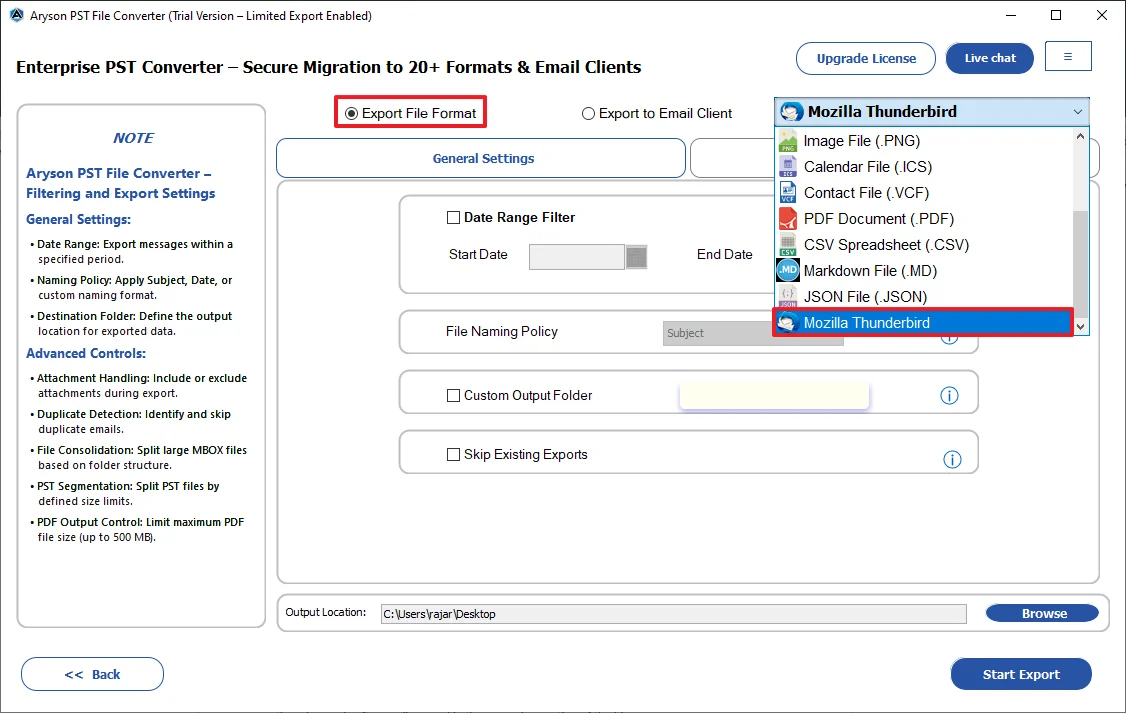
- Select Mozilla Thunderbird from the Export File Format dropdown.
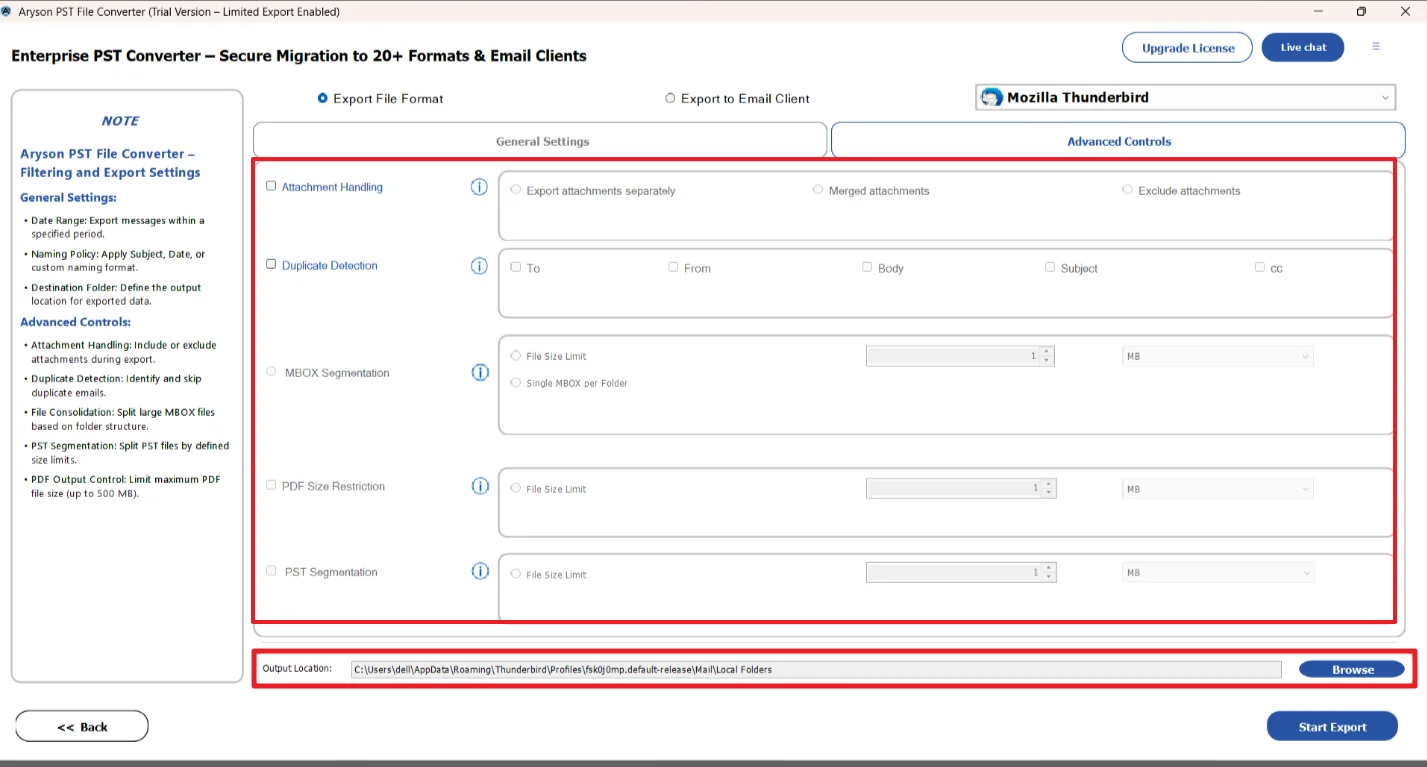
- Now, use the required filters >> set the destination in Thunderbird.
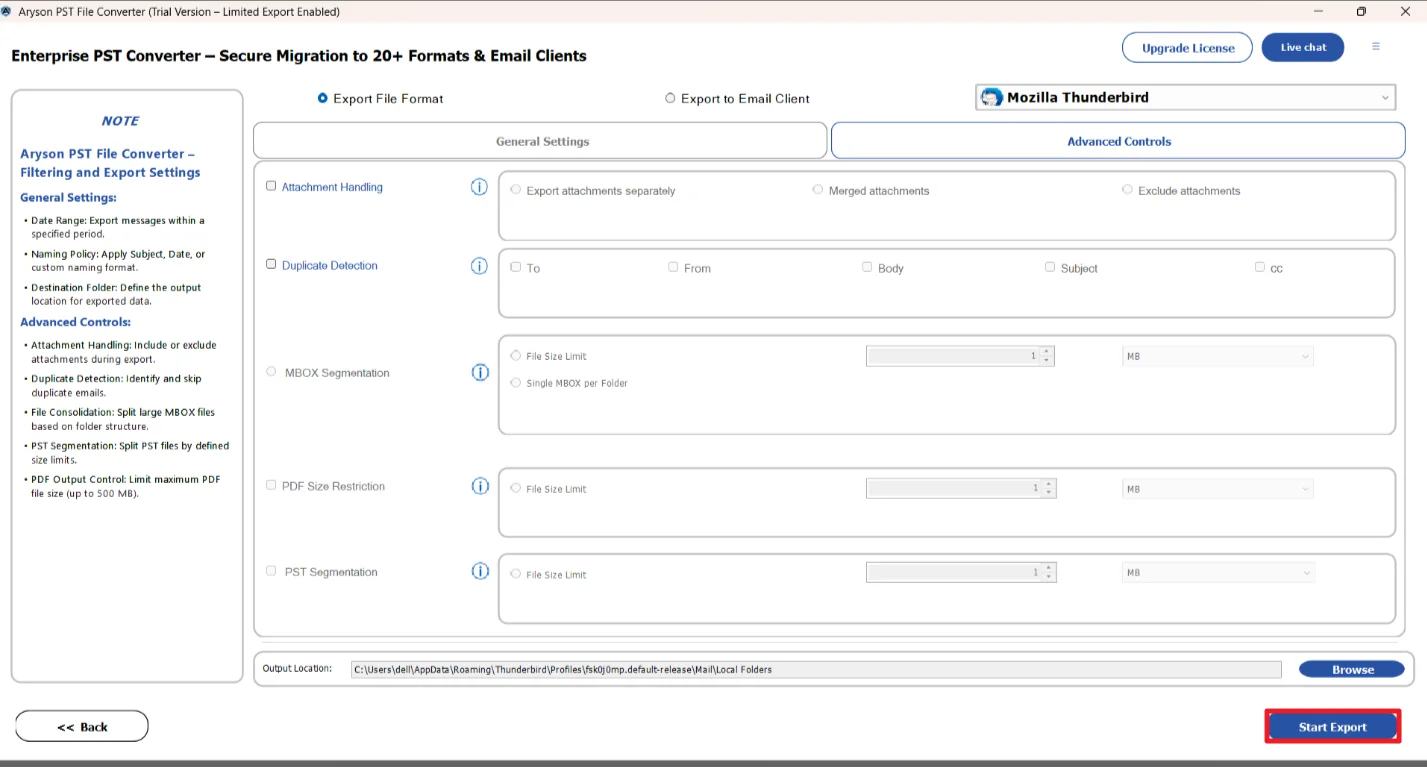
- At last, click on the Start Export button to begin the import process.
Can Thunderbird Open PST Files?
No, Thunderbird cannot open PST files in general. The default formats of Thunderbird are MBOX and EML formats, whereas PST is an Outlook-specific file format. This format incompatibility is the root cause of all the challenges users face. Therefore, to import PST files into Thunderbird, you would either need to install Outlook on the same system or use Gmail as a workaround. To maximize the accuracy and reduce the time consumption, you may opt for the advanced software discussed in the upcoming section of the blog.
Manual Methods to Import PST Files to Thunderbird
Below are the two most commonly used hands-on approaches to transfer Outlook data to Thunderbird. Carefully read through each one and choose the workflow based on aspects like technical expertise, time consumption, and the email client installed on your system.
Method 1: Import PST to Thunderbird Using Thunderbird
For users who have MS Outlook and Thunderbird both installed on their systems, this method is the most straightforward method to follow. You just have to set Outlook as your default email client and then use the built-in import option of Thunderbird to fetch data from it.
Steps to Transfer Outlook to Thunderbird Using Outlook
- Run the Control Panel on your existing system.
- Navigate to Programs >> then Default Programs >> Set Your Default Programs.
- Select Outlook>> and OK to set it as the default client.
- Now, open Thunderbird >> click on the menu icon.
- Select Tools >> click on the Import option.
- Enable the checkbox for Mail & click Next.
- Select Outlook from the list >> click Next.
- Finally, press the Finish button to begin the PST to Thunderbird import.
After performing the above steps carefully, all your selected Outlook emails and folders will successfully appear inside your Thunderbird account.
Method 2: Import PST Files to Thunderbird Using Gmail
In case Outlook is not installed on your system, you may use Gmail as an intermediary email client. This method can efficiently export your PST data to Gmail first using the GWMMO tool (Google Workspace Migration for Microsoft Outlook) and then connect Gmail to Thunderbird via IMAP.
The steps to perform Outlook to Thunderbird migration are as follows:
- Download the GWMMO tool and run it on your system.
- Enter the credentials of an active Gmail account inside the software.
- As asked, upload your PST data file or profile data.
- Check the Mail checkbox >> click Migrate to transfer Outlook data to Gmail.
- After completing the migration process, open your Thunderbird account.
- Go to Tools >> Account Settings >> Account Actions >> Add Mail Account.
- Provide the valid Gmail address & app password >> click Continue.
- Select IMAP >> click Done to connect your Gmail to Thunderbird.
- You can now access your PST data via a linked Gmail account.
Drawbacks of Manual Methods
- It is mandatory to install both Outlook and Thunderbird on the same system.
- For the trial version of Outlook, the import/export feature may not work properly.
- Users might lose their data during the PST to Thunderbird import process.
- It is time-consuming to manually import large or multiple PST files.
- Also, the entire procedure is too technical for beginners.
Quick Solution to Import PST Files to Thunderbird
Aryson PST Converter is an admin-friendly software that helps IT admins to import their PST files into Thunderbird without using Outlook. The main purpose of this utility is to maintain 100% data accuracy during the entire data transfer. Moreover, it provides the users with a preview panel to cross-verify the email content and maintain data integrity. With the help of the same utility, users can convert PST to MBOX, MSG, PDF, EML, and many more formats. Irrespective of your technical knowledge, you can perform the entire import process, as it comes with a simple and intuitive interface.
Step-By-Step Tutorial to Open PST File in Thunderbird Account
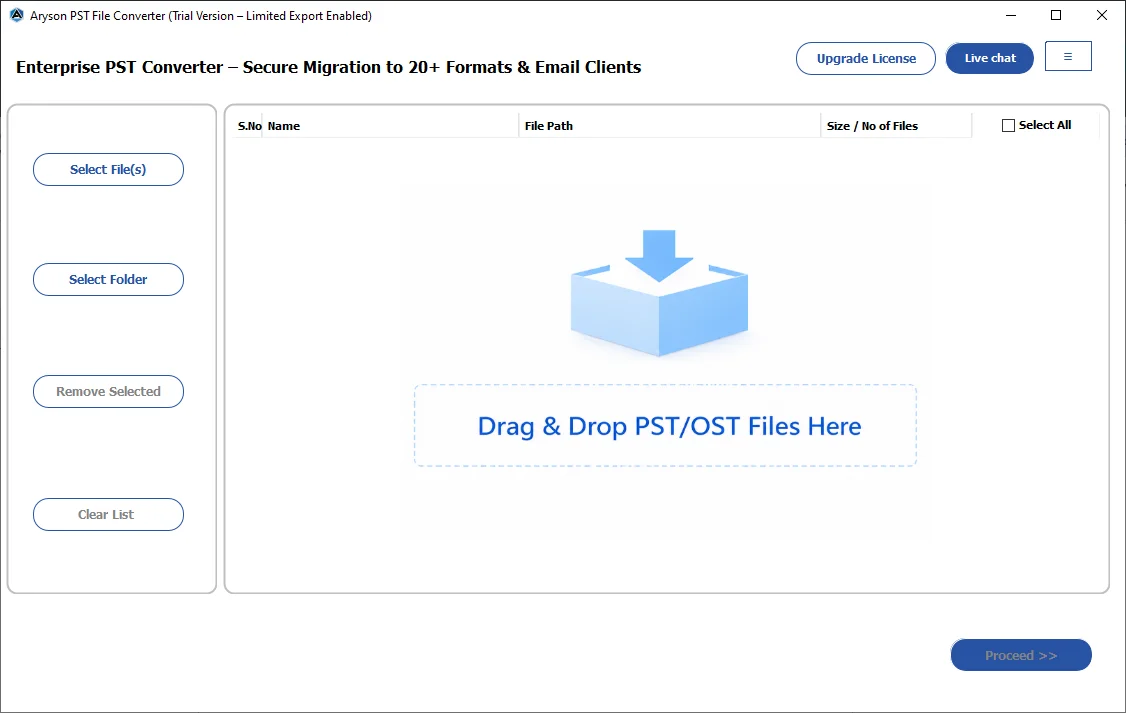
- First, download and install the Aryson PST Converter on your system.
- Click on the Select Files/Select Folders to load the required PST files.
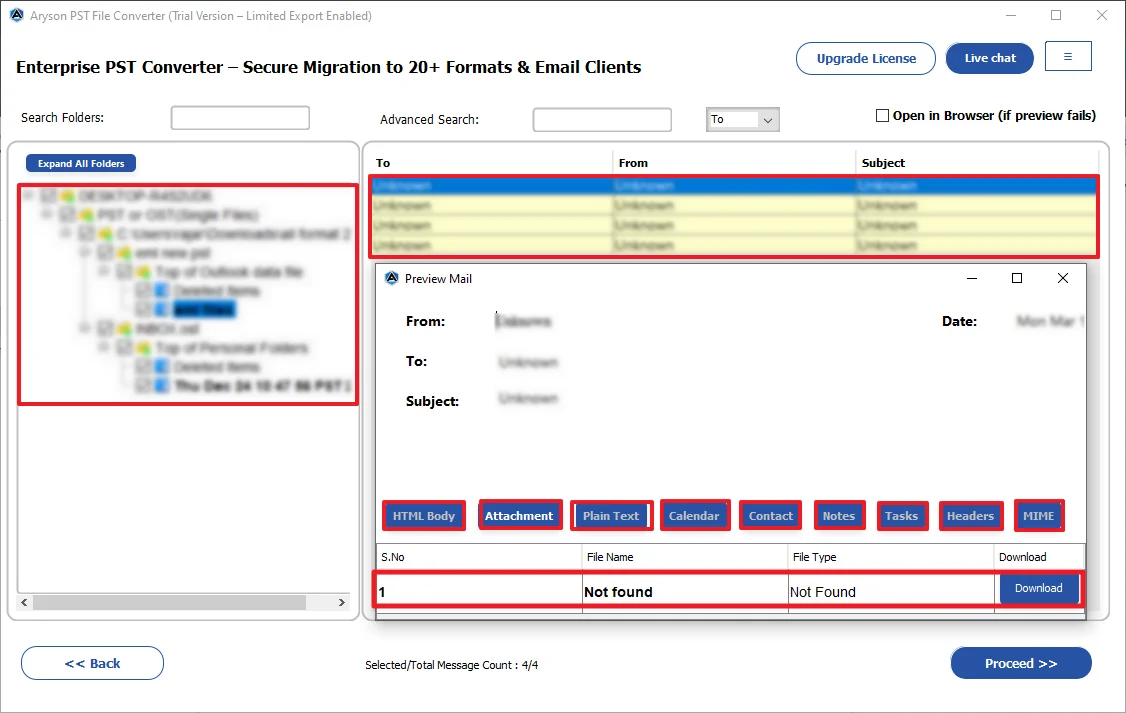
- Expand the tree structure>> select specific email >> preview it >> Next.
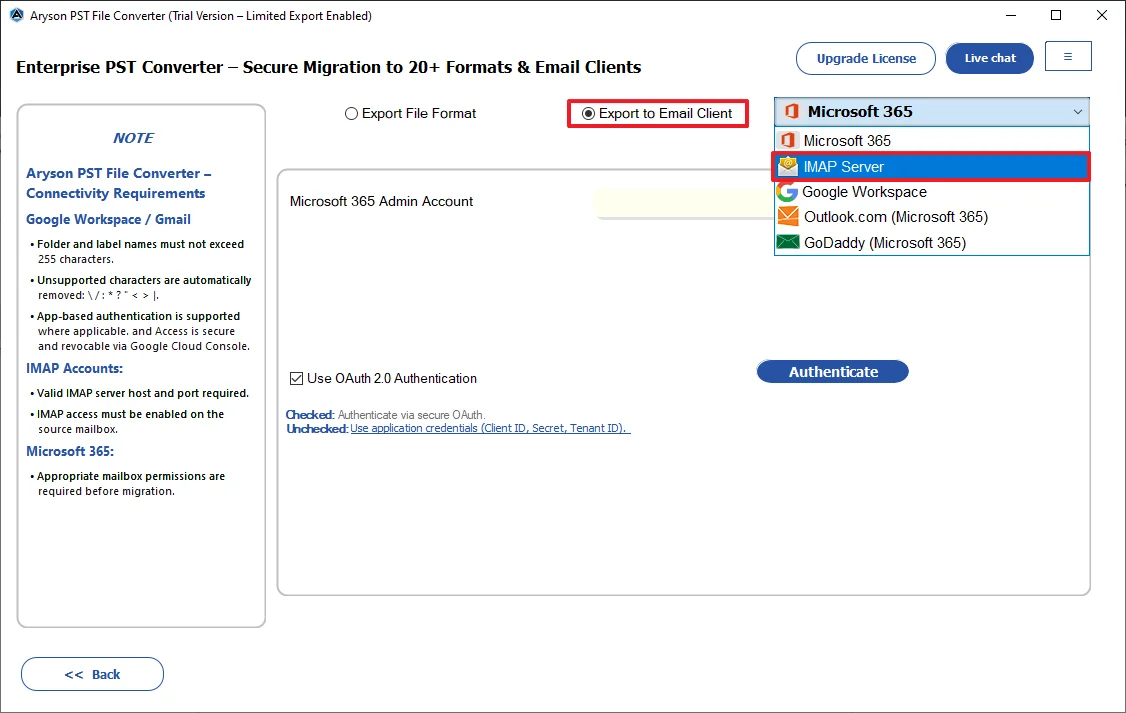
- Now, under the Export File Format dropdown, choose Mozilla Thunderbird.
- Apply the required software filters as per need >> specify destination.
- At last, click Start Export to import PST to the Thunderbird profile.
What Makes Aryson PST Converter Better than Manual Methods?
- This software can import PST file to IMAP, Thunderbird, Gmail, G Suite, etc.
- Users can apply filters to emails based on their date of creation or modification.
- Incremental backup is supported by this software to avoid duplication.
- Moreover, the free demo version can import up to 50 files/folders absolutely for free.
- Also, the Download Report option lets users review the conversion log and status.
Conclusion
In this blog, we learned how to import PST files to Thunderbird via different methods. The manual methods were absolutely free to execute, but they can be time-consuming for a large Outlook dataset. On the other hand, the advanced software discussed above can process any number of PST files efficiently. However, the free version of this software can process up to 50 emails in a folder. Despite the simple interface, if you still face any doubts, feel free to reach out to the support team for personalized assistance.
Frequently Asked Questions
Q.1 Why do users need to migrate Outlook PST to Thunderbird?
Ans: Users migrate PST files to Thunderbird mainly to switch from Outlook’s paid subscription to a free, open-source email client without losing their existing email data.
Q.2 How to import PST file to Thunderbird in 2026?
Ans: You can use the Aryson PST Converter to export from Outlook to Thunderbird without any errors or data loss. Simply load the Outlook data files into the software, preview them, select Thunderbird, apply filters, and click Convert.
Q.3 Do I need Microsoft Outlook installed to convert my PST file?
Ans: However, the manual methods require users to install Outlook; there is no need to install it when using the above automated software.
Q.4 Can I convert only specific emails rather than the entire PST file?
Ans: Yes, using the date range filters, skip previous migrations, and remove duplicates features, you can migrate your PST files selectively rather than the entire PST file.
Q.5 Is there a free way to test the conversion before buying?
Ans: Yes, you can use the free demo version of the Aryson PST Converter to evaluate the performance of the software.
Q.6 How do we validate that no emails were lost or corrupted during large-scale conversions?
Ans: The download report option of Aryson PST Converter allows users to review the conversion logs and status. This way, you can simply validate that no emails were lost or corrupted during large-scale conversions.
About The Author:

Harshita Sachdeva, a professional technical writer at Aryson Technologies, specialize in delivering clear, hands-on documentation for data management, migration, and recovery solutions. With a meticulous, reader-first approach, I break down complex technical processes into simple, actionable content - helping IT professionals and decision-makers tackle challenges efficiently.
Related Post