-

Written By Rohan Wiese
-
Approved By
Shivam Rathore -
Updated on March 24th, 2026
Should You Migrate Email Before SharePoint? Best Order Guide
When users plan a Microsoft 365 migration, one of the most common questions IT teams face is, “Should we migrate email before SharePoint first?”
The order of migration can directly impact user productivity, data integrity, and project success. When users select the wrong sequence, it can cause confusion or data access issues. In this comprehensive guide, we’ll outline the best migration order and discuss both manual and professional migration methods, including the Aryson Microsoft 365 Migration Tool for secure migration. Download Now Purchase Now
Why Does Microsoft 365 Migration Order Matter?
Microsoft 365 migration isn’t about moving data – it’s about maintaining business continuity. Email (Exchange Online) and SharePoint serve different purposes:
- Email – Communication, fewer dependencies
- SharePoint – Collaboration and document management
If migration is not planned properly, then the user may face a lot of issues, which include:
- The user may lose access to their important emails
- Their teams may struggle to find any documents
- Moreover, the workflow may break
Scenarios for Migrating Email Before SharePoint
There are many situations where dividing the correct migration becomes important. Below are some common scenarios. Review each to understand the difficulties users face during the migration process. Let’s begin with the scenarios to migrate email before SharePoint:
- Users migrate SharePoint first but delay email migration, which results in a communication gap and limited access to outgoing conversations.
- Many SharePoint notifications and sharing permissions rely on email migration, which may not function properly if email is not migrated first.
- Migrating SharePoint before configuring email services can lead to synchronization issues between Exchange Online and SharePoint Online.
- Improper migration order can result in mismatched data, where email-linked documents or shared resources are not properly mapped in SharePoint.
- If email migration is not prioritised, there is a risk of important data loss, which is required for business continuity.
Understand the Two Core Workloads
|
Email Migration (Exchange Online) |
SharePoint Migration |
Email is usually the most time-sensitive workload. |
SharePoint is more complex due to its structure, permissions, and dependencies. |
Which to Migrate First Email or SharePoint?
Now, we will discuss the reasons to understand which you should migrate first: email or SharePoint.
1. Business Continuity Comes First
Email is the backbone of daily communication for individuals or the business world. When you migrate it first, make sure:
- Users can send/receive emails immediately.
- There is no disruption in business operations.
2. Faster and simpler migration
Email migration generally consists of:
- More straightforward
- Less dependent on structure
- Easier to validate
3. Reduces User Confusion
When users migrate SharePoint first:
- Users may not know where to access documents.
- Communication gaps may occur.
With email, users stay connected during the transition.
4. Supports Notifications & Alerts
SharePoint relies on email notifications:
- File sharing alerts
- Workflow updates
- Permission changes
Without email, alerts won’t function properly.
5. Easier User Onboarding
The user can:
- Log in to their new environment
- Access email immediately
- Gradually adapt to SharePoint later
Best Method to Migrate Email Before SharePoint
Now, we will explain the two methodologies with complete steps to perform the migration process. Email migration before SharePoint best practice with the following methods:
- Manual Method
- Professional Software
Method 01: Manual Method to Perform the Migration
This is a traditional approach to migrating Microsoft 365 data, where you need to perform each step manually. Follow the steps to migrate data in an accurate way.
Step 01: Prepare Environment
- First, you need to set up a Microsoft 365 tenant.
- After that, configure users and licences.
Step 02: Migrate Email First
- Now, you have to move the mailbox to the Exchange Server.
- Then, you must verify the email flow.
Step 03: Validate Email Migration
- Thereafter, check the email data integrity.
- Afterward, test the email by sending/receiving emails.
Step 04: Migrate SharePoint Data
- Subsequently, you have to move the SharePoint libraries.
- Next, you need to configure the permissions.
Step 05: Post-Migration Testing
- Then, you have to validate files and access.
- After that, check the workflow in SharePoint.
Step 06: User Training & Adoption
- Help users and guide them to adapt to the new environment of SharePoint.
Limitations of the Manual Method
- There is a risk of human error in this method.
- It is not suitable for large data migrations.
- In this method, there is a risk of data loss or incomplete migrations.
- Moreover, it doesn’t contain filter options for selective data migrations.
- To perform migration with this method, the user must have technical expertise.
Method 02: Professional Software to Migrate Email Before SharePoint
Aryson Microsoft 365 Migration Tool is an ultimate solution that is made to transfer users’ valuable data within the Microsoft ecosystem. This software sticks to the privacy policy and does not store or use any data. In this single platform, you can migrate emails and SharePoint. Moreover, this software is reliable for bulk transfer without any loss.
Key benefits of this software:
- It is reliable for the bulk migration of emails and SharePoint sites.
- There is no risk of data loss, and it maintains the hierarchy.
- Embedded with several filters for selective data migration.
- Perform Tenant-to-Tenant Migration for Office 365, SharePoint, and OneDrive.
- Moreover, it is suitable to track the real-time processing.
- Furthermore, it skips duplicate emails to avoid repetition.
Steps to Migrate Email & SharePoint
For Email Migration:
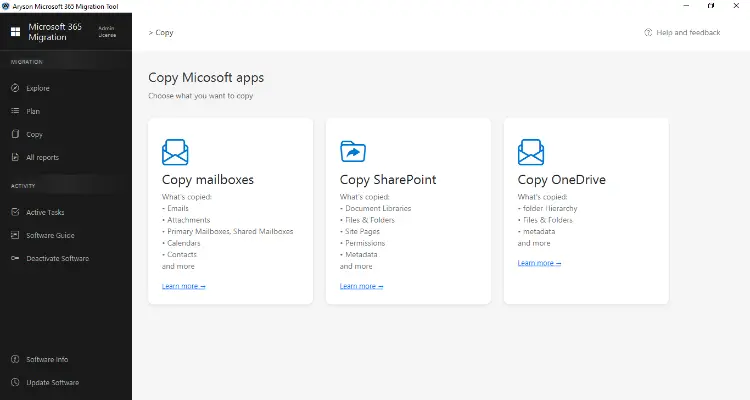
- Download and launch the Aryson Microsoft 365 Migration Tool.
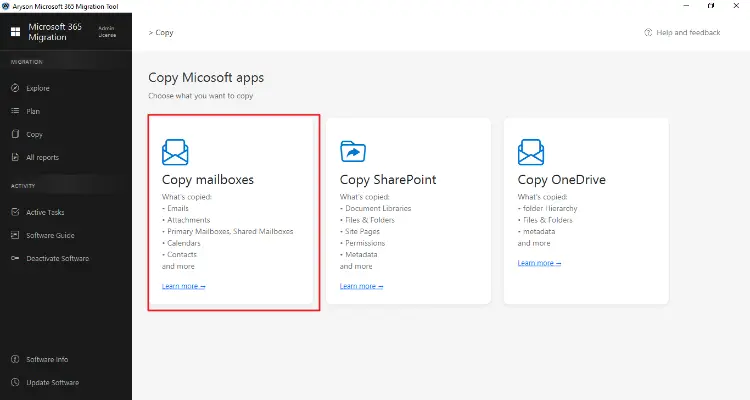
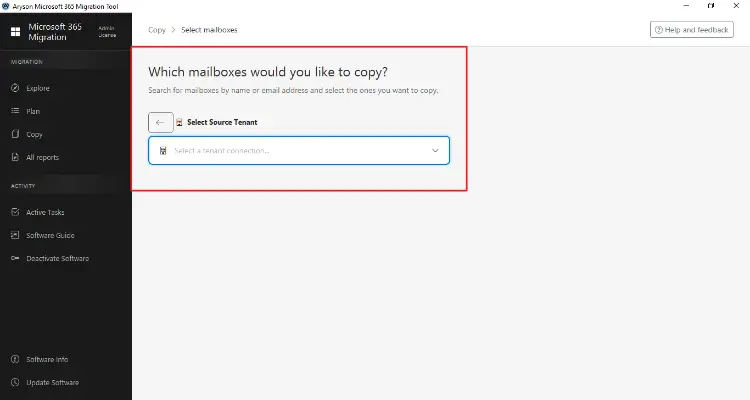
- Click on Copy Mailbox from the dashboard.
- Afterward, add the source tenant and sign in with admin credentials.
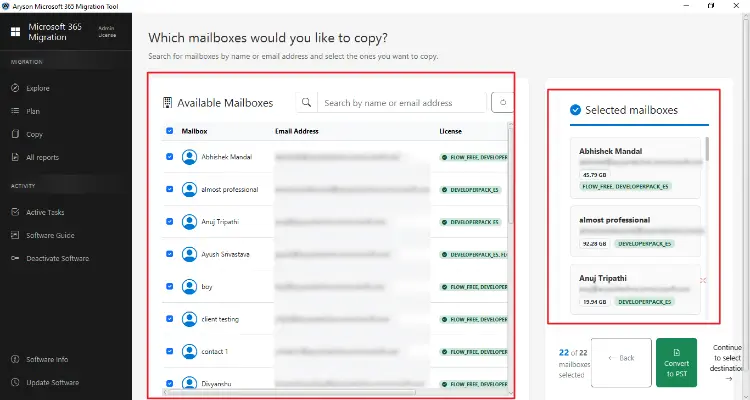
- Choose the required mailboxes and add them to the selection panel.
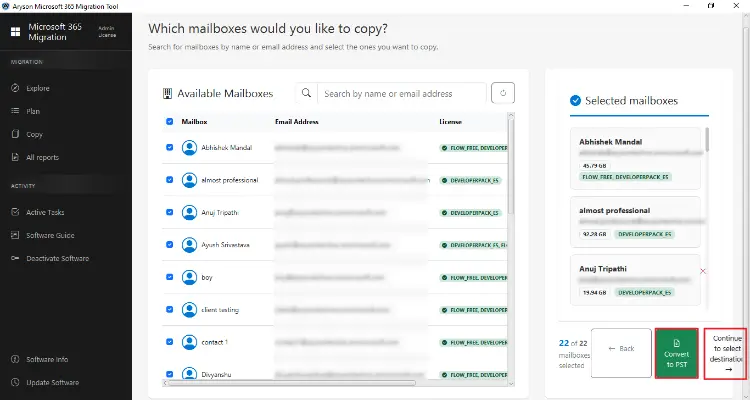
- Then, select Convert to PST to migrate to another tenant.
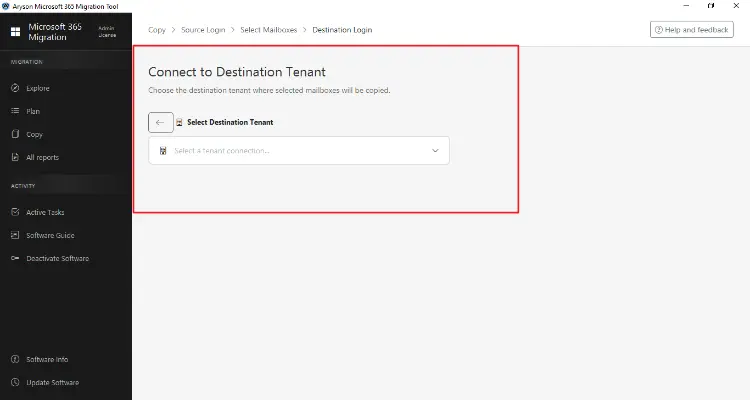
- (Add only if migrating) Log in to the destination tenant.
- Thereafter, you need to map the mailbox and apply filters like date range to skip duplicates.
- Click on Start Migration and check the report after completion.
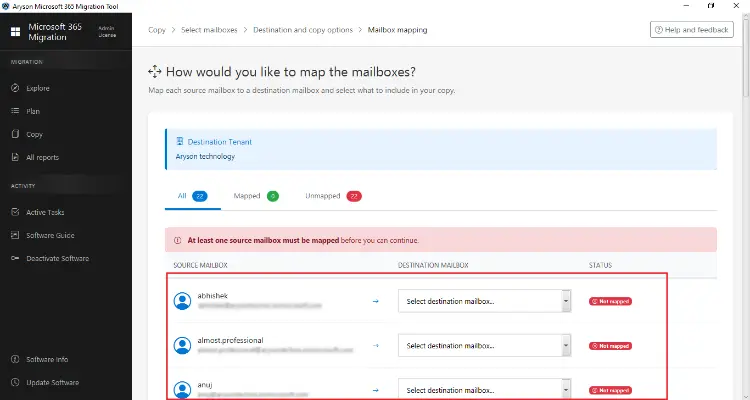
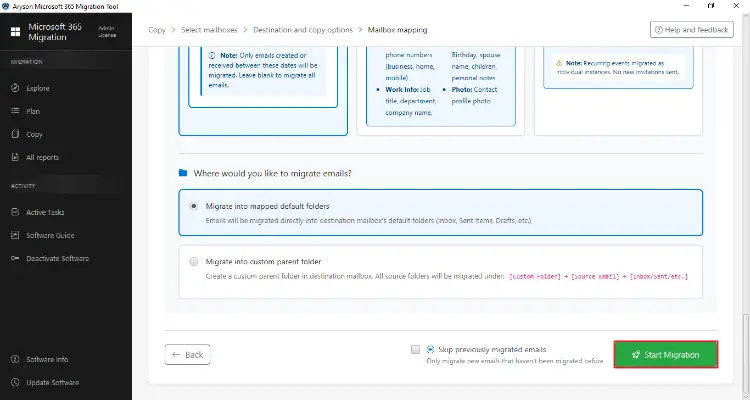
For SharePoint Migration:
- Download and install the Aryson Microsoft 365 Migration Tool.
- Click on Copy SharePoint from the panel.
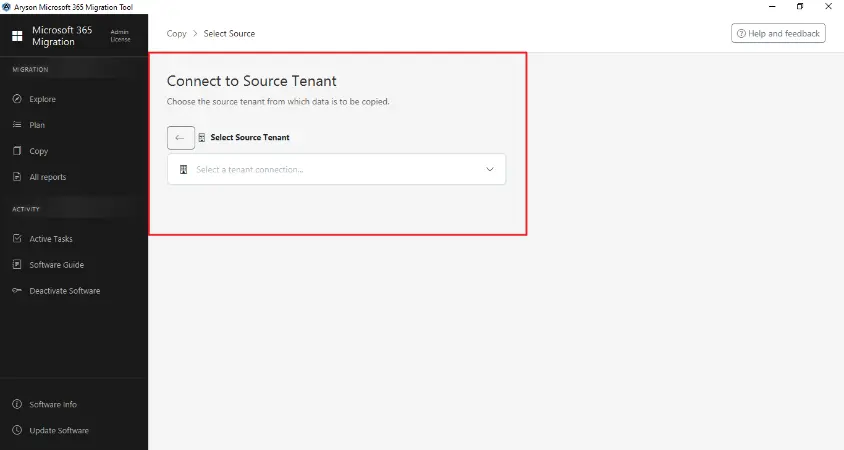
- After that, log in to the source tenant and grant the required permissions.
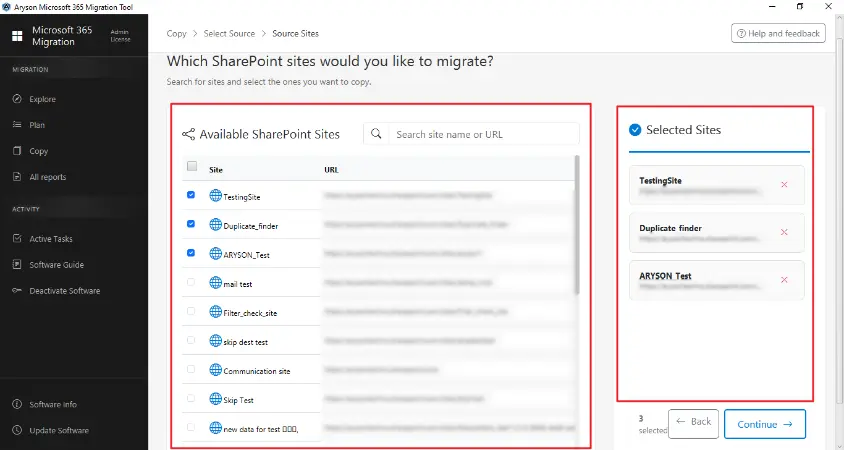
- Then, choose the required sites from the available list.
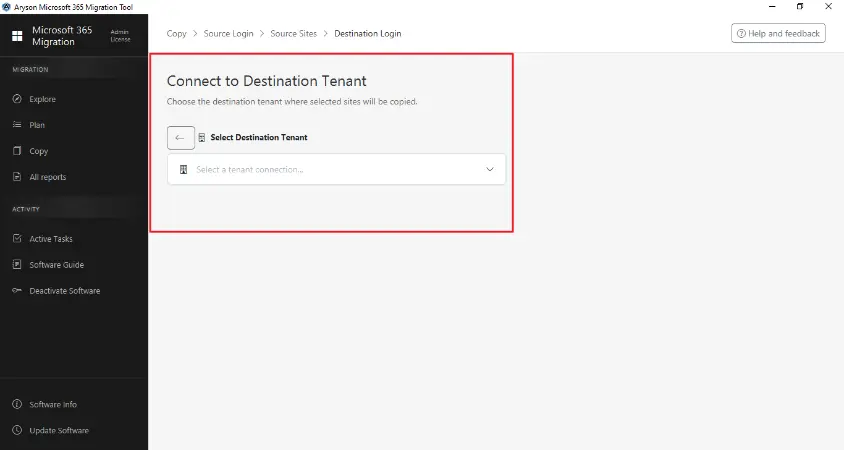
- Now, add the destination tenant and authorize access.
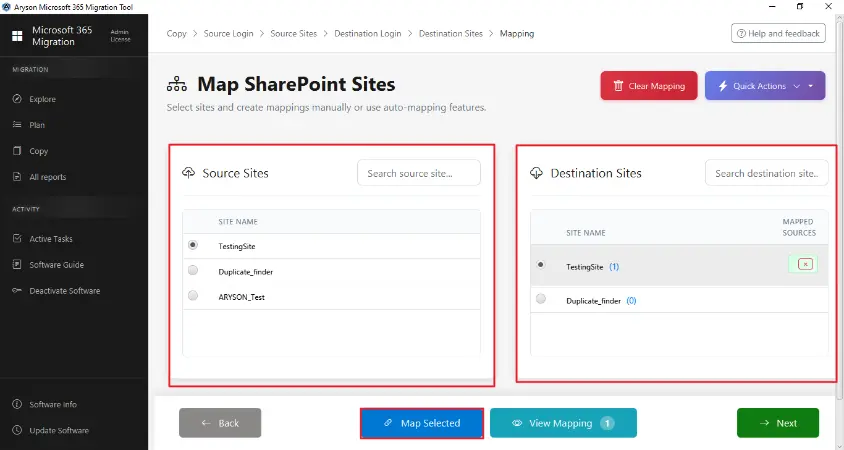
- Next, map source sites with destination sites.
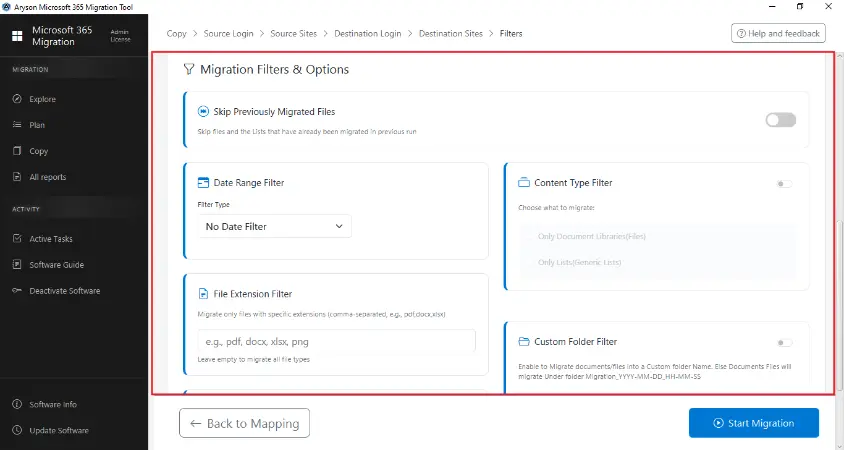
- Apply filters like date, file type, file size, and skip previously migrated data.
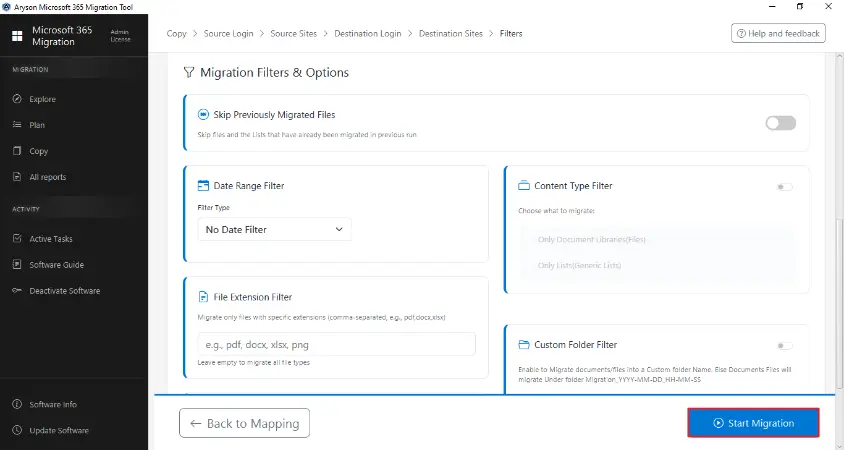
- At last, click on Start migration to begin the process.
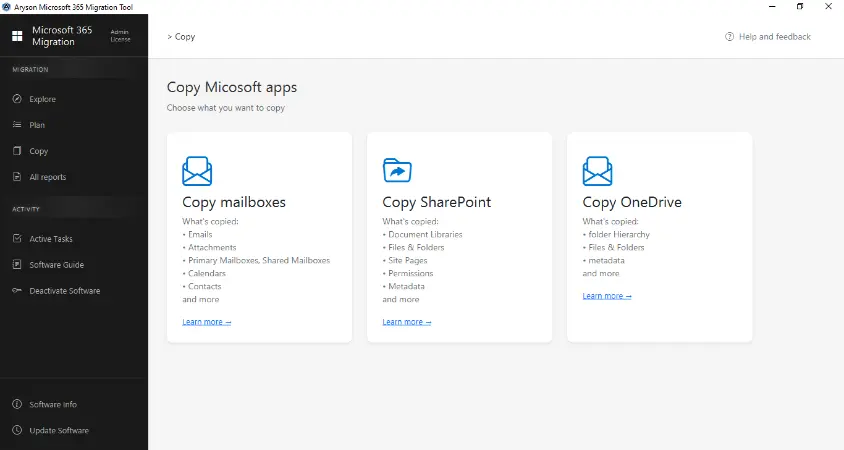
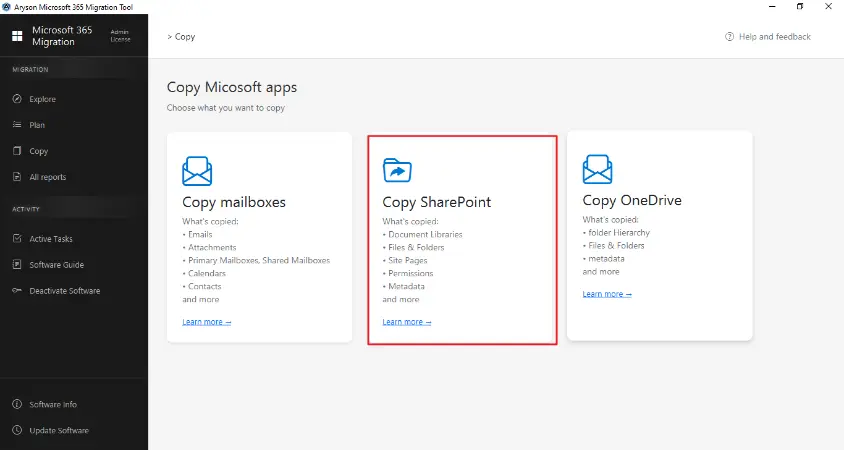
Comparison: Email First vs SharePoint First
|
Factor |
|
SharePoint |
|
Business Continuity |
High |
Medium |
|
Complexity |
Low |
High |
|
User Impact |
Minimal disruption |
Potential confusion |
|
Dependencies |
Support SharePoint |
Lacks email integration |
|
Recommended |
Yes |
Conditional |
Pro Tips for Successful Office 365 Migration Checklist
- Make sure to always start with a pilot migration.
- It is important to use incremental migration to reduce downtime.
- Always make sure to maintain a backup of source data.
- It is recommended to use a professional migration tool for accuracy and data security.
- You must plan a migration during non-business hours.
Conclusion
In this blog, we covered all the aspects of why you should migrate email before SharePoint. Choosing the right order for migration is very important. Firstly, you should perform email migration because of its better communication and reduced migration risk. Once the email is stable, you can proceed with the SharePoint migration. We will discuss both the manual and the professional software that help you to migrate. The manual method has limitations, due to which it is recommended to use professional software that will securely migrate your data without data loss.
Frequently Asked Questions
Q1. Can I migrate SharePoint before email?
Ans. Yes, but only in specific scenarios like document-heavy environments.
Q2. What happens if email is not migrated first?
Ans. The user may face communication issues and miss important notifications.
Q3. Which migration is more complex?
Ans. SharePoint migration is more complex due to its structure and permissions.
Q4. Can both be migrated simultaneously?
Ans. It’s possible but not recommended due to higher risk and complexity.
About The Author:

Rohan Wiese is a Technical Writer at Aryson Technologies. He is an expert Email Forensic, Cloud Computing, and a passionate nerd with over 10 years of experience in technical content writing. He writes about Cloud Migration, Database Recovery, Email Backup, Windows, Mac, and Tech.
Related Post