-

Written By Rohan Wiese
-
Approved By
Shivam Rathore -
Updated on August 25th, 2025
How to Extract Attachments From Mac OLM File – A Complete Guide
Fact-checked and reviewed in accordance with our
Editorial Policy
If you use Microsoft Outlook on Mac, you already know that it stores all your emails, contacts, calendars, notes, and attachments in an OLM file. While this file format helps keep your mailbox data organized, it often becomes bulky because of attachments. Many users search for ways to extract attachments from Mac OLM files so they can manage them separately. In this guide, we will explore why users need attachment extraction and the professional Aryson OLM Attachment Extractor to extract attachments in bulk.
Key Reasons to Extract Attachments from OLM File
If an individual wants to export OLM attachments, it is not just about to save your application space. Because it serves multiple purposes that are essential for smooth email management.
- Reduce Mailbox Size: Attachments consume the largest portion of your OLM file. Hence, it becomes lengthy to deal with those files. If you choose the process of extracting, then it helps to optimize performance.
- Easy Backup: When you store attachments separately. It ensures you have a safe copy. Even if your OLM file becomes inaccessible.
- Quick Share process: Sometimes, you just need to share attachments without the entire OLM file or email. In that case, if you extracted the attachment in your system, it would be quite helpful.
- Migration Needs: If you want to switch from one platform to another, the extracted attachments can be transferred independently with ease.
- Offline Access: Keeping attachments separately allows you to open them without relying on Outlook.
These reasons make it clear why do individuals need to extract their attachments. And how it can be a practical step for Outlook for Mac users.
How to Extract Attachments from OLM File With Ease?
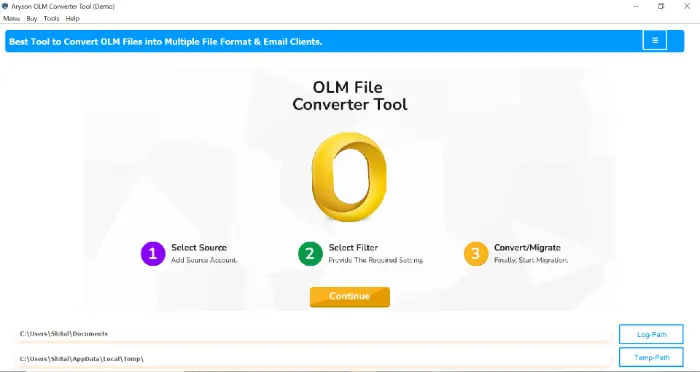
When it comes to managing attachments in bulk, the Aryson OLM Attachment Extractor Tool is one of the most reliable solutions. This utility can simplify the process of extracting attachments from Mac OLM files. Along with that, you can make sure data security and accuracy with this software. The main benefit is, it is not required to open each email separately. Instead of that, you can extract attachments from multiple emails or even the entire mailbox at once. Because this utility supports the batch extraction feature along with the conversion of OLM data:
Steps to Batch Extract OLM attachments within a Few Clicks
- Download and install the Aryson OLM Converter Tool on your system (Windows or Mac).
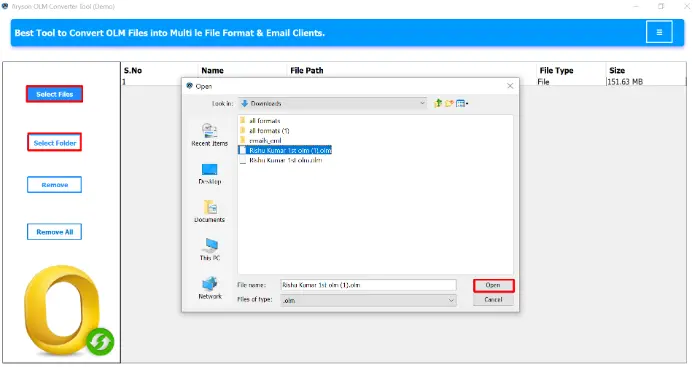
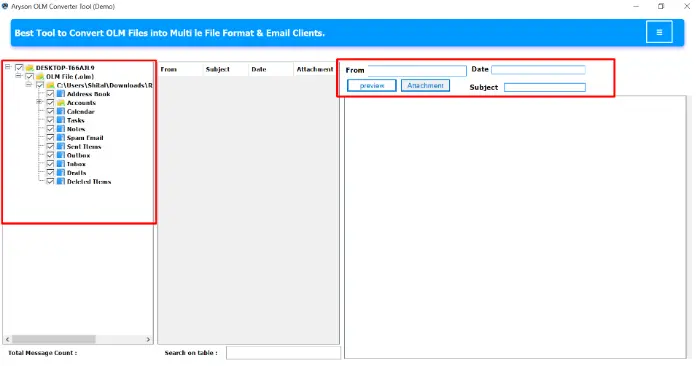
- Now, browse and select the OLM file from which you want to extract attachments.
- Next, you can preview mailbox items, including emails, contacts, calendars, etc.
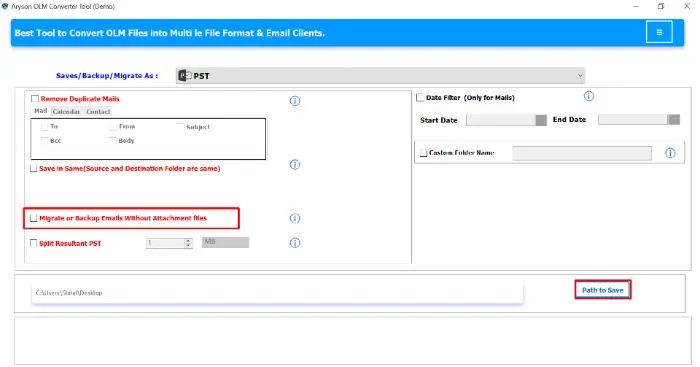
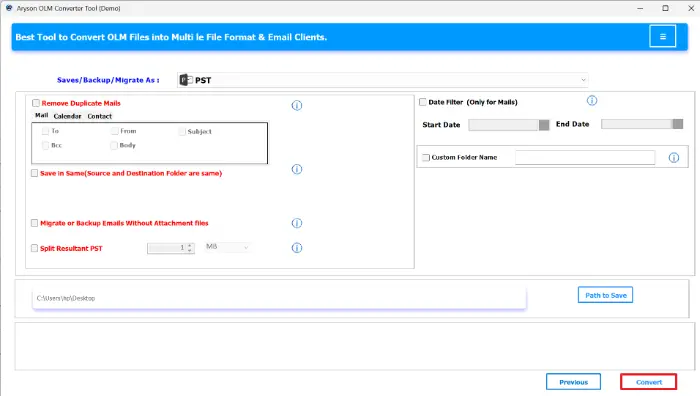
- From the given options, choose migrate or save without attachment along with the destination path.
- Finally, click on the Convert button to start the extraction process.
Additional Key Pointers of Aryson OLM Attachment Extractor Mac
- Bulk Extraction: Save all attachments from OLM files in a single process, no matter how large the file is.
- Preserves Data Integrity: Ensures that attachments are extracted in their original format without any modification.
- Corruption Handling: Even if your OLM file is damaged or inaccessible, the software can still extract attachments.
- Selective Saving: You can choose specific folders, emails, or date ranges to extract attachments, making the process more organized.
- Multi-Format Support: Apart from saving attachments, the tool can also convert emails to formats like PST, EML, MBOX, MSG, and PDF.
- User-Friendly Interface: Designed for both technical and non-technical users, so no advanced skills are required.
- Wide Compatibility: Works with all versions of Outlook for Mac OLM files and supports both Windows and Mac operating systems.
Final Words
To keep your data organized and extract Attachments from OLM files, Aryson OLM Converter Tool proves its value. This utility not only extracts attachments from OLM files in bulk but also ensures data integrity, speed, and flexibility. Whether you need attachments for backup, migration, or simple organization, this software provides a safe and efficient way to export OLM attachments. With just a few clicks, you can separate attachments from your mailbox and keep your Outlook data more manageable.
Frequently Asked Questions (FAQs)
Q1. Which Software is to Extract Attachments from OLM File in bulk?
Ans: The Aryson OLM Converter performs the bulk extraction of OLM attachments at once. Hence, it comes out as the best software to extract or migrate multiple OLM files at once.
Q2. How long does it take to extract attachments from OLM files?
Ans: It depends on the file size and the number of attachments. But still, the recommended automated method is fast. So that it can process large files in minutes.
Q3. Will the folder hierarchy and email structure remain intact?
Ans: Yes. OLM Extractor Tool preserves the original email structure and folder hierarchy even after attachments are extracted.
Q4. Can I extract attachments from selected emails only?
Ans: Yes. With the Aryson professional tool, you can apply filters such as date range, folder selection, or specific emails to extract only the attachments you need.
About The Author:

Rohan Wiese is a Technical Writer at Aryson Technologies. He is an expert Email Forensic, Cloud Computing, and a passionate nerd with over 10 years of experience in technical content writing. He writes about Cloud Migration, Database Recovery, Email Backup, Windows, Mac, and Tech.
Related Post