-

Written By Rohan Wiese
-
Approved By
Shivam Rathore -
Updated on June 20th, 2025
VHD vs. VHDX: When to Choose Older VHD Files
Fact-checked and reviewed in accordance with our
Editorial Policy
Summary: In the world of virtualization, Virtual Hard Disk (VHD) and Virtual Hard Disk eXtended (VHDX) are two crucial file formats. While VHDX is the newer, more advanced option, there are specific scenarios where creating a VHD file might still be necessary or even preferred. This guide will explore the key differences between VHD and VHDX, highlight the situations demanding a VHD, and provide valuable insights into managing these virtual disk formats. In addition, if your VHD or VHDX file is corrupted or damaged, you can use the Aryson Virtual Machine Data Recovery Tool to recover it easily.
VHD vs. VHDX: A Fundamental Comparison
Both VHD and VHDX files represent virtual hard disk drives, containing elements like file systems and disk partitions to store data within a virtual machine environment. However, VHDX introduces significant advancements over its predecessor.
- Virtual Disk Size: VHD files are limited to a maximum size of 2TB. In contrast, VHDX files support significantly larger virtual disks, up to 64TB.
- Data Protection: VHDX offers enhanced data protection by logging changes to its metadata, which helps prevent corruption during power failures or system crashes. VHD lacks this built-in resilience.
- Performance: VHDX generally provides better performance, especially with larger disk sizes and modern hardware.
- Alignment: VHDX aligns more efficiently with 4KB disks, which are common in contemporary storage systems.
- Online Resizing: VHDX disks can be resized online (while the VM is running), a feature not available for VHDs.
When to Choose VHD Over VHDX
While VHDX offers numerous advantages, there are primary reasons why you might still need to create a VHD file:
- Legacy System Compatibility: The most common reason to choose VHD is when exporting or migrating a virtual machine to an environment or resource that only supports VHD files.
- Microsoft Azure IaaS VMs (Classic/older deployments): Historically, and for some older deployments, Azure Infrastructure as a Service (IaaS) virtual machines were based on VHD files. While newer Azure offerings predominantly use VHDX, if you’re dealing with older Azure services or specific migration scenarios, VHD might be required.
- Older Virtualization Platforms: Some older virtualization software or versions might not fully support VHDX, necessitating the use of VHD.
- Generation 1 Virtual Machines: When creating a Generation 1 (Gen 1) virtual machine in Hyper-V, you have the option to use either VHD or VHDX formats. If you’re explicitly working with a Gen 1 VM and the 2TB size limit is not an issue, VHD can be used.
When to Choose VHDX Over VHD
For almost all new deployments and modern virtualization environments, VHDX is the preferred choice due to its superior features:
- Larger Virtual Disks: Essential for modern applications and data storage needs.
- Data Integrity: Reduced risk of corruption, leading to greater stability and reliability.
- Better Performance: Improved I/O operations and overall responsiveness.
- Online Resizing: Flexibility to adjust disk size without downtime.
- Generation 2 Virtual Machines: Gen 2 VMs only support the VHDX format.
Understanding Virtual Machine Dependencies on Disk Offerings
- Generation 1 Virtual Machines: Can utilize both VHD and VHDX formats.
- Generation 2 Virtual Machines Are exclusively designed to use the VHDX format.
Beyond Virtual Machines: Other Uses for VHD/VHDX Files
Virtual hard disk files aren’t solely for virtual machines. They can also be used for:
- Boot to VHD/VHDX: Directly boot into a self-contained operating system stored within the VHD/VHDX file without requiring a separate virtualization layer. It is helpful for testing or having multiple OS installations on a single machine.
- Microsoft iSCSI: In Windows Server environments (e.g., 2012 R2), VHD files can be used for implementing Microsoft’s native iSCSI targets.
How to Convert VHD to VHDX
If you find yourself needing to convert an existing VHD file to the more modern VHDX format, PowerShell provides a straightforward solution:
- Press Windows + X and select Windows PowerShell (Admin).
- Type the following command, replacing <sourceVHD> with the full path to your VHD file and <destinationVHDX> with the desired path and filename for your new VHDX file:
PowerShell
Convert-VHD -Path “C:\path\to\your\source.vhd” -DestinationPath “C:\path\to\your\destination.vhdx” - PowerShell will handle the conversion process. Once completed, you’ll find the new VHDX file at your specified destination.
- It’s always recommended to verify the newly created VHDX file and test it to ensure a successful conversion.
Read Also: Learn How to Repair Corrupt VHD File Manually?
Recovering Data from Corrupted VHD or VHDX Files
Virtual disk corruption can be a significant headache. If your VHD or VHDX file becomes corrupted or damaged, specialized recovery software can be invaluable. Tools like “Aryson Virtual Machine Data Recovery Software” are designed to: Download Now Purchase Now
- Handle various levels of corruption:- From minor issues to severe damage.
- Offer multiple recovery modes:- (e.g., Standard, Advanced, Deep) to cater to different corruption scenarios.
- Preserve data integrity:- Aim for 100% accurate results while maintaining the original formatting and confidentiality of your data.
- Provide a user-friendly interface:- Making it accessible for both technical and non-technical users.
- Allow preview of recovered data:- Before saving, ensure you recover the correct files.
Simple Steps to Potentially Recover a Corrupted VHD or VDHX File (using a hypothetical recovery tool):
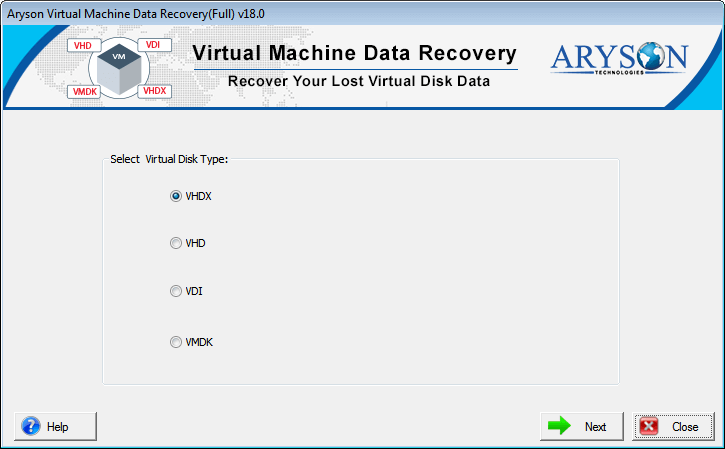
- Launch the Aryson Virtual Machine File Recovery Tool (as administrator).
- Select the VHD/VHDX file type (Dynamic or Fixed).
- Click “Open” and browse to add your corrupted VHD or VHDX file.
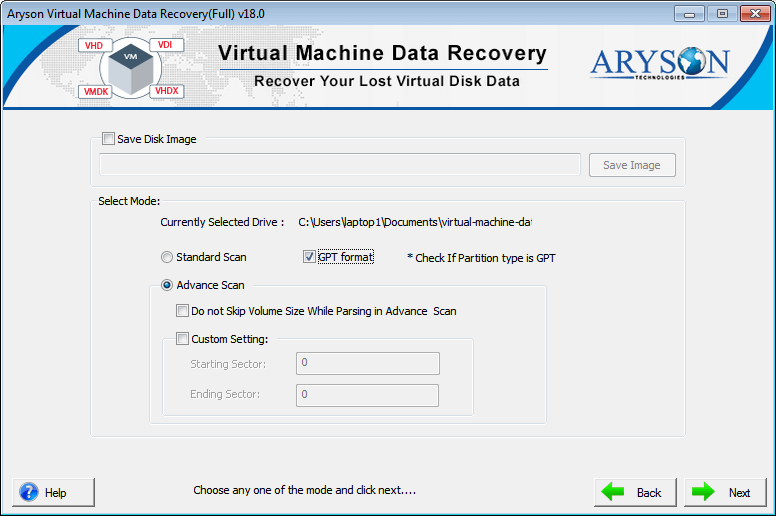
- Choose options based on your needs, then click “Next.”
- Select a suitable Recovery Mode (Standard, Advanced, or Deep).
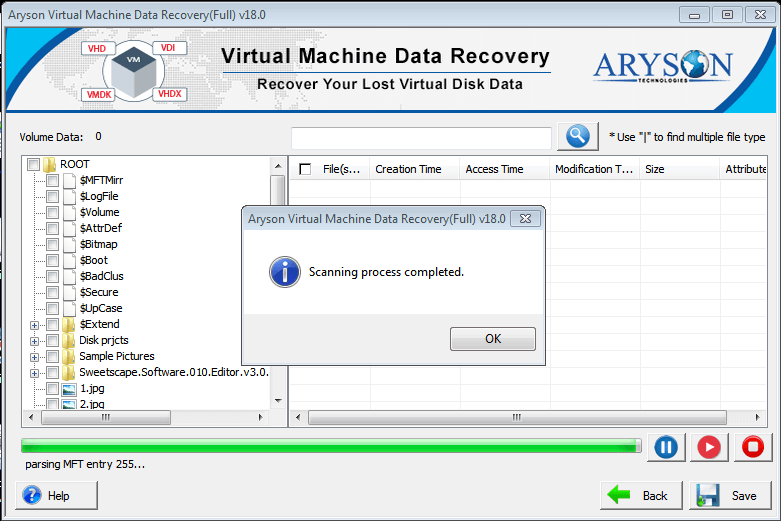
- Preview the recovered VHD/VHDX file data.
- Click “Save” to download your recovered file.
Read Also: How to Open VHD File in Windows?
Conclusion
While VHDX is the dominant and recommended virtual disk format for modern virtualization, understanding the conditions under which a VHD file might be necessary is crucial for IT professionals and enthusiasts alike. Primarily, legacy system compatibility and specific Azure IaaS VM deployments are the key drivers for choosing VHD. For all other scenarios, the enhanced performance, larger capacity, and data protection features of VHDX make it the superior choice. Regardless of the format, robust recovery solutions are available to mitigate the impact of data corruption, ensuring your virtual environments remain resilient.
Frequently Asked Questions (FAQs):-
Q1. What is the fundamental difference between VHD and VHDX?
Ans: VHD is an older format limited to 2TB and lacks advanced features like built-in data protection. VHDX is a newer format supporting up to 64TB, offering better performance, online resizing, and improved protection against data corruption through metadata logging.
Q2. When would I specifically choose to use a VHD file instead of VHDX?
Ans: You would primarily use a VHD file when deploying to platforms or environments that require the VHD format, such as specific older Microsoft Azure IaaS VM deployments, or when working with Generation 1 virtual machines if the 2TB size limit is acceptable.
Q3. Can Generation 2 virtual machines use VHD files?
Ans: No. Generation 2 (Gen 2) virtual machines in Hyper-V are designed only to support the VHDX format. Generation 1 (Gen 1) VMs, however, can use both VHD and VHDX.
Q4. How can I fix a corrupted VHD or VHDX file?
Ans: For corrupted VHD or VHDX files, specialized data recovery software is often the most effective solution. Tools like “VHD Recovery Software” can scan, preview, and recover data from damaged files, usually offering multiple recovery modes to address different levels of corruption.
About The Author:

Rohan Wiese is a Technical Writer at Aryson Technologies. He is an expert Email Forensic, Cloud Computing, and a passionate nerd with over 10 years of experience in technical content writing. He writes about Cloud Migration, Database Recovery, Email Backup, Windows, Mac, and Tech.
Related Post



