LiveChat

Aryson Virtual Machine Data Recovery

Best Tool to Recover Deleted Files from Virtual Machine or VM Files

Aryson Virtual Machine Data Recovery is a risk-free utility to recovers virtual machine or VM files. It recovers deleted Virtual Machine (VM) data that is created by Windows and Linux. Virtual machines play a significant role if a user wants to work on a different operating system on top of another OS. But, sometimes, there are specific corruptions in the Virtual Hard Drives which create troubles for the users. Don’t worry; here is a utility which recovers all the Virtual Machine Disk such as VMDK, VDI, VHD and VHDX. The Virtual Machine Recovery tool smartly recovers and restores deleted or lost data from all the virtual machines saved in the form of VHD, VHDX, VMDK and VDI file format. It is advanced software that helps users to recover files from VMware (VMDK), Oracle (VDI) and Microsoft Virtual (VHD & VDHX) disk image. The GUI of this software is very intuitive and user-friendly so that both technical and non-technical users can use it with ease.

  • Recovers files from a broken Oracle VM VirtualBox Machine .vdi.
  • Recovers deleted files from Virtual Machine (VMDK).
  • Recovers file from Virtual Hard Disk VDH & VDHX.
  • Helps to recover all office document, database files, media files, backup files from Virtual Machine.
  • Allows us to recover data from VMDK, VDI, VHD and VHDX virtual image files.
  • It enable users to recover data from Virtual Drives that is based on FAT16, FAT32, NTFS, exFAT, and NTFS file systems.
  • It supports to recover data from MBR and GPT partition tables of Virtual Disk file.
  • Provides raw recovery mode that helps users to recover data from corrupt or damaged Virtual Machine files.
 Download Now100% safe    Purchase Now

Download Live Demo Version of Aryson Virtual Machine Recovery to Preview the VM Files.

Surprising Tool to Recover Files from Virtual Machine

Aryson Virtual Machine Data Recovery Software is a safe and surprising utility that recovers deleted files from Virtual Machine drives. It supports to recover data from Virtual Machine files VDI, VMDK, VDHX, and VHD files.

Follow the Steps to Recovers Virtual Machine Data Files

  • Install and Run Aryson Virtual Machine Data Recovery Tool.
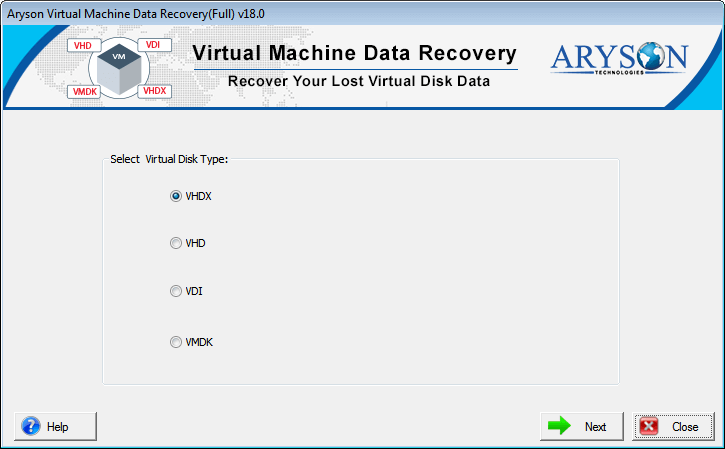
  • Open the software and select Virtual Disk Type, and click on the Next button.
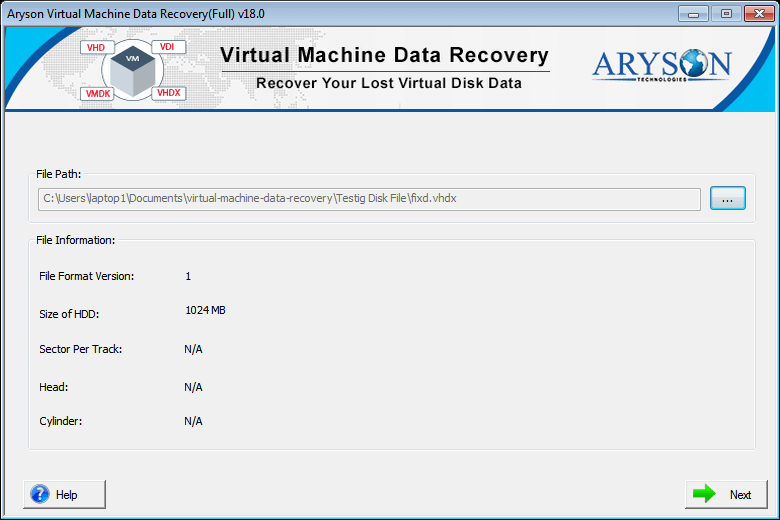
  • Choose Dynamic Disk or Fixed Disk and click on the Browse button and select VM files.
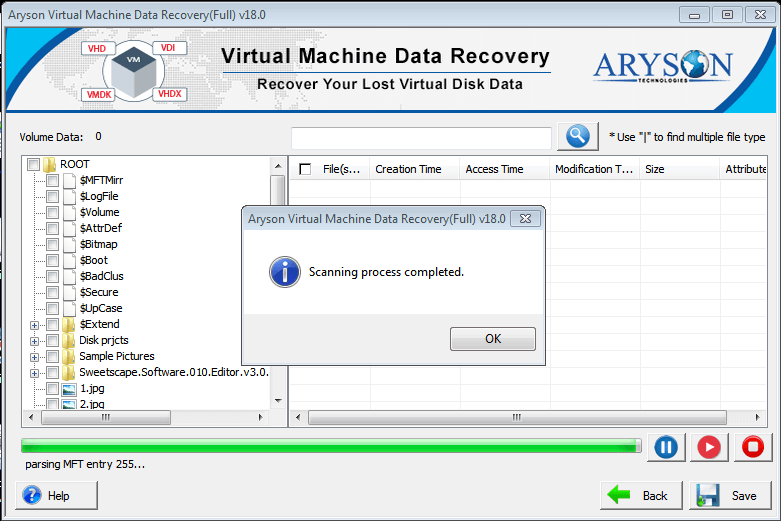
  • Now, scans the selected Virtual Machine files.
  • Click on recovered items to preview them.
  • Click on the Next button to save the recovered Virtual Machine Files into new VM files.
Aryson Virtual Machine Data Recovery

Know When to Use Virtual Machine Data Recovery Software?

There are some situations where you can use this software to recover deleted files from Virtual Machine's Volume. That is given below:-

Use to Recover Virtual Machine Data.

When you need to recover data from corrupt or inaccessible Virtual Machine files, then use the Aryson Virtual Machine Recovery Tool that successfully recovers your Virtual Machine data from corrupted VM files.

Use to Recover ORACLE Virtual Box Data.

Virtual Machine Recovery is professional Oracle Virtual Box Recovery software that recovers or regain Oracle Virtual Box data from VDI files.

Use to Recover VMware Virtual Machine Data.

When you need to recover data from VMware VMDK file, then you can use Aryson Virtual Machine Recovery software that helps to recover VMware data from corrupted or inaccessible VMDK files.

Use to Recover Windows Virtual PC Data.

Aryson Virtual Machine File Recovery tool supports to recover data from Virtual drives that is based on FAT, FAT16, FAT32, FAT64, NTFS, HFS+ and EXTX system file.

Prominent Features of Aryson Virtual Machine Data Recovery

Recovers Deleted Files from Virtual Disk

Recovers Deleted Files from Virtual Disk

With Virtual Machine Disk Recovery Tool help you can recover all the deleted data files from all types of Virtual Machine Disk files. It is one of the ideal utility that supports to recover data from VHD, VHDX, VDI and VMDK files of Virtual Machine Disk.

Recovers Virtual Data from Fixed and Dynamic Virtual Disk Image

Recovers Virtual Data from Fixed and Dynamic Virtual Disk Image

The Virtual Machine Disk Image Recovery tool supports both Fixed and Dynamic Virtual Types of Disk Images and recovers Virtual Machine files from them. Fixed disks allocate a size on your hard drive and use all the space at a time whereas dynamic disks are initially small and only grow if more data is added to them. This software provides you with an option for selecting the disk types and scans them with standard as well as deep recovery mode after that it performs the swift recovery of your data from this disk images file.

Recovers Data with Dual Scanning Mode

Recovers Data with Dual Scanning Mode

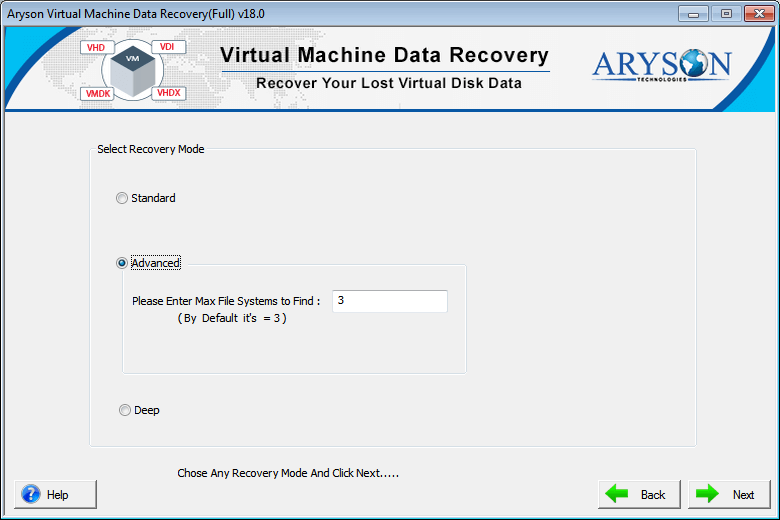
There are two scanning modes in this virtual machine data recovery software, and they enable the corrupt file to be scanned intensively. Standard Mode supports GPT format to scan files if the corruption is minor, and Advanced Mode with the custom setting option, if the corruption in a file is severe.

Supports to Recover Data from MBR and GPT Partition Tables

Supports to Recover Data from MBR and GPT Partition Tables

The Virtual Machine Data Recovery software is strongly supportive of both MBR ( Master Boot Record) and GPT (GUID Partition Table) partition tables and recovers virtual machine data from them. It successfully restores data from corrupt files and saves them in their original format also.

Recovers Data from Virtual Machine File System

Recovers Data from Virtual Machine File System

Aryson Virtual Machine Recovery Software supports all types of Virtual Machine File System and recovers Virtual data from them. It helps to restore data from Windows System file FAT, FAT16, FAT32, FAT64 (exFAT), and NTFS, of Virtual Drives. It also recovers virtual machine data from HFS+ of the macOS system, and EXTX of the Linux system.

Recovers Virtual Data with Tri-Recovery Mode

Recovers Virtual Data with Tri-Recovery Mode

Virtual Data recovery from corrupt Virtual machine files is performed in three different modes depending upon the level of corruption. Standard recovery mode for minor corruption level, Advanced recovery mode for severe corruption level, and Deep recovery mode when all else fails.

Previews Virtual Data in Tree Structure

Previews Virtual Data in Tree Structure

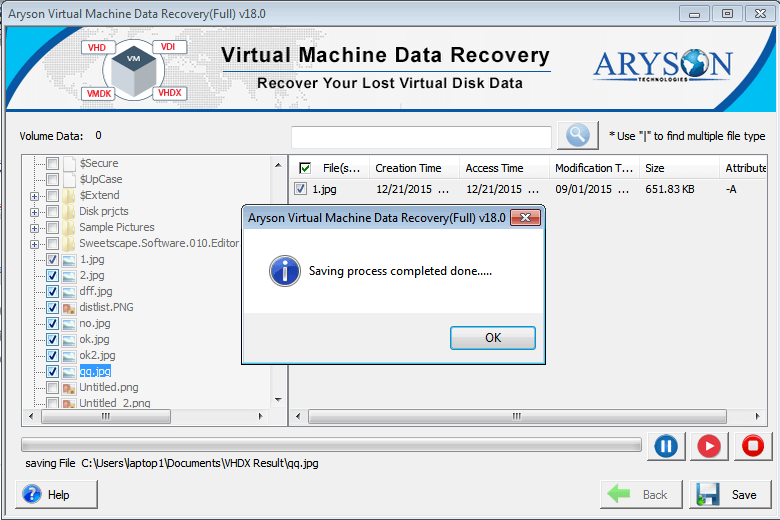
With Aryson Virtual Machine Data Recovery helps user can preview the data recovered Virtual Machine data in a tree structure mode. All the files and folders appear in the left pane, and users can expand this tree structure. In the right pane, properties of selected files will be displayed. You can check/uncheck them as per your need.

Recovers Virtual Files using Custom Setting

Recovers Virtual Files using Custom Setting

The Virtual Data Recovery tool has advanced scanning mode; therefore, you can define the custom settings for the selected virtual drives, i.e. start and end sectors. Also, you can skip the selection of the volume size while parsing operation is being conducted on your system and recovers the virtual files successfully.

Add a Custom Volume

Add a Custom Volume

If you think something has been left, which is not shown in this list, you have an option to add the volume. Click 'Add Custom Volume' button, and a new volume will be added to the list. Now, you can define the custom settings for this newly added volume.

Recovers Raw Data from Virtual Machine

Recovers Raw Data from Virtual Machine

The Virtual Machine File Recovery software has a raw recovery mode option in which the user can recover data from the virtual machine of particular file types which can't be recovered in other recovery modes. The predefined file types are JPG/JPEG, PNG, GIF, BMP, ZIP, RAR, and MP3. By choosing the Treat file system option, you can see RAW recovery. You can select it to parse the selected volume.

Auto-Search files

Auto-Search files

If you want to select specific file items in the large expandable tree-structure, you can do that with the help of the Auto-Search feature just by entering the file name or file type in the search box. You can search multiple files at a time by using | (vertical pipe key) between every two files.

Addition of New Signatures

Addition of New Signatures

With the RAW recovery mode of this Virtual Recovery software that helps users are allowed to add new file signatures to a new or an existing file before the start of data parsing from the selected volume. You can do it by simply clicking the gear button. Then define the file settings as required.

Intuitive User Interface

Intuitive User Interface

This Virtual Machine Recovery tool has a GUI which is highly intuitive and interactive so that it is friendly to both technical and non-technical users. It does not require any prior knowledge for its usage.

Compatible with Windows and Virtual Platforms

Compatible with Windows and Virtual Platforms

Aryson virtual machine data recovery Software is highly compatible with all the popular Windows OS versions - Win 98, Win NT, Win 2000, Win 2003, Win XP, Win Vista, Win 7, Win 8 as well as the latest Windows 10 (32 & 64-bit). This software also supports virtual machine disk files created by all major versions of VMware and Oracle Virtual box. It smoothly performs VMware file partition recovery.
Technical Reviews

Virtual hard disk (VHD) is a file format that serves as a virtual hard disk drive (HDD). It can easily be created by using the Disk Management feature of Windows operating systems. A single system may have more than one VHD file containing data that is available on physical HDDs, such as disk partitions and file systems. Also, it contains files and folders and sometimes is used as the hard disk virtual device. The main function of virtual hard disks is to enable users to run multiple operating systems on a single machine.

VHDX is a Hyper-V virtual hard disk new format that is found in Windows Server 2012. Files under VHDX are not compatible with the older versions of Windows Server. Any file having the VHDX file extension is a Windows 8 Virtual Hard Drive file; thus, it works as an authentic physical hard drive. VHDX outranks VHD in terms of storage capacity, while virtual hard disk has a meagre storage capacity of 2TB; VHDX files boasts of a 64TB storage capacity.

VMDK is a file format used for saving Virtual machine disk files created by virtual machines like VMware Workstation or VirtualBox. In VMware data recovery, we recover VMDK files.

It is used for saving Virtual Disk Image (.VDI) files created by Oracle Virtual Box. It's an open-source desktop virtualization program available for Windows, Mac, and UNIX platforms. The primary function of a VDI file is to run various programs written for different OS in a high-speed virtual environment.

Software Specification

System Requirement
processor
Ram Recommended
Opreating System
License Types
Home License
Home License
Corporate License
Corporate License
Technical License
Technical License
Software Delivery & Version
ElectronicYes
Versionv18.0

Comparison of Demo & Full Version

Product Features Free Version Full Version
Add or open VHD, VHDX, VMDK and VDI files
Scan files with Standard and Advanced mode
Restore Data from formatted virtual drive partitions of files
Supports to recover files saved in Fixed and Dynamic Disk types
Support all popular file systems of different O.S.
Available RAW recovery mode with signatures option
Quick scanning and preview of data in tree structure
Save Recovered Data from Virtual Machine Disk File Preview Only Save All Items
24*7 Tech Support & secure 100%
Price Free $199
Money-Back Guarantee
Rating & Review
cinet

Aryson Virtual Machine Recovery software is highly intuitive with a GUI suitable for both technical and non-technical users.  Read More..

software informer

The software is inbuilt with a feature of three different modes of recovery depending upon level of file corruption.  Read More..

software-informer

This software is unique as it recovers data from virtual machines very smartly in all file format such as VHDX, VMDK, VHD and VDI.  Read More..

softonic

With the feature of preview and auto-search, it has provided an ease to the users.  Read More..

Frequently Asked Questions

Yes, Aryson virtual machine data recovery is such software that can recover all sorts of files, i.e. VHD, VHDX, VMDK and VDI developed by virtual machines.

Yes, with the help of this Aryson Virtual Machine Recovery software, you can recover deleted or inaccessible files from Virtual Machine successfully.

Yes, it offers a software live demo version that previews your recovered Virtual Machine data on your local system. But it does not allow you to save the recovered Virtual data, and the full version software will enable you to keep all recovered Virtual data successfully.

Yes, this software is comfortable with all versions of Windows therefore quickly recover Virtual data on Windows 10 & below versions.

Yes, this software able to recover files from VDI (Virtual desktop infrastructure) created by Oracle VirtualBox.

Yes, this software supports recovering or extract data from the VMDK file successfully.

  • capgemini
  • moto
  • ibm
  • county
  • oreilly
What Our Customers Are Saying About Us
 Submit Your Review
You Might Be Interested in These Products Too

Aryson VMDK Recovery Software

Aryson VMDK Recovery Software

Read More 

Aryson VHD Recovery Software

Aryson VHD Recovery Software

Read More 

Aryson VDI Recovery

Aryson VDI Recovery

Read More 

Aryson Virtual Machine Data Recovery

Aryson Virtual Machine Data Recovery

Read More 
Service

At Service Since
2010

Trusted

Trusted by
Millions

SSL Secure

SSL
Secure

McAfee

McAfee SECURE
100% Secure

Aryson Technologies

united states

2880 Zanker Road, Suite 203, San Jose, CA - 95134, USA

india

A-58 , 2nd Floor A Block Sector 57, Noida, Uttar Pradesh 201301, India

Find Us on

Subscribe to our newsletter to get the latest News & Update

© Copyrights 2014 by Aryson Technologies Private Limited - All Rights Reserved

DMCA.com Protection Status