




Screens

Video

Guide

Eula

Aryson VHD Recovery Software- Rating & Reviews

See what our users have to say about the Aryson Virtual machine disk recovery

Expert Review

Rating & Reviews

Comprehensive Features of the Aryson VHD Recovery Software

Recover Virtual Hard Disk Completely

Recover Virtual Hard Disk Completely

Virtual Hard Disk Recovery is the most advanced VHD File Repair utility that opens inaccessible/corrupt VHD files and restores them completely. It allows you to recover complete data from a Virtual hard disk, including videos, audio, images, archives, databases, etc. It ensures data integrity while recovering content from corrupted, damaged, or inaccessible VHD files.

Recovers Single/Multiple VHD Files

Recovers Single/Multiple VHD Files

The Free VHD Recovery tool not only allows you to scan & recover corrupt Virtual Hard Disk files, but also lets users go for multiple VHD file recovery one by one. This software has an easy-to-use GUI for both technical and non-technical users. This feature is especially useful for administrators handling large virtual environments or multiple disk failures.

Recover Deleted VHD Files

Recover Deleted VHD Files

If a VHD file is accidentally deleted or lost due to system issues, it can scan the storage location and recover the deleted VHD file along with its data. The Virtual hard disk recovery software application is one of the best software applications to recover and restore accessible and corrupt VHD files without affecting the original data.

Multiple Modes to Recover VHD Files

Multiple Modes to Recover VHD Files

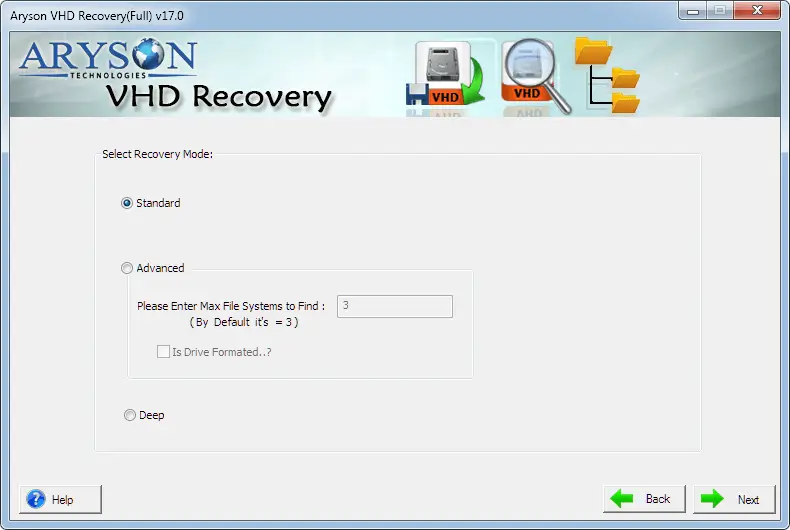
VHD file recovery tool has been loaded with three different recovery modes to handle corruption of different types: Standard for minor corruption, Advanced mode for moderate corruption, and Deep mode when all fails. Users can choose the appropriate mode based on whether the VHD file is slightly corrupted or severely damaged.

Dual Scan Mode to Restore VHD File

Dual Scan Mode to Restore VHD File

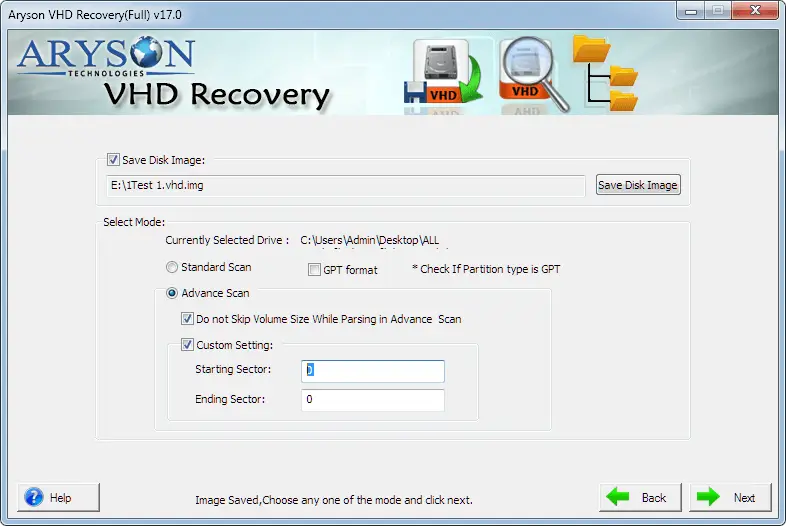
For a quick and effective scanning of your corrupt and inaccessible Virtual Hard Disk files, the application is upgraded with two scanning modes: Standard & Advanced. Users can choose any mode and repair corrupt VHD files. The dual scan feature includes a quick scan for fast recovery and a deep scan for thorough analysis.

Previews Corrupt VHD File

Previews Corrupt VHD File

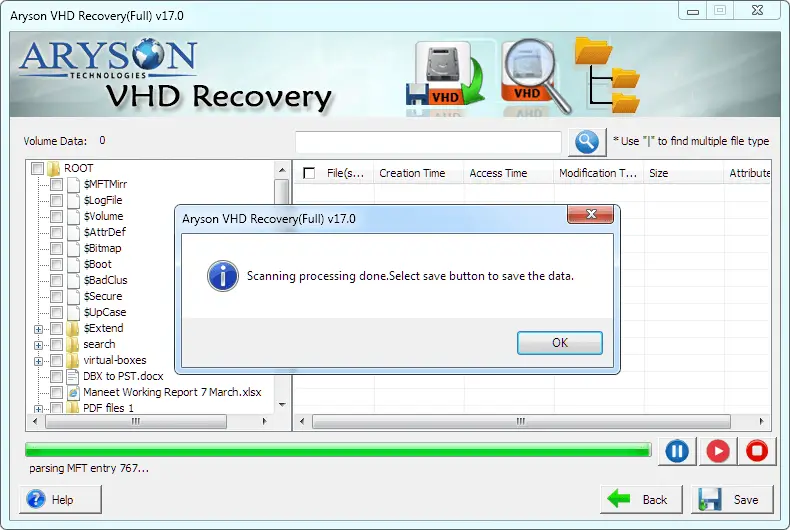
With the help of the VHD data recovery tool, you can easily scan & preview your corrupt files. The software will show the data in a tree structure mode, wherein you will find the folders and files in the left pane. This helps verify data accuracy and allows selective recovery of only required items.

Support MBR & GPT Partition Tables

Support MBR & GPT Partition Tables

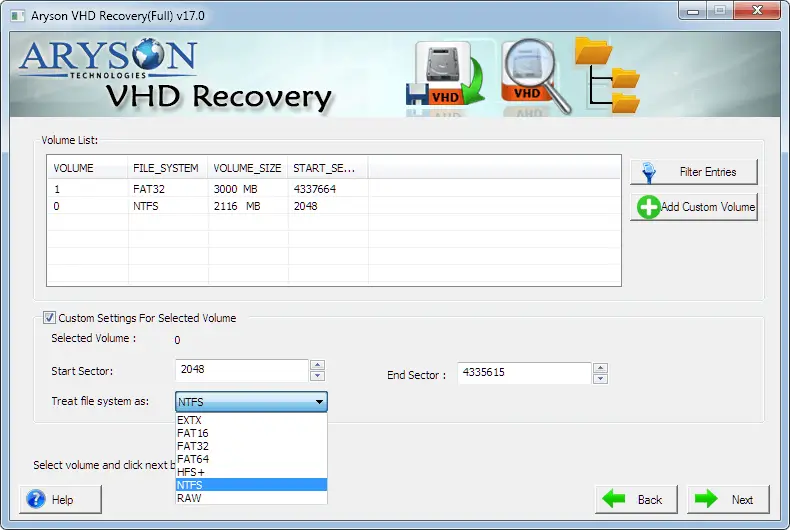
There is a lot of data, like partitioning information of hard disks, which gets stored in MBR (master boot record) and GPT (GUID Partition Table), which remains unrecovered. However, with the VHD recovery Tool, users can recover & restore this data from MBR & GPT partition tables. It ensures accurate recovery from virtual disks created on both older and modern systems.

Compatibility with All VHD Files

Compatibility with All VHD Files

VHD Recovery software is compatible with all VHD files created by Windows 10, Windows Server 8, Windows 7, and Windows Vista. Even the software supports creating VHD files of Hyper-V Server, Windows Server 2012 R2. As a result, it works smoothly with VHD files from different virtual platforms and Windows versions.

How to Recover VHD Files: Complete Guide

Aryson VHD Recovery Guide

The Aryson VHD Recovery Software scans corrupted or inaccessible Virtual Hard Disk (VHD) files and identifies all recoverable data, such as files, folders, and system information. After scanning, it displays the recovered content in a preview panel, allowing users to verify and restore data easily and safely.

  • Step 01: Download and Install Aryson VHD Recovery Software.
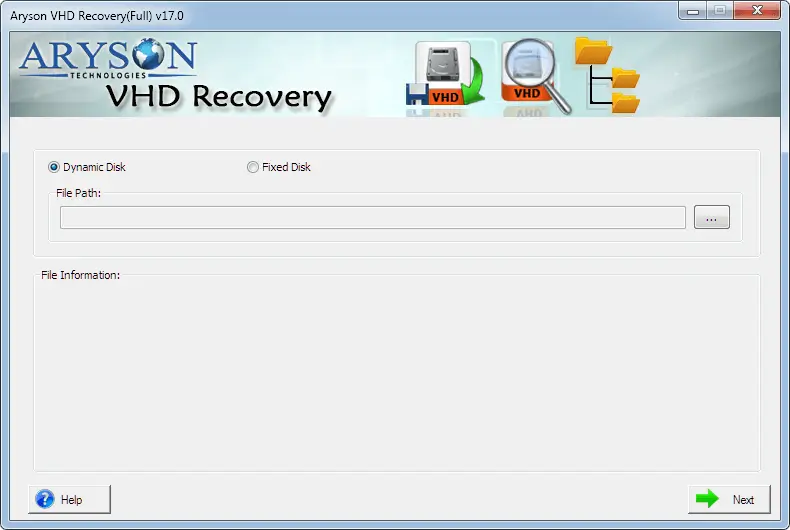
  • Step 02: Then, choose the disk type: Dynamic or Fixed.
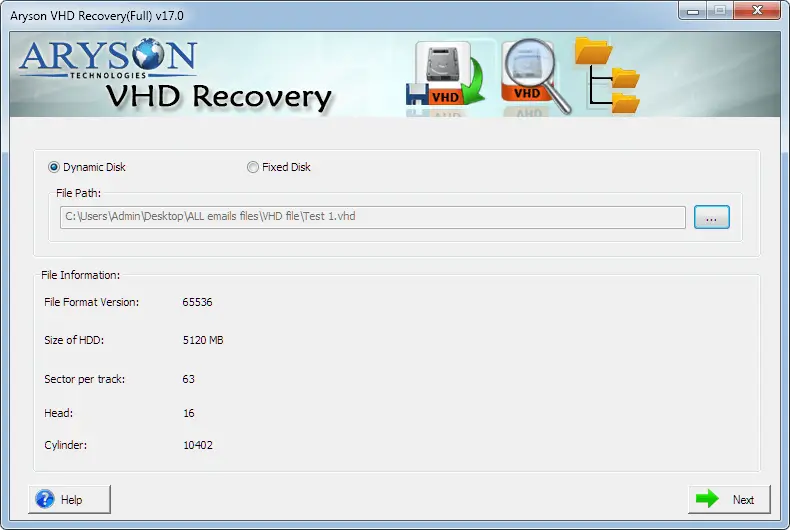
  • Step 03: Select the VHD file from the displayed screen.
  • Step 04: Now, choose the scanning mode and other required options.
  • Step 05: Here, select the recovery mode according to your requirement.
  • Step 06: Check the preview of the scanned files in a tree view.
  • Step 07: Now, save the recovered VHD file at the destination path.

Aryson VHD Recovery Software: System Specifications

Software Download

Size: 1.32MBVersion: 17.0

Trial Limitations

The demo version of Aryson Virtual Hard Disk Recovery allows users to scan damaged VHD files and preview the recovered data on Windows. However, to save or export the recovered data, a licensed version of the software is required.

Requirements & Supported Versions

Processor: Intel® Core™ 2 Duo CPU E4600 @ 2.40GHz 2.39GHz

Hard Disk Space: 500 MB of free hard disk space required

RAM: 4 GB of RAM (4 GB is recommended)

Supported Platforms

Microsoft Windows: 7, 8, 10 (32 bit or 64 bit), 11 (64 bit), Windows Server 2019, 2016, 2008, 2012 R2

Supports Recovery for File Systems: FAT 32, FAT 16, ExFAT, NTFS File System & Cross-Formats between NTFS & Other Formats like FAT16 & FAT32.

Supported Partition: GPT and MBRDisk types – Basic & Dynamic

Software Prerequisites

  • If you are operating Windows OS 11, 10, 8, or 7 (32-bit or 64-bit) then you must launch the tool as an Administrator.
  • Turn off the Windows Firewall for proper installation.
  • Disable the Antivirus programs.

FAQ

Request For Software Customization

If you need to customize Aryson Software or need some additional specific features, then provide the software customization Request Quote.

Aryson VHD Recovery Software: Free & Premium Version

Get an overview of the Free and Premium versions of the Virtual Hard Disk Recovery:

Product Features Free Version Full Version
Scan corrupted VHD files
Recover files and folders Preview Only
Recover formatted VHD partitions Preview Only
Support fixed and dynamic VHD
Support MBR & GPT partition tables
Dual scan mode
No data limitation
Compatible with All Windows Versions
100% Secure with Technical Support
Price Free $99
Money Back Policy

Queries Related to Aryson VHD Recovery

If you want to recover a corrupt .vhd file with the help of PowerShell Commands, then you need to run a script in PowerShell to mount the corrupted VHD file on the root folder. Read More

Yes, the Aryson VHDX File Recovery uses advanced scanning and dual scan modes to recover data even from severely corrupted or inaccessible VHD files.

Ans. Yes, the VHD Recovery for Windows fully supports recovery from both fixed-size and dynamic VHD formats.

Yes, the VHDX File Recovery provides a preview of all recoverable files and folders before saving, which helps users verify data accuracy.

Yes, Aryson VHD Recovery Software can recover deleted VHD files and the data stored within them.

Yes, the Virtual Hard Disk Recovery supports both MBR and GPT partition tables for accurate data recovery.

Yes, VHDX File Recovery allows recovery from single as well as multiple VHD files in one recovery session.

The demo version allows users to scan VHD files and preview recoverable data, but saving or exporting the recovered data requires a licensed version.

Yes, the Virtual machine disk recovery has a user-friendly interface that makes the recovery process simple, even for users with limited technical knowledge.

Aryson VHD Recovery Tool is compatible with all major Windows versions, including Windows 11, 10, 8.1, and earlier editions. Hence, it is the best software to recover VHD files on Windows

Trusted by IT Professionals & Enterprises Worldwide

See what our IT professionals say about their experience with the Aryson VHD Recovery Software

review-rating