




Screens

Video

Guide

Eula

Fix these SQL Server Backup Errors with Aryson SQL Backup Recovery

Explore some of the frequent SQL Server backup errors that this software can detect and repair:

Error Code Description
Error 3241 Indicates corruption in the SQL Server backup set and prevents successful database restoration
Error 3013 Occurs when the RESTORE process terminates abnormally due to backup file corruption.
Error 3168 Appears when SQL Server cannot read the backup header because the .bak file is damaged.
Error 3154 Happens when the backup file cannot be opened due to access issues or corruption.
Error 3634 Indicates logical inconsistencies found inside the SQL Server backup file.
Error 3253 Occurs due to read failures while processing the SQL Server backup media.
Error 4333 Appears when SQL Server cannot process the backup due to an invalid backup format.
MDF & LDF Extraction Errors Occur when SQL Server fails to extract database files from corrupted or inaccessible .bak files.
Error 3621 Indicates that SQL Server encountered a fatal error while restoring the database.

Aryson SQL Backup Recovery Tool - Rating & Reviews

See what our users have to say about the Aryson MSSQL backup recovery

Expert Review

Rating & Reviews

Recoverable Components with Aryson SQL Backup Recovery

Here is the complete overview of essential database components restored by SQL.BAK File Recovery:

Component Description
Tables Complete tables with rows and columns from the backup file.
Stored Procedures SQL procedures saved within the .BAK file.
Indexes & Keys Clustered, non-clustered, primary, and foreign keys are stored in the backup.
Views & Triggers Logical views and triggers are available in the SQL backup.
MDF & LDF Data Extracts and rebuilds MDF and LDF data from the backup file.
Schema & Data Types Original schema, relationships, and SQL data types.
Functions User-defined SQL functions from the backup file.
SQL Scripts Generates SQL scripts for easy database restoration.

Comprehensive Features of Aryson SQL Backup Recovery Tool

Explore this powerful tool to repair and recover damaged or corrupted SQL Server backup files efficiently:

Safely Repair SQL Backup Files

Safely Repair the SQL Backup Files

Aryson SQL Backup Recovery helps users efficiently restore damaged or corrupted SQL Server backup files (.BAK). Whether the backup file is partially damaged, inaccessible, or fails to open, this SQL Server Backup Recovery Software ensures reliable recovery, bringing your database back to a usable state without risking data loss.

Extract MDF & LDF from Backups

Extract MDF & LDF from Backups

This software provides the ability to extract both MDF (primary database file) and LDF (log file) from SQL Server backup files. It supports recovery from both healthy and corrupted .BAK files to retrieve essential data from any situation, allowing anyone to extract MDF and LDF files from Microsoft SQL Server backup files (.bak).

Recover Database Components

Recover Database Components

With this SQL Backup Recovery Tool, you can recover all SQL Server database components. Users can retrieve tables, stored procedures, views, functions, triggers, and columns from their .BAK files, ensuring that every element of the database is restored accurately.

Dual Scanning Mode

Dual Scanning Mode for BAK File

The SQL Backup Repair Tool provides dual scanning modes: Standard and Advanced. Standard Scan Mode is for minor corruption, while Advanced Scan Mode handles severely damaged or corrupted .BAK files.

Repair Compressed or Split BAK

Repair Compressed or Split BAK or SQL Backup File

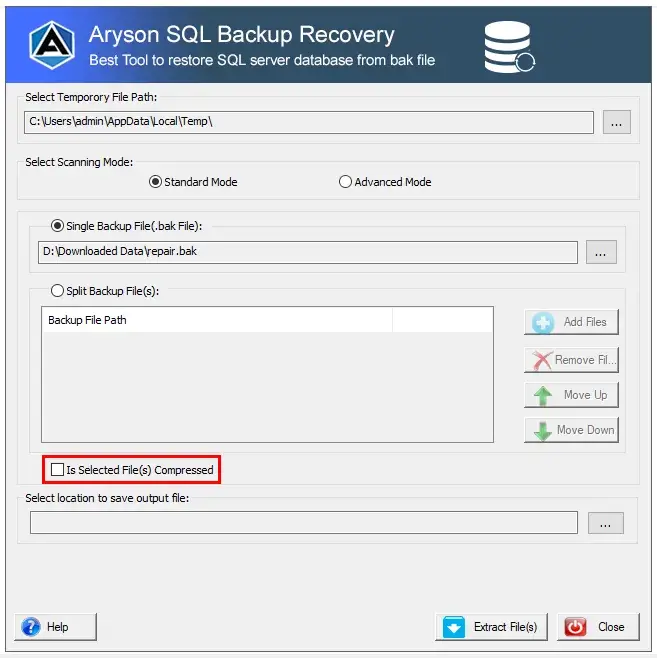
Aryson SQL Backup Recovery can repair and extract data from compressed or split SQL Server backup files. It can merge multiple split BAK files into a single usable database and recover large compressed databases efficiently.

Display BAK File Information

Display BAK File Information or Details

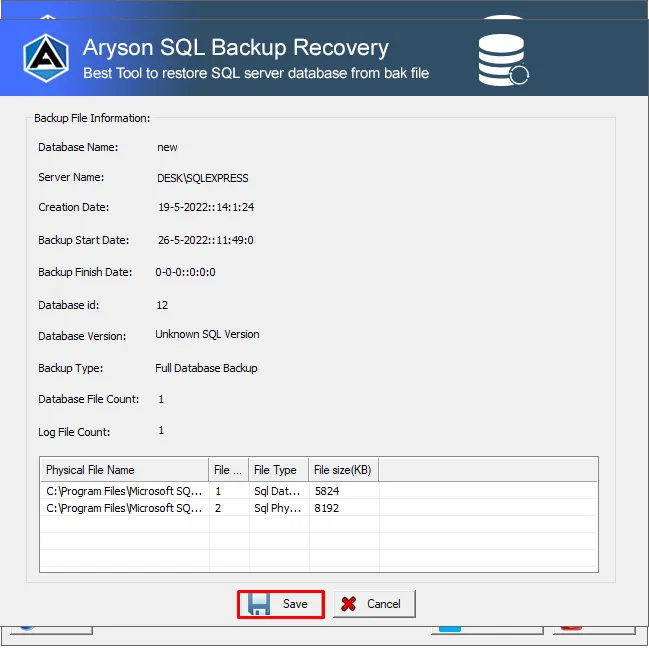
The software allows users to preview selected backup file details, including Database Name, Server Name, Creation Date, Backup Start Date, and more, ensuring a 100% result-oriented recovery process.

Supports Diverse MS SQL Server Versions

Supports Backup File of Diverse MS SQL Server

The SQL Server BAK File Recovery tool supports .BAK files from multiple SQL Server versions including 2005, 2008, 2008 R2, 2012, 2014, 2016, 2017, and 2019.

Efficient Handling of Large BAK Files

Efficient Handling of Large-Sized BAK Files

This software can process large SQL Server backup files smoothly, even multi-gigabyte .BAK files, allowing businesses to recover extensive databases quickly and efficiently.

Simple and Easy-to-Use Interface

Simple and Easy-to-Use Interface

Aryson SQL Backup Recovery features a professional, intuitive interface. No technical knowledge is required to run, repair, and recover SQL-compatible (MDF & LDF) files from a corrupt or damaged .BAK file.

Wide Windows Compatibility

Wide Windows Compatibility

Compatible with all Windows OS including Windows 11, 10, 8, 8.1, 7, Vista, XP, and Windows Server 2003, 2008, & 2012, ensuring a smooth recovery process across platforms.

Complete Guide: Use Aryson SQL Server Backup Recovery Software

Aryson SQL Backup Recovery Guide

Aryson SQL Backup Recovery can help users restore corrupt or inaccessible SQL Server backup files (BAK) safely. This software ensures that your database remains intact while recovering complete data, including tables, stored procedures, triggers, indexes, and more. Follow this simple guide to understand how it works:

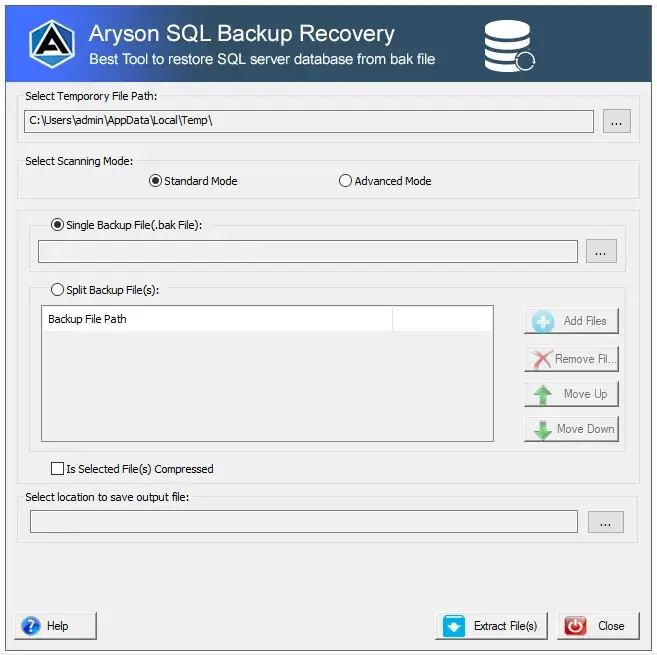
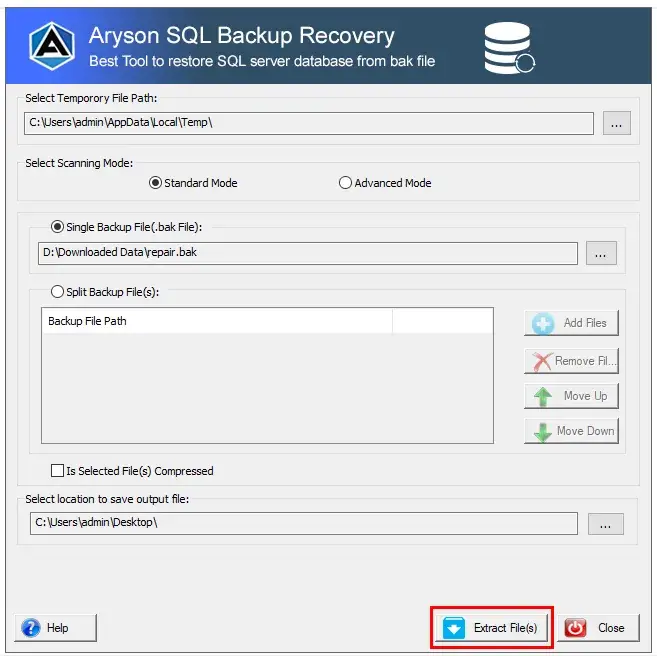
  • Step 01: Install & Run Aryson SQL Backup Recovery.
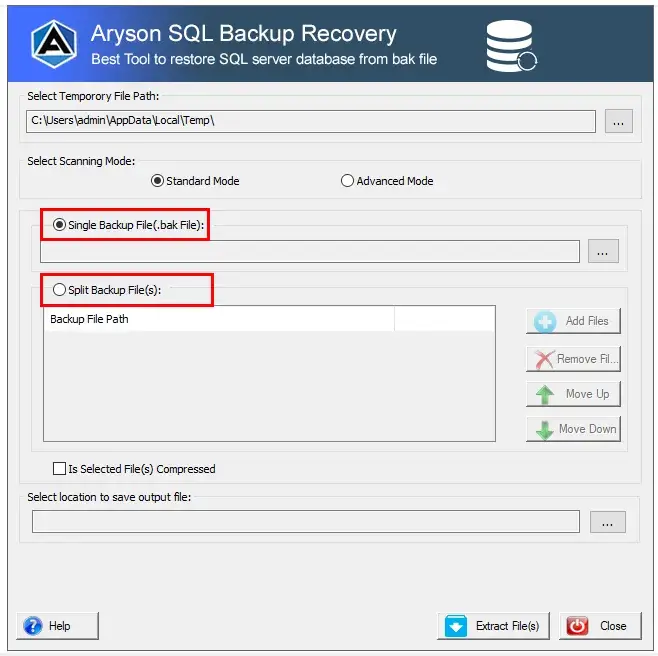
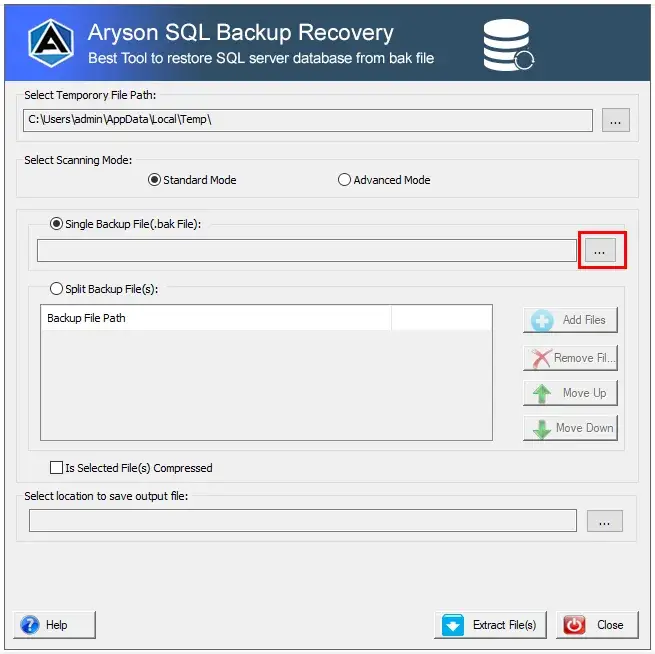
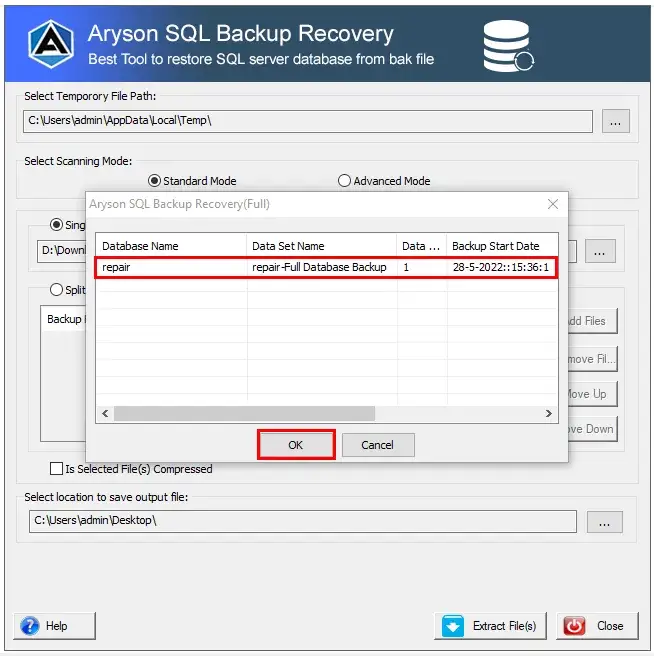
  • Step 02: Now, select your .bak file to repair and extract files.
  • Step 03: You can also select the split or compressed .bak files.
  • Step 04: After selecting the .bak file, choose the saving location.
  • Step 05: Now, click on the Extract files button to proceed further.
  • Step 06: Here, you can view the selected SQL file information.
  • Step 07: Tap Save button to extract .mdf & .ldf files from .bak file.

Aryson SQL Backup Recovery Software: System Specifications

Software Download

Size: 1.2MBVersion: 22.0

Trial Limitations

The demo version of Aryson SQL Backup Recovery allows you to preview and view the SQL backup file information. However, to save or extract the repaired files, you need the licensed version of the software.

Requirements & Supported Versions

Processor: Intel® Core™ 2 Duo CPU E4600 @ 2.40GHz 2.39GHz

Hard Disk Space: 500 MB of free hard disk space required

RAM: 4 GB of RAM (4 GB is recommended)

Supported Platforms

Microsoft Windows: Windows 11 (64-Bit), Windows 10, 8, 7 (32-bit or 64-bit) & Windows Server 2016, 2012 R2, 2008

SQL Server: 2019, 2017, 2016, 2014, 2012, 2008 / R2, 2008, 2005 & 2000

Software Prerequisites

  • If you are operating Windows OS 11, 10, 8, or 7 (32-bit or 64-bit) then you must launch the tool as an Administrator.
  • Turn off the Windows Firewall for proper installation.
  • Disable the Antivirus programs.

FAQ

Request For Software Customization

If you need to customize Aryson Software or need some additional specific features, then provide the software customization Request Quote.

Aryson SQL Backup Recovery Tool: Free & Premium Version

Get an overview of the Free and Premium versions of the SQL backup repair software

Product Features Free Version Full Version
Repair and Recover .bak File of SQL Server Only preview file details
Recover Compressed and Split SQL Backup Files Only preview file details
Support Corrupted .bak File
Preview MDF and LDF Files
Display the File Details / Information
Custom Path to Save
Handle Large-Sized BAK Files
Support for SQL Server 2008–2019
Dual Scanning Modes (Standard & Advanced Scan)
Compatible with All Windows Versions
24/7 Technical Support
Price Free $149
Money Back Policy

Frequently Asked Questions:

Ans. Yes, it can efficiently process large-sized.BAK files without any performance issues.

Ans. Yes, the SQL backup repair software recovers tables, views, procedures, triggers, functions, and columns from.BAK files.

Ans. No, it works independently and does not require SQL Server to be installed on your system.

Ans. It supports SQL Server 2008 through 2019 for repair and extraction.

Ans. Yes, the SQL database restoration tool allows selection and recovery of multiple split or compressed.BAK files seamlessly.

Ans. Yes, the demo version allows you to preview SQL backup file information before performing a full recovery.

Ans. You can save recovered files to any user-defined location on your system.

Ans. Aryson SQL Backup Recovery provides Standard Scan and Advanced Scan modes for thorough and accurate recovery.

Ans. Yes, it is compatible with all major Windows versions, including Windows 11.

Trusted by IT Professionals & Enterprises Worldwide

See what our IT professionals say about their experience with the Aryson SQL.BAK File Recovery

review-rating