





LiveChat

Aryson Split PST Software
Splits Oversized or large-size Outlook PST File(s) into smaller PST files

Aryson Split PST Software is a professional utility that helps to split large-sized Outlook PST files into smaller PST. It split up single or multiple large PST file(s) based on various criteria like date, size, folder, and the sender's email id. Using the PST Splitter tool, users can automatically split up their large PST file including, emails, contacts, calendars, journals, notes, tasks, into smaller PST files.

  • Safely split large PST files into smaller Outlook PST files.
  • Maintain the hierarchy of original PST files after the process.
  • Option to split Single/Multiple PST files at a time.
  • It designs based on an advanced algorithm for splitting large PST files with high precision speed.
  • It helps to save the resultant files to the local storage.
  • Option to split Outlook PST file by date, size, folder, and sender email id.
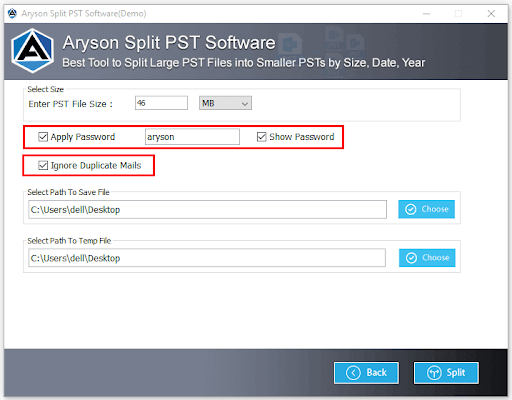
  • Allow to ignore the duplicate emails from the split process.
  • Supports split ANSI and UNICODE PST file types.
  • Support to divide-large Outlook PST files including emails, contacts, tasks, calendars, journals, etc.
  • Feature to Apply password on the resultant PST files.
  • It has a simple user- friendly interface for splitting PST files with ease.
  • Options to create single PST files or separate PST for selected folders after splitting files.
  • Support all versions of Microsoft Outlook PST files created by Outlook 2002, 2007, 2010, 2013, and 2016.
  • Compatible with all versions of Microsoft Windows.

Best Software to Split PST File by Size, Date, & Folder without Outlook

Aryson Split PST Software is an efficacious and virus-free software for splitting large or oversized Outlook PST files by Size, Date, Email ID, and Folder without any alteration within the hierarchy of original PST files.

Steps to Divide or Split PST Files without Outlook

  • Step 1: Install Aryson Split PST Software and Run as Administrator.
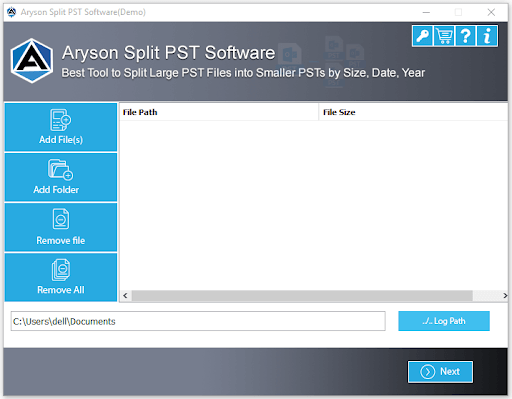
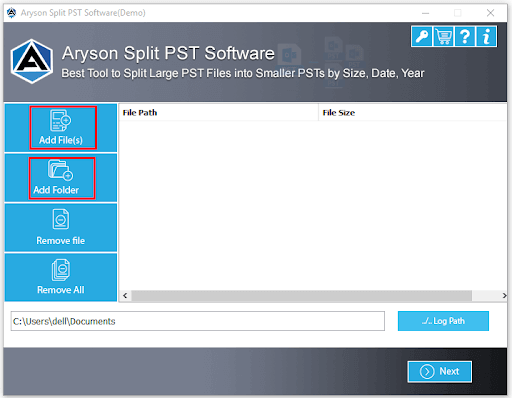
  • Step 2: Click on the Add files button and select the PST file for splitting.
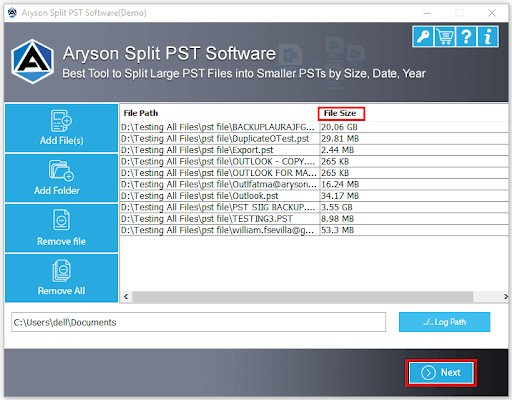
  • Step 3: Now explore the selected PST files and click on the Next button.
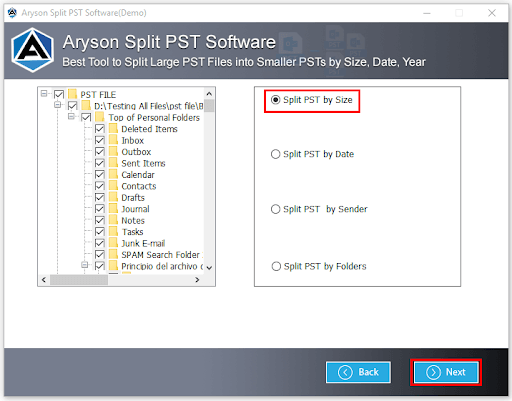
  • Step 4: Here, choose the criteria (size, date, email id, folder) to split PST files. Tap on the Next button.
  • Step 5: After that, if you need then choose the Apply password feature.
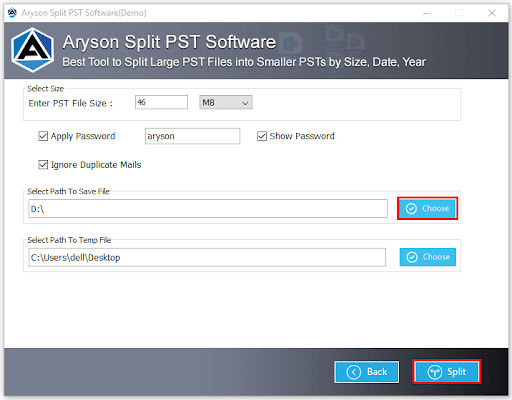
  • Step 6: Here, select the destination path to save the restaurant file.
  • Step 7: Click on the Split button to successfully split up your selected PST file.
Split PST

When to Use Aryson Split PST Software?

When Outlook Mailbox Size Exceeded from Limit

PST File Splitter is a remarkable tool for splitting a large PST file when Outlook mailboxes exceed the size limit. The software allows splitting large-sized PST files into multiple files based on sizes like MB, GB.

To Split Outlook PST files on a Different Scale

Sometimes, Microsoft Outlook users search for a professional utility to split the Outlook PST files by different criteria or scales. Here, Aryson Split PST Software allows splitting PST by Size, Date, Folder, and Sender Email id.

When unable to Split PST Files Manually

Outlook PST Splitter tool allows you to split any size of Outlook PST files when a manual method fails. It distinctly divides large size Outlook PST files into smaller parts of the PST file.

Need to split PST files of Outlook 2019, 2016, 2013

It has been seen that the users look for a solution that supports all the versions of Outlook-created files. Using the Aryson PST Splitter software, they can split PST files created by Outlook 2016, 2019, 2013, 2010, and the lower version.


Key Features Aryson Split PST Software

Safely Split PST Files

Safely Split PST Files

Aryson Split PST Software has an ultra-fast splitting time and also doesn't damage or harm any Outlook PST files during the process. So all the Outlook PST files remain unharmed or don't face any data alteration.

Split Large-Size PST Files

Split Large-Size PST Files

Outlook PST Splitter software splits large-size PST files of MS Outlook into multiple small PST files. This software feature lets users fight against PST corruption issues that occur due to PST file size limitations.

Split Single/Multiple PST Files

Split Single/Multiple PST Files

Aryson PST Splitter allows users to add single or multiple PST files to split them into smaller size PST files. The software is highly developed by an advanced algorithm that helps to keep the data intact as the original.

Multiple Ways to Split PST Files

Multiple Ways to Split PST Files

MS Outlook PST Splitter software provides four valuable ways to divide large Outlook PST files. Users can split their Outlook PST files by size, date, folder, and by sender’s email id. It also has a simple and user-oriented GUI.

Tree-Structure Preview of PST Files

Tree-Structure Preview of PST Files

PST Splitter is the finest and quick software solution to split or divide large-size PST files. Aryson PST Split Software also supports the preview of PST files in a tree structure with its attached folders.

Option to Fix the Size to Split PST

Option to Fix the Size to Split PST

Outlook PST Splitter software allows users to fix the file size while splitting the selected PST files. The software provides the size criteria in megabytes and gigabytes. Select either MB or GB and enter the size to split.

Add Password to Resultant PST Files

Add Password to Resultant PST Files

Outlook PST File Splitter provides a feature (Apply password) to add the password in the resultant PST file. Opt for the option apply password, and enter the password to set on the output PST files.

Option to Save Resultant PST Files

Option to Save Resultant PST Files

The Split PST Software not only helps to divide PST files into smaller and more manageable PST files, but it also empowers the user to save the truncated MS Outlook PST files at the desired location.

Feature to Remove the Identical Emails

Feature to Remove the Identical Emails

Aryson Split PST Software allows users to remove duplicate emails from the splitting process. The feature is the most valuable as it helps to split the original emails and remove the duplicate emails of selected PST files.

Option While Splitting by Folder

Option While Splitting by Folder

While splitting the Outlook PST files by folder, the software allows you to create a single PST file, or you can separate PST for the selected folder. The software provides various features to split PST files without altering any data.

Display All the Sender Email Address

Display All the Sender Email Address

Aryson Split PST Software allows users to display the sender email address of selected Outlook PST files while splitting PST files by sender email id. Click on the Add Email Address button, and the software will automatically display all the sender email addresses.

Intuitive Graphical User Interface

Intuitive Graphical User Interface

The user interface of Outlook PST file splitter is so easy that even a non-technical person can also use it and can split oversize PST files with ease without any technical help. Due to a simple interface, this software is most demanding for splitting PST files.

Technical Overview

MS Outlook uses PST files to store all your data from emails, contacts, messages, calendars, and other mailbox items. PST has a size limit to store the data. If the size exceeds, then the PST file might get corrupted.

The best way to avoid these types of corruption is by compressing the files or splitting them into smaller and more manageable Outlook PST files. There are no manual procedures to compress or split oversize PST files. So the best way to split Outlook PST files is by using Aryson Split PST Software.

Software Specification

System Requirement
processor
Ram Recommended
Opreating System
License Types
Home License
Home License
Corporate License
Corporate License
Technical License
Technical License
Software Delivery & Version
Electronic Yes
Version 21.7
FAQs

It is due to the screen resolution of your system or PC. Please fix the screen resolution to the default to handle the issues of being unable to see the Next button.

Comparison of Demo & Full Version

Product Features Free Version Full Version
Allow to Add Single/Multiple PST File(s) Yes Yes
Split PST File by Date, Size, Email ID, & Folder Split Only 50 Emails Per Folder All
Date Filter to Split Selected Emails
Add Password in the Resultant PST File(s)
Option to Exclude Duplicate Emails
Support (ANSI) & (UNICODE) PST File
Save the Resultant PST
Allow setting the Size to Split PST File(s) (MB & GB)
24*7 Tech Support
Price Free $49
Money-Back Guarantee
Rating & Review
cinet

The most used or trusted PST Splitter Software on CNET DOWNLOAD for splitting a large or oversized PST file and maintaining the structure of the original PST file. Read More..

Informer

Aryson Split PST Software preserves the original structure of Outlook PST Files after splitting. Software. Informer recommends this most trusted software to split PST files.  Read More..

Softpedia

Split PST tool used to split the PST files by date, size, folder, and senders email id. It is 100% safe and trustworthy for users to Split a PST file. Softpedia awarded software.  Read More..

soft32

Splitting or dividing your Outlook emails, contacts, calendars, tasks, and other mailbox items have become comfortable with this Software, review by Soft32.  Read More..

Frequently Asked Questions

Follow the below simple steps to split a pst file which is the following: -

  • Step 1: Download & Install Aryson Split PST Software. Run as Administrator.
  • Step 2: Click on the Add Files or Folder button to add PST file(s).
  • Step 3: Now, tap on the Next button to continue the process.
  • Step 4: Furthermore, choose the criteria (Size, Date, Folder, Email id) to split.
  • Step 5: Here, opt for the additional features of the software.
  • Step 6: Now, define the location in the system where you want to save Outlook PST files after splitting.
  • Step 7: Click on the Split button to successfully split the selected PST file.

Yes! You use the Outlook PST Splitter Tool to split or divide large-size PST files because this software doesn't need Outlook Application.

You can follow the software working process to split PST files created by Outlook 2016. The software supports PST files created by MS Outlook versions 2003, 2007, 2010, 2013, 2016, 2019.

Yes, you can split the large size PST files with the help of the Split PST tool. Within a few steps, you can Split your large size PST file.

Follow the below steps to split large PST files into smaller PST files.

  • Step 1: Install and launch the Outlook PST Splitter Tool.
  • Step 2: Add the file(s) that you want to split into smaller PST files.
  • Step 3: Choose the option Split PST by Size.
  • Step 4: Now, enter the size (MB or GB) in which you need to split the selected files.
  • Step 5: After that, select the saving location.
  • Step 6: Finally, tap the Split button to divide your large PST files into smaller parts.

As we know, PST files get corrupted due to PST files being too large. If we split large-size PST files into smaller PST files, to keep the PST file safe.

  • capgemini
  • moto
  • ibm
  • county
  • oreilly
What Our Customers Are Saying About Us
 Submit Your Review
You Might Be Interested in These Products Too

Aryson Merge PST Software

Aryson Merge PST Software

Read More 

Aryson Add Outlook PST

Aryson Add Outlook PST

Read More 

Aryson Outlook PST Repair

Aryson Outlook PST Repair

Read More 

Aryson Outlook Duplicate Remover

Aryson Outlook Duplicate Remover

Read More 
Service

At Service Since
2010

Trusted

Trusted by
Millions

SSL Secure

SSL
Secure

McAfee

McAfee SECURE
100% Secure

Aryson Technologies

united states

2880 Zanker Road, Suite 203, San Jose, CA - 95134, USA

india

A-58 , 2nd Floor A Block Sector 57, Noida, Uttar Pradesh 201301, India

Find Us on

Subscribe to our newsletter to get the latest News & Update

© Copyrights 2014 by Aryson Technologies Private Limited - All Rights Reserved

DMCA.com Protection Status