




Screens

Video

Guide

Eula

Aryson DBF File Recovery Tool - Rating & Reviews

See what our users have to say about the Aryson DBF Data Recovery Tool

Expert Review

Rating & Reviews

When to Use Aryson DBF Recovery Tool

When DBF Files Become Corrupt or Inaccessible

If the DBF files become corrupt or inaccessible due to errors, the software efficiently repairs the damaged database. It restores complete data, including tables and records, while preserving the original file structure and ensuring that no information is altered or lost during the recovery process.

Use to restore DBF File Objects.

This DBF File Repair Software can recover when important DBF file objects become inaccessible or damaged. The software helps restore essential database objects such as tables, records, fields, and indexes, ensuring the database regains its original structure and remains fully usable after recovery.

To Repair Corrupt DBF Header & Records

With this software, you can easily repair the corrupt DBF file headers and data records. The DBF Recovery software has to run, and the corrupt DBF has to be opened, and then the software repairs it and successfully recovers the data of the DBF file.

When FoxPro or dBase DBF Files Fail to Load

When DBF files created in FoxPro or dBase fail to open, show errors, or load incomplete data, this software helps repair the damaged database. It restores tables, records, and structure. Also, it allows users to access and reuse their DBF files without data loss.

Advanced Capabilities of the Aryson DBF Recovery Software

Explore this powerful tool to repair and recover corrupt or damaged DBF files accurately:

Repair DBF File

Repair DBF File Securely

The Advanced DBF Repair tool can effortlessly repair DBF files created by various database programs. It can repair FoxPro databases and other database files created by dBase, MultiBase, dBXL, Clipper, CodeBase, Arago, etc. It will ensure full recovery of the database file.

Bulk DB Recovery

Bulk DBF Database Recovery

DBF File Repair Software is the most exclusive software for repairing DBF database files on Windows. It can successfully scan a large DBF file in no time and recover the maximum possible data from it. It executes a safe recovery without causing any alteration to the original file content.

Auto File search

Auto Files Search Feature

This software is embedded with an "auto file search" feature to search the DBF files in your computer system. If you don't know where exactly your DBF files are stored in the system, you should use this feature. It'll thoroughly scan your system and search all the DBF files within seconds.

Load Schema

Option to Load Schema

The "load schema" feature of DBF Database Recovery is very helpful in case of extreme header corruption. It allows you to load the schema from another DBF file for a successful recovery. Ensure the DBF file you want to load the schema into contains the same header structure.

Restore Objects

Restore DBF File Objects

With the Aryson DBF Recovery utility, you can restore DBF file objects like tables, indices, primary keys, and column names from corrupt DBF files into a new file. The other data types include columns, candidate key, foreign key, unique key, and regular key. All these items can be restored successfully.

Preview Data

Preview Data from DBF File

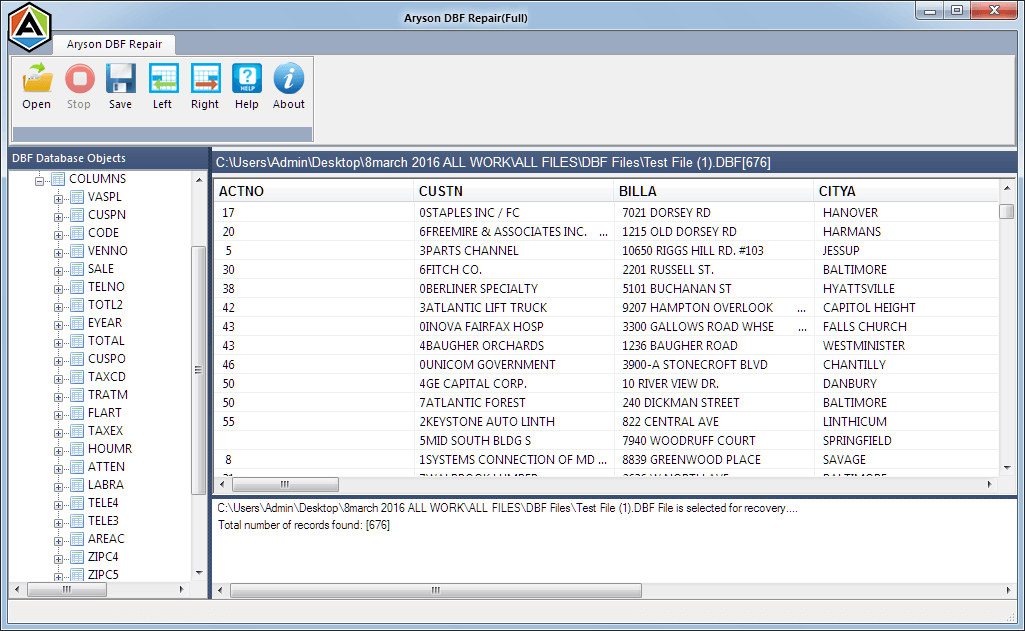
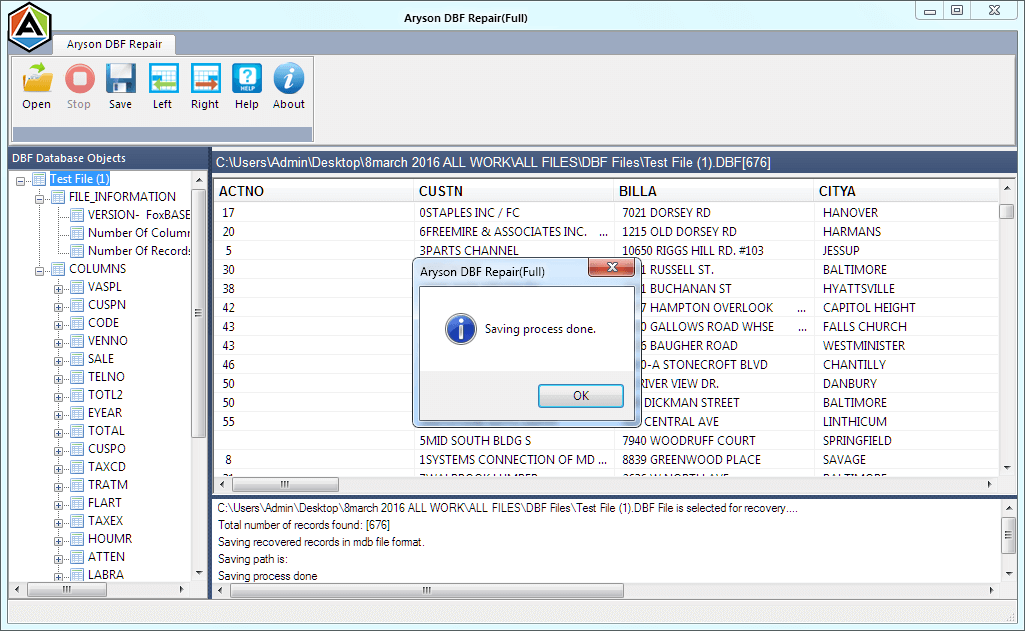
The advanced file preview option of DBF Database Recovery allows you to check what you can recover from the corrupt DBF file. All the recovered data are shown in the tree-structure. You can expand the database objects in the tree-structure and check their preview in the preview pane.

Fix Alignment

Fix Alignment of Records

Corruption can cause incorrect alignment of records in DBF files. This DBF repair tool can successfully fix the alignment of records and entries in corrupt DBF files. Also, it can adjust the correct pattern of records and entries using the Left and Right buttons given in the taskbar.

Convert DBF to MDB

Convert DBF to MDB

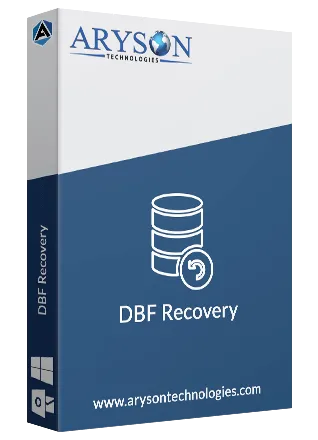
If someone wants to convert DBF files into MDB format, this DBF Recovery software also works as a DBF to MDB converter tool. It provides you with an option to save all the recovered data of DBF to MDB format. But the original DBF file remains intact or unchanged.

Easy to use

Easy-to-Use Application

It's an easy-to-use application that requires no prior technical knowledge. The software contains an interactive and user-friendly interface so that any tech-savvy or novice user can use it with ease. So, you don't need to have any technical knowledge to run this tool.

Window Compatibility

Windows Compatibility

The DBF File Repair software is highly compatible with all Windows-based operating systems. It smoothly runs under Windows 95, 98, 2000, 2003, 2008, ME, NT, XP, Vista, Windows 7 & 8, and the latest Windows 10. So, without any compatibility issues, you can run this software.

How to Use Aryson DBF Recovery Software: Complete Guide

How to Use the Aryson DBF Recovery

Aryson DBF Recovery Tool is the most appropriate utility to repair DBF files and restore all the DBF file objects, such as indices, tables, triggers, and unique keys. It can repair the FoxPro database and other DBF files created by various database programs, including dBase, MultiBase, dBXL, Clipper, CodeBase, Arago, etc. It can easily repair DBF files and restore DBF file objects like indices, tables, triggers, and unique keys.

  • Step 01: Download & Run Aryson DBF Recovery Tool on your system.

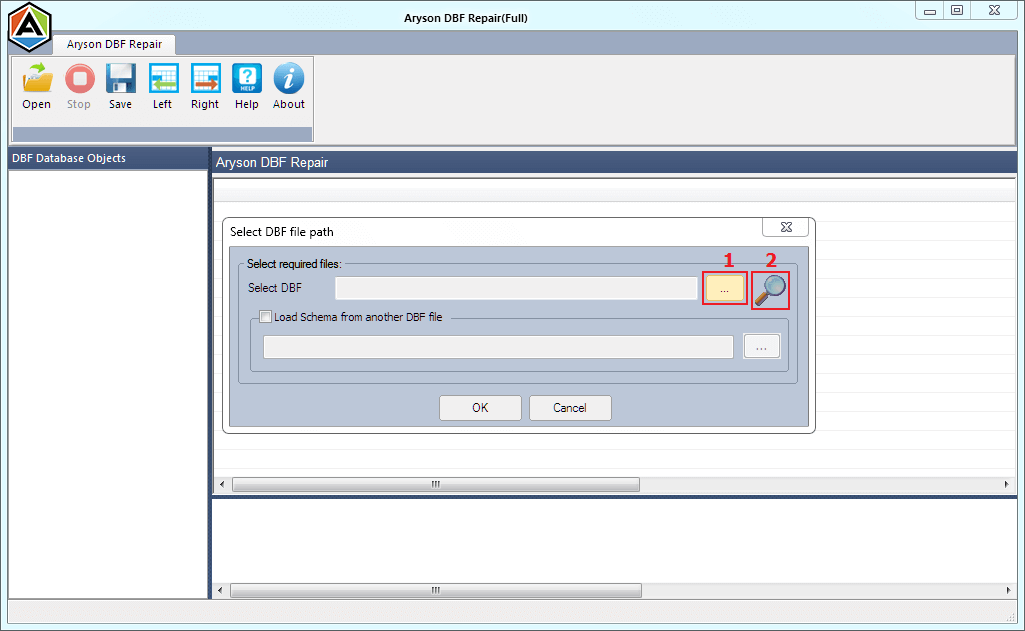
  • Step 02: Click on the Open button to add the damaged DBF file.

  • Step 03: Check the load schema from another DBF file if you want it.

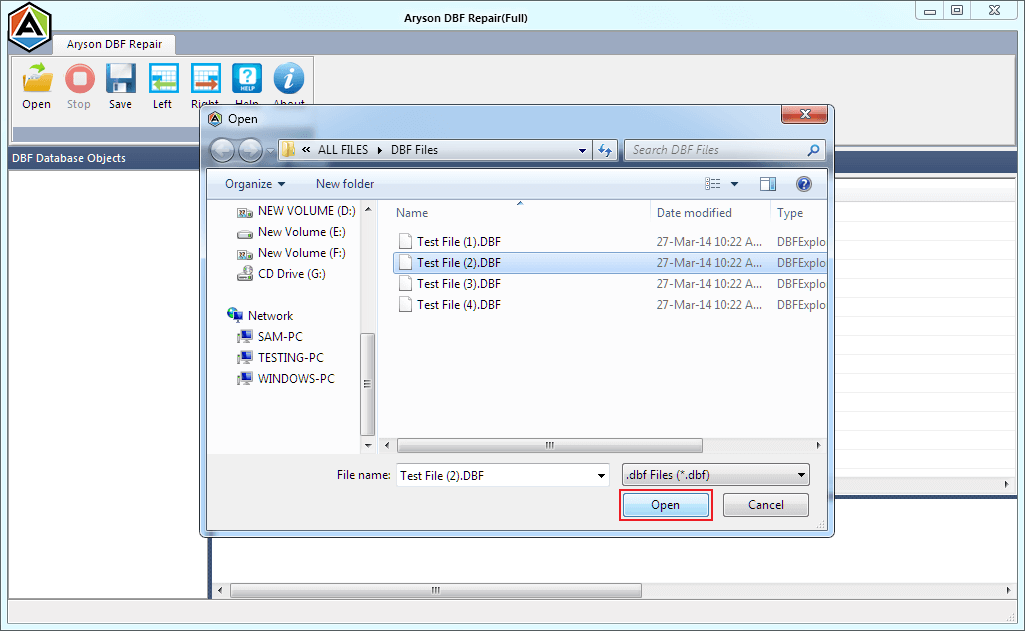
  • Step 04: Browse the path and select the DBF file to load the schema>>Open.

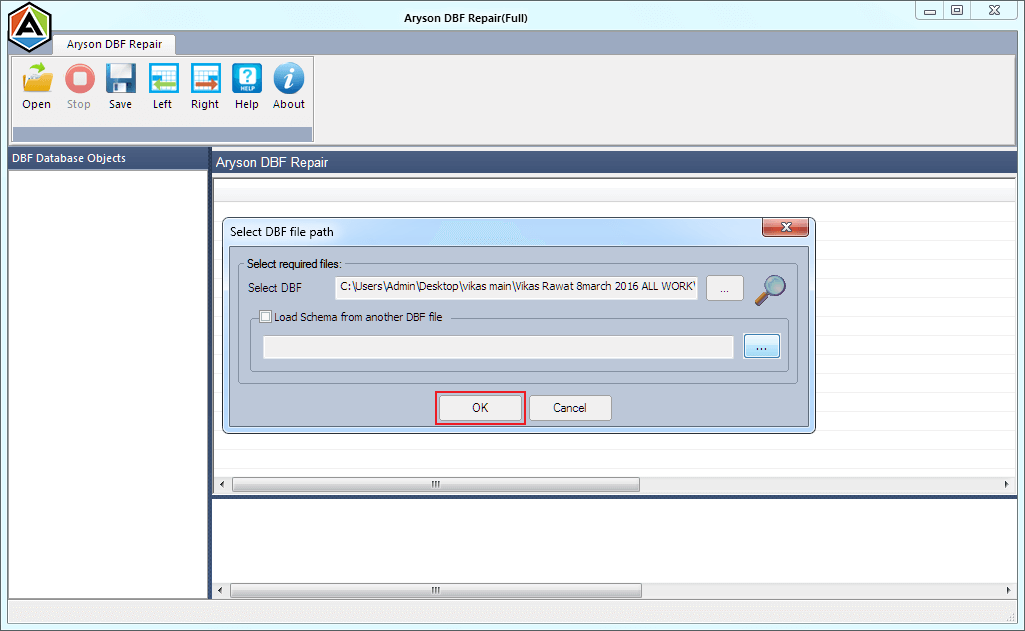
  • Step 05: Press the OK button to start the scanning process.

  • Step 06: Check the file preview in the upcoming preview panel.

  • Step 07: Choose the database objects you want to save, and tap the Save button.

How Aryson DBF Recovery Fixes Common Error Messages in DBF Files

When DBF files get corrupted, users may see errors like “Couldn’t find database” or “Access to table disabled.” Aryson DBF Recovery fixes these issues and restores full database access:

Error Message Possible Cause
Couldn’t find database "XL\database.dbf." The file path is incorrect, orthe file is missing
Database file appears corrupt: Page xyz is of the wrong type Internal corruption of DBF pages
Access to table disabled due to previous error Partial corruption in the table
Error message: "Corrupt table"/"index header." The DBF file header or index is damaged
The fields in the table did not match the entries in the database Data mismatch or table structure corruption

Aryson DBF Recovery Software: System Specifications

Software Download

Size: 2.8MBVersion: 17.0

Trial Limitations

Aryson DBF Recovery demo version allows you to open the corrupted Microsoft FoxPro/Clipper/dBase database and show all data inside the database table. If you want to save these files, then proceed with the licensed version of the software.

Requirements & Supported Versions

Processor: Intel® Core™ 2 Duo CPU E4600 @ 2.40GHz 2.39GHz

Hard Disk Space: 500 MB of free hard disk space required

RAM: 4 GB of RAM (4 GB is recommended)

Supported Platforms

Windows: 95/98/ME/NT/2000/XP/Vista/7/8/8.1/10

Windows Server: 2003/2008/2012/2016/2019.

Software Prerequisites

  • If you are operating Windows OS 11, 10, 8, or 7 (32-bit or 64-bit) then you must launch the tool as an Administrator.
  • Turn off the Windows Firewall for proper installation.
  • Disable the Antivirus programs.

FAQ

Request For Software Customization

If you need to customize Aryson Software or need some additional specific features, then provide the software customization Request Quote.

Comparison of the Best DBF Recovery Tool: Free & Premium Version

Get an overview of the Free and Premium versions of the DBF Database Recovery Tool

Product Features Free Version Full Version
Repair Corrupt DBF Files
Recover Tables, Records, Fields, Indexes
Preview Recoverable Data
Repair DBF Files from FoxPro, dBase, Clipper, CodeBase, Arago
Recover Memo/Binary Fields (DBT/FPT)
Save Recovered Data to MDB Format
Restore DBF File Objects (Triggers, Indices, etc.)
Advanced Recovery for Severely Corrupted Files
Schema Loading Support
Compatible with All Windows Versions
24/7 Technical Support
Price Free $59
Money Back Policy

Frequently Asked Questions:

Ans. The DBF File Recovery Tool supports all DBF file formats used by dBase, FoxPro, Visual FoxPro, and other DBF-based applications.

Ans. Yes, Aryson DBF Recovery can restore deleted records and recover data even from heavily corrupted DBF files.

Ans. No, Aryson DBF Recovery works independently and does not require any database software like FoxPro or dBase to be installed on your system.

Ans. No, the DBF Recovery Software ensures 100% data integrity while repairing and recovering DBF files, so your tables, records, and indexes remain intact.

Ans. Yes, Aryson DBF Recovery supports multilingual DBF files, including ANSI, Unicode, and special character sets.

Ans. The DBF Recovery is compatible with all recent Windows versions, including Windows 11, 10, 8.1, 8, and 7.

Ans. Yes, Aryson DBF File Recovery Tool offers a free demo version so you can scan and preview recoverable DBF files before purchasing the full version.

Ans. The software uses advanced scanning algorithms, making the recovery process fast and efficient, even for large DBF files.

Ans. Yes, the DBF Data Recovery Tool allows you to save recovered files to any desired location on your system without overwriting the original files.

Ans. In case of extreme header corruption, the software fails to read the header part of the corrupt DBF file. In such a situation, the "Load Schema" feature helps you load the schema from another database. But make sure the database you're uploading the schema to contains the same header structure and column types as the corrupt database.

Trusted by IT Professionals & Enterprises Worldwide

See what our IT professionals say about their experience with the Aryson DBF Recovery.

review-rating