-

Written By Rohan Wiese
-
Updated on July 8th, 2025
How to Recover Corrupted VHD File on Windows 10/11 Easily
Summary: Data is essential to survive in this digital age. There is always a chance of data corruption, and VHD files are no exception. This results in data becoming inaccessible and lost. To avoid these situations in the future and recover the corruption, users want to fix corrupted VHD files. In this blog, we explain what a VHD file is and the common causes of its corruption. Additionally, we will discuss effective methods for manually restoring a corrupt VHD file and using VHD Recovery Software.
Why Do VHD Files Get Corrupt and Inaccessible?
The VHD file may be corrupt or inaccessible due to various reasons, including software or hardware failures. In addition to this, we also mention some of the other reasons:
- If you are working with a VHD file while mounting and the system unexpectedly shuts down, it can result in file corruption.
- Malware or cyberattacks alter and modify the data of the VHD file, causing it to fail.
- Corruption in the file configuration of the system and the VHD file sector is causing inaccessibility.
- Additionally, the corruption was triggered by modifications and deletions to metadata.
VHD Corruption Symptoms: Early Warning Signs
When a virtual hard disk (VHD) file becomes corrupt or is about to become corrupt, it typically displays warning signs. Identifying these symptoms and signs can help take necessary, timely action. Ignoring these signs can result in significant data loss. Read this section to learn some common indicators of VHD file corruption.
- Windows shows a mounting error and fails to mount or attach the VHD file.
- Unexpected data additions or losses were detected in the VHD file.
- You are experiencing the loss or inaccessibility of relevant data.
- The VHD file crashed or became inaccessible frequently when used in a VM.
How to Recover Data From Corrupt VHD?
There are several methods for restoring data from a corrupted VHD file. In the following action, we discussed and delivered all the relevant methods, including the manual techniques and professional VHD Recovery Software. All the discussed methods help you to restore access to your virtual disk efficiently.
Manual Method to Fix Corrupted VHD File
Several manual methods are available to recover the corrupted VHD file. Some of them are mentioned below:
Using Disk Management to Recover Corrupt VHD Files in Windows 10
You can solve the corrupted virtual hard disk by using Windows Disk Management. Windows Disk Management is a method for resolving minor corruption in the VHD file using the CHKDSK VHD repair tool.
- Press the Windows button to open the search toggle.
- Next, open Device Manager by searching for it and clicking the result.
- Navigate to the menu bar and select the Action > Add Drivers.
- A pop-up appears that says, “Browse for the drivers on your computer.”
- Here, click the Browse button and select the .vhd or .vhdx file, then click OK.
- If the VHD is only slightly corrupted, it will mount as a new drive
- Next, press the Windows key and type Command Prompt.
- Then, right-click on it and select Run as administrator to open it with elevated privileges.
- Search/run the command:
- After entering the command, press Enter to initiate the system scan and automatically recover any detected errors.

Fix Corrupted VHD File using PowerShell
There is also a manual method that uses PowerShell to restore the corrupted VHD file. This method is technically advanced and requires familiarity with command-line operations and PowerShell terminology.
To Restore VHD using PowerShell, follow these steps carefully:
- Press the Windows key and search for Windows PowerShell. Run it as an administrator.
- Here, run the command “Mount-VHD” cmdlet to mount the corrupted Windows 10 VHD file.
- After that, run another command to view mounted VHDs:
- After executing all the above commands, launch Command Prompt with administrative privileges.
- Now, run the following command:
- After successful repair, dismount the VHD device. Run the command:




Instantly Fix Corrupted VHD File: Recover and Restore Data
You can restore your corrupted VHD file by applying a suitable manual recover method. However, the manual techniques are complicated and not ideal for all users. To remove this dilemma, we demonstrate the professional VHD Recovery Software.
The tool is the best VHD Recovery software, offering a clean user interface that is helpful for all kinds of users. It supports all types of VHD files, whether dynamic or static and works with all file system formats. Try this software to restore severely corrupted or structurally damaged VHD files.
Steps to Restore Corrupted VHD File on Windows 11:
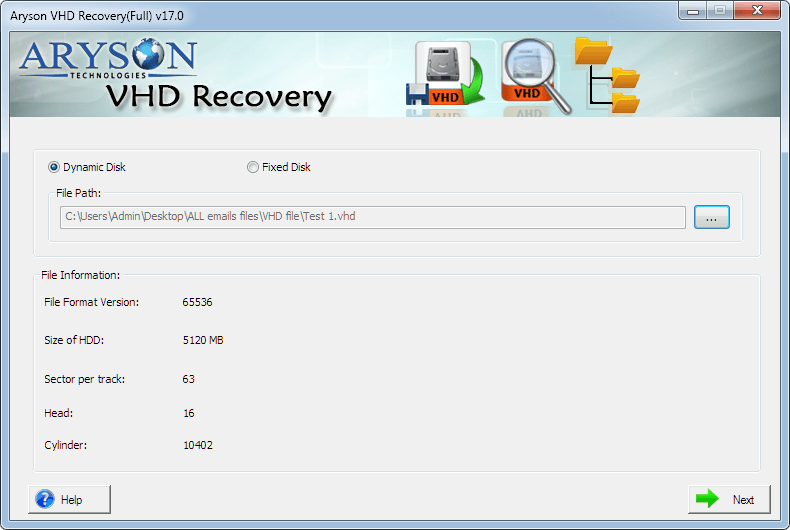
- Download and install the VHD Recovery Software on your machine.
- Next, select the type of VHD file: static or dynamic.
- Now, fetch the relevant information of the selected disk.
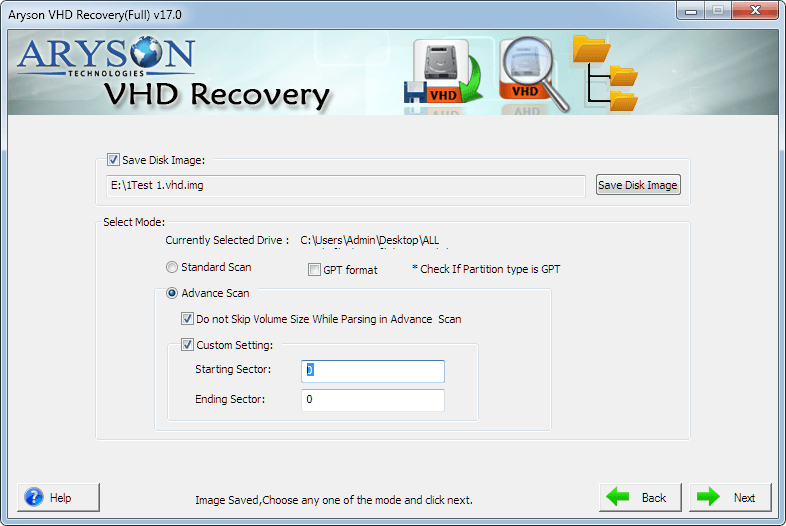
- In the next step, select the scanning mode based on the level of corruption.
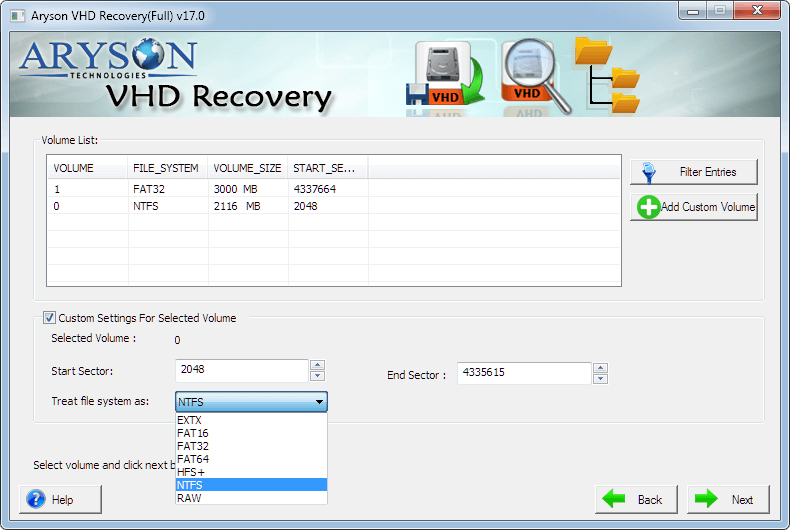
- Select the volume and specific data you wish to recover or repair.
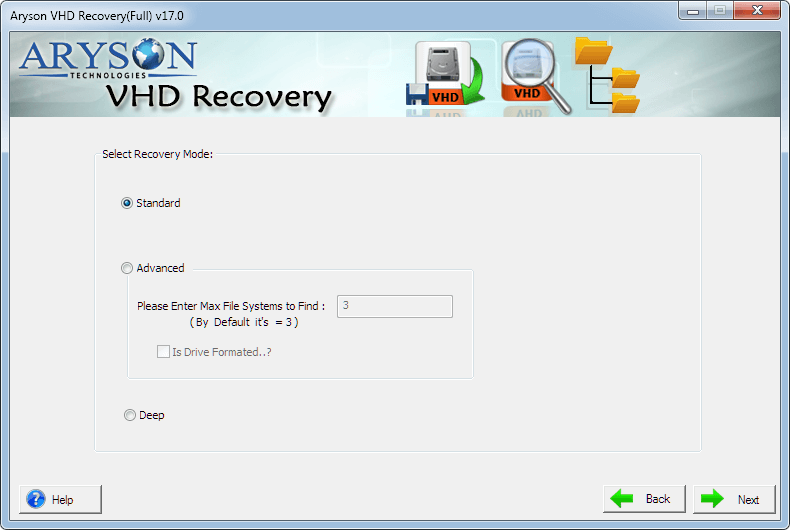
- After that, choose the recovery mode as needed. Click OK.
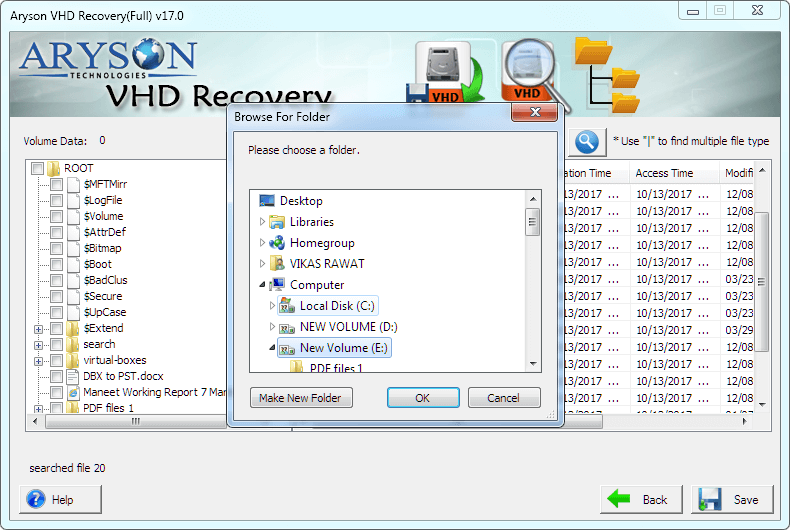
- In the end, browse and select the saving location to save the repair data.

Free Demo Tool: To test if the software can fix corrupt VHD files, run the free software available on our website.
Conclusion
In summary, after following all these methods, you can know how to fix a corrupted VHD file and easily restore it. However, if you encounter any difficulties with the manual techniques, consider using professional software as an alternative. The VHD Recovery Tool is easy to use and comes with the latest algorithm that recovers all kinds of VHD files. In the end, I hope that by following all the steps and reading this entire blog, you have recovered your VHD file with ease.
Frequently Asked Questions (FAQs):-
Q: How can I identify if my VHD file is corrupted?
Ans: Several symptoms and indicators are commonly associated with VHD file corruption.
✅ The VHD file shows a size of zero bits.
✅ Data inside the VHD file is inaccessible.
✅ The VHD file fails to mount in Disk Management.
Identify and eliminate them as early as possible to minimize the risk of data loss.
Q: What is the easiest way to repair a corrupted VHD file in Windows 10/11?
Ans: The most straightforward way to repair VHD files in Windows 10/11 is by using professional VHD Recovery Software. The tool easily recovers your entire corrupted data without altering the metadata. Use it and eliminate all possibilities of data loss.
About The Author:

Rohan Wiese is a Technical Writer at Aryson Technologies. He is an expert Email Forensic, Cloud Computing, and a passionate nerd with over 10 years of experience in technical content writing. He writes about Cloud Migration, Database Recovery, Email Backup, Windows, Mac, and Tech.
Related Post



