-

Written By Rohan Wiese
-
Updated on December 23rd, 2025
How to Delete a File in Office 365 OneDrive: Simple Step-by-Step Guide
Microsoft OneDrive for Business, included with Microsoft 365, enables organizations to store, manage, and share files securely across teams. However, as data grows, storage management becomes a critical administrative task. Unused or outdated files can consume valuable storage and complicate governance policies. In such scenarios, users need to delete file in Office 365 OneDrive. Hence, administrators often rely on Aryson OneDrive Migration Tool to manage OneDrive data efficiently.
Questions Asked by Users on Microsoft Community: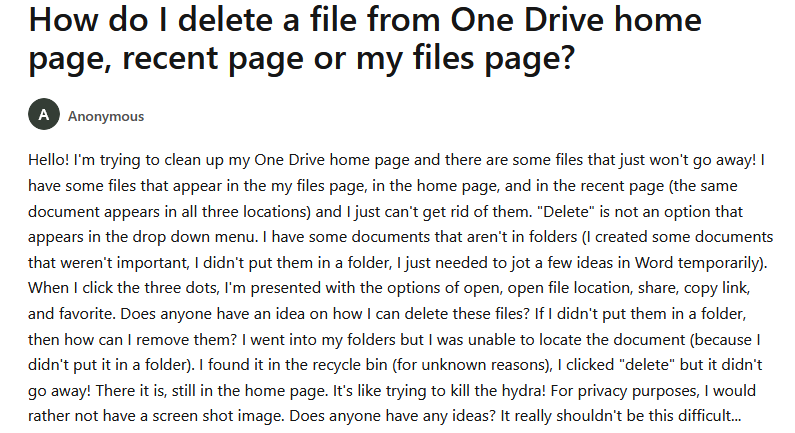
Therefore, understanding how to delete a file in Office 365 OneDrive is essential for business users and administrators. This guide explains standard user-level deletion, administrator-controlled deletion, and permanent removal, using Microsoft-recommended workflows and terminology.
Why Business Users and Admins Need to Delete Files in OneDrive
In enterprise environments, file deletion is not only about storage cleanup. It also supports compliance and governance.
- First, removing obsolete files helps optimize OneDrive storage quotas.
- Second, it supports data lifecycle management and retention strategies.
- Third, it reduces the risk of retaining outdated or sensitive information.
- Finally, it improves collaboration by keeping shared libraries clean.
Because of these reasons, file deletion should be part of routine Microsoft 365 administration.
Points to Consider Before You Delete File From OneDrive
Administrators and users should understand the Microsoft OneDrive file deletion process:
- Deleted files are moved to the First-stage Recycle Bin.
- Files remain recoverable for up to 93 days in OneDrive for Business (depending on tenant policies).
- After permanent deletion, files cannot be restored unless covered by retention or backup policies.
- Retention policies configured in Microsoft Purview may override deletion actions.
Therefore, always review organizational policies before removing business-critical data.
How to Delete File in Office 365 OneDrive for Business (Microsoft 365 Web Portal)
This method applies to both standard users and business users.
- First, sign in to the Microsoft 365 Admin Center or user portal.
- Next, open OneDrive from the app launcher.
- Then, navigate to My files or the relevant shared location.
- Select the file you want to remove.
- Click Delete from the command bar.
- Confirm the deletion.
As a result, the file moves to the OneDrive Recycle Bin.
How to Delete files in OneDrive or Folders in OneDrive for Business
Bulk deletion is common in enterprise environments.
Steps for Bulk File Deletion
- First, open OneDrive for Business in your browser.
- Select multiple files or folders using the selection checkboxes.
- Click Delete from the top command bar.
- Confirm the action.
This method significantly reduces administrative effort during cleanup tasks.
How to Delete Files from Synced OneDrive Client (Windows & macOS)
Many organizations deploy the OneDrive Sync Client for local access.
- Open the OneDrive synced folder on your system.
- Locate the file or folder.
- Right-click and select Delete.
- Ensure the OneDrive client shows a successful sync status.
Once synced, the deletion reflects across all devices and the cloud.
OneDrive File Management and Deletion at Enterprise Scale
Bulk deletion is required for compliance-driven cleanup. However, Microsoft OneDrive for Business allows manual file deletion. But this approach is suitable only for small, user-level tasks. However, in enterprise environments, administrators often deal with large volumes of data, multiple user accounts, and tenant-level storage constraints. In such cases, an automated OneDrive management solution becomes essential.
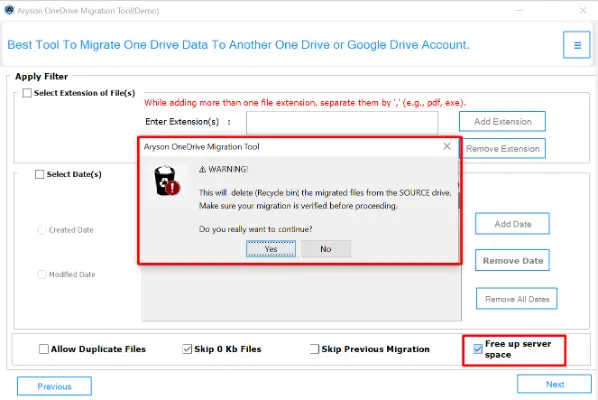
The Aryson OneDrive Migration Tool works as a reliable automated solution that not only migrates OneDrive data but also helps administrators delete unnecessary files and free up server space in a hassle-free manner. All you need to enable the “Free Up Server Space” option. When this option is enabled, it automatically removes source OneDrive data only after successful migration confirmation. As an outcome, duplicate data does not remain on the source tenant. This automated solution works well in situations like Microsoft 365 tenant-to-tenant OneDrive migration, employee offboarding, and account closure. It also helps clean old or inactive OneDrive accounts and reduce storage usage.
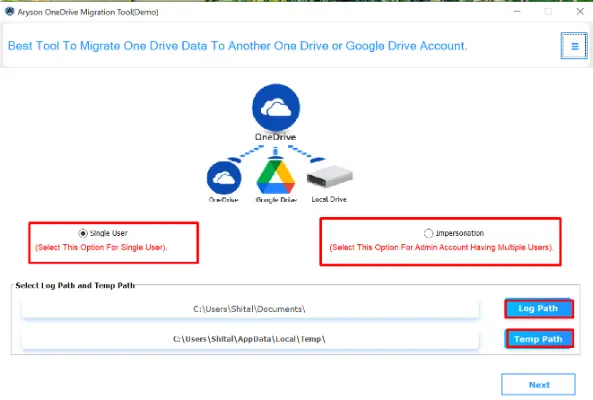
Simple Steps to Remove Files from OneDrive Office 365
- Install and open the Aryson OneDrive Migration Tool on your system.
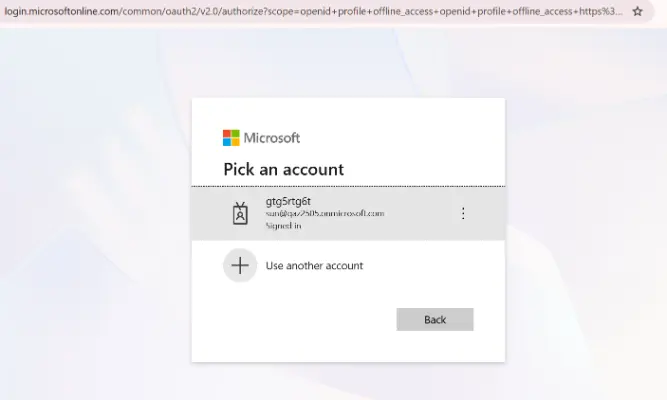
- After installing, select the Account Type: OneDrive Business A/C or Personal A/C.
- Enter the credentials of the source OneDrive account [User Name & Password]
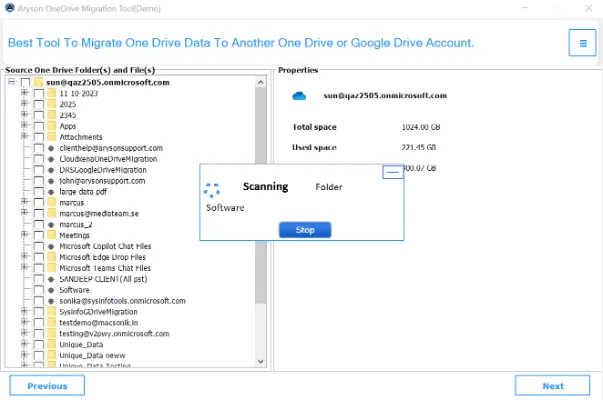
- Now, you can select the files or folders you want to migrate or remove>>Next.
- To deleting the source files and free storage, enable the Free Up Server Space option.
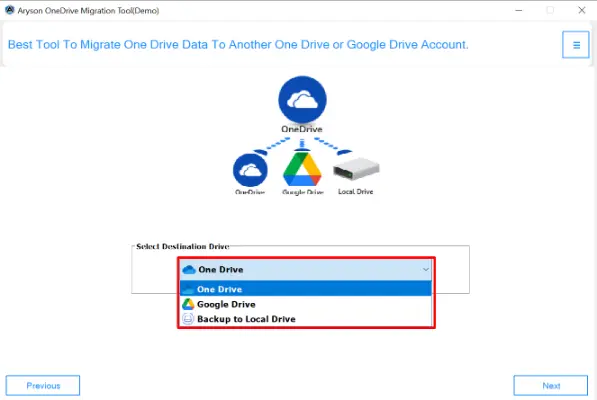
- Select the target destination where the files should be moved.
- At last, click on the OK button to delete File in Office 365 OneDrive.

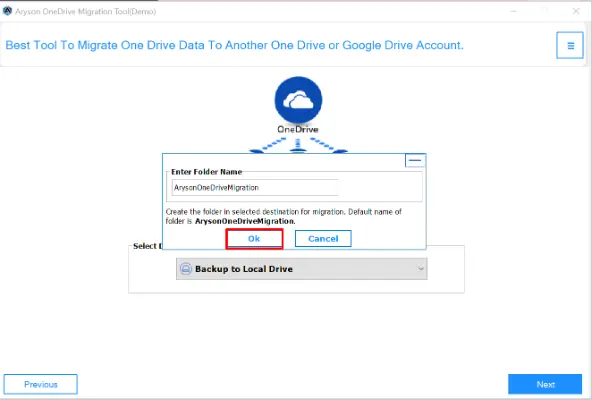
Why This Automated Approach Is More Reliable Than Manual Deletion
From an administrative standpoint, automation reduces risk and improves efficiency.
- First, files are deleted only after migration validation.
- Second, administrators avoid accidental data loss.
- Third, the process remains consistent across all users.
- Finally, storage optimization happens without violating retention policies.
In all these scenarios, automated cleanup offers a more scalable and reliable approach compared to manual file deletion. Therefore, this software complements Microsoft 365 governance instead of bypassing it.
Administrator-Controlled File Deletion via Microsoft 365 Admin Center
Administrators may need to delete file in Office 365 OneDrive for departed users or inactive accounts.
Admin-Level Deletion Process
- Sign in to the Microsoft 365 Admin Center.
- Navigate to Users >> Active users.
- After that, select the user account.
- Open OneDrive settings for the user.
- Access the user’s file storage and delete the required data.
This process plays an important role during employee offboarding and account cleanup.
How File Deletion Works with Shared Files and Permissions
In OneDrive for Business, deletion behavior depends on ownership.
- If the user is the file owner, deletion removes access for all collaborators.
- If the user is not the owner, deletion only removes the shortcut or access.
- Files stored in SharePoint document libraries follow site-level permissions.
Therefore, administrators should verify ownership before deletion.
Common Issues Faced by Business Users While Deleting Files
Enterprise users may face a few common problems when they delete file in Office 365 OneDrive:
- Sometimes, users do not have permission to delete certain files.
- At times, files are open or in use, which blocks deletion.
- In some cases, company retention rules stop files from being removed.
- Sync issues can also cause deletion delays across devices.
When it happens, administrators should review user permissions, sharing settings, and retention policies to fix the issue.
Conclusion
Effective file deletion in Office 365 OneDrive is essential for storage optimization, security, and compliance in business environments. Manual deletion is still useful for day-to-day file management. However, during migrations and large-scale cleanup, relying only on manual methods is not practical. The Aryson OneDrive Migration Tool fills this gap by offering controlled deletion through automation and delete File in Office 365 OneDrive.
Frequently Asked Questions:
Q1. Can I delete a file from OneDrive on all devices at once?
Ans: Yes. Aryson OneDrive Migration Tool allows administrators to handle multiple user accounts in a single process. As an outcome, it is ideal for enterprise-level cleanup and migration tasks.
Q2. Can I recover a file after permanent deletion?
Ans: No. Once a file is permanently deleted and removed from the Recycle Bin, it cannot be recovered unless your organization has a backup solution.
Q3. Is there a faster way to delete multiple files in OneDrive?
Ans: Yes. You can select multiple files or folders and click Delete to remove them at once. For enterprise users, automated tools like Aryson OneDrive Migration Tool can manage large-scale deletions safely.
Q4. Does deleting a shared file remove it for other users?
Ans: If you are the owner, deleting a file removes it for all collaborators. If you are not the owner, it only removes your access.
About The Author:

Rohan Wiese is a Technical Writer at Aryson Technologies. He is an expert Email Forensic, Cloud Computing, and a passionate nerd with over 10 years of experience in technical content writing. He writes about Cloud Migration, Database Recovery, Email Backup, Windows, Mac, and Tech.
Related Post