-

Written By Rohan Wiese
-
Updated on February 17th, 2026
How to Import MSG Files into Gmail with Attachments (Step-by-Step Guide)
MSG files are like digital snapshots of your Outlook emails, complete with attachments and important details. But when it comes to keep them on your computer, then you have to think which mail client will be appropriate. In that term, Gmail is on everyone’s mind. Many users keep important emails as MSG files but need them in Gmail for easy access across devices. In this blog, we will show you the top two solutions, including Aryson MSG Converter, to import MSG files into Gmail. User with both small and large email collections can migrate their messages safely.
Understanding the Basic Need to Transfer MSG emails to Gmail
Many people use Microsoft Outlook to store important emails in MSG files. In some situations, users find it difficult to access these emails through Outlook. Then, they navigate to Gmail to open the MSG file with ease.
- In basic terms, MSG files keep emails and attachments safely in Outlook.
- Outlook is desktop-based, and Gmail is easily accessible on other devices.
- Gmail is cloud-based, so users can access it from anywhere at any time.
- Transferring MSG emails ensures all emails and attachments stay safe.
- When you import MSG files to Gmail, you can easily organize your MSG data.
Now, the main point is the transfer of MSG data to Gmail helps you manage your emails more easily and stay connected across devices.
Top Two Methods to Import MSG Files to Gmail
There are two main ways to add MSG files to Gmail. According to the file size and technical expertise, you can pick from the mentioned methods. Just navigate and go through the given process individually:
Method 01: Use MS Outlook to Import MSG to Gmail Manually
Users with the installed Outlook application can accomplish the manual method to import MSG files to Gmail.
- Microsoft Outlook is installed on your computer.
- Gmail account added in Outlook using IMAP.
- MSG files should be saved on your computer.
Step 1: Configure Your Gmail Account in Outlook
- Open Outlook and go to File and click Add Account.
- Enter your Gmail email address and click Connect.
- Choose IMAP as the account type and enter your password.
- Now, Outlook will access your Gmail account successfully.
- Once connected, your Gmail folders appear in Outlook.
Step 2: Import MSG Files into Gmail Account
- Open the folder where your MSG files are stored.
- Now, select the files you want to import into Gmail.
- Open the Gmail folder in Outlook where emails should go.
- After that, select the MSG files from your computer folder.
- Drag and drop the MSG files directly into Outlook’s folder.
- Wait, the Outlook syncs emails with your Gmail account.
- Do not close Outlook until all files finish syncing.
Additional pointer: If you want to import your MSG file into Google Workspace, then you can use the MSG to Google Workspace Converter to simplify the import process.
Cons Pointers Associated with the Manual Method
When using the manual method to import MSG files into Gmail, there are several limitations to keep in mind:
- However, the process can be very time-consuming for multiple MSG files.
- Moreover, it requires Microsoft Outlook to be installed and configured.
- Also, drag-and-drop or sync errors may lead to missing emails.
- In addition, handling bulk MSG files manually is inefficient.
- Even a slow or unstable internet connection can interrupt syncing.
Due to these limitations, the manual method is better suited for a small number of emails. In terms of the bulk of MSG data, you can navigate to the next automated solution.
Method 02: Use Aryson MSG Converter to Import MSG Files to Gmail
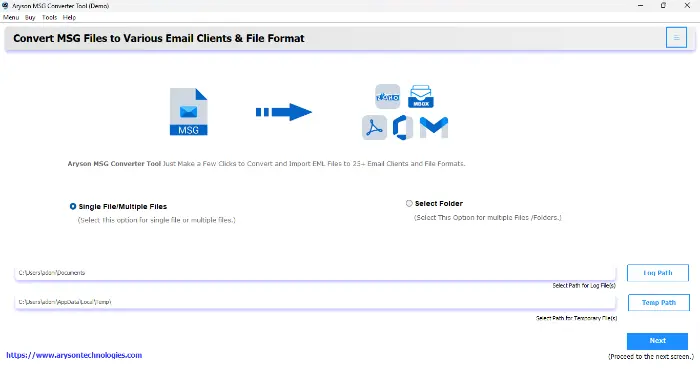
The Aryson MSG Converter is a simple and easy-to-use solution to import the MSG file into your Gmail account. Users can insert a bulk of MSG files at once and get all those files in Gmail with ease. This utility can perform multiple tasks. So, you can convert the MSG file into PST and other formats according to your preference. In addition, it can directly migrate MSG files to Gmail with all your attachments and actual formatting. Along with a user-friendly interface, this utility is quite compatible with all versions of Windows and the Outlook application.
Simplified Steps to Import MSG files to Gmail
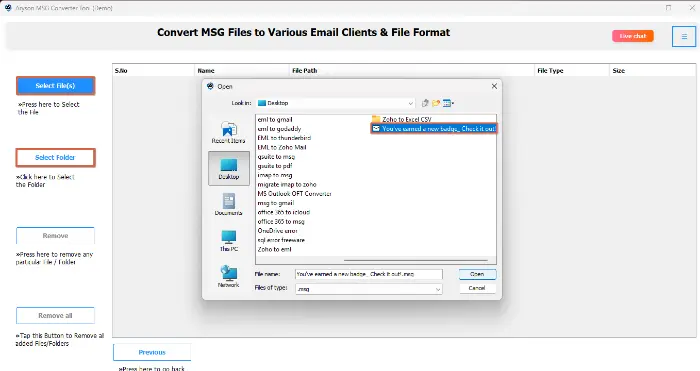
- Simply download the Aryson MSG Converter Tool on your screen.
- From your system, choose the desired MSG file and click Open.
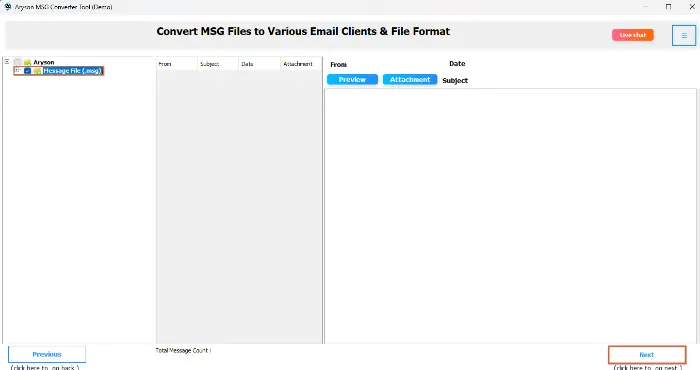
- Preview and cross-verify all your selected MSG data and click Next.
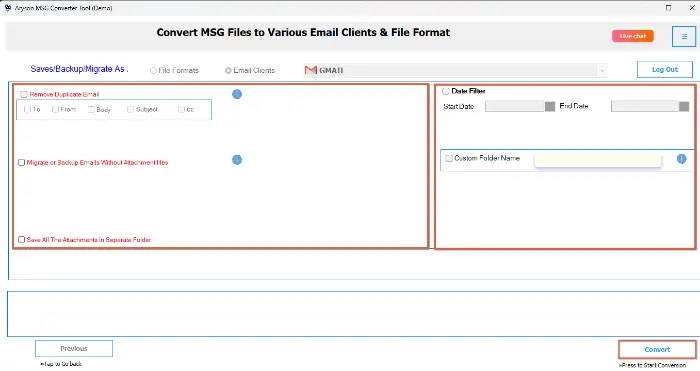
- Choose Gmail and log in with the correct credentials of that account.
- Use the built-in feature of the software and click the Convert button.

Conclusion
In this blog, we explained easy ways to import MSG files into Gmail with attachments. We discussed the manual method using Outlook along with the automated one. Although which method you choose to proceed completely depends on the amount of data you have. The basic concern is data accuracy, which was fulfilled with the help of the automated solution. You can even try the demo version of the software and import MSG into Gmail without any cost.
Frequently Asked Questions:
Q1. Can I import multiple MSG files into Gmail at once?
Ans: Manually, you must import one MSG file at a time. However, Aryson MSG Converter lets you import multiple MSG files in bulk.
Q2. Is Outlook required to import MSG files into Gmail manually?
Ans: Yes, the manual method requires Outlook since MSG files are designed to open in Microsoft Outlook.
Q3. Which is the best solution to import MSG files with attachments into Gmail?
Ans: The best solution is using an automated tool like Aryson MSG Converter, as it ensures data safety, speed, and accuracy.
About The Author:

Rohan Wiese is a Technical Writer at Aryson Technologies. He is an expert Email Forensic, Cloud Computing, and a passionate nerd with over 10 years of experience in technical content writing. He writes about Cloud Migration, Database Recovery, Email Backup, Windows, Mac, and Tech.
Related Post