-

Written By Rohan Wiese
-
Updated on July 21st, 2025
Quickly Migrate Outlook Emails to Office 365 Using Easy Solutions
Summary:- Many users are shifting from desktop-based Outlook to cloud-powered Office 365 for improved access, security, and collaboration. Outlook saves emails locally in PST files, whereas Office 365 offers cloud storage and smooth integration with Microsoft apps like Teams, OneDrive, and SharePoint. The switch can be for business needs or personal use. In this complete blog, we’ll explain the most effective ways to migrate Outlook emails to Office 365. You’ll learn both manual and automated methods, including how the Aryson Import PST to Office 365 Tool simplifies the process for users with large or multiple PST files.
Overview of Outlook & Office 365
MS Outlook: Outlook is a desktop email client that stores your data locally in PST or OST files. It works well but is limited to the device it’s installed on.
Office 365: Office 365, now known as Microsoft 365, is a cloud-based service that includes Outlook and other tools like Teams and OneDrive. It lets you access your emails and files from any device, anytime.
Although Outlook is primarily focused on offline use, Office 365 offers more flexibility, enhanced security, and easier collaboration.
Significant Advantages of Outlook to Office 365 Migration
Moving your emails from Outlook to Office 365 is not just a simple upgrade. It’s a better way to handle your emails and work with others in today’s online world. Here are some significant benefits you’ll get when you migrate Outlook emails to Office 365:
- With Microsoft 365, you can access your emails anytime and from any device.
- Moreover, there’s no need to worry about storage limits or PST file corruption.
- In addition, you get real-time collaboration with tools like Teams and OneDrive.
- Not only that, but your data stays protected with advanced cloud security features.
- Furthermore, you receive automatic updates without manual effort.
- Also, Office 365 scales easily to match your personal or business needs.
- Office 365 helps you stay organized and connected from anywhere in the world.
These advantages clearly show why Office 365 is a modern option for anyone still using traditional Outlook.
Top 3 Solutions to Migrate Outlook Emails to Office 365
There are several ways to move your Outlook emails to Office 365, but not all methods suit every user or situation. Below, we’ve listed the top 3 most reliable solutions that can help you migrate your data smoothly.
Method 01: Quickly Migrate Outlook Emails to Office 365 with an Advanced Tool
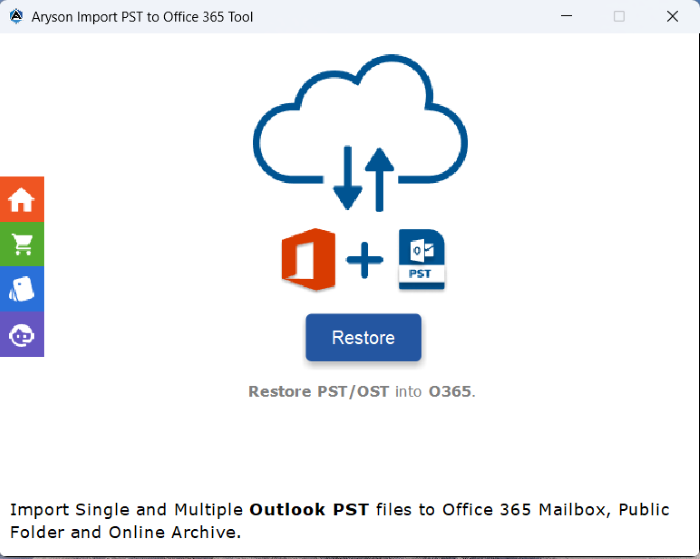
The Aryson Import PST to Office 365 Tool offers an efficient and user-friendly way to move Outlook emails into Office 365 without the need for Outlook installation. It’s built to handle both individual and bulk PST migrations while preserving the original folder structure, metadata, and attachments. With its simple interface and advanced filtering options, users can easily select specific folders or date ranges to migrate only the data they need. Whether for personal use or enterprise-level needs, it provides a reliable and time-saving solution.
Follow the Steps to Migrate Outlook PST Emails into Office 365:
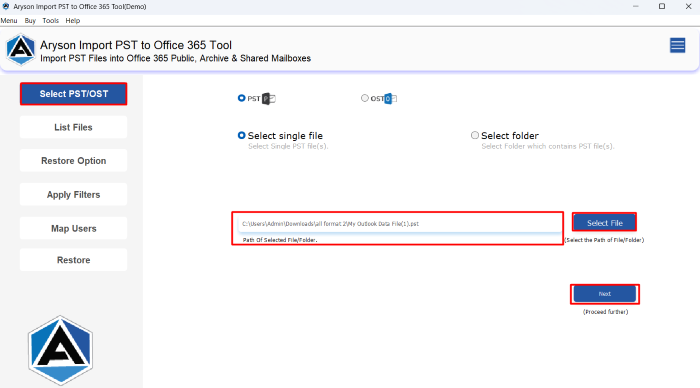
- Launch the Aryson Import PST to Office 365 Tool and open it on your PC.
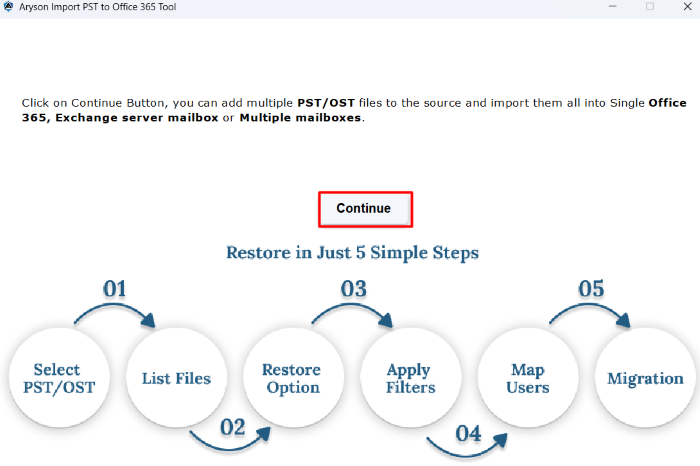
- After that, click on the Continue button to proceed with the migration process.
- Now, click on Select PST/OST and choose the Outlook emails to migrate>>Next.
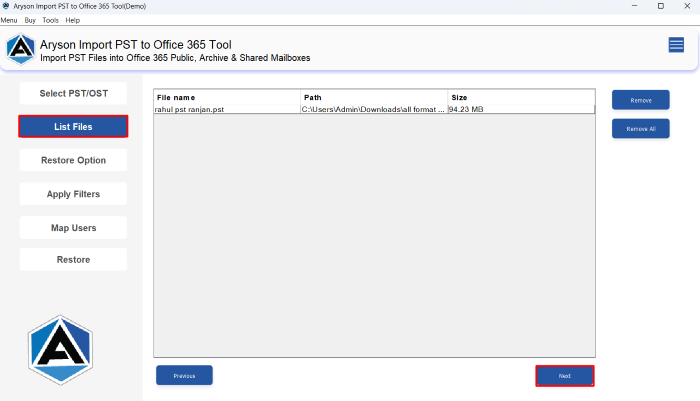
- In the next panel, it will show the list of selected Outlook emails and click Next.
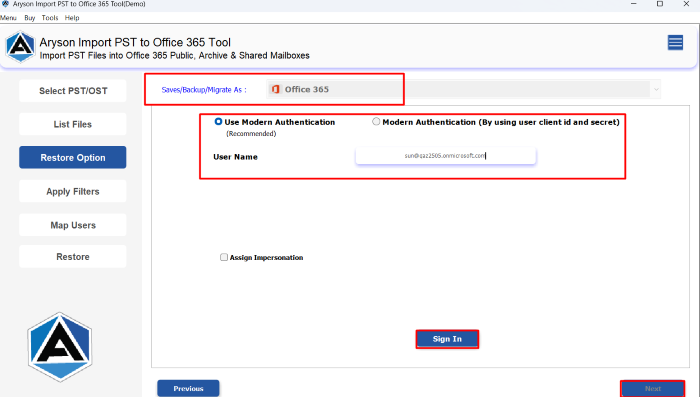
- After that, enter the Office 365 credentials to Sign In to your O365 account.
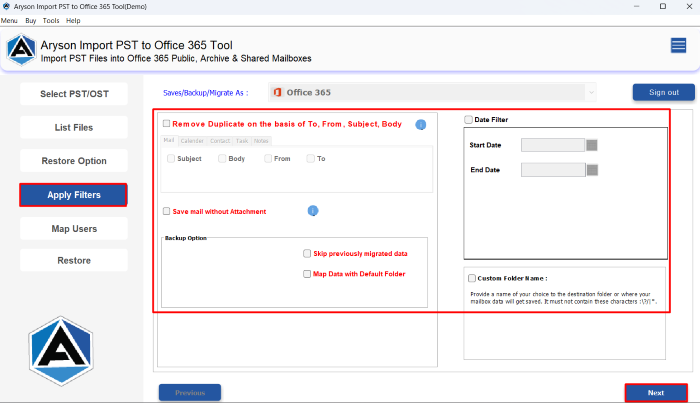
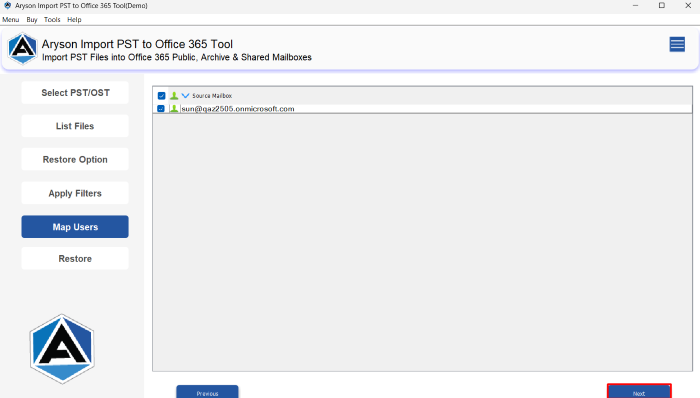
- Use the advanced filtering options to migrate specific data accordingly>>Hit Next.
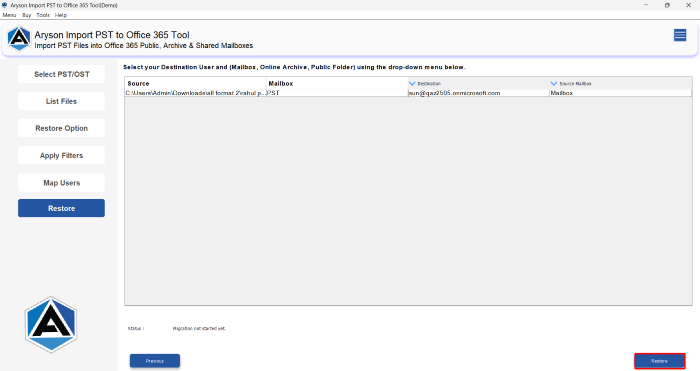
- Map each file to the respective Office 365 user account and begin the migration.
- Lastly, tap on the Restore button to complete the Outlook to Office 365 migration.
Method 02: Network Upload Method to Migrate Outlook emails to Office 365
Although this method is free for Office 365 users, it’s not ideal for beginners. It requires technical knowledge, especially when handling SAS URLs, CSV mapping files, and import job settings.
- To begin, sign in to the Microsoft 365 Compliance Center.
- From there, go to the Import section and copy the SAS URL provided.
- After getting the SAS URL, download and install the Azure AzCopy tool.
- After that, upload PST files to Microsoft’s Azure Storage location using AzCopy.
- Now, create a CSV file that maps each PST file to the correct Office 365 user mailbox.
- Return to the Microsoft 365 Compliance Center and create a new PST import job.
- Upload your mapping file and verify all the details before proceeding.
- You can choose to apply filters and start Outlook email migration to Office 365.
Method 03: Import Outlook PST into Office 365 Using MS Outlook
Another manual way to move Outlook emails to Office 365 is by using the Import feature in Microsoft Outlook. This method is helpful if your Office 365 account is already configured in your Outlook application.
Note: This method works only when your Office 365 mailbox is added and connected to the Outlook desktop app.
Also Read: Learn How to Export Office 365 Mailbox to PST File?
Steps to Migrate Emails to Office 365 Using MS Outlook:
- Make sure your Office 365 account is already added and connected.
- After that, click on the File option and then pick Open & Export.
- From the menu, choose the Import/Export option to continue.
- Click Next and choose Outlook Data File (.pst) from the list.
- Choose how to handle duplicate items and click Next again.
- You can also select a specific folder if you want organized import.
- Outlook will now import your PST data into the Office 365 account.
Drawbacks of Using the Manual Import Process
Manual migration methods are often used because they are free and built into Microsoft’s ecosystem. However, both the Network Upload and MS Outlook Import methods come with several limitations that can affect the migration experience.
- You need to understand tools like Azure AzCopy. It can be confusing for non-IT users.
- One wrong step in mapping or file handling can lead to data loss or PST file corruption.
- You must have Microsoft Outlook installed and configured with the Office 365 account.
- This method is slow and impractical for businesses handling multiple or large PST files.
- This method is slow and impractical for businesses handling multiple or large PST files.
Because of these challenges, manual methods are best for basic or small-scale migrations. For bulk, secure, or selective transfers, using a professional tool is better alternative.
Conclusion
In this guide, we explored the top methods to migrate Outlook Emails to Office 365, including manual options like the Network Upload method and the Import feature in MS Outlook. While these methods are free, they come with limitations such as complexity, time consumption, and the risk of data loss. For a more efficient and hassle-free experience, using a professional solution like the Aryson Import PST to Office 365 Tool is highly recommended.
Frequently Asked Questions:-
Q1. Can I migrate PST files to Office 365 without Outlook?
Ans: Yes, you can migrate PST files to Office 365 without installing Outlook by using the professional Aryson Import PST to Office 365 Tool. Follow the given steps:
✅ Launch the tool and click Continue to begin.
✅ Click Select PST/OST, choose files, and hit Next.
✅ Review the listed emails and click Next again.
✅ Sign in with your Office 365 credentials.
✅ Apply filters as needed and proceed by clicking Next.
✅ Map users to their mailboxes and start the migration.
✅ Finally, click Restore to complete the process.
Q2. How long does it take to migrate Outlook emails to Office 365?
Ans: The time depends on the size of the Outlook mailbox data and the method used. Manual imports can take hours, while automated tools complete the process much faster.
Q3. Can I migrate only selected emails or folders from Outlook to Office 365?
Ans: Yes, automated tools offer filters to migrate specific folders, date ranges, or email types, which is not possible with most manual methods.
About The Author:

Rohan Wiese is a Technical Writer at Aryson Technologies. He is an expert Email Forensic, Cloud Computing, and a passionate nerd with over 10 years of experience in technical content writing. He writes about Cloud Migration, Database Recovery, Email Backup, Windows, Mac, and Tech.
Related Post