-

Written By Rohan Wiese
-
Updated on July 3rd, 2025
How to Easily Import Maildir Files into Outlook: A Simple Guide
Summary:-If you’re trying to open Maildir emails in Microsoft Outlook, you may quickly realise that Outlook doesn’t support Maildir files by default. Maildir is commonly used on Linux-based servers, such as Dovecot, Postfix, and Qmail, and it stores each email as a separate file. Hence, it is incompatible with Outlook’s PST format. As a result, it creates a challenge for users who need to access or migrate those emails into the Windows-based Outlook environment.
In this blog, you’ll learn the most effective ways to import Maildir to Outlook. One of the key solutions we’ll explore is the Aryson Maildir Converter, a powerful tool that simplifies the process and ensures data integrity.
In this blog, you’ll learn the most effective ways to import Maildir to Outlook. One of the key solutions we’ll explore is the Aryson Maildir Converter, a powerful tool that simplifies the process and ensures data integrity.
Brief About the Maildir Files
Maildir is a standard email storage format used mostly on Unix and Linux-based servers. It saves each email message as a separate file inside three subfolders: “cur“, “new“, and “tmp“. This structure helps prevent file locking issues and supports faster email delivery. Maildir is a reliable option for server-side storage, but it isn’t directly supported by email clients like Microsoft Outlook, which use the PST format. Because of this, users often need to convert Maildir files before accessing them in Outlook.
Why You Should Import Maildir Files into Outlook
To begin, it’s essential to understand the need for this conversion and the most effective methods for performing it. Here are the key reasons to convert Maildir to PST format:
- Outlook works flawlessly on Windows and is widely used. Hence, email access and management are much easier than with Maildir.
- Moreover, Outlook lets you organise emails, contacts, calendars, and tasks all in a single user-friendly interface.
- In addition, it improves integration. You can seamlessly connect Outlook with Microsoft 365, Exchange Server, and cloud services for real-time syncing.
- Additionally, importing emails to Outlook helps you keep them safe for an extended period. PST files are easy to back up and work well with Outlook’s built-in archive features.
- Furthermore, its powerful search capabilities help you find emails and attachments faster than browsing Maildir folders.
By now, it’s clear that switching from Maildir to Outlook not only simplifies your workflow but also brings advanced features and better compatibility. Let’s now explore the different methods you can use to perform this conversion efficiently.
Top Methods to Import Maildir to Outlook
Let’s explore how to import them into Outlook. First, we’ll examine the manual method, and then we’ll proceed to a reliable automated solution.
Method 01: Manual Method to Import Maildir Emails to Outlook
You can manually import Maildir emails into Outlook by following a two-step process. First, you’ll need to export the Maildir files from the server and then import them into Outlook using its built-in features. Follow the given steps:
Stage 1: Export Maildir Files from the Server
- To begin with, connect to the server where your Maildir files are stored.
- Next, open the mailbox folder and check for Maildir directories.
- After that, you’ll see folders like cur, new, tmp, Drafts, and Sent.
- Then, copy all these folders and create a backup on your local drive.
Stage 2: Import Maildir Emails into Outlook
- First, launch Microsoft Outlook on your system.
- Then, go to the File tab, located at the top of the menu bar.
- From there, click on “Open & Export” and select “Import/Export.”
- Now, select “Import from another program or file” and click “Next”.
- Afterwards, click the Browse button to locate and select the saved Maildir file.
- Next, choose whether to include subfolders and how to handle duplicate items.
- Finally, click the Finish button to import Maildir to Outlook.
Things to Keep in Mind
The manual method may seem like a cost-free and straightforward solution, but there are several essential points to consider before you begin. This approach works, but it comes with certain risks and limitations you should be aware of:
- If you’re working with multiple Maildir folders, the process can be time-consuming.
- Moreover, Outlook doesn’t support Maildir directly, so you’ll always need some form of conversion workaround.
- Additionally, it requires basic technical knowledge, which may not be appropriate for beginners.
- If steps are not followed correctly, you risk losing emails, attachments, or breaking the folder structure.
- The manual method doesn’t offer advanced features like email filtering or selective migration.
When considering these factors, it becomes clear that this method is not suitable for everyone. If you’re handling large volumes of data or need accurate results, prefer using an automated Maildir to Outlook Converter as mentioned next.
Method 02: Advanced Solution to Bulk Import Maildir Files into Outlook PST
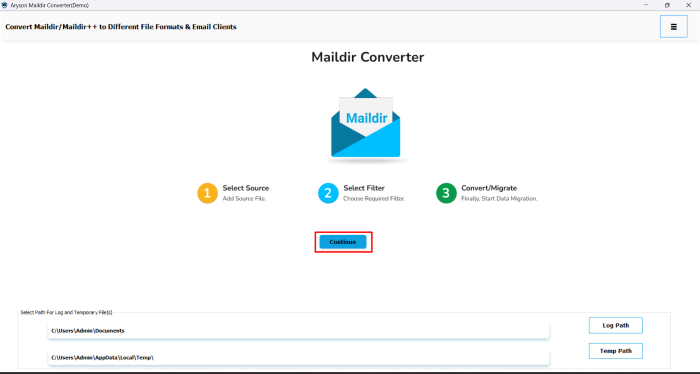
With the help of the Aryson Maildir Converter, you can skip the lengthy manual process and avoid the risk of data loss. This utility is designed to convert Maildir files (along with cur, new, and tmp folders) into PST format, which is fully compatible with all versions of Microsoft Outlook. Moreover, it provides a reliable method for managing large-scale migrations efficiently, particularly for businesses or users handling multiple Maildir files. The intuitive interface and demo version support make it a user-friendly and reliable solution for both personal and professional use. Additionally, it is fully compatible with all major Windows versions and supports Outlook editions, including 2021, 2019, and earlier.
Follow these Steps to Import Maildir to Outlook Data File(PST):
- Step 01: First, download and install the Aryson Maildir Converter Tool on your PC.
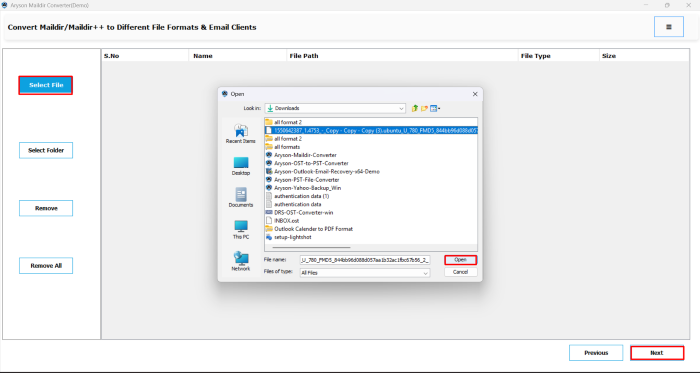
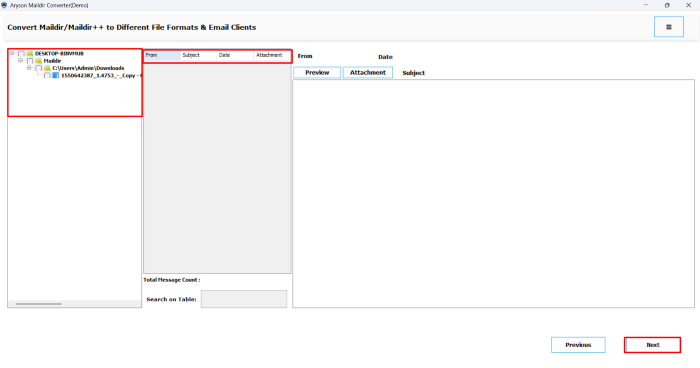
- Step 02: Click on the Select File/Select Folder button to locate and add your Maildir folder.
- Step 03: Next, it will display all emails and folders in a tree structure.
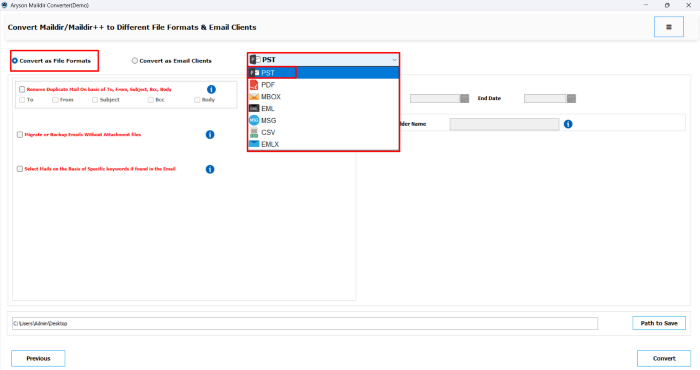
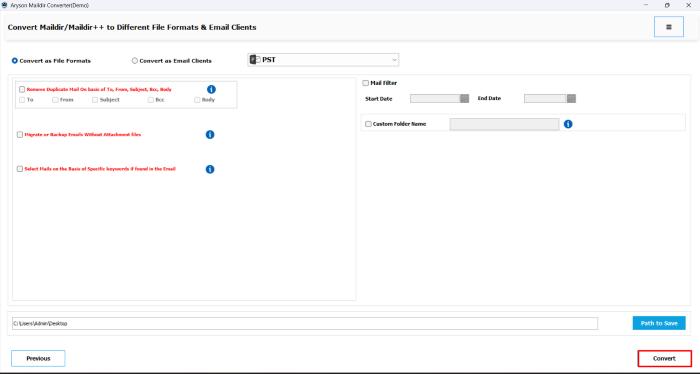
- Step 04: Now, mark Convert as File Formats>>From the list of export options, choose PST.
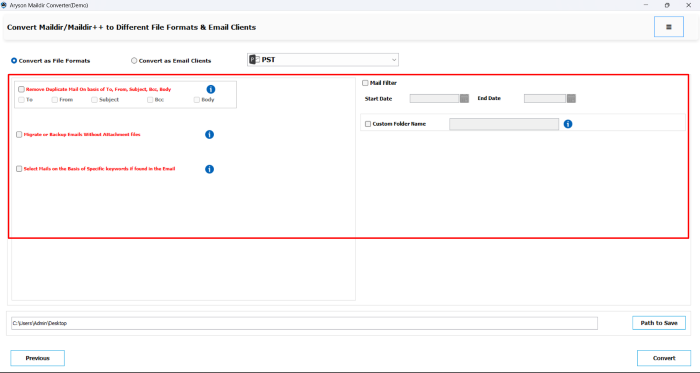
- Step 05: According to your need or preference, convert only specific emails.
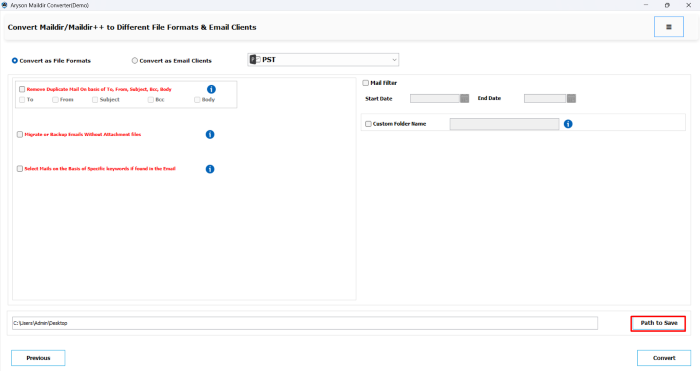
- Step 06: Next, click “Path to Save” to choose the location where you want to save the PST file.
- Step 07: Finally, click the Convert button to import the maildir to an Outlook data file (PST).
Important Note: After converting Maildir files to PST, open Outlook and navigate to File > Open & Export > Import/Export. Select Outlook Data File (.pst), browse the PST, and click Finish to complete the import.
Conclusion
To simplify the process, you can either pick the manual method or proceed with the automated solution. We explored the manual method, including its multi-step approach. Additionally, we introduced a dedicated utility to ensure the task is accomplished with accuracy. This software is beneficial for system administrators, IT professionals, and end-users in managing email migrations from Unix-based servers to the Microsoft Outlook platform. It’s entirely up to you. So, you can pick the methods accordingly to import maildir to Outlook.
Frequently Asked Questions:-
Q1. Can Outlook open Maildir files directly?
Ans: No, Outlook doesn’t support Maildir files. You need to convert Maildir into PST format before importing. The Aryson Maildir Converter helps you do this without any data loss.
Q2. What is the most effective way to convert a Maildir file to PST format?
Ans: The easiest way is to use the Aryson Maildir Converter. It converts Maildir files into PST format in just a few clicks. After that, you can import the PST file into Outlook using its built-in Import feature.
Q3. Can I convert multiple Maildir folders at once?
Ans: Yes, the software supports batch conversion. You can add and convert several Maildir folders at once into a single or multiple PST files.
Q4. Which Outlook versions support the PST files created by this tool?
Ans: Converted Maildir to PST by Aryson Maildir Converter are compatible with all Outlook versions, including 2021, 2019, 2016, 2013, and earlier.
About The Author:

Rohan Wiese is a Technical Writer at Aryson Technologies. He is an expert Email Forensic, Cloud Computing, and a passionate nerd with over 10 years of experience in technical content writing. He writes about Cloud Migration, Database Recovery, Email Backup, Windows, Mac, and Tech.
Related Post