
















Screenshots

Video

Guide

Eula

Aryson Email Eraser Tool: Supported Email Platforms

Erase Emails Safely Across All Supported Web-Based & Cloud-Based Platforms

Gmail
GSuite
Office365
Hotmail
AIM
Yandex_Mail
Zoho_Mail
HostGator
IMAP
GoDaddy
Mail2World
AOL

Aryson Email Eraser Tool – Rating & Reviews

See what users and industry experts say about the Email Cleanup Software

Expert Review

Rating & Reviews

Powerful Email Deletion Filters in Aryson Email Eraser Tool

Easily filter and delete unread emails, attachments, or messages by size & age efficiently:

  • Efficient Unread Mail Cleanup: Aryson Email Eraser allows users to quickly remove all unread emails from their mailbox, freeing up storage and improving email management.
  • Selective Processing: Users can target unread emails in specific folders or across the entire mailbox, ensuring important messages are preserved.
  • Complete Metadata Handling: The Email Cleanup Software ensures that email headers, sender details, and timestamps are properly recognized before deletion.
  • Integrity Assurance: Only unread emails are removed, preventing accidental loss of read or important messages.
  • Bulk Processing Support: Aryson Inbox cleanup tool handles thousands of unread emails efficiently without slowing down the system.
  • Preview and Verification: Provides a clear count of unread emails selected for deletion, helping users confirm actions before processing.
  • Attachment-Based Email Removal: Aryson Email Cleaning Software can identify and remove emails containing attachments, helping manage mailbox size and storage quotas.
  • Supports All Attachment Types: Emails with PDF, DOCX, JPG, ZIP, and other formats are detected and processed seamlessly.
  • Folder-Wide Application: Inbox Cleanup Tool users can choose to delete attachment emails from specific folders or across the entire mailbox.
  • Preserves Email Structure: Non-attachment emails remain untouched, maintaining overall mailbox organization.
  • Metadata Accuracy: Sender, recipient, subject, and timestamp information is considered to prevent accidental deletion of essential emails.
  • Detailed Count Display: Shows the number of emails containing attachments selected for deletion versus the total, allowing precise control over the cleanup.
  • Size and Age Filters: Aryson Email Eraser lets users delete emails larger than a specified MB size or older than a set number of months, optimizing mailbox performance.
  • Customizable Parameters: Users can define exact thresholds for email size and age to target only unnecessary or outdated messages.
  • Comprehensive Coverage: Scans all folders, including Inbox, Sent, Drafts, and custom directories, for matching emails.
  • Safe Deletion: Ensures only emails meeting the defined criteria are removed, avoiding accidental loss of recent or smaller messages.
  • Batch Processing: Inbox Cleanup Tool handles large volumes of emails efficiently, even when dealing with thousands of old or oversized messages.
  • Clear Selection Overview: Email Cleaning Software displays selected and total matching emails for verification before executing the deletion, giving users full control.

Supported Email Services by Aryson Email Eraser Tool

Best Free Email Cleaner to Erase Emails Safely Across All Email Platforms

Web-Based Email Clients

Users can access emails via a browser without a web-based email client. Aryson Email Cleaning Tool is convenient for multiple devices with basic inbox management, search, and spam filtering. Supported email clients are:

  • Hotmail / Outlook.com
  • AIM
  • Lycos Mail
  • MWEB Webmail
  • KPN Mail
  • Libero Mail
  • ASIA.com
  • 163 Mail
  • 126 Mail
  • ARUBA
  • Mail.ru
  • Mail.com

Cloud-Based / Hosted Email Services

This Email Cleaner Software supports enterprise-grade email cleanup across various cloud-based platforms. Some of the supported Cloud-Based email clients are as follows:

  • G Suite (Google Workspace)
  • Office 365 / Microsoft 365
  • Zoho Mail
  • HostGator
  • GoDaddy
  • Mail2World
  • AOL
  • Gmail
  • Yahoo Mail
  • iCloud Mail
  • Proton Mail
  • Amazon WorkMail

Comprehensive Features of the Aryson Email Cleaner Tool

Discover the capabilities of this software for secure email cleanup across multiple platforms.

Delete Emails

Delete Emails from 60+ Email Platforms

Aryson Email Eraser supports secure deletion across Gmail, Office 365, Yahoo, Zoho, and other IMAP-based services. It connects directly to cloud and webmail accounts to remove unwanted messages. This allows organizations to manage and clean multiple platforms centrally without compatibility or configuration challenges.

CBulk & Batch Email Deletion Engine

Bulk & Batch Email Deletion Engine

This Email Eraser Software integrates a high-performance bulk and batch deletion engine that processes thousands of emails and multiple accounts simultaneously using CSV imports. This eliminates manual cleanup, accelerates large-scale mailbox management, enforces consistent cleanup policies, and significantly reduces administrative workload across enterprise environments.

Folder-Level Mailbox Management

Folder-Level Mailbox Management

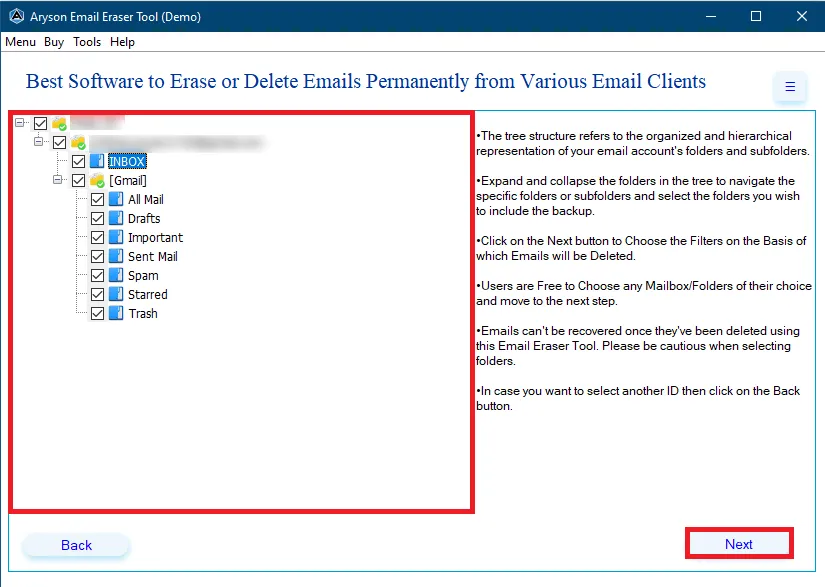
With the help of this bulk Email Cleaner, you can clean up across the Inbox, Sent, Spam, Trash, Promotions, Social, and custom folders. Users can focus on specific directories rather than deleting entire mailboxes. It ensures structured mailbox organization and maintains important data within relevant folders.

date-range-filter

Date Range–Based Deletion Control

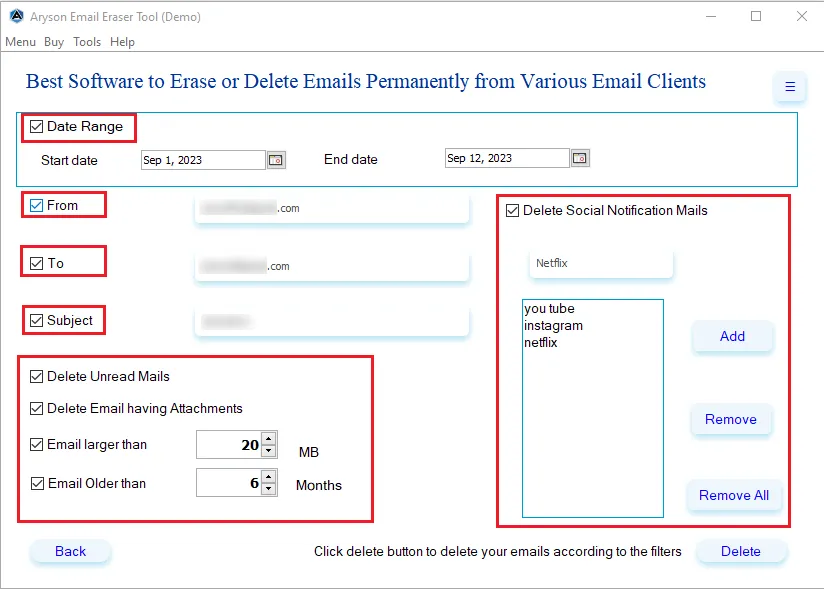
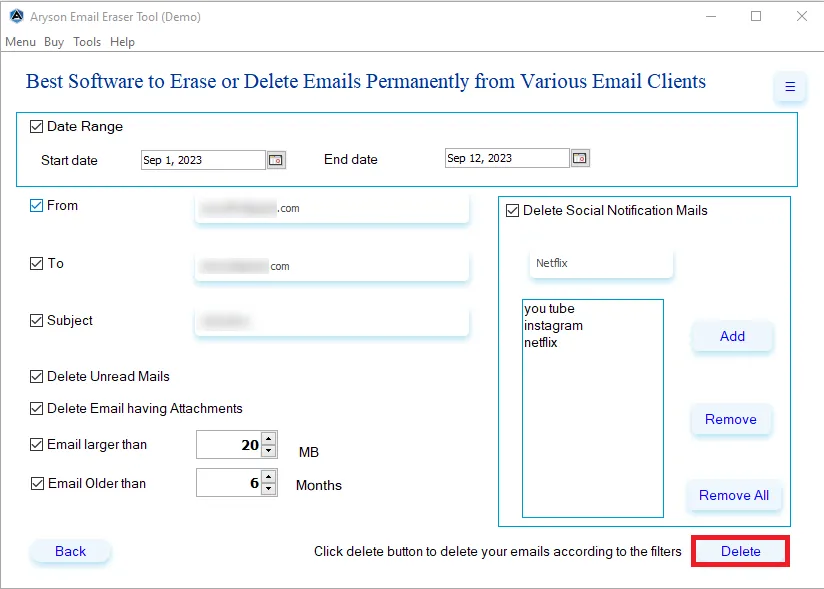
Aryson Email Eraser Tool includes an easy-to-configure Date Range Filter that performs the date-based email deletion & removes emails between specific Start and End dates. Combined with From, To, and subject criteria, it enables precise, time-based cleanup of outdated messages while protecting recent, relevant, or business-critical communications.

Unread, Attachment & Size-Based Email Detection

Unread, Attachment & Size-Based Email Detection

Aryson Email Cleanup Software automatically detects unread emails, messages containing attachments, and oversized emails exceeding defined size thresholds. These conditions help isolate low-value or storage-heavy content for selective removal, allowing users to reclaim mailbox space, improve performance, and maintain streamlined inboxes without affecting critical business correspondence.

Backup-schedule

Time-Based Retention & Lifecycle Controls

Aryson Email Eraser supports time-based deletion rules that remove emails older than a specified time period or retention period. This automated lifecycle management helps organisations enforce data governance policies, eliminate obsolete records, reduce storage accumulation, and maintain compliant, well-structured mailboxes without continuous manual monitoring.

Keyword-Based Removal

Social Notification & Keyword-Based Removal

The software includes dedicated controls to detect and delete social notifications and promotional emails using custom keyword lists with add, remove, or bulk-clear options. Users can effortlessly clean up the junk emails or notifications that they receive from Social platforms like Amazon, LinkedIn, Facebook, Netflix, and many more.

Access

Secure IMAP Authentication

Aryson Email Removal Software uses secure IMAP authentication protocols to access accounts safely during cleanup operations. Credentials remain protected while maintaining stable connectivity. This ensures enterprise-grade security and reliability when managing sensitive or business-critical mailboxes.

Performance Optimization

Performance Optimization

By removing redundant and obsolete emails, the software reduces mailbox size and server load. Smaller mailboxes improve synchronization speed and application responsiveness. Users benefit from faster email access and smoother daily operations across devices.

Intuitive GUI

Intuitive GUI and Easy Operation

The Aryson Email Cleaning Tool features a simple, well-structured interface that allows quick configuration of accounts, filters, and deletion settings. Even non-technical users can operate it efficiently. This reduces training requirements while enabling faster deployment across teams or departments.

Windows

Windows and Enterprise Compatibility

This Bulk Email Cleaner runs smoothly on Windows 11, 10, 8.1, and earlier versions while supporting both personal and enterprise environments. It integrates with cloud and IMAP servers seamlessly. This broad compatibility ensures flexible deployment across diverse organizational infrastructures.

Free Demo

Free Demo & Evaluation Version

Aryson Free Email Cleaner online provides a fully functional demo edition that allows administrators to delete upto 50 emails per folder for free. This enables technical validation, workflow testing, and performance assessment in real environments, ensuring compatibility, reliability, and informed deployment decisions.
How to Use Aryson Email Eraser Tool: Complete Guide

How to Use the Aryson Email Eraser Tool

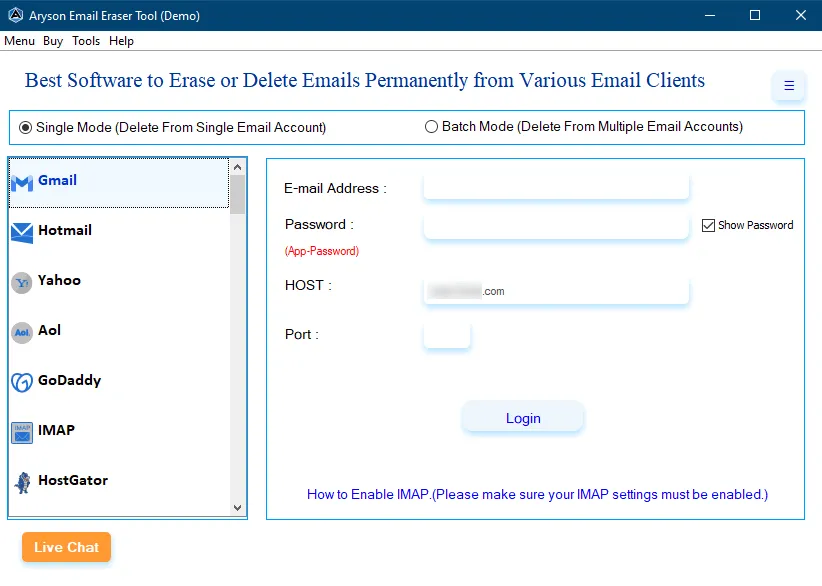
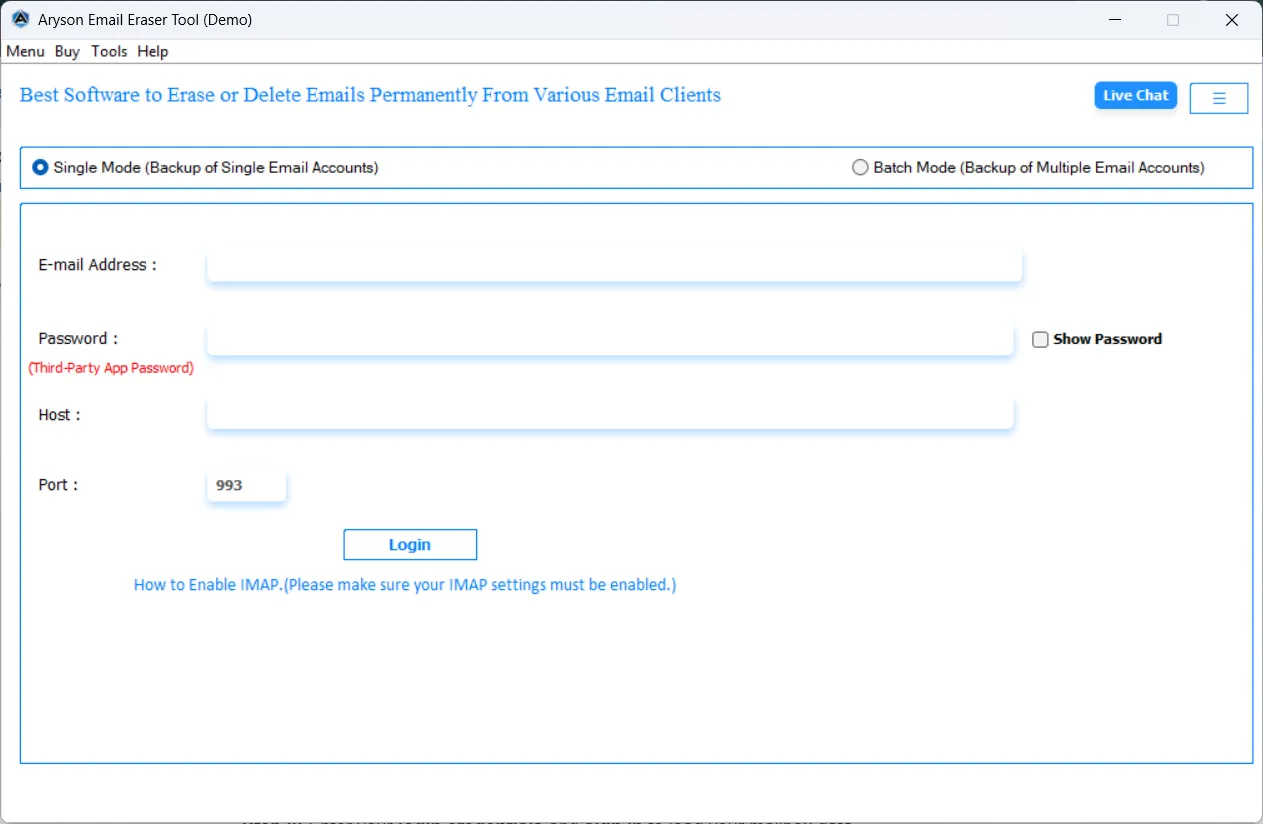
Aryson Mass Email Deletion Tool is a secure and efficient solution designed to permanently delete unwanted emails and mailbox data from various email clients and servers. With its simple interface and advanced filtering options, users can selectively remove emails based on size, age, attachments, or status without affecting important data. Follow the steps below to erase emails safely and free up mailbox space:

  • Step 01: Download and install the Aryson Email Erasing Tool on your system.
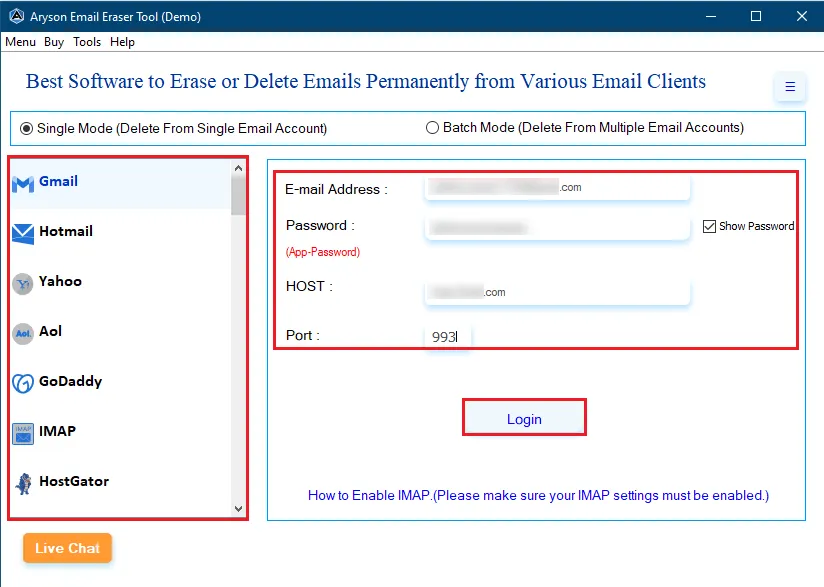
  • Step 02: Launch the software and select the desired email source or email client.
  • Step 03: Enter your login credentials and sign in to load your mailbox data.
  • Step 04: Preview mailbox folders and choose the folders or items you want to clean.
  • Step 05: Use the advanced built-in features provided by the software.
  • Step 06: Click Delete to permanently remove the selected data.

Aryson Email Eraser Tool: Enterprise-Level Use Cases

Here’s how organizations securely clean up and optimize large-scale mailboxes

Application

Scalable for Enterprise Environments:

Designed for growing organizations managing hundreds of mailboxes and large datasets. This software scales efficiently without disrupting daily operations.

Storage

Storage Optimization for Cloud Email Platforms:

Aryson Email Cleaning Tool enables organizations using Microsoft 365, Google Workspace, or IMAP servers to reduce mailbox size significantly. Therefore, businesses can lower storage costs and improve server performance.

User interface

IT Administrative Efficiency:

Aryson Bulk Email Eraser allows IT teams to perform bulk email deletion across multiple accounts simultaneously using batch processing. Consequently, administrative workload is reduced, and cleanup tasks are completed faster.

Bulk Conversion

Bulk & High-Volume Mailbox Processing:

Supports the cleaning of thousands of emails in a single operation from large or overloaded mailboxes. Hence, enterprises can manage high-volume data without performance issues.

Safe and Secure

Compliance & Data Privacy Management:

Permanently removes sensitive, confidential, or regulated emails to meet internal policies and legal requirements. As a result, organizations strengthen data governance and reduce security risks.

Access

Secure Authentication & Access Control:

Aryson Email Removal Software uses secure IMAP-based authentication protocols for safe mailbox connectivity. It ensures enterprise-grade protection while performing cleanup operations.

Selective

Selective & Policy-Based Deletion:

Provides date range, sender, subject, and attachment filters for precise email targeting. Thus, organizations can delete only non-essential emails while retaining business-critical communications.

Spam Mangement

Spam & Notification Management:

Aryson Email Cleaning Software eliminates promotional, social, and automated notification emails across all accounts. Therefore, users experience cleaner inboxes and improved productivity.

System Requirements - Aryson Email Erasing Tool

Software Download

Size: 239MBVersion: 25.07(Latest Release)

Trial Limitations

Users can evaluate the Aryson Free Email Cleaner online using the free demo version, which allows the deletion of 50 emails per folder. To perform unrestricted bulk deletion and full mailbox cleanup, activate the licensed version of Aryson Email Eraser Tool.

Requirements & Supported Versions

Processor: Intel® Core™ 2 Duo CPU E4600 @ 2.40GHz 2.39GHz

Hard Disk Space: 512 MB of free hard disk space required

RAM: 4 GB of RAM (4 GB is recommended)

Internet: Stable IMAP/Cloud connectivity required

Supported Platforms

Window OS: 11, 10, 8.1, 8, 7, Vista, XP, 2000, 98, NT, and 95.

Software Prerequisites

  • If you are operating Windows OS 11, 10, 8, or 7 (32-bit or 64-bit) then you must launch the tool as an Administrator.
  • Turn off the Windows Firewall for proper installation.
  • Disable the Antivirus programs.

FAQ

Request For Software Customization

If you need to customize Aryson Email Eraser Software or need some additional specific features, then provide the software customization Request Quote.

Aryson Email Eraser Tool – Free & Premium Version

Get the Overview of the Free and Full Versions for Secure Email Cleanup

Product Features Free Version Full Version
Clean Emails from 60+ Platforms 50 Emails/per folder Complete Mailbox
Bulk Email Deletion 50 Emails/per folder
Advanced Filters (Date, From, To, Subject, Size)
Folder-Level Cleanup
Attachment-Based Removal
Batch Processing (CSV Accounts) 50 Emails/per folder
Permanent & Secure Deletion
Spam & Promotional Cleanup
Retention Policy Automation 50 Emails/per folder
Maintains Account Integrity
Supports All IMAP Services
Windows Compatibility
Technical Support
Price Free $49
Money Back Policy

Frequently Asked Questions

Ans. Aryson Email Eraser supports Gmail, Microsoft 365, Outlook.com, Yahoo Mail, Zoho Mail, GoDaddy, AOL, and all IMAP-enabled cloud or webmail platforms. It securely connects to accounts and performs direct mailbox cleanup without requiring exports or manual configuration.

Ans. Yes, the software includes batch processing that allows administrators to import multiple accounts using CSV and clean them simultaneously. This feature is ideal for enterprise environments where bulk deletion across teams or departments is required.

Ans. Yes, Aryson Email Eraser features a high-performance bulk deletion engine that can process thousands of emails in a single operation. It eliminates manual effort and enables fast cleanup of large or heavily populated mailboxes.

Ans. Yes, the Aryson Email Removal Software provides advanced filtering options such as date range, From, To, subject, attachment size, and folder selection. These filters help users precisely target unwanted emails while protecting important or business-critical messages.

Ans. Yes, the Date Range filter of the Email Cleaner Software allows administrators to delete emails between defined Start and End dates. This helps enforce retention policies, remove obsolete messages, and maintain optimized mailbox storage without affecting recent communications.

Ans. Yes, Aryson Email Eraser permanently removes selected emails to prevent recovery or unauthorized access. This ensures secure cleanup of sensitive or confidential data and helps organizations meet privacy and compliance requirements.

Ans. Yes, the Aryson Email Eraser Tool identifies emails with large or unnecessary attachments and allows selective removal. This helps free up mailbox space, reduce storage costs, and improve overall email client performance.

Ans. Yes, Aryson Email Eraser offers a free demo version that allows users to remove up to 50 emails/folders absolutely for free. To unlock unrestricted cleanup and full mailbox processing, upgrading to the full version is required.

Ans. The software is fully compatible with Windows 11, 10, 8.1, 8, 7, and earlier versions. It runs smoothly on both modern and legacy systems.

Ans. Yes, Aryson Email Eraser uses secure IMAP protocols and Modern Authentication (OAuth) for Microsoft 365 and Gmail accounts. This ensures encrypted login, protects user credentials, and maintains enterprise-grade security during cleanup operations.

Trusted by IT Professionals & Enterprises Worldwide

See what IT administrators say about their experience with the Aryson Email Eraser Tool.

review-rating