




Screens

Video

Guide

Eula

Best PST Compression Tool with Flexible Compression Options

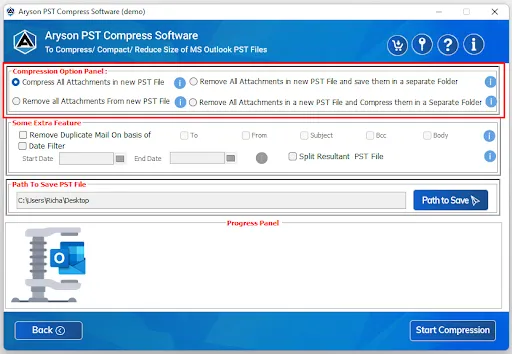
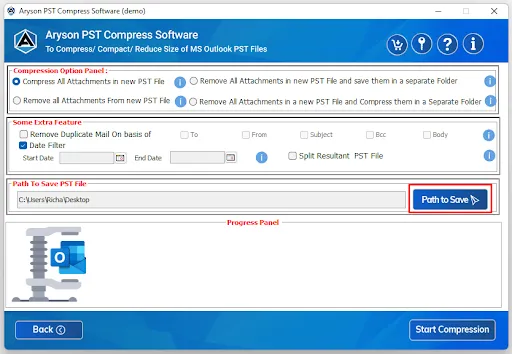
The Aryson PST Compress Tool provides multiple ways to handle attachments during the compression process. It depends on your preference; you can either compress, remove, or save attachments separately. Here are the options available

Advanced Compress Option Compress Large PST Files with Ease
Compress All Attachments in New PST File Reduces PST file size and compresses all attachments within the new PST file.
Remove All Attachments and Save Separately Deletes attachments from the PST file but saves them in a separate folder.
Remove All Attachments from New PST File Permanently removes attachments from the PST file.
Remove & Compress Attachments in Separate Folder Extracts all attachments, compresses them, and saves them in a separate folder.

Aryson Free PST File Compressor- Rating & Reviews

See what our users have to say about the Aryson Outlook PST Compressor

Expert Reviews

Rating & Reviews

Aryson PST Compress Tool- All Advanced Exclusive Features

Reduce the size of the Outlook PST File

Reduce the size of the Outlook PST File

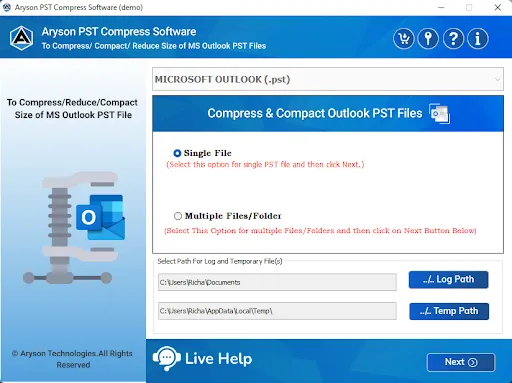
Aryson PST Compress and Compact Tool is the best and most efficient utility that allows users to reduce the Outlook PST file size. It will enable you to compress single and multiple PST files simultaneously with ease.

 Compress PST File without Outlook

Compress PST File without Outlook

With the help of the Aryson PST Compress Tool, you can compress ANSI and UNICODE PST files without Outlook installations. Therefore, you just need to download and install this software and compress the PST file size easily.

Remove Duplicate Emails from PST Files

Remove Duplicate Emails from PST Files

Using this PST Compact Tool, you can remove similar emails from the selected Outlook folders, subfolders, and files. This utility detects duplicate emails based on criteria like To, From, Subject, Bcc, and Body. You can make sure your mailbox stays clean and well-organized.

Flexible PST File Compression Options

Flexible PST File Compression Options

Aryson PST Compress software provides different ways to handle attachments while reducing PST size. You can remove attachments completely, extract and save them in a separate folder, or compress them within the PST file itself. This flexibility allows you to choose the method that best suits your needs.

Advanced Filters for Selective Conversion

Advanced Filters for Selective Conversion

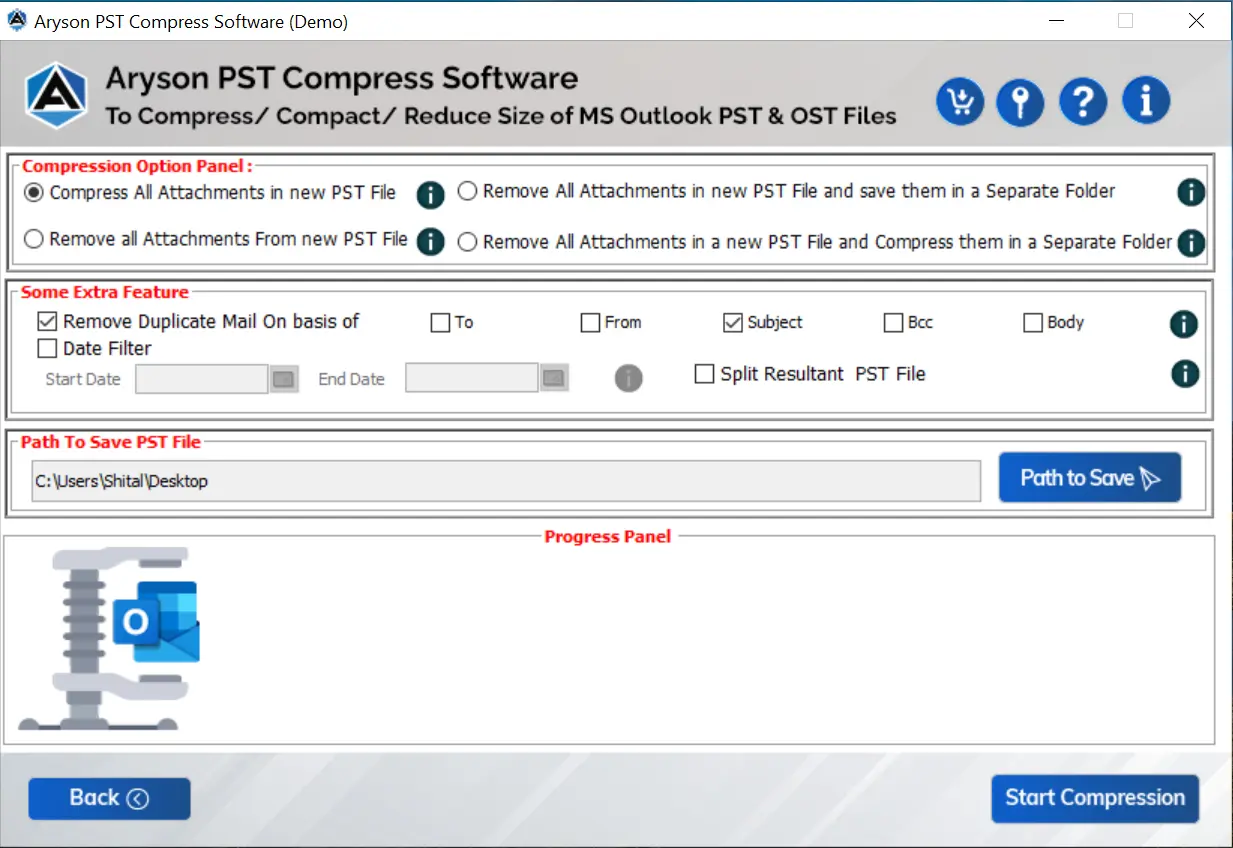
When you compress your Outlook PST files, you will get some advanced built-in features. If you don’t want to compress the entire PST file, you can apply a date filter. This feature allows you to include or exclude emails within a specific date range, so you only compress the data that matters most.

 Split the Resultant PST File

Split the Resultant PST File

In case you want to split the compressed PST files, you can easily split them with the help of the Split Resultant PST file option. For this, you just have to check the Split Resultant PST File option and set the size based on MB or GB. Also, you have the option to select a path for the output folder.

Different options to Save Attachments

Different options to Save Attachments

You will get two advanced options for downloading the attachment files separately with this Aryson PST Compress Tool. The software offers options: Remove All Attachments new PST file, and save them in a separate folder & Remove All Attachments from a new PST file, and Compress them in a separate folder.

Widely Compatible with Outlook & Windows

Widely Compatible with Outlook & Windows

The PST Compress Tool is available with all Outlook versions, like 2021, 2019, 2016, 2013, 2010, 2007, etc. The software works smoothly on Windows, such as Windows 11, 10, 8.1, 8, 7, Vista, XP, etc. Furthermore, it has an easy-to-use interface so that users from a non-technical background can also work with this software easily.

How to Use Aryson pst compress tool

How to Use the Aryson PST Compress Tool

Using the Aryson PST Compress Tool is simple and requires no technical expertise. This software comes with a user-friendly interface that guides you step by step through the compression process. You can remove attachments, extract them to a separate folder, or split large PST files. All in a quick and hassle-free way.

  • Step 01: Install the Aryson PST Compress Tool on your system.
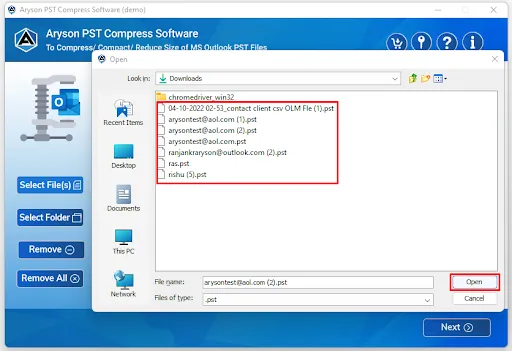
  • Step 02: Click on the Open button to browse and select your PST file.
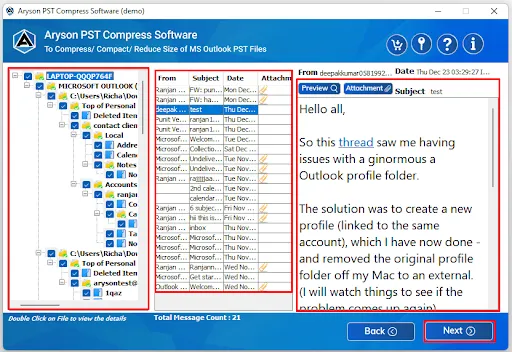
  • Step 03: Now, view all mailbox folders in a tree structure on the left panel.
  • Step 04: Pick the compress feature from the Compress Option Panel.
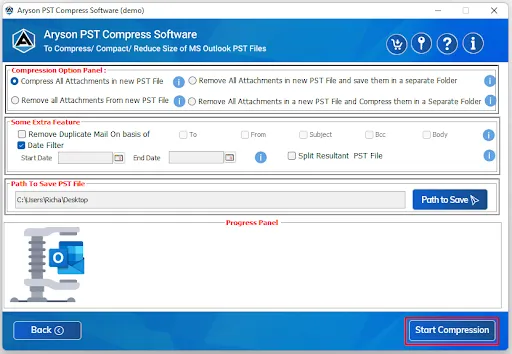
  • Step 05: Click the Start Compress button to compress the PST File.

Aryson Outlook PST Compressor: System Specifications

Software Download

(Windows)

Download Now


Size: 123MBVersion: 25.08

Trial Limitations

The trial version of the Aryson Free PST Compress allows you to compress 50 files without any cost. To compact more than 50 PST files into another, users need to purchase the licensed version.

Requirements & Supported Versions

Hard Disk Space: 500 MB of free hard disk space required

RAM: 4 GB of RAM (4 GB is recommended)

Processor: Intel® Core™ 2 Duo CPU E4600 @ 2.40GHz 2.39GHz"

Supported Platforms

Window OS: 11/ 10/ 8.1/ 8/ 7/2008/ 2012 (32 & 64 Bit), and other Windows versions.

Outlook Versions: Office 365, 2019, 2016, 2013, 2010, 2007, 2003, 2002, 2000, 98, and 97.

Software Prerequisites

  • If you are operating Windows OS 11, 10, 8, or 7 (32-bit or 64-bit) then you must launch the tool as an Administrator.
  • Turn off the Windows Firewall for proper installation.
  • Disable the Antivirus programs.

FAQ

Request For Software Customization

If you need to customize Aryson Software or need additional some specific features then, provide the software customization Request Quote

Comparison of Demo and Full Version of Aryson PST Compress Tool

Get an Overview of Aryson PST Compress Software in a Detailed Demo/Full Version

Product Features Free Version Full Version
Compress large PST files
Compress single as well as multiple OST files 50 emails per folder Complete Mailbox
Reduce the size of the single and multiple PST files 50 emails per folder Complete Mailbox
Shows the details preview of the PST files
Compress All Attachments in the new PST file
Remove All Attachments from the new PST file
Remove all attachments new PST file and save them in a separate folder
Remove All Attachments in a new PST file and compress them in a separate folder
Remove Duplicate Emails
Date Range & Split Resultant PST file
24*7 Tech Support & 100% Secure
Price Free $49
Money Back Policy

Frequently Asked Questions

Ans. Yes, the Aryson PST Compress Tool reduces the file size without affecting your emails, contacts, calendars, or other data.

Ans. No, you can choose how to handle attachments. You can either compress them, remove them, or save them separately in a folder.

Ans. Absolutely, the Aryson PST Compress Tool is 100% secure and maintains the original structure of your Outlook mailbox.

Ans. Yes, this Outlook PST Compress Tool works with large PST files and also provides an option to split oversized files into smaller parts.

Ans. Yes, this software supports both types of PST files created in all versions of Microsoft Outlook.

Ans. The Outlook PST Compressor is compatible with all Outlook versions, including Outlook 2021, 2019, 2016, 2013, 2010, and 2007.

Ans. Yes, PST Compress Software allows batch compression. So, you can reduce the size of multiple PST files in a single process.

Ans. Yes, besides PST, you can also compress and manage OST files with the best PST Compression Tool.

Ans. No, you don’t need to have Outlook installed. The software works independently to compress PST files.

Trusted by IT Professionals & Enterprises Worldwide

See what our IT professionals and businesses say about their experience with our PST Compress Tool

review-rating