-

Written By Rohan Wiese
-
Updated on October 15th, 2025
How to Convert PST Files to MBOX Fast and Safely
Outlook stores emails in PST files, which are not compatible with most other email applications. On the other hand, MBOX is a widely supported format that works frequently with many email clients. If you want to access your Outlook emails in a new client, you need to convert PST to MBOX. In this guide, we will show you easy and reliable methods to complete this conversion process. Along with the manual, use Aryson PST to MBOX Converter to convert PST file to MBOX format within a few clicks. Follow this complete guide to make sure that your emails and attachments are safely transferred without losing any data.
Understand the Key Reasons to Convert Outlook PST to MBOX
There are several important reasons for users to convert their PST files into MBOX format. Here, we will introduce some of the main reasons why this conversion has become a common need for email users:
- PST files are exclusive to Microsoft Outlook. When you convert them to MBOX, you can easily access your emails in other email clients like Thunderbird, Apple Mail, or Entourage.
- If you are switching from Outlook to another email platform, MBOX ensures a smooth migration without losing important emails or attachments.
- If you need to open PST emails without Outlook by converting them to MBOX. Then, you can read your messages right away in any email client that supports MBOX files.
- MBOX files serve as a universal backup format. So, you can store and secure your emails outside Outlook.
- As PST requires Outlook to open. But you can view MBOX files easily and import them into multiple email clients.
- When you handle bulk email data files, users need the format that can easily maintain data accuracy. And the MBOX file will help you in this.
Understanding these reasons makes it clear why converting PST files to MBOX is often necessary for both individual users and organizations.
Explore the Methods to Convert PST to MBOX
Among the several solutions, users are generally confused about which one to pick. Now, you don’t need to think about it anymore. Below, we’ll go through the different methods you can use to convert PST files into MBOX format with ease. Here are the top two solutions:
Method 01: Automated Way to Convert PST File to MBOX without Outlook
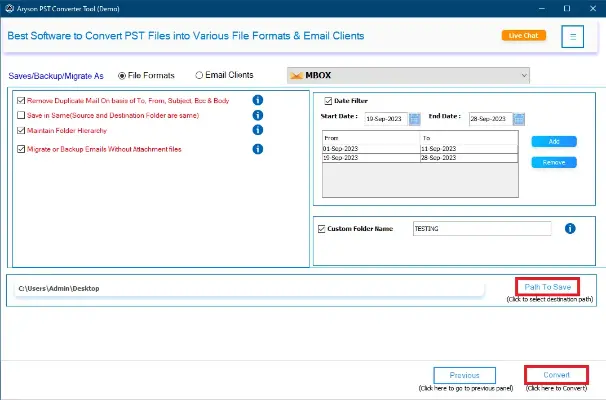
The Aryson PST to MBOX Converter is an easy and reliable tool to convert Outlook PST files into MBOX format. It saves time and effort compared to doing it manually and lets you convert one or many PST files at the same time. The Aryson PST Converter utility keeps all your emails safe, preserving their structure, formatting, and details. You can also filter emails by date, sender, or subject for a more precise conversion. Its simple interface makes it easy for both beginners and advanced users. Plus, it works with popular MBOX email clients like Thunderbird, Apple Mail, and Eudora. Overall, it is a safe, fast, and professional way to convert PST files to MBOX.
Simple Steps to Convert Outlook PST to MBOX
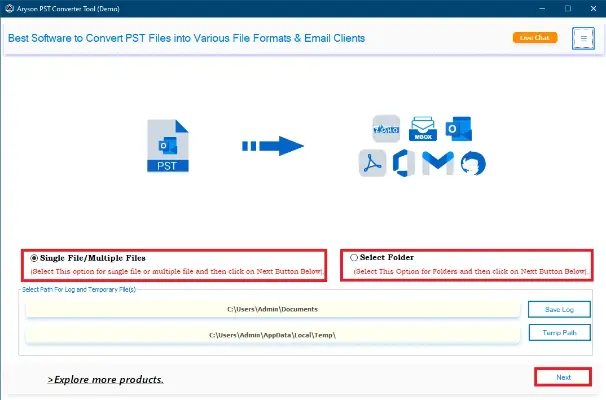
- Install the Aryson PST to MBOX Converter on your Windows or Mac system.
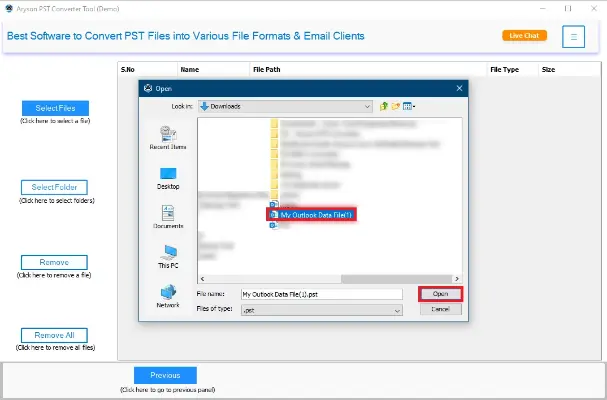
- Click on Select File or Select Folder to select the PST file(s) you want to convert.
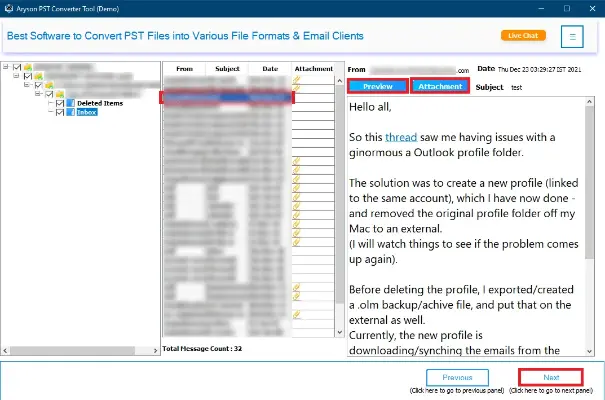
- In the next panel, you can preview all your selected PST data and click Convert.
- Now, choose MBOX as the format in which you want to save the converted emails.
- Select the location on your system and click Convert to convert PST to MBOX format.
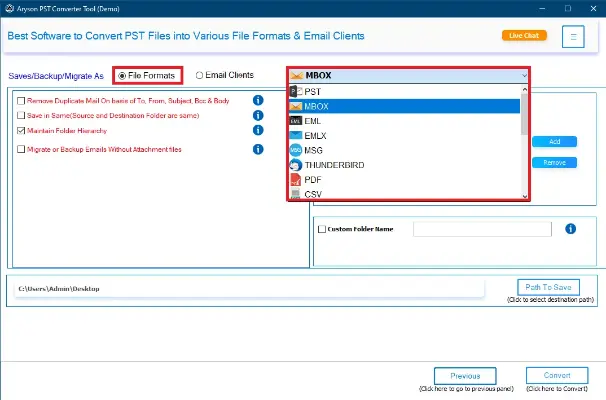
Additional Note: In addition, you can also convert PST files to EML, MSG, CSV, HTML, PDF, and other file formats.
Method 02: Use the Manual Method to Convert PST file to MBOX
For users who want to carry out the process on their own, there’s also a manual technique. Let’s go through how you can convert PST to MBOX manually with the help of Outlook and Thunderbird.
Requirements:
- Microsoft Outlook (with the PST file accessible).
- Mozilla Thunderbird is installed on your system.
- ImportExportTools NG add-on for Thunderbird.
Step 1: Export Emails from PST via Outlook
- Open Microsoft Outlook.
- Go to File > Open & Export > Import/Export.
- Select Export to a file and click Next.
- Choose Outlook Data File (.pst) and click Next.
- Select the mail folder(s) you want to export (Inbox, Sent, etc.).
- Choose a location to save the PST file and finish the export.
It makes sure that all your Outlook emails are now in a PST file format.
Step 2: Install Thunderbird and Add ImportExportTools NG
- Install Mozilla Thunderbird if not already installed.
- Open Thunderbird and create a new local folder to store emails.
- Go to Tools > Add-ons & Themes, search for ImportExportTools NG, and install it.
- Restart Thunderbird after installation.
Step 3: Import PST into Thunderbird
- Open Thunderbird and right-click on the Local Folders section.
- Navigate to ImportExportTools NG > Import all messages from a directory > including its subdirectories.
- Browse to your PST file.
- Note: You may need to extract it using Outlook to a readable format like EML if Thunderbird doesn’t read PST directly.
- Select the folder and click Open.
- All emails will be imported into Thunderbird.
Step 4: Export Emails from Thunderbird to MBOX
- Right-click the folder you imported in Thunderbird.
- Select ImportExportTools NG > Export folder.
- Choose the MBOX format and save it to your desired location.
Now all your PST emails are successfully converted to an MBOX file.
Drawbacks Associated with the Manual Conversion Process
Although the manual method is a free way to convert PST to MBOX, it is not always the most practical option. Several limitations make it less suitable for non-technical users or those handling large amounts of data. Here are some of the major drawbacks:
- Takes a lot of time – The process has many steps and is slow, especially for big files.
- Needs technical skills – It can be difficult for beginners to follow the steps correctly.
- No direct PST support – Thunderbird cannot open PST files directly, so extra steps are needed.
- Risk of losing data – Some emails, attachments, or formatting may get lost during the conversion.
- Not good for large files – Big PST files often cause errors or incomplete results.
- No extra features – You cannot filter, select specific emails, or use advanced options like in professional tools.
In short, the manual method may work for smaller PST files and users with technical expertise, but it is not the best solution for professionals or organizations dealing with critical data.
Final Words
This complete blog guided you through the simplified solutions to convert PST to MBOX. Either it can be done manually or with the help of the automated tool. The manual method works for small files, but it is time-consuming, complicated, and may risk data loss. On the other hand, the Aryson PST to MBOX Converter offers a fast, safe, and professional solution. It preserves all email data, supports batch conversion, and works with popular MBOX email clients. If you face any issues, you can connect to our tech support team for further assistance.
Frequently Asked Questions:
Q1: Can I convert PST to MBOX without Outlook?
Ans: Yes, you can use Aryson PST to MBOX Converter to convert PST files without installing Outlook. Manual methods, however, require Outlook.
Q2: How long does it take to convert a PST file to MBOX?
Ans: With Aryson PST to MBOX Converter, even large PST files can be converted in a few minutes, depending on the file size. Manual conversion may take much longer.
Q3: Will my email formatting be preserved during conversion?
Ans: Yes, Aryson PST to MBOX Converter preserve email formatting, attachments, metadata, and folder structure. Manual methods may sometimes alter formatting.
Q4: Can I convert multiple PST files at once?
Ans: Yes, batch conversion is supported in Aryson PST to MBOX Converter, allowing multiple PST files to be converted to MBOX simultaneously.
Q5: Is there a risk of data loss during PST to MBOX conversion?
Ans: Using a reliable Aryson PST to MBOX Converter minimizes the risk of data loss. Manual methods carry a higher risk, especially with large files.
About The Author:

Rohan Wiese is a Technical Writer at Aryson Technologies. He is an expert Email Forensic, Cloud Computing, and a passionate nerd with over 10 years of experience in technical content writing. He writes about Cloud Migration, Database Recovery, Email Backup, Windows, Mac, and Tech.
Related Post