-

Written By Rohan Wiese
-
Updated on September 30th, 2025
2 Free Methods to Convert EMLX to MBOX
When you switch between email clients, it generally creates the compatibility issue. Among several terms, one of the most common cases is with Apple Mail. This email client stores individual messages in the EMLX format. It works better on macOS. But it does not support most other platforms. On the other hand, the MBOX format is widely accepted by email clients like Thunderbird, Entourage, Opera Mail, and many more. Because of this limitation, users who want to move their emails from Apple Mail to another client often need to convert EMLX to MBOX. This way, you can store and manage emails with ease. In this blog, we will provide different solutions, including Aryson EMLX Converter, to convert EMLX files to MBOX within a few clicks.
Top Reasons to Convert EMLX Files into MBOX Format
Prior to the solutions, we should understand why the EMLX to MBOX conversion is necessary.
- EMLX files can only be used within Apple Mail. However, MBOX files are accepted by multiple clients. So that the migration of data becomes simple.
- If you are moving from macOS to Windows or switching to Thunderbird or other platforms, MBOX ensures hassle-free email transfer.
- Along with that, the MBOX file is easy to backup and store compared to individual EMLX files.
- MBOX saves all emails in a single file, which is easier to manage compared to multiple EMLX files.
It is clear from these reasons that MBOX works better than EMLX for easy migration and reliable accessibility.
How to Convert EMLX to MBOX: Different Methods
There are several ways to convert EMLX files into MBOX format. Although it depends on your requirements and technical comfort. Users can pick the manual approach for small-scale conversions. Also, they can opt for a professional automated solution to convert data with ease and get the safe results.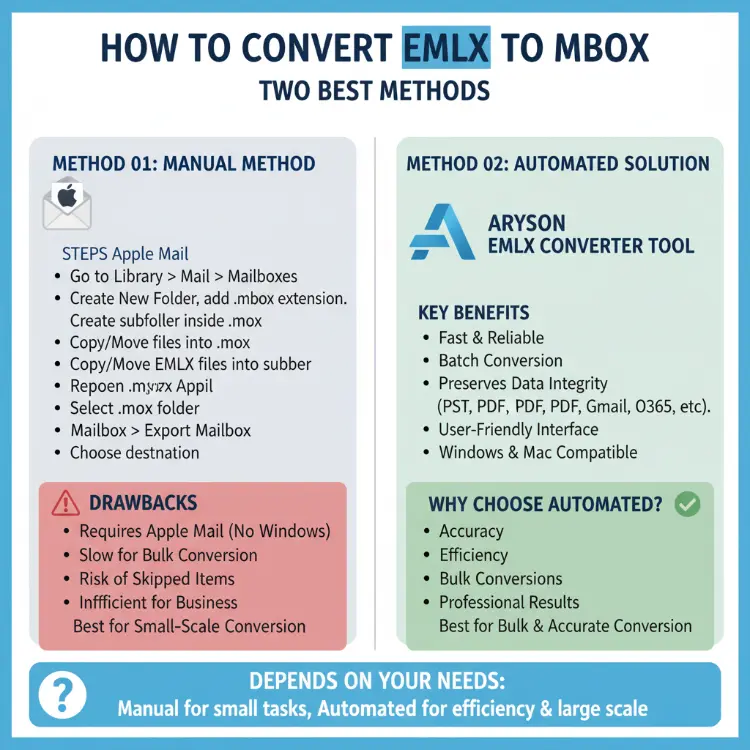
Method 01: Manual Method to Export EMLX to MBOX Format
Apple Mail provides an option to export emails directly into MBOX. If you already use Apple Mail, you can follow the steps below to accomplish the task manually:
Follow these Steps to Convert EMLX to MBOX manually:
- First, close your Apple Mail completely if it is currently open.
- After that, navigate to the Search Bar and tap on the Library button.
- To perform the next step, tap on Mail option>>Mailboxes and press Enter.
- Then, create a new folder and give it a .mbox extension.
- After that, create a subfolder inside the MBOX folder for your messages.
- Now, copy or move your EMLX files into this message subfolder.
- Then, reopen Apple Mail on your system.
- Next, locate and select the .mbox folder you created earlier.
- Afterward, go to the Mail menu bar and hit on the Mailbox>>Export Mailbox.
- Finally, choose the destination location for the MBOX file by clicking Choose.
When the above-mentioned are complete, all your EMLX files will be successfully converted into MBOX format.
Drawbacks Associated with the Manual Method
Manually converting EMLX files to MBOX using Apple Mail is possible, but this method has some limitations that you should know about. Knowing these drawbacks can help you decide whether to use the manual method or choose a professional tool instead.
- You can only use this method if Apple Mail is installed. Hence, it does not work for Windows users.
- Exporting many mailboxes one by one can be slow, especially if you have hundreds or thousands of emails.
- Some emails or attachments might be skipped during manual export. It causes the incomplete conversion.
- Beginner users may find this method confusing to find Mail folders and create .mbox files correctly.
- Converting multiple EMLX files or large mailboxes at once is not possible. Hence, this method is inefficient for business or professional use.
Because of these issues, the manual method works best for small-scale conversions only. For accuracy and bulk conversions, a professional EMLX to MBOX converter is the best alternative.
Method 02: Automated Solution to Batch Convert EMLX to MBOX Format
The Aryson EMLX Converter Tool provides a fast and reliable way to convert EMLX files to MBOX format. It allows users to perform batch conversions. Also, it makes sure that all emails, attachments, and folder structures remain the same throughout the process. This software is equipped with several advanced algorithms and provides an efficient conversion. Also, it can convert EMLX to PST and other multiple output formats such as EML, PDF, and HTML. Along with that, you can migrate EMLX to cloud platforms like Gmail and Office 365. With the simple user interface, users can navigate through the process with ease. Additionally, this utility is compatible with both Windows and Mac. As an outcome, the conversion process becomes efficient for both beginners and advanced users.
Simple Steps to Convert Apple Mail to MBOX
- Launch and open the Aryson EMLX Converter Tool on your existing PC.
- Select the EMLX files from your computer and click Open to add them.
- On the next screen, preview the selected emails and then click Next.
- From the list of available formats, choose MBOX as the output format.
- Input the destination folder, save your EMLX as MBOX and click Convert.
Additional Note: As it supports multiple output formats, you can convert EMLX to PDF, PST, MSG, CSV & more.
Final Words
Both methods can work, but the choice depends on your requirements, along with the size of your mailbox. After following either of these methods, you can convert emlx to mbox successfully. But keep in mind that the manual method is usable in terms of a few emails only. However, for bulk conversions or risk-free migration, use the recommended automated solution. It is usually the more efficient and reliable option.
Frequently Asked Questions:
Q1. Can I convert EMLX files without Apple Mail?
Ans: Yes, you can convert EMLX files without Apple Mail by using the Aryson EMLX Converter. It can directly convert EMLX data on both Windows and Mac systems.
Q2. Can I convert EMLX to formats other than MBOX?
Ans: Yes, Aryson EMLX Converter allows you to convert EMLX files into multiple formats, including PST, EML, PDF, HTML, Gmail, and other email platforms. This utility provides flexibility with different email clients.
Q3. Will my attachments be preserved during conversion?
Ans: Yes, the above-recommended automated solution preserves all email attachments, formatting, and folder hierarchy.
Q4. Is the manual method safe for large mailboxes?
Ans: No, the manual method is not ideal for large mailboxes. Exporting many emails one by one can be slow, and there is a risk of missing emails or attachments. Hence, it is less reliable for bulk conversions.
About The Author:

Rohan Wiese is a Technical Writer at Aryson Technologies. He is an expert Email Forensic, Cloud Computing, and a passionate nerd with over 10 years of experience in technical content writing. He writes about Cloud Migration, Database Recovery, Email Backup, Windows, Mac, and Tech.
Related Post