-

Written By Rohan Wiese
-
Updated on November 27th, 2025
Export Google Chat to PDF and Save All Chat Conversations
Summary: Google Chat is used a lot for both personal and work conversations. Sometimes, you may want to save your chat history for record-keeping, legal needs, or future reference. But Google Chat does not give you any direct option to download chats as a PDF file. Because of this, most users want a verified and trusted way to export Google Chat to PDF. So that they can keep their conversations safe. In this blog, you’ll learn different ways to save your Google Chat messages, including an easy automated method using the Aryson JSON Chat Converter. Proceed further and get all the simplified solutions to convert Google Chat to PDF in a hassle-free manner.
Download Now Purchase Now

What Does It Mean to Export Google Chat to PDF?
It is essential to first understand what exporting chat conversations actually means. When you backup Google Chat to PDF, you create an offline record of your messages, including sender names, timestamps, and attachments. It helps you preserve conversations exactly as they appeared in Google Chat. Unlike regular screenshots or copy-pasting, PDF export provides a well-formatted, shareable, and printable version of your chat history.
Why Do You Need to Save Google Chat as PDF?
You save your Google Chat messages not only to keep old conversations but also for many personal and work-related reasons. Here are the main ones:
- Many companies need to store communication records for legal, financial, or compliance checks.
- Keeping a backup helps you recover important messages or files even if the original chat gets deleted.
- When you switch to a new Gmail or Workspace account, exporting your old chats helps you retain important discussions.
- Once saved as a PDF, you can view chats without depending on an internet connection.
In short, exporting chats is an effective way to secure both personal and professional communication history.
How to Export Google Chat to PDF
There are two main methods to export your Google Chat data:
- Manual methods: Using Google Takeout or browser-based options.
- Automated methods: Using a professional tool to simplify the entire process.
Both methods have different advantages. Manual options are free but limited. On the other hand, experts recommend that automated software provides speed and flexibility.
1. Export Google Chat to PDF Using Google Takeout
Google Takeout is Google’s official method to export Google Chat. So, you can download a copy of your messages directly from Google’s servers. Follow the given steps to backup Google Chat to PDF:
- Start the process and open the Google Takeout.
- Now, navigate and sign in to your Google account.
- There is an option to deselect all products first to avoid unnecessary data export.
- Next, scroll down and select Google Chat from the list of available products.
- Click Next Step at the bottom of the page.
- Choose Export type (one-time export is usually enough).
- Under File type & size, select ZIP format and a preferred file size limit.
- Click Create Export to export Google Chat to PDF.
Once the export is complete, you’ll receive an email with a download link. The data file usually contains your chat records in JSON format.
To convert the Zip file into a readable PDF:
- First, you should extract the ZIP file.
- Also, you can use an online JSON to PDF converter or import it into an application that supports printing to PDF.
Note: Google Takeout may not include attachments, images, or exact chat formatting. So, you can use it only for the basic chat export, not for business-grade exports.
2. Save Google Chat Manually as PDF
If you only need to save a few conversations, you can do it manually using the browser’s built-in options. This approach requires no additional software. Here’s how you can download Google Chat history:
- Open Google Chat in your browser.
- Select the conversation or group chat you wish to save.
- Highlight and copy the messages.
- Paste them into a Google Docs or Microsoft Word document.
- Go to File >> Download > PDF Document (.pdf).
- Alternatively, you can press Ctrl + P (or Cmd + P on Mac), choose Save as PDF, and download it directly.
This method gives you a quick snapshot of your conversation, but it’s not suitable for multiple or lengthy chats. It may also miss timestamps and attachments.
Limitations of Manual Export Methods
However, both manual approaches are simple; they come with several drawbacks:
- Time-consuming: You must export each chat separately.
- Attachments not included: Images and shared files aren’t saved.
- No date filters: You can’t choose specific time frames or chat participants.
- Formatting issues: The PDF may not resemble your original chat layout.
- Limited data size: Google Takeout files can be large and difficult to manage.
If you often need to archive or share chat histories, using an automated tool is a far more efficient solution.
Best Reliable and Trusted Alternative to Export Google Chat to PDF
Aryson JSON Chat Converter is one of the most recommended solutions to export Google Chat data to PDF format within a few clicks. It can convert Google Chat or Hangouts JSON files into a readable PDF format. Along with that, it also supports DOCX, TXT, or HTML formats without losing data. It preserves the chat structure, including sender names, timestamps, and message content, exactly as they appear in Google Chat. Moreover, it supports batch conversion to export multiple chat files at once, which saves time and effort. Apart from this, the software provides advanced options, like date filters and custom naming conventions for selective chat export. These features are quite useful for both personal and business use.
Working Steps to Export Google Chat to PDF with Ease
- Download the Aryson JSON Chat Converter and tap on the Google Chat option.
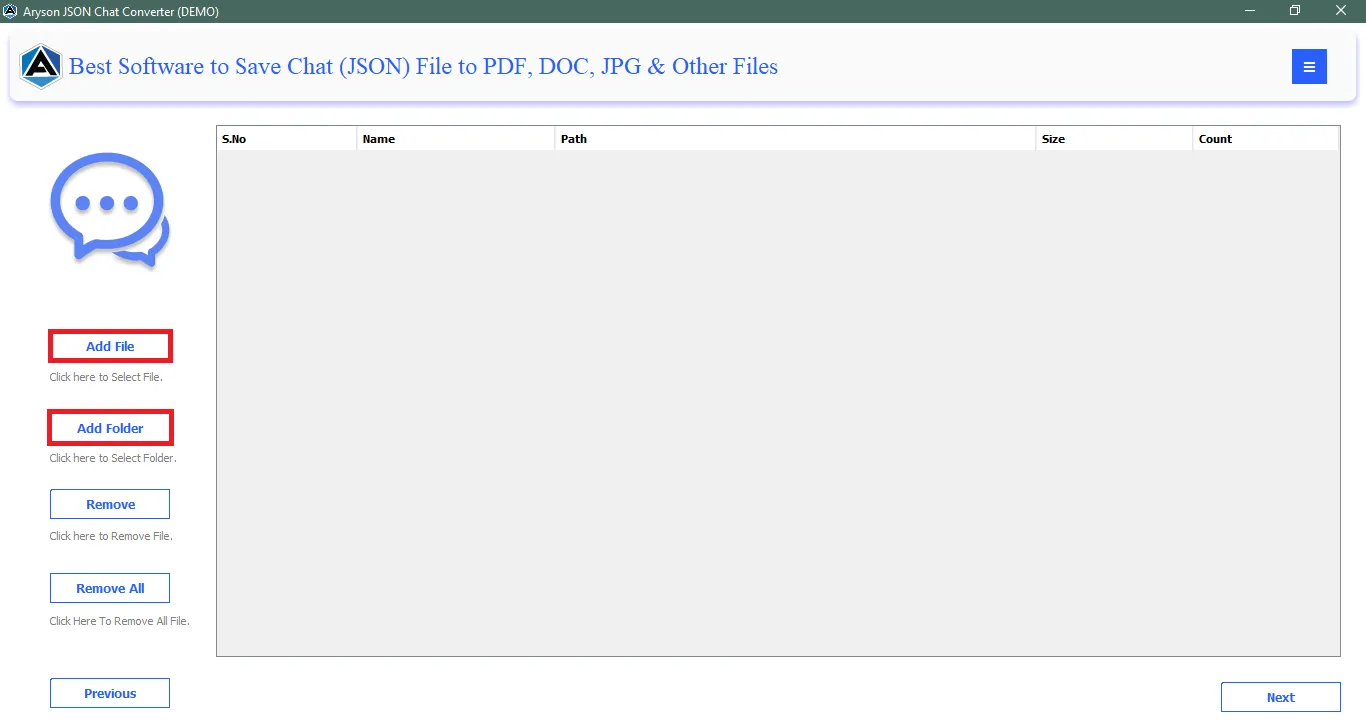
- Now, tap on Add File(s)/ Folder to add the Google Chat file data to the software.
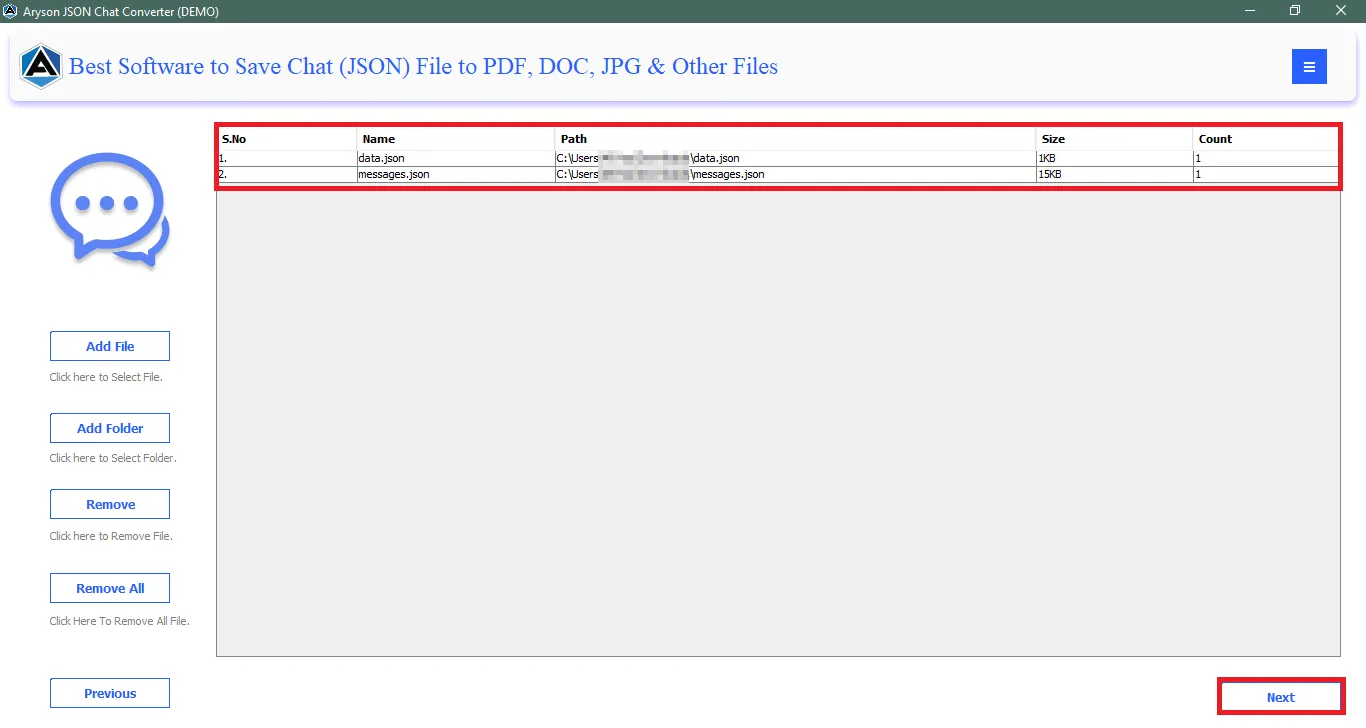
- Then, check the uploaded files in the Preview Panel, and tap on the Next button.
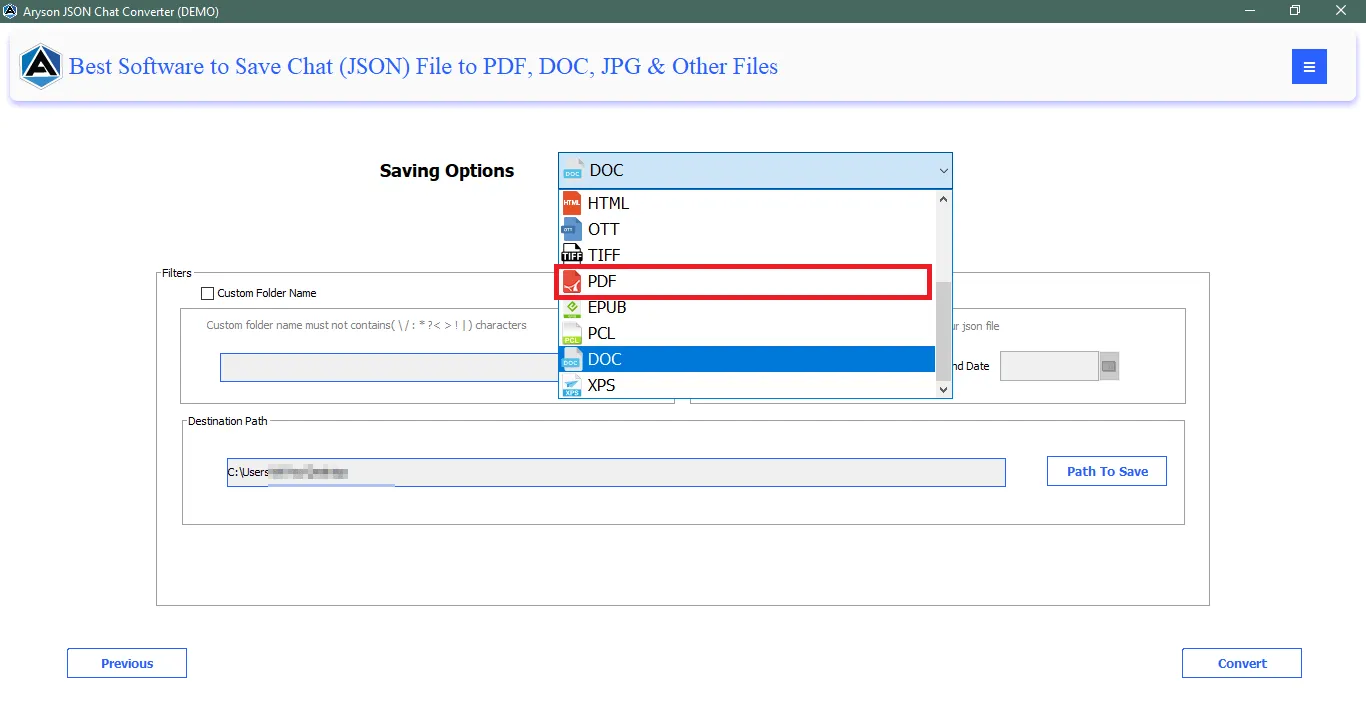
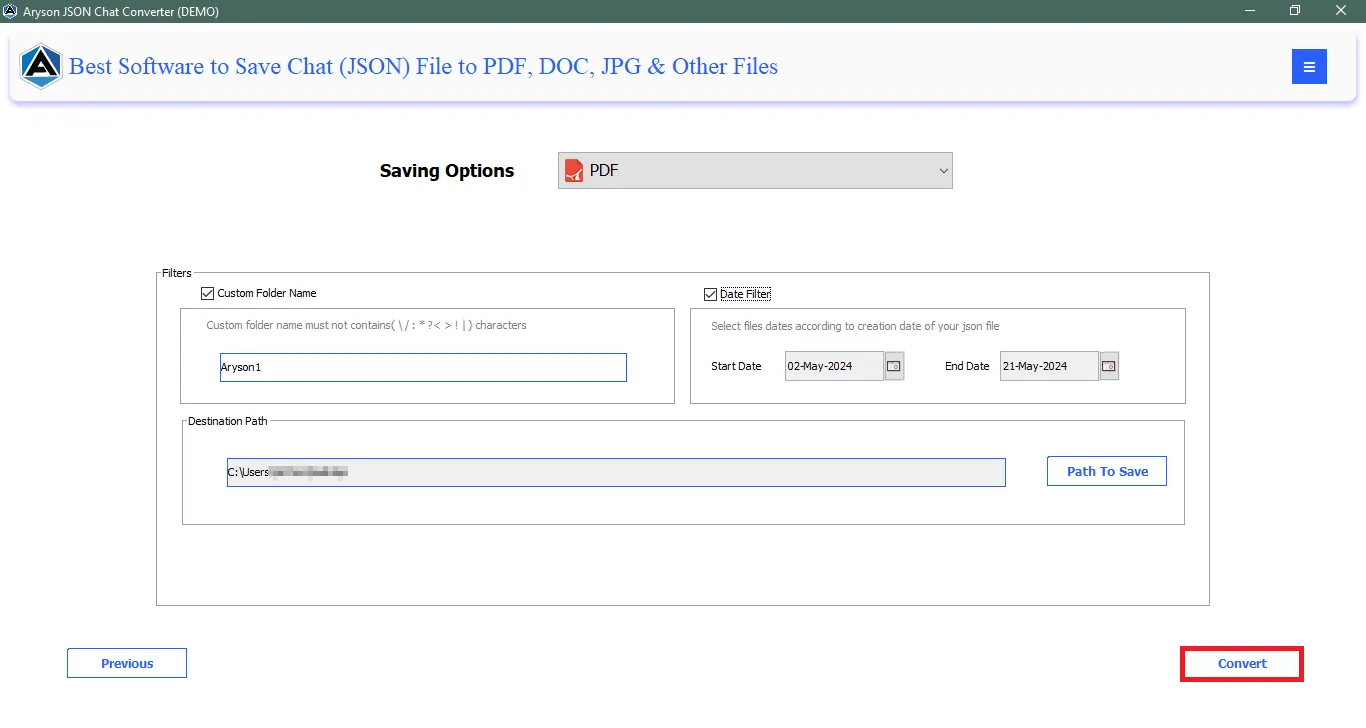
- From the export options, select PDF as your preferred file format.
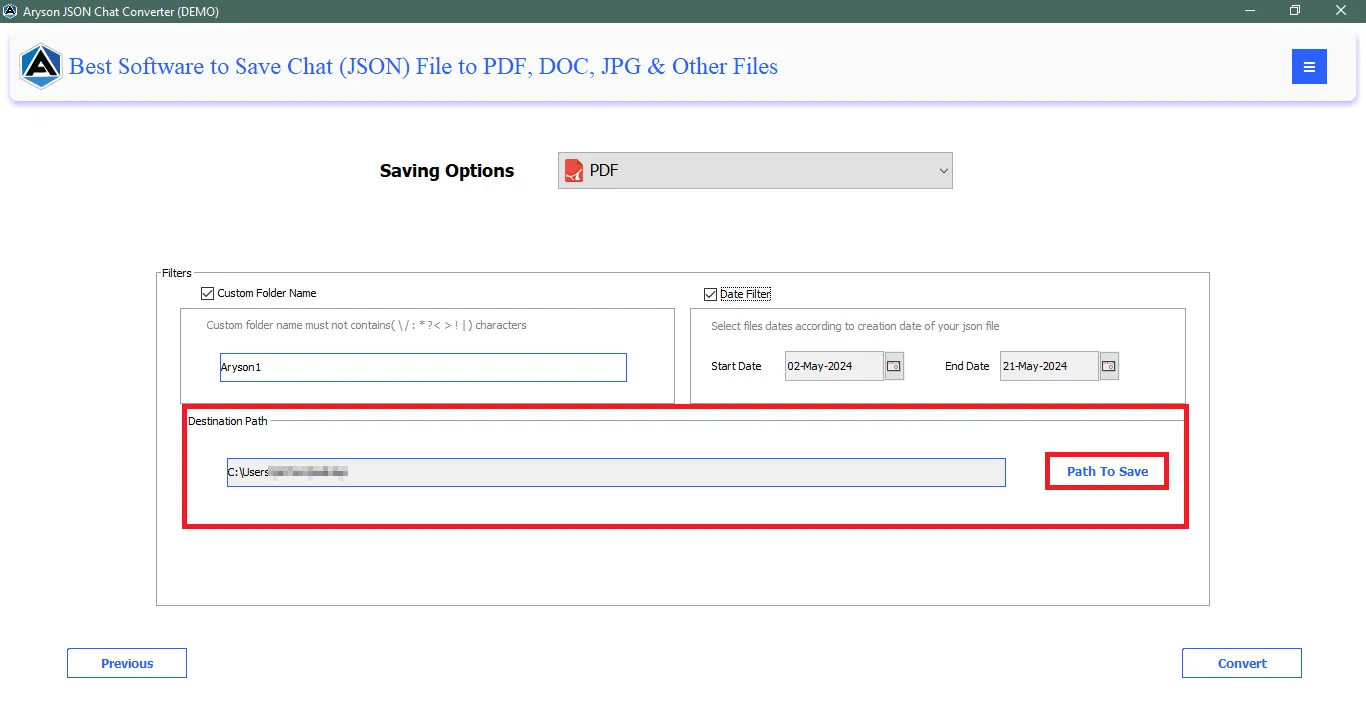
- Now, narrow down chats along with the destination path to save Google Chat.
- At last, hit the Convert Button to convert Google Chat to PDF format.

Additional Note: Apart from Google Chat, you can also export Microsoft Teams Chats to PDF and other formats as well.
Conclusion
This blog provides a complete guide to export Google Chat to PDF and securely save all your conversations. Whether you choose manual methods or use an automated solution, the goal is to preserve your important messages without data loss. However, if you want an accurate and hassle-free process, the Aryson JSON Chat Converter comes out as the best solution. It not only converts Google Chat JSON files to PDF but also makes sure that every detail from your chats remains the same and well-organized. As a result, you can access them for future use as well.
Frequently Asked Questions (FAQs):-
Q1. Can I export chats from a Google Workspace account?
Ans: Yes. Workspace admins can allow data export or use an Aryson JSON Chat Converter to export chats safely.
Q2. Is Google Takeout secure to use?
Ans: Yes, it’s an official Google service. However, it doesn’t always provide readable chat formats.
Q3. Can attachments and images be exported?
Ans: Manual methods usually skip attachments, but Aryson JSON Chat Converter exports them along with chat data.
Q4. Can I export group and space chats tool?
Ans: Yes, both individual and group chats can be exported using the right method.
About The Author:

Rohan Wiese is a Technical Writer at Aryson Technologies. He is an expert Email Forensic, Cloud Computing, and a passionate nerd with over 10 years of experience in technical content writing. He writes about Cloud Migration, Database Recovery, Email Backup, Windows, Mac, and Tech.
Related Post


