-

Written By Harshita Sachdeva
-
Approved By
Shivam Rathore -
Updated on July 3rd, 2026
Restore Table Data in SQL Server: Complete Guide 2026
Fact-checked and reviewed in accordance with our
Editorial Policy
Query: I have a backup table (TMP) containing 50 million records and need to make my original SQL Server table (ORIG) identical to it. I tried using DELETE and INSERT queries with comparison conditions, but the process takes over an hour. Batch processing and indexing have not improved performance. What is the most efficient way to restore and synchronize the original table from the backup table?
Summary: Losing table data in SQL Server due to accidental deletion, corruption, or system failure can be an issue. In this article, we explain how to restore table data in SQL Server with the help of a manual method and a professional Aryson SQL Recovery Tool. It also covers SQL Server 2019, 2017, 2016, 2014, and 2012 editions. It enables users to recover and restore SQL Server table data with minimal effort and maximum accuracy.
How is SQL table data deleted from SQL Server?
SQL Server table data can be deleted for various reasons. The user may run DELETE, TRUNCATE, or DROP TABLE commands and remove important records. Moreover, data loss can also occur due to database corruption or unsuccessful updates.
In some cases, application errors or improper sync processes overwrite or delete table data. You must take a regular backup to recover lost SQL Server table data quickly.
Best Ways to Restore Table Data in SQL Server
If your SQL Server table data is lost, deleted, or corrupted. You can restore it with the help of backup files, backup tables, or a specialized SQL recovery tool to recover data quickly and accurately.
Manual Method to Recover Lost Corrupted Table Data
Follow the manual methods we will discuss further to accomplish the restoration of the SQL table data.
01: Steps to Restore Table Data from SQL Server Backup (.bak)
- Open SSMS and connect to your SQL Server instance.
- In Object Explorer, right-click the Databases folder >> select Restore Database.
- Choose Device as the backup source >> click Browse/Add to select the .bak file.
- Enter a temporary database name to avoid overwriting the existing production database.
- Click OK to restore the backup >> wait for the process to complete successfully.
- Expand the restored database and locate the table you want to recover.
- Use INSERT INTO….SELECT, EXPORT/Import Wizard, or Generate Scripts to copy the required table data back to the original database.
- Verify the restored records in the original table end, and once confirmed, remove the temporary database if it is no longer needed.
Note: SQL Server cannot directly restore a single table from a .bak file. You must first restore the entire backup to a temporary database,>> extract the required table data.
02: Recover Table Data in SQL Server via Transaction Log Backup
- Make sure the SQL Server database is configured with the Full Recovery Model & that transaction log backups are available.
- Restore the most recent Full Database Backup to a temporary database via SSMS.
- Apply the required Transaction Log Backups in sequence and stop the restore process at the point in time just before the data was deleted or modified.
- Once the database is restored, locate the required table & verify that the missing records are present.
- Copy the recovered table data back to the original database through INSERT INTO….SELECT, Export/Import Wizard, or SQL scripts, and validate the restored records.
Note: This method is ideal for recovering accidentally deleted or modified table data when transaction log backups are available.
03: Restore Table Data From a Backup Table (TMP)
- You have to open SSMS >> connect to the SQL Server database.
- Verify that the TMP table contains the required backup data.
- Then, copy missing records from TMP to the original table via INSERT INTO.SELECT.
- Next, remove unwanted records or use a MERGE statement to sync both tables.
- Validate the restored data >> make sure the original table matches the TMP table.
Limitations of the Manual Method to Recover Lost or Corrupted Table Data
- Recovery is impossible without a backup, log backup, or backup table.
- Transaction log recovery requires the Full Recovery Model.
- Moreover, large tables consume significant system resources at the time of recovery.
- For these methods, the user must have technical knowledge.
- Recover Single Table from SQL Server Database is difficult.
Professional Software to Restore Table Data in SQL Server
Aryson SQL Database Recovery Tool is a reliable and best utility to restore data from corrupt, damaged, inaccessible SQL Server database files in easy steps. You can easily restore table data and other database components from corrupt or healthy SQL Server files(.mdf,.ndf, & .ldf). The software provides two modes,i.e., Standard & Advanced, to restore table data in SQL Server effortlessly.
In addition, once you restore table data from the MDF file, you can save the recovered data as SQL Server Compatible scripts, CSV files, and re-upload the data to the SQL Server database via Windows & Server Authentication. You can also fix recovery pending state in SQL Server database. Furthermore, you can restore the table data from the MDF file of SQL Server versions 2019, 2017, 2016, 2014, and 2012 & below.
Step-by-step Process to Restore SQL Database Table After Accidental Deletion
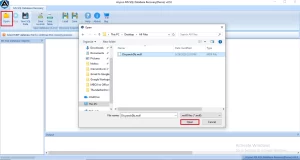
- Download, install, & run the Aryson SQL Database Recovery on your computer.
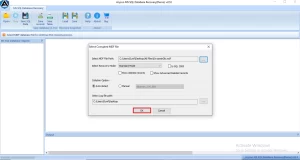
- Tap on the Open button to select the .mdf file.
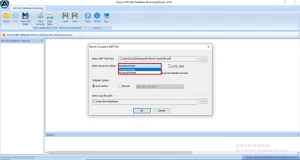
- After that, choose the recovery mode as per the level of corruption (Or you can leave the scanning mode if you have a healthy MDF file).
- Click Ok to start the scanning process.
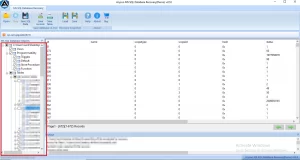
- You will find all your recovered MDF file data in the preview panel.
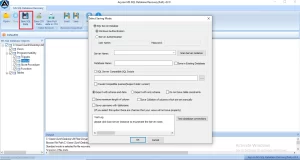
- Now, click on the Save SQL Data button.
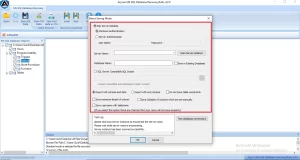
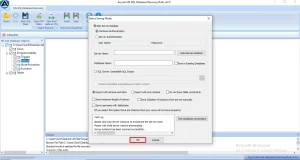
- Choose the saving mode: Import into SQL Server Database or Save as SQL Server Compatible Script.
- Select the other needed features and click Ok to start the restoring process.

Conclusion
To sum up, SQL Server tables are essential for storing critical business records. In case of data loss or corruption, the methods discussed above can help you restore Table Data in SQL Server safely & efficiently.
Frequently Asked Questions
Q.1 How do I restore table data in SQL Server from a corrupted database?
Ans. You can use the Aryson SQL Database Recovery Software to restore table data from corrupted SQL Server database files. Simply load the MDF file, select the appropriate recovery mode, scan the database, preview the recovered data, and save it either directly to SQL Server or as a SQL-compatible script.
Q.2 What recovery modes are available to restore SQL Server table data?
Ans. Aryson SQL Database Recovery Software provides Standard and Advanced recovery modes. Standard mode is suitable for minor corruption, while Advanced mode is designed to handle severely damaged or inaccessible SQL Server database files.
Q.3 Does the software recover only tables or other database objects as well?
Ans. No, the software recovers not only tables but also other SQL Server database objects, including views, triggers, stored procedures, indexes, rules, functions, and keys.
Q.4 Can I preview table data before restoring it?
Ans. Yes, Aryson SQL Database Recovery Software offers a preview feature that allows users to view recoverable table data and other database objects before saving or restoring them.
Q.5 Does the tool support recovery from MDF and NDF files?
Ans. Yes, the software supports the recovery of data from both MDF (Primary Database Files) and NDF (Secondary Database Files), helping users recover SQL Server databases efficiently.
Q.6 Does the tool preserve schema and table information during recovery?
Ans. Yes, Aryson SQL Database Recovery Software preserves table structures, schema information, relationships, and other database properties throughout the recovery process.
Q.7 Is the SQL Server table recovery tool compatible with all Windows versions?
Ans. The software is compatible with major Windows operating systems, including Windows 11, 10, 8.1, 8, 7, and Windows Server editions.
Q.8 How does the software maintain data integrity while restoring SQL Server table data?
Ans. The software uses advanced scanning and recovery algorithms to restore database objects without modifying the original file, ensuring data integrity, accuracy, and consistency during recovery.
Q.9 Does the SQL Server Recovery Tool provide 24/7 technical support?
Ans. Yes, Aryson provides dedicated technical support to assist users with installation, activation, and recovery-related queries. Users can contact the support team for guidance whenever needed.
Q.10 Can I customize the SQL Server recovery process according to my requirements?
Ans. Yes, the software allows users to choose recovery modes, select specific database objects for restoration, preview data before saving, and export recovered data in different formats based on their requirements.
About The Author:

Harshita Sachdeva, a professional technical writer at Aryson Technologies, specialize in delivering clear, hands-on documentation for data management, migration, and recovery solutions. With a meticulous, reader-first approach, I break down complex technical processes into simple, actionable content - helping IT professionals and decision-makers tackle challenges efficiently.
Related Post