-

Written By Harshita Sachdeva
-
Approved By
Shivam Rathore -
Updated on July 3rd, 2026
Migrate from Zoho to Office 365 for Businesses: Quick Guide
Fact-checked and reviewed in accordance with our
Editorial Policy
Query: I have a client who wants to migrate from Zoho to Office 365, and it doesn’t seem like an easy straight swap. Do you guys have any advice?
Summary: Mostly, businesses start with Zoho Mail because it is simple & cost-effective. But as teams grow, email needs also grow. Microsoft 365 becomes a common choice because it offers stronger security & deeper integration with tools like Outlook & OneDrive. Migrating from Zoho Mail to Microsoft 365 is not just about moving emails. It involves the preservation of folders, attachments, and business communication history without disruption. This guide explains both manual and professional Aryson Zoho Mail Backup Tool, along with their limitations and best practices.
Quick Steps to Migrate Zoho Mail to Microsoft 365
- Download the Zoho Backup Tool.
- Enter the login credentials.
- For the destination, connect to Office 365.
- Enable filters for selective migration.
- Start the migration process.
Things to Know Before Migrate from Zoho to Office 365
- Make sure you have admin access to both Zoho & Microsoft 365 accounts.
- Check mailbox size and storage limits.
- Plan migration timing to avoid business disruption.
- Back up important emails before migration.
- Decide whether to migrate all folders or selected data.
- Proper planning reduces the risk of data loss or downtime.
Best Ways for Zoho Mail to Office 365 Migration
Two ways to migrate your emails from Zoho Mail to Office 365. You will have to just follow the steps to move your data correctly.
- Manual Method
- Professional Method
Manual Methods to Migrate from Zoho to Office 365
Follow the given manual method that suits your requirements to accomplish the migration of Zoho Mail to Office 365.
01: Migrate Zoho Mail to Office 365 via IMAP
IMAP migration via the Microsoft 365 Admin Center is a widely used server-side method. It allows businesses to transfer Zoho Mail data directly into Microsoft 365 without relying on manual Outlook imports. That makes it more stable and suitable for structured email migration.
- Enable IMAP in Zoho Mail Admin Console for all user accounts that will be migrated.
- Verify your domain in Microsoft 365 by adding and confirming DNS records.
- In Exchange Admin Center, create an IMAP migration endpoint using Zoho IMAP settings (imap.zoho.com, port 993, SSL).
- Create a migration batch and upload a CSV file with user emails and credentials.
- Start the migration batch and allow Microsoft 365 to sync emails from Zoho Mail.
- After completion, verify mailboxes in Outlook and update MX records to finalize migration.
02: Migrate from Zoho to Office 365 Using the Manual Method
This method has two processes to migrate Zoho email to Office 365. Follow the below-mentioned steps to start the migration.
Step 01: Extract Emails from Zoho Mail into an EML file
- Log in to Zoho Mail >> click on the Settings icon on the opening dashboard.
- Select the Import/Export Emails option.
- Go to the advanced settings to do the Folder selection and Date Filter.
- Click on the Export button to create a Zip file.
- You must extract the ZIP file to get all emails in the .eml format.
- Once you get the EML file, go to the steps below to complete the migration process.
Step 02: Drag-and-Drop the EML File into Office 365
In this step, you need to use or open the Outlook application in which your Office 365 account is configured to finish the process.
- Start the Outlook Application on your PC.
- Go to the folder where you need to add the data.
- Expand the inbox >> drag & drop the .eml files here.
- This will be migrated into your Office 365 account.
Drawbacks of the Manual Methods
- The manual method is complicated and does not offer a direct email migration solution.
- Applicable to a limited number of emails.
- Users must have the technical expertise to initiate the Zoho Mail to Office 365 migration process.
- The process is too time-consuming and lengthy.
Method 02: Migrate from Zoho to Office 365 Using a Professional Solution
Aryson Zoho Backup Tool is one of the simplified solutions to migrate the bulk of Zoho mailbox emails to an Office 365 account. It allows users to transfer all the email folders from Zoho Mail to a Microsoft 365 account in a few simple steps. You can also Migrate Emails From Zoho to Outlook in the same way.
- Supports bulk mailbox migration.
- Make sure to preserve folder structure and metadata.
- It is much faster than the manual process.
- Reduces the risk of important data loss.
- There is no need for Outlook dependency.
- Suitable for business-scale migration.
- It migrate Zoho Mail to iCloud and other via IMAP.
Simple Steps to Move Emails from Zoho Mail to Office 365
- Download and Install Aryson Zoho Email Backup Tool.
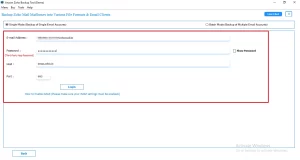
- Enter your Zoho email address and app password and log in.
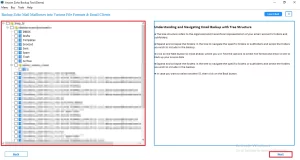
- Select the folders in the preview panel >> click Next.
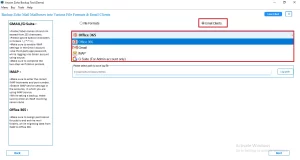
- Now, you need to opt for Office 365 from the drop-down list.
- Click on Login and enter your Office 365 email address & password to authenticate.
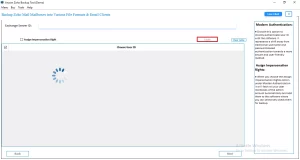
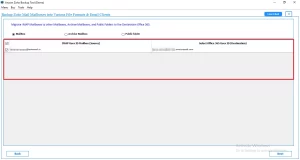
- Choose from which mailbox you have to migrate data >> Next.
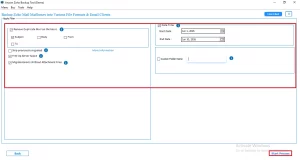
- You can even include different features of this software >> Start Process.
Richard’s Success Story
Richard, IT Manager at a New York consulting firm, needed to migrate 300+ Zoho Mail accounts to Microsoft 365 before an infrastructure upgrade deadline. The native IMAP migration caused delays and duplicate email challenges. To make sure a smooth execution, he used the Aryson Zoho Mail Backup Tool with batch migration and filter options. It preserved folder structure and metadata, completing the Zoho to Office 365 migration on time with no data loss or disruption.
Conclusion
In short, switching to Microsoft 365 is a common step for a business’s growth. While manual methods work for small mailboxes, they are not suitable for large mailbox migration. Therefore, it is suggested to migrate from Zoho to Office 365 with professional software for bulk migration. Proper planning makes sure a smooth transition without email loss or downtime.
Frequently Asked Questions
Q1. Can I preview my Zoho mailbox before migration to Office 365?
Ans. Yes, Aryson Zoho Mail Backup Tool provides a preview feature before migration. It allows users to view emails, folders, attachments, and mailbox structure. This helps ensure only required data is selected for migration.
Q2. Will folder hierarchy be maintained when migrating Zoho to Office 365?
Ans. Yes, Aryson Zoho Mail Backup Tool preserves the complete folder structure during migration. All emails remain organized in the same hierarchy as in Zoho Mail. This ensures no data rearrangement after transfer to Office 365.
Q3. Can I remove duplicate emails during migration to Office 365?
Ans. Yes, Aryson Zoho Mail Backup Tool includes a duplicate removal feature. It helps prevent repeated emails during migration by filtering duplicate items. This ensures a clean and optimized mailbox in Office 365.
Q4. Can I free up Zoho server space while migrating to Office 365?
Ans. Yes, once migration is completed using the Aryson Zoho Mail Backup Tool, users can safely remove data from Zoho Mail. This helps reduce server storage usage while ensuring all data is already available in Office 365.
Q5. Is there a free trial for migrating Zoho to Office 365?
Ans. Yes, Aryson Zoho Mail Backup Tool offers a free demo version. It allows users to test migration features with limited data before purchasing the full version. This helps evaluate compatibility and performance.
Q6. Will email metadata be preserved when migrating to Office 365?
Ans. Yes, Aryson Zoho Mail Backup Tool preserves complete email metadata during migration. This includes sender, recipient, subject, timestamps, and attachments. It ensures data integrity across Zoho Mail and Office 365 platforms.
Q7. Is technical support available if I face problems migrating Zoho to Office 365?
Ans. Yes, Aryson Zoho Mail Backup Tool provides dedicated technical support. Users can get assistance during installation, configuration, and migration. This ensures a smooth and error-free migration process.
Q8. Will migration logs be available for troubleshooting data integrity issues?
Ans. Yes, Aryson Zoho Mail Backup Tool generates detailed migration reports. These logs help track successful and failed migrations. They are useful for troubleshooting and verifying complete data transfer to Office 365.
About The Author:

Harshita Sachdeva, a professional technical writer at Aryson Technologies, specialize in delivering clear, hands-on documentation for data management, migration, and recovery solutions. With a meticulous, reader-first approach, I break down complex technical processes into simple, actionable content - helping IT professionals and decision-makers tackle challenges efficiently.
Related Post